
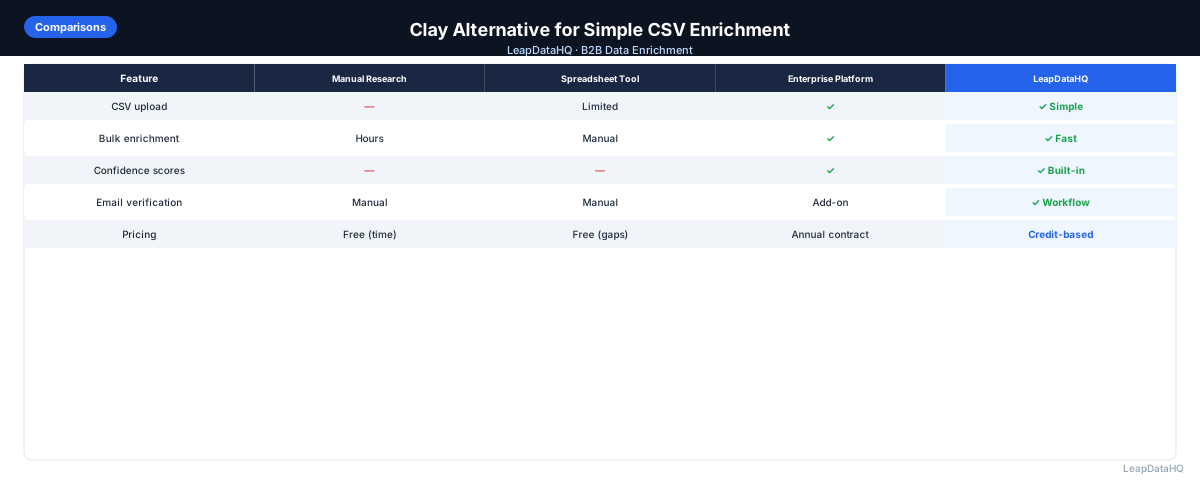
Clay.com has established a strong reputation in B2B data operations. Its core advantage is flexibility: it connects to dozens of data providers, lets you build custom enrichment workflows, and uses waterfall logic to try multiple sources when one misses a record. For teams with sophisticated data operations needs, Clay delivers real value.
The tradeoff is complexity and cost. Clay requires meaningful setup time to configure workflows, has a credit model that spans multiple providers simultaneously, and carries a monthly cost that reflects its power. For teams with simpler needs — upload a CSV, get emails back, export — Clay is more tool than the job requires.
This guide is for teams considering Clay for simple CSV enrichment and wondering whether it's the right fit or whether a simpler alternative would serve them better.
The key distinction is between data operations and data enrichment. Data operations encompasses multi-step workflows, conditional logic, and integration orchestration — Clay's sweet spot. Data enrichment is a narrower task: take a list of contacts with known identifiers, find missing contact and company fields, and return the augmented data. When your need is the latter, a tool purpose-built for enrichment eliminates the overhead of configuring workflows and managing multi-provider credits.
Teams often start with Clay because they see it as the most powerful option and assume power translates to better results for all use cases. In practice, a simpler tool designed specifically for CSV enrichment can achieve comparable match rates on standard B2B data with significantly less setup time and lower per-record cost. The question isn't which tool is better overall — it's which tool is better for the specific job you need done.
What Makes Clay Powerful
Clay's value proposition is multi-provider enrichment with waterfall logic: if Provider A doesn't find an email for a contact, Clay automatically tries Provider B, then Provider C. This approach typically achieves higher overall match rates than any single provider alone.
Clay also supports complex custom workflows: conditional logic, multiple enrichment fields from different sources in a single run, integration with dozens of APIs, and automation of multi-step data processes. For teams that need to build a sophisticated data pipeline, Clay is genuinely useful.
Where Clay Adds Friction for Simple Use Cases
Setup and Learning Curve
Clay is not a simple upload-and-go tool. Building a workflow requires understanding Clay's interface, connecting data providers, configuring waterfall logic, and testing the pipeline. For a team that needs to enrich a CSV quickly, this setup time is overhead the job doesn't justify.
Cost
Clay's pricing reflects its multi-provider capability. Because it queries multiple enrichment providers in sequence, the credit cost per record is often higher than a single-provider tool. For high match rates on hard-to-find contacts, this is worth it. For standard B2B contact lists with good domain and name data, the premium may not be justified.
Not Optimized for Pure CSV Workflows
Clay is a workflow builder, not a CSV enrichment tool. The interface is optimized for building data pipelines, not for the quick upload-enrich-export cycle. Teams that just want to process a list file regularly may find Clay's workflow model more overhead than value.
When Complexity Actually Hurts
For simple CSV enrichment, complexity doesn't just add setup time — it creates ongoing maintenance overhead. When a team member needs to run a quick enrichment and can't remember which workflow configuration to use, they either spend time re-learning the setup or avoid the task entirely. Over time, workflows drift as different team members make ad-hoc adjustments.
The multi-provider waterfall model that makes Clay powerful also introduces ambiguity in results. When a record is enriched through Provider B but not Provider A, and Provider C partially enriched it, understanding which data points came from which source requires tracking metadata that Clay provides but that adds cognitive load for teams that just want a clean output file.
Cost Comparison at Typical Volumes
Ready to enrich your CSV list?
Upload a CSV, fill missing data, review confidence scores, and export clean records.
Upload a CSV — Start EnrichingFor a team enriching 2,000 contacts per month with standard email and company fields, the cost comparison is instructive. Clay's entry-level plan starts at a monthly base fee plus per-credit costs for each provider query. A simple enrichment job that needs one email source and one company data source consumes credits from both. At typical pricing, the per-match cost can be two to three times higher than a single-provider enrichment tool that queries one comprehensive source.
The premium may be justified for contacts that are hard to find — executives at small private companies, international prospects, niche industries — where waterfall logic across multiple providers genuinely finds matches that a single provider misses. For standard B2B contacts at well-known companies with complete name and domain data, a single high-quality provider typically achieves match rates that are close enough that the cost premium doesn't justify the marginal improvement.
If your enrichment volume is unpredictable — some months 500 contacts, some months 5,000 — the monthly subscription model adds a cost floor that pay-per-match tools don't have. In low-volume months, you're paying for capacity you don't use. In high-volume months, you may hit credit caps that require plan upgrades.
LeapDataHQ as a Simpler Alternative
LeapDataHQ is designed for teams that need the upload-enrich-export workflow without configuring workflows, managing multi-provider credits, or learning a complex interface. Upload your CSV with company domains and contact names, get email addresses and company data returned with confidence scores, and download the enriched results. The process is designed to be completed in minutes, not hours.
For teams that occasionally need Clay's multi-provider power for complex lists, using both tools strategically — LeapDataHQ for routine enrichment, Clay for the hard-to-find contacts — gives you the right tool for each job without paying the complexity premium on every list you process.
When Clay Is the Right Choice
Clay makes sense when you need:
- Maximum match rates — willing to pay for waterfall enrichment across multiple providers
- Complex multi-step data workflows (enrich, filter, route, format in a single automated flow)
- A technical team member who can build and maintain Clay workflows
- Integration with dozens of specialized data sources beyond standard enrichment
- Custom logic for high-value account enrichment where maximizing coverage justifies the cost
When a Simpler Alternative Makes More Sense
A simpler CSV enrichment tool is a better fit when you need:
- Upload a CSV and download enriched results — no workflow configuration required
- Standard email + company data enrichment without multi-provider complexity
- Lower per-record cost for routine list enrichment
- Fast access without onboarding or setup
- Non-technical team members doing enrichment without requiring training
- Variable monthly volume without ongoing credit management complexity
What the Simple CSV Enrichment Workflow Looks Like
- Prepare CSV: company domain, first name, last name
- Upload to enrichment tool
- Map columns (auto-detected in good tools)
- Review match rate and confidence distribution
- Filter to high-confidence results
- Export and proceed to email verification and outreach
This workflow takes minutes in a purpose-built tool. In Clay, you'd first need to set up a table, connect your data providers, configure the waterfall logic, and run the workflow — all valuable for complex use cases, but overhead for this simple job.
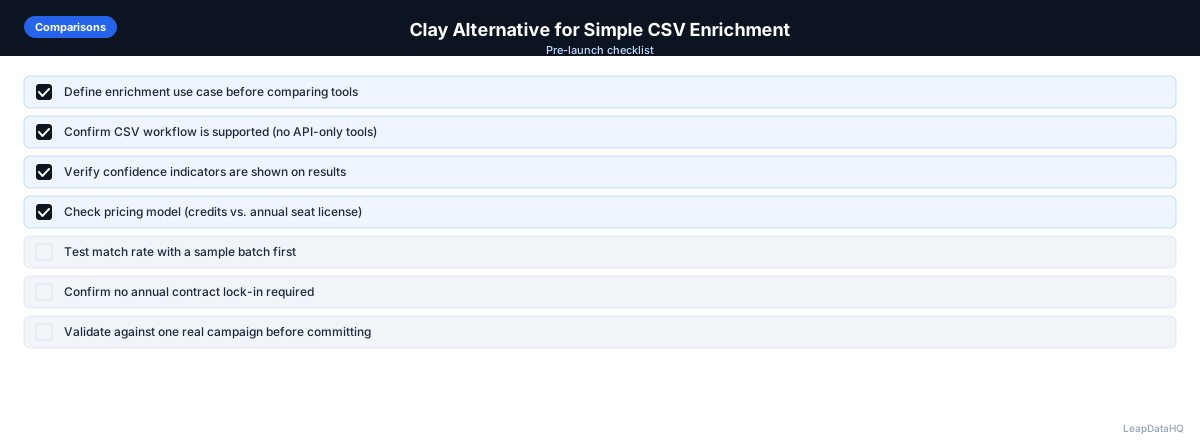
When to Use LeapDataHQ
LeapDataHQ is the simple CSV enrichment alternative to Clay for teams that need the upload-enrich-export workflow without multi-provider complexity. Upload your list, get emails and company data back with confidence scores, and export the results.
For teams currently using or evaluating Clay primarily for basic CSV enrichment (not complex multi-step workflows), LeapDataHQ offers a simpler workflow with transparent per-match pricing. For teams building sophisticated data pipelines that benefit from waterfall logic across multiple providers, Clay remains a strong choice for that specific use case.
Start Enriching LeadsFrequently Asked Questions
Does Clay achieve better match rates than simpler tools?
Clay's waterfall approach does tend to achieve higher match rates than single-provider tools because it tries multiple sources for records that one provider misses. The question is whether the higher match rate justifies the cost and complexity premium. For high-value account lists where every match matters, Clay's approach is often worth it. For routine list enrichment, a single-provider tool at lower cost may be sufficient.
Can non-technical users use Clay?
Clay has improved its onboarding, but it still has a meaningful learning curve compared to simple CSV tools. Technical team members or operations professionals with workflow-building experience will find it easier. Non-technical SDRs or freelancers doing occasional enrichment typically find simpler tools more accessible.
Is there a simpler way to use Clay for just email enrichment?
Clay offers templates that simplify some common workflows. Even with templates, you're working within a workflow environment that requires more setup than a simple upload tool. If your use case is pure CSV enrichment with no custom logic, a purpose-built tool will likely be faster to start and use regularly.
Can I use both Clay and a simpler enrichment tool?
Yes. Some teams use Clay for high-priority, complex enrichment workflows (key accounts, accounts requiring multiple data sources) and a simpler tool for routine list enrichment. This hybrid approach lets you apply Clay's power where it's most valuable without paying its cost for every enrichment job.