
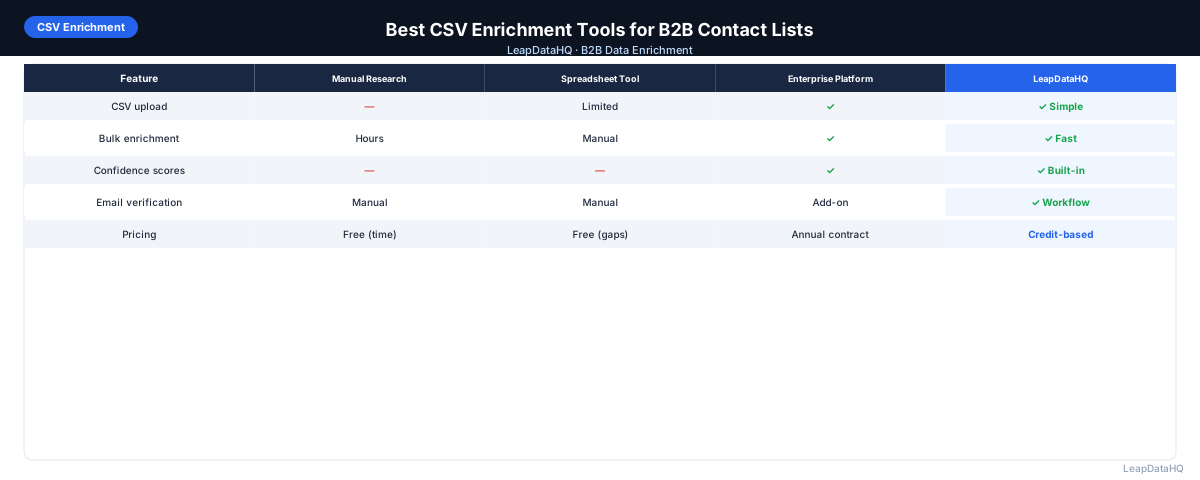
CSV enrichment is the most common workflow for B2B data teams: export a list from your CRM, LinkedIn, or event platform, upload to an enrichment tool, download with missing fields appended, and import back to your tool.
The best CSV enrichment tools make this workflow fast, accurate, and repeatable. The worst require manual column mapping for every upload, return results you can't trust without significant verification work, and bill you for records that weren't matched.
This guide covers the key features to evaluate in a CSV enrichment tool and how to choose the right one for your team's workflow.
Choosing a CSV enrichment tool is a decision that affects your team's daily workflow. Unlike enterprise platforms that require long-term contracts and implementation support, CSV enrichment tools are typically evaluated on immediate practical criteria: how well they handle your specific file format, how quickly they return results, and how easy it is to review and export the enriched data. The right tool for a team that enriches 200 records per week is different from the right tool for a team that enriches 10,000 records per month.
The evaluation process should start with understanding your own requirements rather than comparing feature lists. Consider the types of input files you typically work with, the fields you most commonly need to enrich, the volume of records you process per month, and how you prefer to handle the enriched output. Teams that clarify these requirements before starting their tool search consistently find better-fitting tools than teams that begin by reading comparison articles and feature lists.
What Makes a CSV Enrichment Tool Good
Match Rate
Match rate is the percentage of uploaded records that return a result. For email enrichment with quality input (company domain + first + last name), a good match rate is 50–75% depending on your target market. Tools that claim 90%+ match rates on all records are worth scrutinizing — high claimed match rates can mask low-quality results.
Confidence Scoring
Confidence scores let you filter by quality before using enriched data. Without them, you treat all returned results the same — including low-quality matches in your outreach. The best tools return a score with each result so you can filter to the confidence threshold appropriate for your campaign.
Field Coverage
Some CSV tools only return email addresses. Better tools also return phone numbers, job title, company size, industry, and revenue range. If you need multiple fields, check that the tool returns all of them in a single pass.
Credit Policy for Unmatched Records
Some tools charge credits for every row uploaded, regardless of whether a match was found. Others only charge for matched records. If you expect 30–50% non-matches, the credit policy has a meaningful impact on actual cost per matched record.
Types of CSV Enrichment Tools
Purpose-Built CSV Upload Tools
Tools designed specifically for the CSV enrichment workflow: upload, map, enrich, review, export. Simple, focused, and optimized for repeat use. Pricing is typically credit-based.
Full Platform Bulk Export Features
Apollo.io, Hunter.io, and similar platforms include bulk enrichment as a feature within a larger sales intelligence platform. These work but the CSV feature may not be as polished as the platform's primary interface.
API-Driven Tools With a UI
Some tools expose enrichment as an API but also offer a CSV upload wrapper. These are typically more flexible but may require more technical knowledge to configure. Good if you plan to eventually automate enrichment via API.
Ready to enrich your CSV list?
Upload a CSV, fill missing data, review confidence scores, and export clean records.
Upload a CSV — Start EnrichingHow to Evaluate a CSV Enrichment Tool
- Sign up for a free trial or free credits if available
- Upload a test file of 50–100 contacts from your actual target market
- Note the match rate and confidence distribution
- Spot-check 10–15 returned emails against LinkedIn profiles or company website patterns
- Send a small outreach test to high-confidence results and monitor bounce rate
- Compare cost-per-matched-record across tools you're evaluating (not just cost-per-upload)
- Evaluate UX: how easy is column mapping? How clear is the confidence display?
Common CSV Enrichment Tool Mistakes
Choosing Based on Claims Instead of Tests
Match rate claims reflect best-case scenarios. Always test with your specific data before committing. A tool that performs well on US tech companies may perform very differently on European healthcare contacts.
Not Using Confidence Filters
Downloading all results without filtering by confidence includes low-quality matches in outreach campaigns. Always filter to high-confidence results for primary campaigns.
Skipping Verification
Even high-confidence enrichment results should be verified before large-scale outreach. Verification confirms the specific mailbox is deliverable — a different check than the enrichment confidence score.
CSV Enrichment Tool Evaluation Checklist
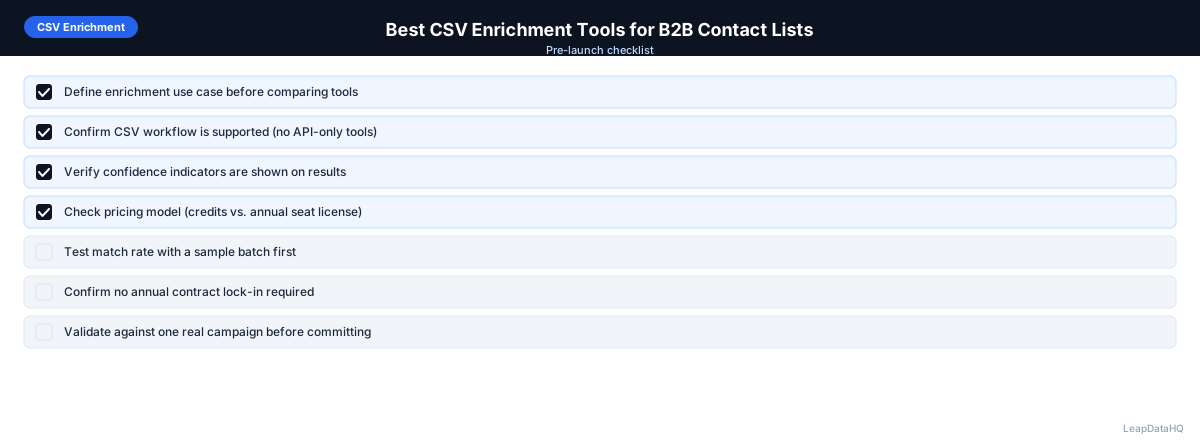
- Free trial or sample enrichment available to test before buying
- Match rate tested with actual target market data
- Confidence scores returned alongside results
- Fields needed all available in single pass
- Credit policy understood: charged per upload or per match?
- Export format compatible with your CRM or sequencer
- Processing time acceptable for your typical file size
- Pricing transparent and aligned with expected monthly volume
Data Privacy and Security Considerations
When evaluating CSV enrichment tools, data privacy and security practices are important considerations, particularly if you work with contacts in regulated industries or European markets under GDPR. Check where the enrichment provider processes data, what data retention policies they apply to uploaded files, and whether they share your uploaded data with third-party data sources. Reputable enrichment providers process uploaded data only for the duration of enrichment and do not retain your prospect lists after processing.
For teams handling sensitive prospect data, also consider whether the tool offers features like automatic deletion of uploaded files after processing, encryption for data in transit and at rest, and compliance certifications relevant to your industry. While most CSV enrichment tools operate on a straightforward processing model, understanding the data handling practices helps you choose a tool that aligns with your compliance requirements.
CSV Enrichment Tool Workflow Integration
A CSV enrichment tool's value depends on how well it fits into your existing workflow. Consider the entire data flow: how do you typically export lists from your CRM? What format are they in? How do you import enriched data back? The best tool for your team is one that minimizes the number of manual steps between raw export and enriched, campaign-ready data.
Some teams prefer a tool with CRM integration that syncs enriched data directly into contact records. Others prefer the control of CSV export, review, and selective import. Neither approach is objectively better — the right choice depends on your team's preference for automation versus manual quality control. For teams that enrich data regularly, automation reduces time and ensures consistency. For teams that enrich infrequently or handle sensitive data, the manual review step provides important quality assurance that automated sync cannot replace.
When to Use LeapDataHQ
LeapDataHQ is a CSV-first enrichment tool. Upload a CSV with company domains and contact names, get email addresses and company data returned with confidence scores, filter to high-quality results, and export a file ready for outreach.
Try LeapDataHQ with a small upload to test match rates on your specific target market. Credits are used only for matched records, so testing is low-risk.
Start Enriching LeadsFrequently Asked Questions
What input data do CSV enrichment tools need?
Most email enrichment tools need: company domain (most important), first name, and last name. Some can work with company name instead of domain, but match rates are lower. The more accurate your input, the better your match rate.
How long does CSV enrichment take?
For files under 1,000 rows, most tools return results in 1–5 minutes. Larger files (5,000–50,000 rows) may take 10–30 minutes. Processing time depends on file size and the tool.
What's a good match rate benchmark for CSV enrichment?
For well-prepared input, 50–75% is a realistic target. Under 40% suggests input data quality issues (missing or malformed domains). Over 80% on mixed-quality lists may indicate the tool is returning guesses rather than verified matches.
Should I enrich before or after building my outreach sequence?
Enrich before. The company size, industry, and other data returned should inform your sequence structure and personalization. Build the list, enrich it, segment by enriched data, then write sequences for each segment.