
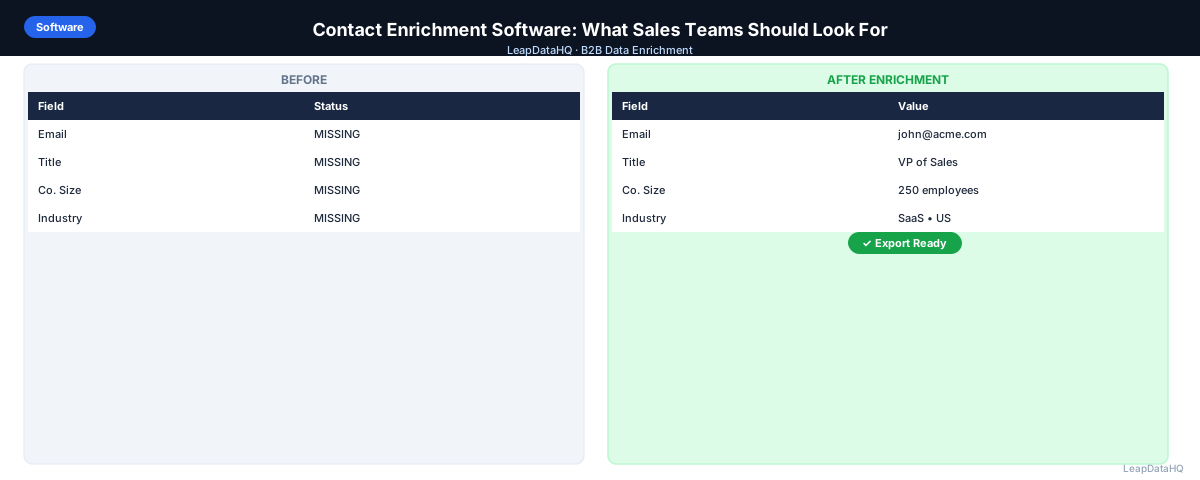
Contact enrichment software helps B2B sales teams fill missing data fields in their prospect lists — adding email addresses, job titles, company information, and other contact details. The market has grown quickly, with tools ranging from enterprise platforms to lightweight CSV-based solutions.
If you are evaluating contact enrichment software for your sales team, agency, or RevOps department, you need to understand what features actually matter for your use case. Enterprise platforms with annual contracts and API integrations are overkill for teams that enrich 500 records per month. Lightweight tools may lack the data coverage needed for specific industries.
This guide covers what to look for when evaluating contact enrichment software: data coverage and match rates, confidence scoring, CSV upload support, pricing models, integration options, and the review workflows that separate high-quality enrichment from simple data appending.
What Does Contact Enrichment Software Do?
Contact enrichment software takes an input record — typically a company domain, contact name, or partial contact profile — and appends additional data from external sources. The output is a more complete record with fields like work email, phone number, company size, industry, job title, and LinkedIn URL.
The core capability is matching your input data against databases of business contact information. When you provide a company domain and a contact name, the software searches its database for a matching record and returns the available data fields.
Different tools use different data sources. Some build proprietary databases, others aggregate from multiple providers, and some combine crawling with public records. The data source affects coverage, accuracy, and freshness.
Key Features to Evaluate
Data Coverage and Match Rates
Data coverage determines what percentage of your input records return enriched data. A tool with strong US technology coverage may have weak coverage for European manufacturing companies. Test with a representative sample of your actual target market.
Confidence Scoring
Confidence scores indicate how reliable each enriched data point is. Tools that return data without confidence signals leave you guessing which records to trust. Look for software that flags uncertain results and lets you filter by confidence level.
CSV Upload and Export
For most sales teams and agencies, CSV support is the primary workflow. You upload a spreadsheet, map your columns, and download enriched results. No developer integration required. This is the fastest way to get started.
Email Verification Integration
Enriched email addresses should be verified before outreach. Some enrichment software includes built-in email verification. Others require a separate tool. Built-in verification streamlines the workflow and ensures you do not skip this critical step.
Pricing Model
Contact enrichment software typically uses per-record pricing, credit-based pricing, or seat-based pricing. Credit-based and per-record models are more flexible for variable volume. Seat-based pricing is predictable but expensive if you enrich sporadically.
Ready to enrich your CSV list?
Upload a CSV, fill missing data, review confidence scores, and export clean records.
Upload a CSV — Start EnrichingTypes of Contact Enrichment Software
Enterprise Database Platforms
These platforms maintain vast proprietary databases of company and contact information. They offer deep data coverage, CRM integrations, and team collaboration features. The trade-off is cost — annual contracts with seat-based pricing.
API-First Enrichment Providers
Developer-focused tools that return structured data when queried programmatically. These work for custom integrations but require technical expertise to set up and maintain.
CSV-Based Enrichment Tools
Lightweight tools designed for spreadsheet workflows. Upload a CSV, map columns, process, and download results. These are the fastest to set up and often the most affordable for small teams.
Evaluation Criteria Checklist
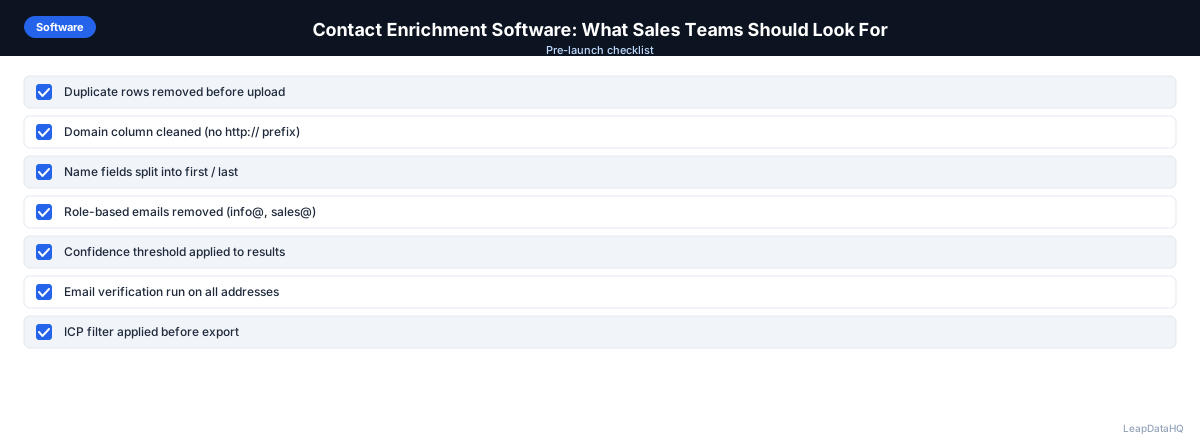
Use this checklist when comparing contact enrichment software options:
- Match rate tested with your actual target market data, not demo samples
- Confidence scores provided for each enriched field
- CSV upload and download supported without developer integration
- Pricing model matches your volume pattern — per-record, credit, or seat-based
- Email verification included or integrates with your existing verification tool
- Data coverage verified for your target industries and geographies
- No long-term contract required for your volume tier
- Free trial or sample enrichment available to test with real data
Common Mistakes When Choosing Enrichment Software
- Choosing based on brand recognition: Enterprise brands are not always the best fit for small teams. Evaluate based on your requirements and test results.
- Not testing with your actual data: Demo data does not reflect performance on your target market. Always test with a representative sample before committing.
- Ignoring total cost: Per-record cost is only part of the equation. Setup time, integration complexity, and manual verification all add to the real cost.
- Over-engineering for current needs: API-first tools are powerful but unnecessary if your workflow is CSV-based. Choose a tool that matches how you actually work.
- Skipping the trial: Most tools offer free trials or sample enrichment. Testing with 50-100 records tells you more than any comparison article.
How LeapDataHQ Helps
LeapDataHQ provides CSV-based contact enrichment designed for small teams and agencies. You upload a spreadsheet with company domains and contact names, map your columns, and the platform returns enriched records with confidence scores for each field. No developer setup required.
The credit-based pricing at /pricing means you pay only for what you enrich, with no monthly seat fees or annual contracts. This makes it practical for teams with variable enrichment needs.
LeapDataHQ returns confidence scores alongside each enriched field, giving you control over output quality. You filter to high-confidence results before exporting. Explore the full feature set at /features.
When to Use LeapDataHQ
LeapDataHQ is designed for teams that need contact enrichment software without the complexity of enterprise platforms or the developer requirements of API-first tools. It fits when you are working with batch enrichment — uploading a CSV file of 50-5,000 records.
The credit-based pricing means you pay only for what you enrich, with no seat fees or annual contracts. You can enrich 500 records one month and 3,000 the next without paying for unused capacity.
LeapDataHQ returns confidence scores alongside each enriched field, giving you control over output quality. You filter to high-confidence results before exporting, rather than importing everything and dealing with bounces later.
Start Enriching LeadsFrequently Asked Questions
Do I need a CRM integration to use contact enrichment software?
Not if the tool supports CSV upload and download. Many teams enrich outside their CRM, review results, then manually import the enriched file. This gives more control over what enters your CRM.
What is a good match rate for contact enrichment?
For US-based B2B contacts in established industries, 60-80% for email enrichment is realistic. Tech companies and enterprise targets tend to have higher rates. Test with your actual data.
How often should I re-enrich my contact list?
B2B contact data decays at roughly 2-3% per month. Re-enrich active lists every 60-90 days for outbound campaigns. For CRM records, quarterly re-enrichment catches job changes.
What is the difference between data enrichment and data verification?
Enrichment appends missing data fields. Verification checks whether existing data — particularly email addresses — is currently valid. Both are important steps. Enrich before verifying.
Can contact enrichment software handle international data?
Coverage varies by tool and region. Some tools have strong global coverage; others focus primarily on US and European markets. Test with data from your target geographies.