
The market for B2B data enrichment tools has grown crowded. There are enterprise platforms with expensive annual contracts, API-first tools aimed at engineers, and lightweight CSV-based tools designed for small teams. Each solves a slightly different problem.
If you're a founder, SDR, agency owner, or marketing manager trying to figure out which tool actually fits your workflow, this guide cuts through the noise. We'll cover what enrichment tools do, what separates a good one from a mediocre one, and how to evaluate options without signing a contract you'll regret.
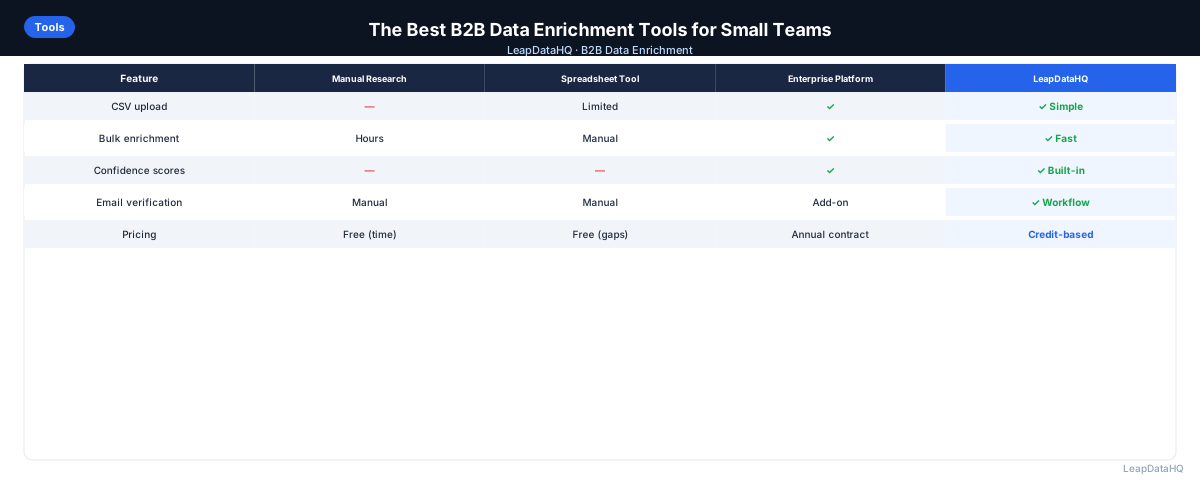
The right tool depends on three things: how many records you're enriching per month, what data fields you need, and how much you're willing to spend. Enterprise platforms make sense for large teams with consistent high-volume needs. API-first tools work for teams building custom integrations. CSV-based tools fit teams that work primarily in spreadsheets and need flexibility without complexity.
Understanding these categories helps you narrow the field quickly. Most teams over-invest in evaluating tools that are designed for a different use case than theirs. A solo founder does not need the same tool as a 50-person sales organization. An agency running enrichment for 15 clients has different requirements than an in-house team enriching their own CRM.
This guide helps you understand the trade-offs and choose the right tool for your specific situation.
What Does a B2B Data Enrichment Tool Actually Do?
At its core, a data enrichment tool takes an input — a company name, domain, or partial contact record — and appends additional data from external sources. The output is a more complete record with fields like work email, phone number, company size, industry, job title, or technology stack.
The key difference between tools is where their data comes from. Some build and maintain their own database. Some aggregate data from multiple providers. Some use a combination of crawling, third-party licensing, and community-verified records. The source affects coverage, freshness, and accuracy.
Understanding the data source matters because it determines how well the tool performs for your specific target market. A tool with strong coverage in US technology companies may have poor results for European manufacturing firms. The only reliable way to evaluate is to test with your actual data.
What This Means for Your Team
Choosing the right enrichment tool affects your outreach quality, team efficiency, and budget. The wrong tool means low match rates, wasted credits, and incomplete data that still requires manual research. The right tool integrates into your workflow, returns reliable data, and scales with your needs.
For small teams and agencies, the evaluation criteria are different than for enterprise sales organizations. You need flexibility, transparent pricing, and tools that work without developer support. Enterprise platforms with annual contracts and complex integrations do not fit teams enriching 500 records one month and 3,000 the next.
The cost of choosing poorly is not just the subscription fee — it is the time your team spends working around the tool's limitations, the missed outreach opportunities from low match rates, and the frustration of inconsistent data quality. Taking time to evaluate properly saves significant resources downstream.
Who Should Use B2B Data Enrichment Tools
Different roles use enrichment tools for different purposes. Understanding your specific use case helps you evaluate tools more effectively:
- Sales teams and SDRs: enriching prospect lists before cold outreach and CRM imports to ensure complete contact data
- Agencies: delivering enriched lead lists to clients as part of lead generation services where data quality drives retention
- Founders and solo salespeople: building outreach lists without dedicated research staff or expensive platform subscriptions
- RevOps and sales ops: maintaining CRM data quality and filling gaps in existing records during periodic cleanup cycles
- Marketers: enriching event leads, webinar registrants, and downloaded content leads before launching nurture campaigns
- Recruiters: finding contact information for passive candidates sourced from LinkedIn or industry directories
- Business analysts: appending company data to existing datasets for market analysis and segmentation projects
If you work with B2B contact data and need to fill missing fields, an enrichment tool is the right solution. The key is choosing one that matches your volume, technical comfort level, and budget structure. A tool designed for enterprise API integrations is overkill for a team that just needs to enrich a CSV once a month.
What to Look For When Evaluating an Enrichment Tool
Match Rate and Data Coverage
Match rate is the percentage of your input records that return enriched data. A tool with strong US coverage may have poor coverage for European or Asian companies. Before choosing, test with a representative sample of your actual target market.
Coverage varies not just by geography but by industry and company size. Tools often perform well for large, well-known companies but struggle with small businesses and niche industries. Test with the types of companies you actually target.
Confidence Scoring
Good enrichment tools tell you how confident they are about each piece of data. Returning a result without a confidence signal means you can't tell which records are reliable and which are guesses. Look for tools that flag uncertain records.
Confidence scoring is what gives you control over output quality. Without it, you are forced to either accept all results (including bad ones) or reject all results from a tool that had any uncertainty. With confidence scores, you filter to the records worth using.
CSV Upload Support
If you're working with spreadsheets — which most small teams are — you need a tool that lets you upload a CSV, map your columns, and download enriched results without writing code. Many tools are API-only, requiring developer time to integrate.
CSV-based tools let anyone on your team run enrichment, not just the technical staff. This matters for agencies where different account managers need to run enrichment for their clients, or for sales teams where SDRs build their own lists.
Pricing Model
Per-record pricing is more flexible than monthly seat fees if your volume varies. If you enrich 500 records some months and 5,000 others, a credit-based model is more cost-effective than paying for a seat you're not fully using.
Calculate your expected monthly cost based on typical volume and compare across tools. Include the cost of any required add-ons or premium features in your comparison.
Common Types of Enrichment Tools
Enterprise Database Platforms
Tools with vast company and contact databases with direct CRM integration. These are powerful but expensive — typically requiring annual contracts. They make sense for large sales teams with consistent, high-volume prospecting needs.
API-First Enrichment Providers
These focus on developer-friendly integrations. You query a domain or email and get structured JSON back. They work well if you're building a product or workflow automation, but for non-technical users the learning curve is steep.
CSV-Based Enrichment Tools
Lightweight tools designed for non-technical users who work primarily in spreadsheets. You upload a CSV, the tool processes it, and you download results. These are faster to set up and often more affordable, though they may have limited CRM integrations.
Questions to Ask Before Committing to a Tool
- What is the match rate for my specific target industries and geographies?
- Is pricing per seat, per record, or credit-based?
- Do I need a developer to get started, or can I upload a CSV same day?
- Does the tool tell me how confident it is in each result?
- Can I export only the records I'm confident in?
- What's the cancellation or refund policy?
- Is there a free trial I can test with real data?
Trade-offs to Understand
More data coverage usually means higher cost. Enterprise platforms offer broad coverage but require long-term commitments. Lighter tools are more accessible but may have gaps in specific verticals or regions.
Accuracy and freshness are also correlated with price. Data degrades over time — people change jobs, companies get acquired, contact details become outdated. Tools that continuously update their databases maintain better accuracy.
How to Evaluate an Enrichment Tool: Step-by-Step
Step 1: Define Your Requirements
Ready to enrich your CSV list?
Upload a CSV, fill missing data, review confidence scores, and export clean records.
Upload a CSV — Start EnrichingBefore evaluating tools, document what you need: monthly enrichment volume, required data fields (email, phone, company data), target industries and geographies, and budget range. This prevents you from over-paying for features you don't need or under-investing in tools that can't cover your use case.
Write down your top three requirements and your nice-to-haves. This list becomes your evaluation rubric and keeps you focused during the comparison process.
Step 2: Test With Your Actual Data
Every enrichment tool performs differently for different industries and company sizes. Request a free trial or sample enrichment with 50-100 records from your actual target market. Check match rates, accuracy, and confidence scores on data you know.
Marketing claims and demo data do not reflect real performance on your specific target market. Testing with your own data is the single most important evaluation step.
Step 3: Check Data Coverage for Your Target Market
Tools with strong US coverage may have poor coverage for European or Asian companies. Test with a representative sample of your target market, not just well-known enterprise companies. If you're targeting SMBs, test with SMB data specifically.
Step 4: Evaluate the User Experience
Can you upload a CSV and get results without writing code? Is the column mapping intuitive? Are confidence scores clearly displayed? For non-technical users, the setup experience matters. Tools that require developer integration add time and complexity.
Step 5: Understand the Pricing Model
Per-record pricing scales with usage. Seat-based pricing is predictable but expensive for variable volume. Credit-based models offer flexibility. Calculate your expected monthly cost based on your typical enrichment volume and compare across tools.
Step 6: Review Support and Documentation
Check if the tool has clear documentation, responsive support, and a community or knowledge base. When you hit a problem during enrichment, you need quick answers, not a support ticket that takes days to resolve.
Step 7: Check Integration Options
If you need CRM integration, verify the tool connects to your specific CRM (Salesforce, HubSpot, etc.). If you work primarily in spreadsheets, CSV upload and download may be sufficient. Do not pay for integrations you will not use.
Step 8: Make a Decision Based on Total Cost
Consider not just the per-record cost but the total cost including setup time, maintenance, and opportunity cost of poor data quality. A slightly more expensive tool with higher match rates may be more cost-effective than a cheap tool that requires manual verification of every result.
Checklist: Enrichment Tool Evaluation
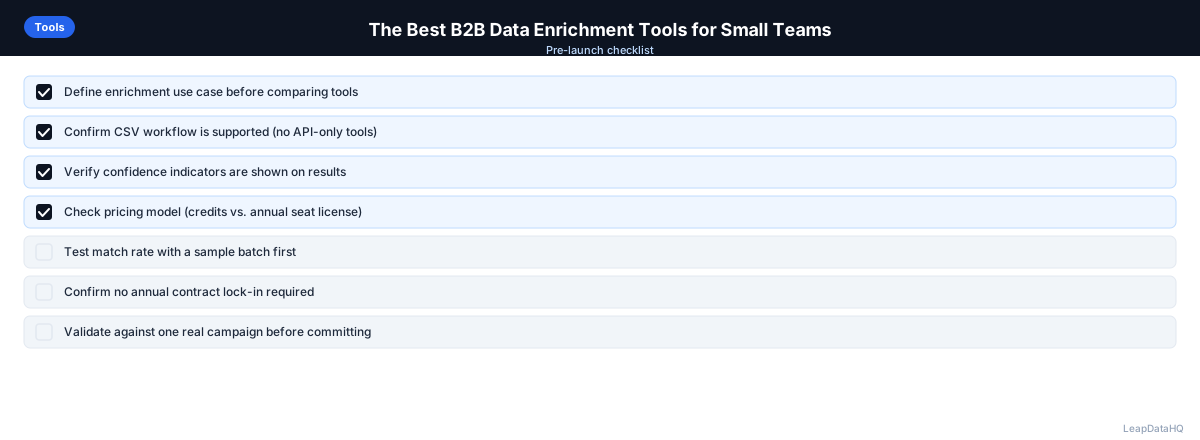
Use this checklist when comparing enrichment tools to ensure you evaluate each option thoroughly and consistently:
- Match rate tested with your actual target market data, not just demo samples
- Confidence scores provided for each enriched field so you can filter results
- CSV upload and download without developer support for self-service workflow
- Pricing model matches your volume pattern — per-record, credit-based, or seat-based
- Data coverage verified for your target industries and geographies
- Email verification capability or integration available for deliverability protection
- CRM integration available if needed for your specific workflow
- Free trial or sample enrichment available to test with real data before committing
- Clear documentation and responsive support channels available
- No long-term contract required for your volume tier
- Data freshness practices documented — how often the database is updated
- Export filtering options to control which records are included in output
Common Mistakes to Avoid
These mistakes lead to poor tool selection, wasted budget, and frustration. Avoiding them helps you choose a tool that actually fits your workflow:
- Choosing based on brand recognition alone: Enterprise platforms with large marketing budgets are not necessarily the best fit for small teams. Evaluate tools based on your specific requirements, test results, and budget — not market position or name recognition.
- Not testing with your actual data: Demo data and marketing claims do not reflect performance on your specific target market. Always test with a representative sample before committing. A tool that works for tech companies may fail for manufacturing or healthcare.
- Ignoring total cost of ownership: Per-record cost is not the only factor. Setup time, integration complexity, and manual verification requirements all add to the real cost. Calculate total cost based on your complete workflow, not just the subscription price.
- Over-engineering for current needs: Enterprise platforms with API integrations and CRM connectors make sense for large teams. For teams enriching 500-5,000 records per month, simpler CSV-based tools are more practical and cost-effective.
- Not checking data freshness: Data degrades over time. Tools that do not regularly update their databases return stale information. Ask how frequently data is refreshed and test with contacts you know have changed jobs recently.
- Skipping the trial period: Most tools offer a free trial or sample enrichment. Use it. Testing with 50-100 records costs nothing and tells you more than any sales pitch or comparison article.
- Evaluating tools you do not need: If you work in spreadsheets, do not spend time evaluating API-first tools. If you enrich 200 records per month, do not evaluate enterprise platforms. Focus on tools designed for your use case and volume.
Practical Examples
Example 1: Early-Stage Startup
A 5-person startup needs to enrich 200-500 prospect records per month. They choose a credit-based CSV enrichment tool because it requires no developer setup, scales with their variable volume, and costs less than enterprise platforms with minimum commitments.
Example 2: Lead Generation Agency
An agency enriches lists for 15 clients across different industries. They need a tool that works for multiple client niches without per-client seat fees. A credit-based enrichment tool lets them run batches for different clients with the same account and charge clients for actual enrichment used.
Example 3: Mid-Market Sales Team
A 20-person sales team enriches 2,000-3,000 records monthly and needs Salesforce integration. They evaluate both enterprise platforms and lighter tools, ultimately choosing a tool with strong CRM integration and consistent data quality for their target market.
Example 4: Solo Consultant
A solo consultant enriches 100-300 records per quarter for client projects. They need a tool with no monthly minimums and simple CSV workflow. A lightweight enrichment tool with pay-as-you-go pricing fits their sporadic usage pattern.
How LeapDataHQ Helps
LeapDataHQ helps teams evaluate and use B2B data enrichment through a straightforward CSV-based workflow. You upload your spreadsheet with company domains and contact names, and the platform returns enriched records with confidence scores for each field. There is no developer setup required — you can run your first enrichment the same day you sign up.
The credit-based pricing model at /pricing means you pay only for what you enrich, with no monthly seat fees or annual contracts. This makes it practical for teams with variable enrichment needs — agencies running batches for multiple clients, startups scaling their outreach, or sales teams with seasonal prospecting patterns.
LeapDataHQ returns confidence scores alongside each enriched field, giving you control over output quality. You filter to high-confidence results before exporting, rather than importing everything and dealing with bounces later. Explore the full feature set at /features to see if the workflow fits your team.
Next Steps
If you are evaluating B2B data enrichment tools, the best next step is to test with your actual data. Prepare a sample CSV of 50-100 records from your target market and run it through a few tools to compare match rates, confidence scores, and output quality.
LeapDataHQ offers a straightforward way to test with real data. Upload a sample CSV, see match rates and confidence scores on your actual target market, and decide if the credit-based workflow fits your team. Check /features and /pricing to learn more.
When to Use LeapDataHQ
LeapDataHQ is designed for teams that need to enrich CSV files without a developer, without an annual contract, and without paying for seats they don't use. It's built for SDRs, agencies, recruiters, and founders who upload a list, enrich it, review confidence signals, and export what's worth using.
It fits best when you're working with batch enrichment — uploading a file of 50–5,000 records — rather than single-record lookups or real-time API enrichment. If you want to test enrichment with real data before committing to a platform, LeapDataHQ offers a low-friction starting point.
The credit-based pricing means you pay only for what you enrich, making it practical for teams with variable monthly volume. No seat fees, no annual contracts, no minimum commitments. You can enrich 500 records one month and 3,000 the next without paying for unused capacity.
LeapDataHQ returns confidence scores alongside each enriched field, giving you control over output quality. You filter to high-confidence results before exporting, rather than importing everything and dealing with bounces later. This filtering step is what separates professional enrichment from simply appending data.
For teams evaluating enrichment tools, LeapDataHQ offers a straightforward way to test with real data. Upload a sample CSV, see match rates and confidence scores on your actual target market, and decide if the tool fits your workflow before committing to larger volumes. The platform works across industries and geographies, with results that depend on input data quality and the public data available for each target company.
Start Enriching LeadsFrequently Asked Questions
What's the difference between an enrichment tool and a prospecting database?
A prospecting database lets you search for contacts by filters like industry, title, and location, then build a list. An enrichment tool takes a list you already have and fills in missing data. Some platforms offer both, but they solve different problems. Use prospecting databases to build lists from scratch, enrichment tools to complete lists you have already sourced.
What's a reasonable match rate to expect?
For US-based B2B contacts in established industries, a match rate of 60-80% for email enrichment is realistic. Tech companies and enterprise targets tend to have higher rates. SMBs, non-profits, and less digitally active industries often have lower rates. Match rates vary by tool and target market, so test with your actual data before committing to any platform.
Do I need a CRM integration to use an enrichment tool?
Not if your tool supports CSV upload and download. Many teams enrich outside their CRM, review results, then manually import the enriched file. This gives more control over what enters your CRM. CRM integrations are convenient but not essential. CSV-based workflows work well for teams enriching 50-5,000 records per month.
How often should I re-enrich my contact list?
Professional contact data decays at roughly 20-30% per year. If you are running outbound campaigns, re-enriching every 6-12 months helps maintain deliverability and reduces bounces from outdated emails. For active prospecting lists, re-enrich before each campaign. For CRM records, quarterly re-enrichment catches job changes and company updates.
Are there free B2B data enrichment tools?
Most tools offer a limited free tier — often 10-50 free enrichments. Fully free tools exist but tend to have poor coverage or low accuracy. For production use, budget for a paid tool with credit-based pricing. Free tiers are useful for testing, but do not rely on them for ongoing enrichment needs.
How do I know if an enrichment tool is worth the cost?
Calculate the time savings versus manual research. If manual lookup takes 3-5 minutes per contact and you are enriching 500 contacts, that is 25-40 hours of research time. Compare that to the enrichment tool cost. Add the value of improved deliverability and reply rates from better data. For most teams, the ROI is clear within the first month.
Should I use multiple enrichment tools?
One tool is simpler to manage and avoids conflicting data from different sources. If your primary tool has gaps in specific markets, adding a secondary tool for those segments makes sense — but manage them separately rather than mixing outputs without flagging sources. Most teams are well-served by a single tool that covers their primary target market.