
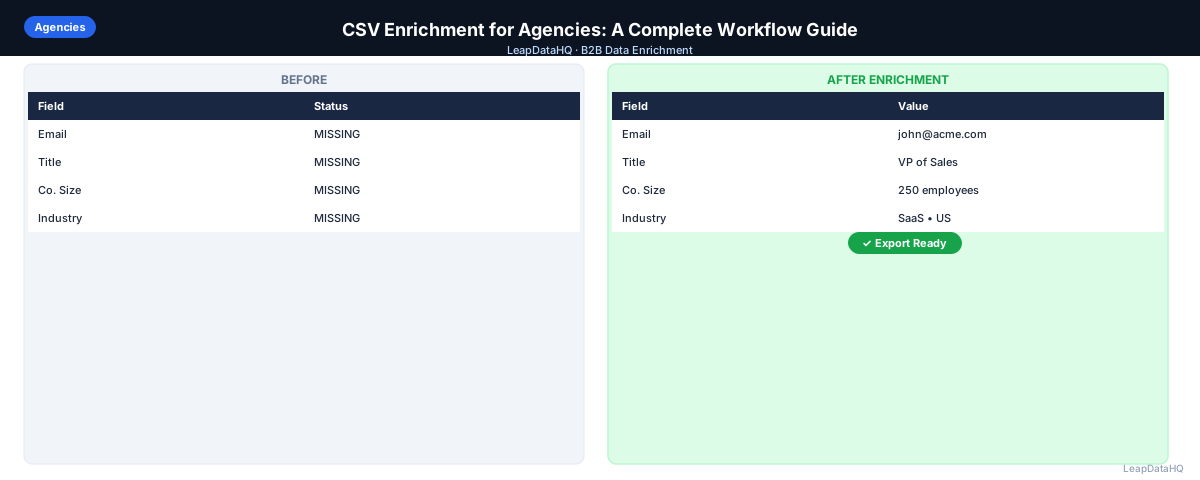
Agencies face a unique enrichment challenge. Unlike in-house sales teams enriching their own CRM, agencies work with different client ICPs, different verticals, and different deliverable formats — often simultaneously. A workflow that works for one client may be completely wrong for another.
The agencies that do this well have a repeatable process: receive or build a raw list, clean and enrich it in bulk, review confidence signals, and deliver a formatted output that's ready for the client to import directly.
This guide walks through that workflow — from raw input to client-ready output. You will learn how to define client target profiles, source and clean input lists, run bulk enrichment, review and filter results, format deliverables for different client CRM systems, and price enrichment services profitably.
The key to agency enrichment success is standardization. When you have a consistent process that works across clients, you can scale enrichment volume without proportionally increasing headcount. The agencies that struggle are those that treat each client project as a unique workflow.
Whether you are a solo consultant or a 20-person agency, the principles in this guide help you build an enrichment workflow that scales.
Why Agencies Need a Dedicated Enrichment Workflow
Most agencies start enrichment ad hoc: a team member manually researches contacts on LinkedIn, copy-pastes emails from company websites, or uses a personal tool account. This doesn't scale across clients, and quality is inconsistent between team members.
A dedicated enrichment workflow standardizes output quality, reduces manual time per list, and makes it possible to take on more volume without proportionally increasing headcount.
Standardization also makes pricing predictable. When you know your enrichment process takes X hours and costs Y in credits, you can price client projects accurately. Ad hoc enrichment makes it impossible to estimate costs or deliverables reliably.
Step 1: Define the Client's Target Profile
Before building or enriching a list, get clarity on who the client is targeting: industry, company size, geography, job titles, and negative filters (exclude companies below 50 employees, exclude competitors). The target profile determines which data fields matter.
Document the target profile in a standard format that your team can reference for every client project. This prevents miscommunication and ensures enrichment efforts align with client expectations.
Step 2: Source or Receive the Raw List
Some clients provide a raw list — a spreadsheet of company names, domains, or partial contacts. Others expect the agency to source the list. Common raw inputs: company names only, names + domains, LinkedIn Sales Navigator exports, event attendee lists, or CRM exports with gaps.
Understanding the input format helps you plan the enrichment workflow. Lists with domains enrich more efficiently than lists with only company names. LinkedIn exports require domain addition before enrichment.
Step 3: Clean the Input CSV
Before enriching, standardize the format:
- Column headers are clear and consistent
- Company names are not in all-caps or all-lowercase
- Domains are formatted without "http://" or trailing slashes
- Duplicates are removed
- Rows with no meaningful identifying information are deleted
Cleaning the input improves match rates and prevents wasted enrichment credits. A clean input file is the single biggest factor in enrichment quality.
Step 4: Run Bulk Enrichment
Upload the cleaned CSV to your enrichment tool and map columns. For company-level enrichment, the domain column is the primary key. For contact-level, you need domain + first name + last name. Review the overall match rate — if it's unexpectedly low, the input data may have quality issues worth flagging to the client.
Document match rates for each client project. This helps you set realistic expectations and identify input quality issues early.
Step 5: Review and Filter Before Delivery
Don't deliver raw enrichment output. Review confidence scores and filter to records that meet your quality threshold. Delivering low-confidence emails that bounce damages your agency's reputation more than delivering a smaller, cleaner list.
Set a standard quality threshold for all client projects — for example, only deliver emails with high or medium confidence scores. This standardization ensures consistent quality across clients.
Step 6: Format the Deliverable
Format the enriched CSV to match what the client needs — if they're importing into HubSpot, match HubSpot's import format. A well-formatted deliverable reduces back-and-forth and makes the work feel complete.
Create templates for common CRM import formats (HubSpot, Salesforce, etc.) so formatting is consistent and efficient across client projects.
Pricing Enrichment Services as an Agency
Agencies typically price enrichment as a line item in a lead generation retainer or as a per-list deliverable. Credit-based enrichment tools make cost calculation straightforward: you know the input size, you know the cost per credit, you price accordingly.
Factor in your time for cleaning, review, and formatting when pricing. The enrichment credits are only part of the cost — your team's time is the larger component for most projects.
What This Means for Your Agency's Scalability
A standardized enrichment workflow is what allows agencies to scale. When every team member follows the same process — clean, enrich, review, format — you can handle more clients without hiring more people. Quality stays consistent because the process is repeatable.
Ready to enrich your CSV list?
Upload a CSV, fill missing data, review confidence scores, and export clean records.
Upload a CSV — Start EnrichingThe agencies that struggle with enrichment are those where each team member has their own approach. Standardization eliminates this variability and makes training new team members straightforward.
Scalability also means predictable pricing and deliverables. When you know your process takes 2 hours for a 500-record list and costs $X in credits, you can quote clients accurately and deliver on time, every time.
Who Should Use Agency Enrichment Workflows
This workflow is designed for agencies that deliver enriched data as part of their services:
- Lead generation agencies: delivering enriched prospect lists to clients for outbound campaigns
- Marketing agencies: enriching event leads, webinar registrants, and content download leads for client nurture campaigns
- Recruiting agencies: enriching candidate lists with contact information for client hiring projects
- Sales consulting firms: building and enriching target account lists for client sales initiatives
- Account-based marketing agencies: enriching ABM target lists with complete contact and company data
- Data service providers: offering enrichment as a standalone service to clients who need bulk data completion
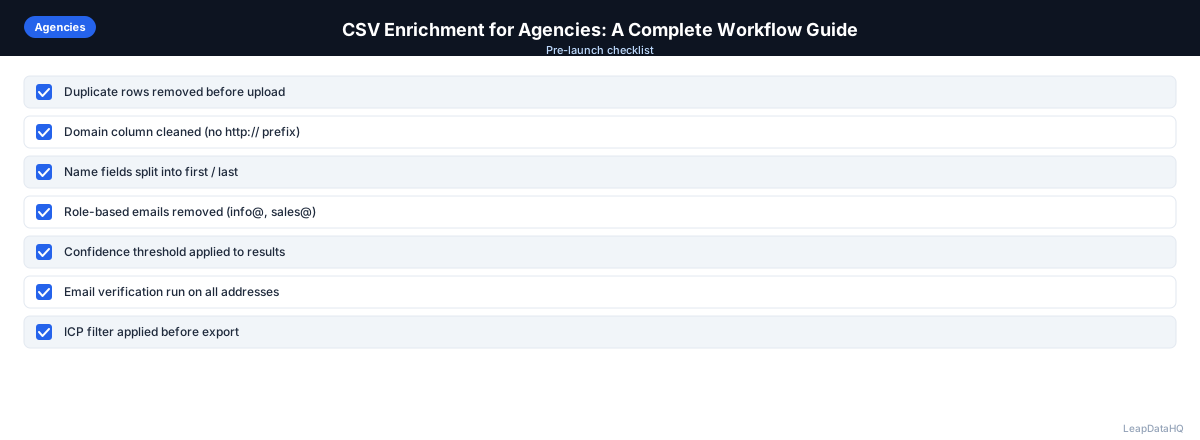
Checklist: Agency Enrichment Workflow
Use this checklist for every client enrichment project to ensure consistent quality:
- Documented client target profile — industry, company size, geography, job titles, exclusions
- Received or sourced raw list and confirmed input format and quality
- Cleaned input CSV — removed duplicates, standardized formatting, added domains where missing
- Mapped columns correctly in enrichment tool for client-specific data requirements
- Ran bulk enrichment and documented overall match rate
- Reviewed confidence scores and filtered to quality threshold before delivery
- Verified email addresses for client campaigns where deliverability is critical
- Formatted deliverable to match client CRM import format (HubSpot, Salesforce, etc.)
- Calculated project cost — enrichment credits plus team time for cleaning and review
- Delivered enriched list with documentation of match rate and quality filtering applied
- Flagged any input quality issues or low match rates to client with explanation
- Stored project template and match rate data for future reference and process improvement
Common Mistakes to Avoid
These mistakes reduce agency enrichment quality and client satisfaction:
- Not standardizing the workflow across clients: When each team member has their own approach, quality varies and training is difficult. Create a standard process template that every team member follows for every client project.
- Delivering raw enrichment output without review: Low-confidence emails that bounce damage your agency reputation. Always review confidence scores and filter to your quality threshold before delivering to clients.
- Not documenting match rates: Without tracking match rates by client and input type, you cannot set realistic expectations or identify quality issues. Document match rates for every project.
- Not formatting deliverables for client CRM: Clients want data ready to import. Delivering a generic CSV that requires reformatting creates extra work for the client and makes your deliverable feel incomplete.
- Not factoring team time into pricing: Enrichment credits are only part of the cost. Your team spends time cleaning, reviewing, and formatting. Price based on total project cost, not just enrichment credits.
- Not flagging input quality issues to clients: If a client provides a low-quality input list, document the issues and communicate them. This manages expectations and explains lower match rates.
- Using different tools for different clients: Standardize on one enrichment tool for all clients. This reduces training time, simplifies pricing, and ensures consistent output quality across projects.
Practical Examples
Example 1: Lead Generation Agency
A lead gen agency enriches lists for 12 clients across different industries. They use a standard workflow: receive client list, clean, enrich, review confidence scores, verify emails, format for client CRM, and deliver. They price enrichment as a line item in their retainer. Each client project takes 2-3 hours for 500 records.
Example 2: Marketing Agency Event Follow-Up
A marketing agency manages event follow-up for a client. They receive a 300-person attendee list, enrich for emails and company data, filter to high-confidence results, verify emails, and deliver 260 outreach-ready contacts formatted for the client's HubSpot instance.
Example 3: Recruiting Agency Candidate Enrichment
A recruiting agency enriches candidate lists for client hiring projects. They receive LinkedIn exports from recruiters, add company domains, enrich for work emails, verify, and deliver formatted candidate lists. They charge clients a per-candidate enrichment fee.
Example 4: ABM Agency Target List
An ABM agency builds target lists for enterprise clients. They source 50 target accounts per client, identify 5 decision makers each, enrich for emails and company data, verify, and deliver highly personalized outreach lists. They price ABM enrichment as a premium service.
Example 5: Data Service Provider
A data service provider offers CSV enrichment as a standalone service. Clients send lists of 1,000-10,000 records. The agency cleans, enriches, reviews, verifies, and delivers formatted outputs. They price per record with volume discounts. Standardized workflows handle high volume efficiently.
How LeapDataHQ Helps
LeapDataHQ is designed for the agency enrichment workflow. Its credit-based pricing means you pay per enrichment batch — not a flat monthly seat fee. You can run enrichment for multiple clients using the same account, and confidence scoring makes the review step straightforward.
The platform works consistently across different client verticals and list types. Whether you are enriching a fintech client's prospect list or a healthcare client's attendee list, the workflow is the same: upload, enrich, review confidence scores, export. This consistency makes training team members and standardizing processes easier.
For agencies doing consistent list building and enrichment as a service, LeapDataHQ provides the enrichment layer at /csv-enrichment-for-agencies without requiring developer integration or platform-level commitments. The credit-based pricing at /pricing aligns costs with actual client project volume. Explore /features and /lead-database-for-agencies for details.
Next Steps
If your agency needs a scalable enrichment workflow, start by standardizing your process. Create a template that every team member follows: clean, enrich, review, format, deliver. Document match rates and project costs for each client to refine your pricing and process over time. Then test LeapDataHQ with a client project to see if the workflow fits.
LeapDataHQ makes agency enrichment straightforward. Upload client CSVs, review confidence scores, and export clean data ready for delivery. The credit-based model aligns costs with actual project volume, making it easy to price client engagements accurately. Check /features and /pricing to see if it fits your agency's needs.
When to Use LeapDataHQ
LeapDataHQ is designed for this agency workflow. Its credit-based pricing means you pay per enrichment batch — not a flat monthly seat fee. You can run enrichment for multiple clients using the same account, and confidence scoring makes the review step straightforward.
For agencies doing consistent list building and enrichment as a service, LeapDataHQ provides the enrichment layer without requiring developer integration or platform-level commitments.
The platform works across different client verticals and list types, making it practical for agencies that serve diverse industries. The credit-based model means you can run enrichment for 15 clients in a month without paying for 15 separate subscriptions.
LeapDataHQ returns confidence scores alongside each enriched field, giving you control over output quality. You filter to high-confidence results before delivering to clients, which protects your agency reputation and ensures client satisfaction.
For agencies working through the complete enrichment workflow — from input cleaning through enrichment, review, formatting, and delivery — LeapDataHQ provides the enrichment layer with consistent quality across client projects. Results depend on input data quality and the public data available for each target.
Start Enriching LeadsFrequently Asked Questions
Can an agency use one enrichment account for multiple clients?
Yes. A credit-based account works across different client lists — upload different CSVs for different clients and download separate outputs. There is no need for separate accounts per client. This simplifies billing and workflow management.
How should agencies handle low match rates?
Low match rates often indicate input quality issues — bad domains, ambiguous company names, or very small private companies. Document the match rate, explain what drove it, and offer to source replacement records or supplement from a different source. Transparency builds client trust.
What data fields should agencies deliver by default?
First name, last name, work email, job title, company name, company domain, company size, and industry. Add direct phone numbers and LinkedIn URLs when available. The specific fields depend on client needs — confirm requirements before starting enrichment.
Is it better to enrich company-level or contact-level first?
Company-level first. Getting company domain, industry, and size right lets you filter companies that do not match ICP before enriching contacts — avoiding spending credits on companies you will discard anyway. This two-step approach is more cost-effective.
What's the fastest way to increase list enrichment capacity at an agency?
Build a standardized cleaning and enrichment template that any team member can follow. Use the same tool with the same column mapping format for every client. Standardization reduces per-list time more than any individual tool improvement.
How should agencies price enrichment services?
Price based on total project cost: enrichment credits plus team time for cleaning, review, and formatting. Consider per-record pricing for simple projects or per-project pricing for complex ones. Factor in your time, not just the tool cost.
What if a client provides a low-quality input list?
Document the input quality issues, communicate them to the client, and explain how they affect match rates. Offer to clean the list (at additional cost) or suggest the client provide a better input. Managing expectations upfront prevents disputes later.