
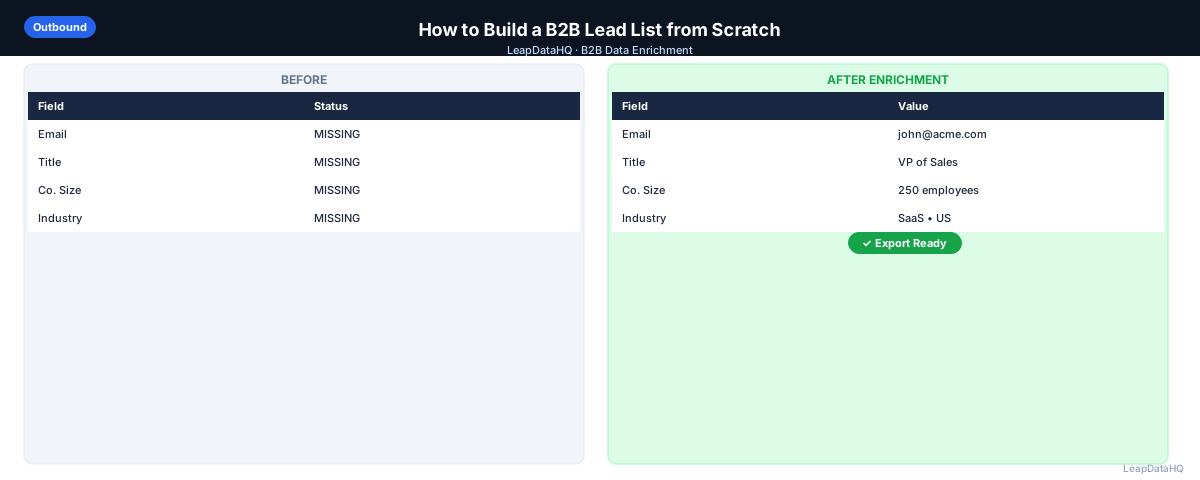
A good lead list is the foundation of every outbound campaign. Bad lists — filled with stale contacts, wrong titles, or missing emails — mean low reply rates, high bounce rates, and wasted rep time.
Building a lead list from scratch sounds simple in theory: find the right people at the right companies and get their contact information. In practice, each step requires decisions that affect quality.
This guide walks through the full process — from defining who you're targeting to delivering a list that's enriched and ready for outreach. You will learn how to define your ICP with enough specificity to actually guide list building, source target companies from multiple channels, identify the right contacts, enrich for contact information, verify emails, and segment for targeted messaging.
The difference between a good list and a bad list is not luck — it is process. Teams that follow a systematic approach to list building consistently outperform teams that throw together a spreadsheet and start sending.
Whether you are building your first prospecting list or refining an existing process, this guide covers the steps that matter most.
Step 1: Define Your Ideal Customer Profile (ICP)
Before you build a list, you need to know who you're looking for. An ICP is a description of the type of company that is most likely to benefit from your product or service — and most likely to buy.
Common ICP attributes include industry, company size (by headcount or revenue), geography, technology stack, funding stage, and growth signals. The more specific your ICP, the more targeted your list — and the better your reply rates.
A well-defined ICP also makes enrichment more effective. When you know your target company size and industry, you can filter enriched data to focus on the records most likely to convert. Without an ICP, you are enriching blindly.
ICP Example
Instead of "companies that need sales tools", a specific ICP might be: SaaS companies with 10-100 employees, based in the US or Canada, with a VP of Sales or Head of Growth, that are using HubSpot and have raised a Series A in the past 18 months. That level of specificity makes targeting and messaging much more focused.
Step 2: Build a List of Target Companies
Once you have an ICP, build a list of companies that match it. Sources include:
- LinkedIn company search (filter by industry, size, location)
- G2 or Capterra category pages (companies using specific software)
- Crunchbase (filter by funding stage, industry, location)
- Industry associations and conference attendee lists
- Your existing CRM (look-alike companies based on your best customers)
- News and press releases (companies announcing growth or new hires)
Build a spreadsheet with company name, domain, and why each company matches your ICP. This becomes the foundation of your lead list.
Diversifying your sourcing channels produces better lists than relying on a single source. Each channel surfaces different companies — LinkedIn shows active professional presence, Crunchbase shows funding signals, G2 shows technology adoption. Combining sources gives you a more complete picture.
Step 3: Identify the Right Contacts at Each Company
Now find the specific people at those companies you want to reach. Your ICP should include the job title(s) or seniority levels of your decision makers. Common targets in B2B outbound include VPs of Sales, Heads of Marketing, Founders, Operations Managers, and IT Directors — depending on your product.
LinkedIn is the most reliable place to find the right title at a specific company. Search the company on LinkedIn, go to People, and filter by title. Note the names and titles of relevant contacts.
For each target company, identify 2-3 contacts at different seniority levels when possible. This gives you multiple entry points and increases the likelihood that at least one contact is the right person to reach.
Step 4: Enrich for Contact Information
At this point you have company names, domains, and contact names — but no email addresses or phone numbers. Run your list through a CSV enrichment tool to append the contact details you need for outreach.
Include company domain, first name, last name, and job title in your input CSV for the best match rate. Review confidence scores and filter to records where the enrichment tool is confident in the email before adding them to your outreach sequence.
Step 5: Verify Emails Before You Send
Even enriched emails should be verified before being added to a large outreach campaign. Email verification tools check whether the mailbox exists and can receive mail without sending an actual email.
High bounce rates damage your sender reputation and can result in your domain being flagged. Verification adds a small step but significantly protects deliverability.
Step 6: Segment and Prioritize Your List
Not all leads are equal. Before launching a sequence, segment your list by company size, ICP fit score, industry, or engagement signal. Running your best-fit accounts in a separate sequence allows you to personalize messaging and prioritize follow-up time on the most promising targets.
What This Means for Your Outreach Results
The quality of your lead list directly determines your outreach results. A well-built list of 300 targeted, enriched, and verified contacts will outperform a poorly built list of 3,000 every time. The difference is not in volume — it is in relevance.
When your list matches your ICP, your messaging resonates. When your contacts are enriched with complete data, your personalization works. When your emails are verified, your deliverability stays healthy. Each step in the list building process compounds to produce better campaign results.
Teams that invest in systematic list building see higher reply rates, lower bounce rates, and more meaningful conversations from their outreach. The time spent on list building is not overhead — it is the foundation of everything that follows.
Ready to enrich your CSV list?
Upload a CSV, fill missing data, review confidence scores, and export clean records.
Upload a CSV — Start EnrichingWho Should Build B2B Lead Lists
Lead list building is a core skill for anyone doing B2B outbound:
- SDRs and sales reps: who need targeted lists for cold outreach campaigns and prospecting sequences
- Founders doing early sales: who are building their first prospect lists and need a systematic approach
- Agencies: who build lists for clients across different industries and need a repeatable process
- Marketers: who need targeted lists for account-based marketing campaigns and event outreach
- Business development teams: who identify partnership targets and need complete contact data
- Recruiters: who build candidate lists for specific roles and need contact information for outreach
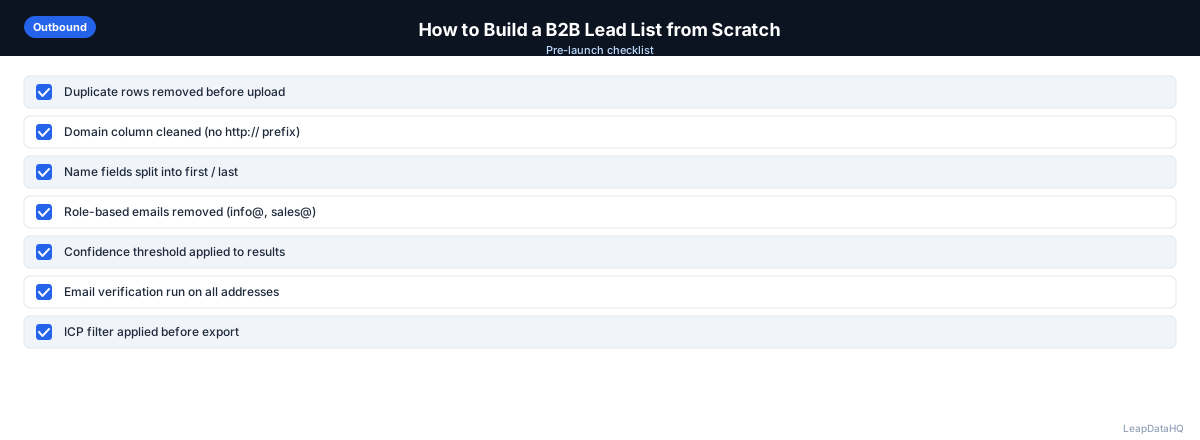
Checklist: B2B Lead List Building
Use this checklist to ensure a complete and systematic lead list building process:
- Defined ICP with specific attributes — industry, company size, geography, technology, funding stage
- Built target company list from multiple sourcing channels (LinkedIn, Crunchbase, G2, etc.)
- Added company domains to all target company records
- Identified 2-3 decision makers at each target company using LinkedIn
- Created input CSV with company domain, first name, last name, and job title for enrichment
- Ran CSV enrichment and reviewed confidence scores on all returned records
- Filtered to high-confidence enrichment results before exporting
- Verified all enriched email addresses before importing to outreach tool
- Segmented list by company size, industry, or ICP fit score for targeted messaging
- Removed duplicates from the final list before importing to outreach tool
- Documented list building process and match rates for future reference
- Set reminder to refresh the list in 90-120 days for re-engagement
Common Mistakes to Avoid
These mistakes reduce lead list quality and campaign performance:
- Not defining the ICP before sourcing: Without a specific ICP, your list will be broad and unfocused. Define your target company and contact attributes before you start sourcing to ensure every record matches your criteria.
- Prioritizing quantity over quality: A list of 200 well-matched, enriched, and verified leads outperforms 2,000 poorly matched ones. Focus on building a targeted list rather than maximizing row count.
- Skipping enrichment verification: Importing all enriched records without reviewing confidence scores leads to high bounce rates. Filter to high-confidence results and verify emails before importing to your outreach tool.
- Using the same list repeatedly without refreshing: Contact data decays over time. A list built six months ago may have significant inaccuracies today. Refresh your list every 90-120 days for active campaigns.
- Building one giant sequence for all leads: Segmentation improves performance. Create separate sequences for different company sizes, industries, or ICP fit levels. Personalized messaging based on enriched data measurably improves reply rates.
- Not adding company domains before enrichment: Domains are the most reliable lookup key for email enrichment. Running enrichment without domains produces lower match rates. Add domains to your list before enriching.
- Sourcing from a single channel: Relying on one source (e.g., only LinkedIn) limits your coverage. Use multiple sourcing channels — LinkedIn, Crunchbase, G2, industry directories — to build a more complete target company list.
Practical Examples
Example 1: SDR Building First Prospecting List
A new SDR defines their ICP (mid-market SaaS companies, 50-200 employees, VP of Sales). They source 150 companies from LinkedIn and Crunchbase, identify 2 contacts per company, enrich for emails, verify, and launch a targeted sequence. They book 8 meetings from 300 contacts.
Example 2: Agency Building List for Client
An agency builds a list for a fintech client. ICP: financial services companies, 100-1000 employees, Head of Compliance. They source 200 companies, identify 3 contacts each, enrich, verify, and deliver 500 outreach-ready contacts. The client launches campaigns immediately.
Example 3: Founder Doing Early Sales
A founder building their first prospect list defines ICP based on their best existing customers. They source 100 look-alike companies from their CRM, identify founders and VPs at each, enrich for emails, and run a personalized sequence. They close 3 deals from the first batch.
Example 4: ABM Campaign List
A marketing team builds a list for an ABM campaign targeting enterprise accounts. ICP: Fortune 1000 companies in healthcare. They source 50 accounts, identify 5 decision makers each, enrich for emails and company data, and create highly personalized sequences for each account.
Example 5: Event Follow-Up List
After a conference, a team builds a follow-up list from 100 companies they met. They add domains, identify additional contacts at each company via LinkedIn, enrich for emails, verify, and launch personalized follow-up sequences referencing the event.
How LeapDataHQ Helps
LeapDataHQ helps you build better lead lists by handling the enrichment step. Once you have a list of target companies and contacts with domains, you upload the CSV to LeapDataHQ to enrich for email addresses and additional company data. The platform returns confidence scores so you know which results to trust.
You review the enriched results, filter to high-confidence records, and export a clean list ready for your outreach tool. The credit-based pricing at /pricing means you pay only for what you enrich — no seat fees for months when you are not building lists.
For agencies and SDRs who build multiple lists for different clients or campaigns, LeapDataHQ provides flexible, on-demand enrichment. Upload your prepared CSV at /csv-email-enrichment, review confidence scores, and export clean data. Explore /features and /sales-prospecting-data-tool for details.
Next Steps
If you are building a B2B lead list, start by defining your ICP with specific attributes. Then source target companies from multiple channels, identify contacts, and prepare your CSV for enrichment.
LeapDataHQ handles the enrichment step. Upload your list at /sales-prospecting-data-tool, review confidence scores, and export clean data ready for outreach. Check /features and /pricing to see if the workflow fits your list building process.
When to Use LeapDataHQ
LeapDataHQ fits into Step 4 of this process. Once you have a list of target companies and contacts (with domains), upload it to LeapDataHQ to enrich for email addresses and additional company data. Review confidence scores, filter to high-confidence results, and export a list ready for your outreach tool.
For agencies and SDRs who build multiple lists for different clients or campaigns, the credit-based model means you only pay for what you enrich — no seat fees for months you're not building lists.
The platform returns confidence scores alongside each enriched field, giving you control over output quality. You filter to high-confidence results before exporting, rather than importing everything and dealing with bounces later.
LeapDataHQ is designed for the list building workflow — you bring the prospecting data from LinkedIn, Crunchbase, or other sources, and the platform fills in the contact details needed for outreach.
For teams working through the complete list building process — from ICP definition through sourcing, contact identification, enrichment, verification, and segmentation — LeapDataHQ provides the enrichment layer without requiring developer integration or platform-level commitments. Results depend on input data quality and the public data available for each target.
Start Enriching LeadsFrequently Asked Questions
How many leads should be on a cold outreach list?
Quality matters more than quantity. A list of 300 well-targeted, enriched, verified leads will outperform 3,000 poorly targeted ones. Start with a focused list, run the campaign, analyze results, and scale what works.
Where do I find target companies if I don't have a CRM?
LinkedIn company search, Crunchbase, industry directories, G2/Capterra category pages, conference attendee lists, and job board postings (companies hiring for specific roles are often in growth mode) are all practical starting points.
How do I know if my ICP is right?
Look at your existing customers. What industries do they come from? What size are they? Who was the champion in the buying process? Your best existing customers are the best signal for your ICP.
Should I buy a pre-built lead list instead of building my own?
Pre-built lists vary widely in quality. They can be a useful starting point but typically require enrichment, deduplication, and verification before use. Building from a defined ICP and sourcing yourself produces higher-quality leads but takes more time.
How often should I refresh a lead list?
For active outbound campaigns, refresh your list every 90-120 days. Contacts who have not responded to outreach and records that are 6+ months old should be re-enriched to verify currency before re-engaging.
What is the most important step in list building?
ICP definition. Everything else — sourcing, contact identification, enrichment, segmentation — flows from having a clear target. Without a specific ICP, your list will be unfocused and your messaging will be generic.
How do I prioritize contacts within my list?
Segment by ICP fit strength, company size, engagement signals, and seniority level. Your best-fit accounts with the strongest engagement signals should be in a separate, highly personalized sequence. Lower-priority contacts go in a standard sequence.