
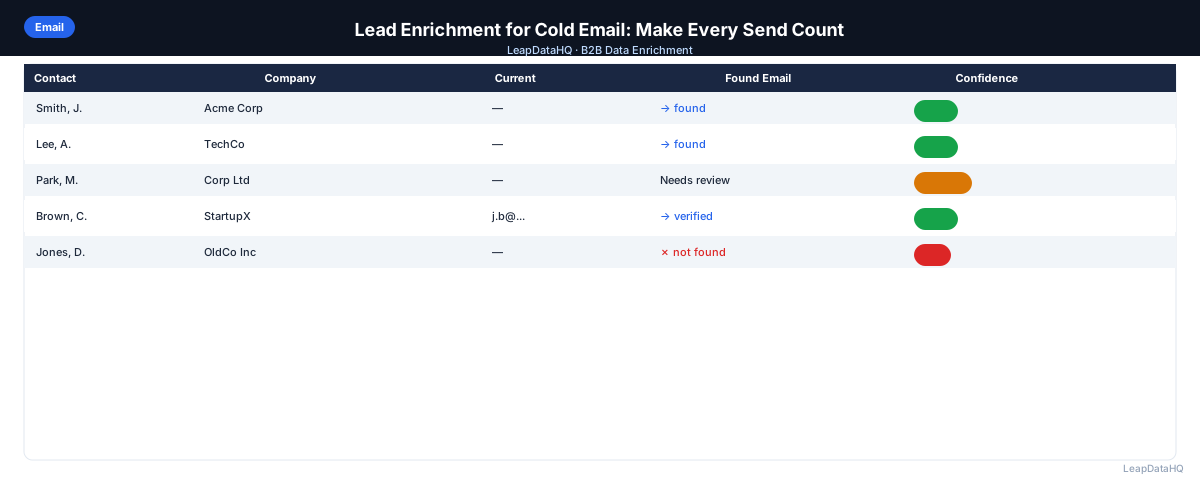
Cold email performance depends on three things: reaching the right person, with the right message, at the right time. Lead enrichment directly improves the first two. Enriched contact data gets you to the right person — not a stale email or someone who left the company. Enriched company data enables more specific, relevant messaging.
The difference between a cold email campaign with a 2% reply rate and one with an 8% reply rate often comes down to list quality and message relevance. Enrichment improves both.
Without enrichment, your cold email campaigns are built on incomplete data. You're sending to contacts whose email addresses may be outdated, whose job titles you're guessing at, and whose company context you don't have. Every one of these gaps reduces the effectiveness of your outreach.
With enrichment, you fill those gaps systematically. Email addresses are verified and current. Job titles are accurate, enabling you to target the right decision-makers. Company data — size, industry, tech stack — enables personalization that shows you've done your research. The result is outreach that feels relevant rather than generic.
This guide covers how to use lead enrichment specifically to improve cold email performance, from building enriched lists to using enriched data for personalization.
How Bad List Data Hurts Cold Email Campaigns
Bounced emails damage your sender reputation. High bounce rates signal to email providers that you're sending to unvetted lists, which results in your emails landing in spam — not just for the bounced contacts, but for everyone on the campaign.
Wrong titles mean irrelevant messaging. Reaching a VP of Engineering with a message about marketing automation, or a junior coordinator with a message designed for a C-suite decision-maker, produces low reply rates regardless of how well the email is written.
Missing company data means generic messaging. Without knowing the prospect's industry, company size, or technology stack, your message defaults to generic value propositions that could apply to anyone — and therefore resonate with no one.
What Enrichment Adds to Your Cold Email Workflow
Valid, Current Email Addresses
The most basic enrichment value: email addresses that actually work. Enrichment tools query current data sources to find work emails. Combined with verification, this keeps your bounce rate low and your sender reputation intact.
Correct Job Titles for Targeting
Enriched job titles let you filter your list to the right decision-maker level before launching a campaign. If your product is for marketing leaders, filter to contacts with "Marketing" and "VP", "Director", or "Head" in their title.
Company Data for Personalization
Company size, industry, and technology stack enable better personalization. Instead of a generic "I noticed you're in the software industry", you can write "I noticed TechCorp uses Salesforce and HubSpot — we specifically integrate with both".
What This Means for Your Campaign Performance
Enrichment affects every metric in your cold email campaign. Deliverability improves because enriched and verified emails bounce less. Open rates improve because your sender reputation stays healthy. Reply rates improve because your messaging targets the right people with relevant, personalized content.
The compounding effect is significant. A campaign with 98% deliverability (vs 90%), 40% open rates (vs 20%), and 8% reply rates (vs 2%) produces dramatically different results from the same number of sends. The difference between a campaign that generates 2 meetings and one that generates 15 often comes down to list quality.
For teams running multiple campaigns per month, the cumulative impact of enrichment on campaign performance is substantial. Each campaign benefits from better data, and the learnings from each campaign feed into better targeting for the next one.
Who Should Use Lead Enrichment for Cold Email
Lead enrichment for cold email is relevant for anyone running B2B outbound campaigns:
- SDRs and sales reps: running cold email campaigns to prospect and book meetings
- Agency teams: managing cold email campaigns for multiple clients across different industries
- Founders doing early sales: building their first cold email outreach without dedicated support
- Growth marketers: running experimentation campaigns that need clean, targeted lists
- Marketing operations: preparing lists for email campaigns while protecting sender reputation
- RevOps teams: ensuring enriched data flows through the outreach technology stack
- Business development professionals: reaching new markets with targeted cold email
Building an Enrichment-First Cold Email Workflow
- Source your target accounts and contacts (LinkedIn, directories, CRM exports)
- Upload your raw list to an enrichment tool
- Review confidence scores — filter to high-confidence contacts only
- Verify email addresses for deliverability
- Segment by title, company size, or industry
- Write sequences tailored to each segment
- Load clean, enriched, segmented list into your sequencer
- Track bounce rates as a quality signal — anything over 2% indicates list quality issues
Personalization Fields Enabled by Enrichment
- {{company_size}}: "I noticed {{company_name}} has grown to around 200 employees"
- {{industry}}: "Working with a lot of {{industry}} companies recently..."
- {{tech_stack}}: "Since you're already using Salesforce..."
- {{job_title}}: reference their role specifically in the opening line
- {{company_funding}}: "Congrats on the recent funding round — seems like a good time to think about..."
Ready to enrich your CSV list?
Upload a CSV, fill missing data, review confidence scores, and export clean records.
Upload a CSV — Start EnrichingEnrichment for Reply Management
Enrichment isn't just for the send step. When you get a reply from an interested prospect, enrichment data helps you prepare for the next conversation. Company size tells you expected deal size. Tech stack tells you what integrations matter. Funding stage suggests timeline and budget context.
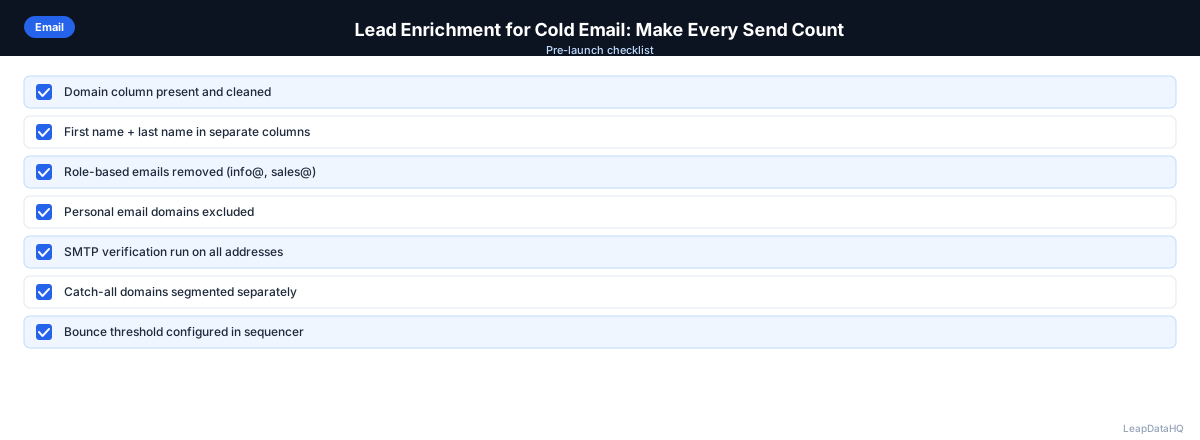
Checklist: Cold Email Enrichment Workflow
- Defined target persona and ICP before building list
- Sourced target accounts and contacts from LinkedIn, directories, or CRM
- Prepared input CSV with company domain, first name, last name, and title
- Removed duplicates and standardized formatting in input file
- Uploaded cleaned CSV to enrichment tool and mapped columns correctly
- Reviewed confidence scores on all returned enriched records
- Filtered to high-confidence results before export
- Verified enriched email addresses before importing to sequencer
- Segmented contacts by title, company size, or industry for targeted messaging
- Wrote personalized sequences referencing enriched data fields
- Loaded clean, enriched, segmented list into sequencer
- Tracked bounce rates as quality signal — paused if over 2%
Common Mistakes to Avoid
- Sending without enrichment: Running cold email campaigns with unenriched lists means sending to incomplete records. Missing emails bounce. Wrong titles create irrelevant messaging. Missing company data forces generic personalization.
- Skipping verification after enrichment: Even high-confidence enriched emails should be verified before sending. Confidence scores indicate pattern accuracy, not live deliverability. Verification catches closed mailboxes and inactive domains.
- Not segmenting after enrichment: Enrichment adds data fields that enable better targeting. If you don't use company size, industry, and title data to segment your list, you're missing the personalization value of enrichment.
- Using generic messaging for all segments: One-size-fits-all messaging produces low reply rates. Use enriched data to write different messages for different segments — different titles, different industries, different company sizes.
- Not tracking bounce rates: Bounce rate is your earliest warning signal for list quality issues. If it climbs above 2%, pause and investigate before continuing to send.
- Reusing lists without re-enrichment: Contact data decays over time. Lists older than 3 months should be re-enriched before reusing for new campaigns to catch job changes and email updates.
- Ignoring enriched data for reply preparation: When a prospect replies, use the enriched company data to prepare for the conversation. Company size, tech stack, and funding stage all inform your approach.
Practical Examples
Example 1: SDR Running a Targeted Campaign
An SDR builds a list of contacts at mid-market tech companies. After enrichment, she segments by company size (100-250 vs 250-500 employees) and writes two separate sequences. The smaller company sequence emphasizes speed and simplicity; the larger company sequence emphasizes scalability. Segmented sequences generally produce higher reply rates than a single unsegmented campaign.
Example 2: Personalized Outreach Using Tech Stack Data
A sales rep selling integration software enriches his list and uses the tech stack data to personalize each email. Contacts using Salesforce receive a message about the Salesforce integration. Contacts using HubSpot receive a message about HubSpot. The personalized approach generates 4x more replies than his previous generic messaging.
Example 3: Agency Running Campaigns for Multiple Clients
An agency manages cold email for 4 clients in different industries. For each client, they build targeted lists, enrich for contact data and company information, segment by persona, and write industry-specific sequences. Each campaign uses enriched data for personalization, producing reply rates of 6-10% across all clients.
Example 4: Founder Running First Cold Email Campaign
A founder launching a new B2B product builds a list of 80 target contacts. She enriches the list, verifies emails, and writes a single personalized sequence referencing each prospect's company and role. The enriched personalization generates 12 replies and 4 meetings from 80 sends — a 15% reply rate.
Example 5: Re-Engagement Campaign with Enriched Data
A growth team re-enriches a list of 300 contacts from a campaign 4 months ago. The re-enrichment catches 45 job changes. They update the CRM, remove stale contacts, and launch a re-engagement sequence to the remaining 255 verified contacts with updated personalization referencing recent company developments.
How LeapDataHQ Helps
LeapDataHQ fits into steps 2-4 of the enrichment-first cold email workflow: upload your list, enrich for email addresses and company data, review confidence signals, and export a clean list ready for your sequencer. The confidence scoring system helps you filter to high-quality results before verification and sending.
For cold email practitioners who run multiple campaigns per month for different ICPs, the credit-based model lets you enrich lists on demand rather than paying a flat monthly fee regardless of campaign volume. Enrich 200 contacts for one campaign and 500 for another — you only pay for what you use.
The enriched data fields — email, title, company size, industry, tech stack — directly enable the personalization that drives higher reply rates. Visit /sales-prospecting-data-tool and /lead-enrichment-tool to explore how LeapDataHQ fits your cold email workflow.
Next Steps
If your cold email reply rates are below target, start by examining your list quality. Build a test list of 50-100 contacts, enrich with LeapDataHQ, segment by persona, and write personalized sequences using the enriched data. Compare the results to your previous campaigns to see the impact of enrichment on performance.
When to Use LeapDataHQ
LeapDataHQ fits into steps 2-4 of the enrichment-first cold email workflow: upload your list, enrich for email addresses and company data, review confidence signals, and export a clean list ready for your sequencer.
For cold email practitioners who run multiple campaigns per month for different ICPs, the credit-based model lets you enrich lists on demand rather than paying a flat monthly fee regardless of campaign volume. This flexibility matches how cold email campaigns actually work — variable list sizes depending on targeting and campaign cadence.
The enriched data fields directly enable the personalization that drives higher reply rates. Company size, industry, job title, and tech stack data all provide signals for more relevant messaging. When your outreach references specific details about the prospect's company and role, it feels researched rather than generic.
For teams that have experienced deliverability issues, LeapDataHQ's confidence scoring helps filter to high-quality results before verification and sending. This reduces bounce rates and protects sender reputation across all your campaigns.
For agencies managing cold email for multiple clients, LeapDataHQ provides a single enrichment tool that works across different industries and geographies. Run enrichment batches for different clients using the same account, and export separate outputs for each client's campaigns. Visit /sales-prospecting-data-tool and /pricing to explore how it fits your cold email workflow.
Start Enriching LeadsFrequently Asked Questions
How much does lead enrichment improve cold email reply rates?
There's no universal number — it depends on your baseline and how bad your data quality was before enrichment. The clearest impact is on bounce rates: better data consistently reduces bounces, which protects deliverability for your entire campaign.
Should I enrich every lead before adding to a cold email sequence?
For new contacts from external sources (LinkedIn, purchased lists, event exports), yes. For contacts already in your CRM with recent activity, enrichment is less urgent but still useful for refreshing data on contacts that haven't been touched in 6+ months.
What enrichment fields matter most for cold email personalization?
Company size, industry, and job title are the most consistently useful. Tech stack matters if your product has integrations. Recent company news is highly effective for personalization but requires a different type of data (trigger-based rather than profile-based).
How do I handle enrichment for very small companies (under 10 employees)?
Enrichment match rates are lower for very small companies because there's less public data. For these targets, supplement with manual research on LinkedIn or the company website. The effort per contact is higher but often worthwhile for high-value SMB targets.
What's the minimum data I need before cold emailing someone?
At minimum: a verified work email address, their first name, and their company name. Job title is strongly recommended for accurate personalization. Without a verified email, you risk bouncing; without a name or company, your personalization will be generic or broken.
How do I use enriched data for personalization without sounding creepy?
Reference company-level data naturally: "I noticed [Company] is growing quickly" or "Since you're using [Tool]..." Avoid overly specific personalization that feels surveillance-like. The goal is relevance, not demonstrating that you've stalked their LinkedIn profile.
Should I re-enrich contacts who didn't reply to my first campaign?
Yes, if 3+ months have passed. Contact data decays over time, and re-enrichment catches job changes and email updates. A contact who didn't reply 4 months ago may be at a different company now — re-enrichment ensures your follow-up reaches them at their current role.