
Most outbound problems can be traced back to the list. Bad email addresses cause bounces. Wrong names generate awkward personalization ("Hi {{FirstName}}, I noticed you're the CEO at..."). Duplicate rows mean your contacts get the same email twice.
Cleaning a CSV before loading it into your sequencer is not optional — it's the critical step that determines whether your campaign runs cleanly from the very first send or creates problems you'll spend days untangling. Invest the time upfront to avoid costly deliverability issues and damaged sender reputation that can affect all your future campaigns for weeks or even months to come. A clean CSV is the foundation of successful outreach that delivers results.
The cost of skipping CSV cleaning is measurable. Every bounced email damages your sender reputation. Every duplicate row risks a spam complaint. Every broken personalization token makes your message look automated and impersonal. These issues compound across campaigns, gradually eroding your deliverability and response rates.
A systematic cleaning process addresses each category of problem: duplicates, formatting errors, missing fields, invalid emails, and contacts who shouldn't receive your campaign. Working through each step methodically ensures your list is outreach-ready before it reaches your sequencer.
Here's a practical checklist for getting your CSV outreach-ready, with specific steps you can implement for every campaign.
Step 1: Remove Duplicate Rows
Duplicates are one of the most common problems in outreach CSVs, especially when lists are built from multiple sources. In Excel, use Data > Remove Duplicates. In Google Sheets, use the UNIQUE function or the Remove Duplicates extension.
Remove duplicates on your primary key — typically email address. A contact appearing twice means they'll receive the same sequence twice, which is a common reason for spam complaints.
Step 2: Check and Fix Email Formatting
Every email address in your list should meet basic formatting requirements:
- Contain exactly one @ symbol
- Have a domain with a valid TLD (.com, .io, .org, etc.)
- Contain no spaces before or after the address
- Not be a role-based address (info@, support@, noreply@, admin@)
- Not be a generic placeholder (test@test.com, email@email.com)
Use a filter to scan for obvious problems. A spreadsheet formula like =ISNUMBER(FIND("@", A2)) quickly identifies rows missing @ symbols. Remove any role-based addresses — they rarely respond to personalized outreach and can trigger spam filters. Also check for common typos: double @ symbols, missing domain extensions, and addresses with spaces or special characters that shouldn't be there.
What This Means for Your Outreach
A clean CSV means your campaign runs smoothly from the first send. Emails deliver correctly. Personalization tokens populate with the right data. No contacts receive duplicate messages. Your sender reputation stays healthy because bounce rates remain low.
The alternative — sending from a dirty CSV — creates problems that cascade. Bounced emails trigger spam filtering. Wrong names make your outreach look careless. Duplicate sends generate spam complaints. Each problem requires time to fix and damages the effectiveness of not just this campaign but future ones as well.
Who Should Use This CSV Cleaning Checklist
This checklist is relevant for anyone loading contact data into an outreach tool:
- SDRs and sales reps: preparing prospect lists for cold email campaigns
- Agency teams: building outreach lists for multiple clients
- Marketing operations: preparing lists for email campaigns and nurture sequences
- Founders doing early outbound: building their first prospect lists
- Sales operations: maintaining clean data flowing into outreach tools
- Growth teams: running experimentation campaigns that require clean targeting data
- Recruiters: preparing candidate outreach lists for sourcing campaigns
Step 3: Standardize Name Fields
Most email sequencers use {{first_name}} personalization. If your first name column contains "JOHN", "john", or "John Smith" (full name in the first name field), your personalization will break or look wrong. Standardize to proper case (first letter capitalized). Remove trailing spaces. Split first and last name into separate columns if they're combined.
Remove prefixes like "Mr.", "Dr.", "Ms." unless your template explicitly uses them. Check for nicknames in parentheses — "Robert (Bob)" should be standardized to one form. Consistent name formatting ensures your personalization tokens populate correctly every time, which is essential for making your outreach feel personal rather than automated.
Step 4: Verify All Required Fields Are Present
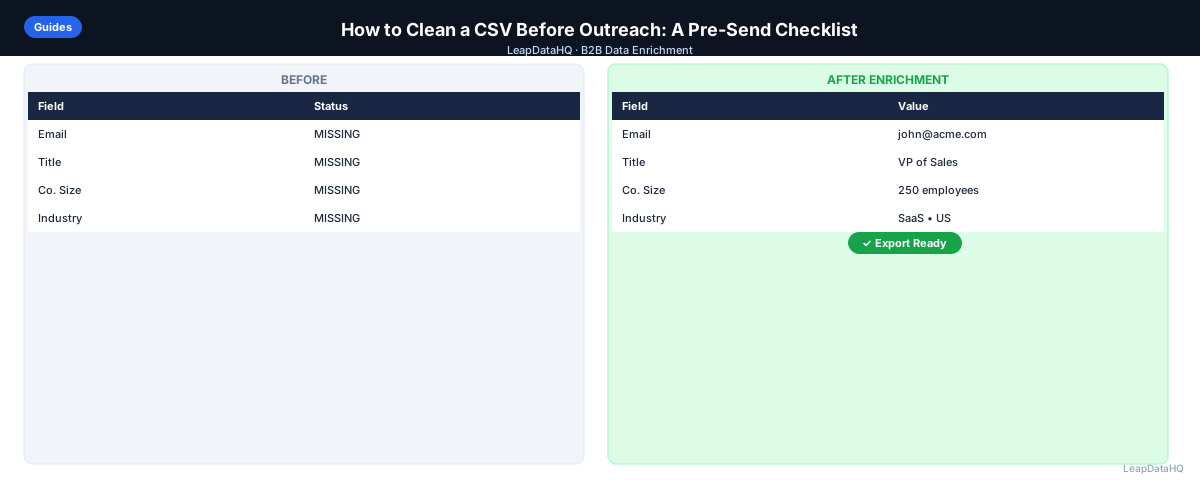
Before loading your CSV, check that every row has values for all the fields your sequence template uses. Common required fields: first name, email address. Rows with missing required personalization fields should either be enriched before outreach or removed from the CSV. If you have missing data, use an enrichment tool like LeapDataHQ to fill the gaps.
A sequence that sends "Hi , I noticed you're at " looks worse than no personalization at all. It signals to the recipient that your outreach is fully automated and you haven't done any research. Either ensure all personalization fields are populated through enrichment, or use fallback values in your template (like "Hi there," instead of "Hi {{first_name}},") for contacts where the data is missing.
Step 5: Normalize Company Names
If your template uses {{company}} personalization, make sure company names are consistent and well-formatted. Remove "Inc.", "LLC", "Ltd" if you want the friendlier short name. Fix all-caps company names. Standardize legal entity suffixes if you're keeping them.
Inconsistent company names also affect segmentation and reporting. If you're filtering campaigns by company or analyzing responses by organization, variations like "Acme Corp" and "ACME Corporation" will be treated as different companies. Standardizing company names ensures your segmentation works correctly and your reporting reflects reality.
Step 6: Remove Contacts Who Shouldn't Receive This Campaign
Before loading your CSV, cross-reference against lists of contacts who should be excluded from this specific campaign:
- Existing customers (unless you're running a customer nurture campaign)
- Contacts who previously unsubscribed or complained
- Contacts already in a different active sequence targeting the same outcome
- Contacts in specific exclude territories or industries
- Contacts from your own company domain
Ready to enrich your CSV list?
Upload a CSV, fill missing data, review confidence scores, and export clean records.
Upload a CSV — Start EnrichingSending to existing customers or unsubscribes creates confusion, damages relationships, and can trigger legal issues under CAN-SPAM and GDPR. Most sequencers maintain suppression lists automatically, but manually verifying before every import adds an extra layer of protection. Cross-reference your CSV against your customer list, unsubscribe list, and any active sequences before loading.
Step 7: Verify Emails Before Loading
The last step before loading into your sequencer: run your email list through an email verification tool. This catches invalid addresses that formatting checks miss — emails that look valid but belong to closed mailboxes or inactive domains.
Set a threshold: only import emails with a valid or probably-valid status. Remove unknowns and invalids before importing. For catch-all domains that accept any address, treat them as risky and consider sending a small test batch first to check deliverability before including the full set in your campaign.
Verification is the single most impactful step in the entire cleaning process. It's the difference between a campaign that delivers cleanly at 99% and one that bounces at 5-8%, triggering spam filters and damaging your sender reputation for weeks. The few minutes spent on verification save hours of deliverability recovery.
Checklist: Pre-Outreach CSV Cleaning
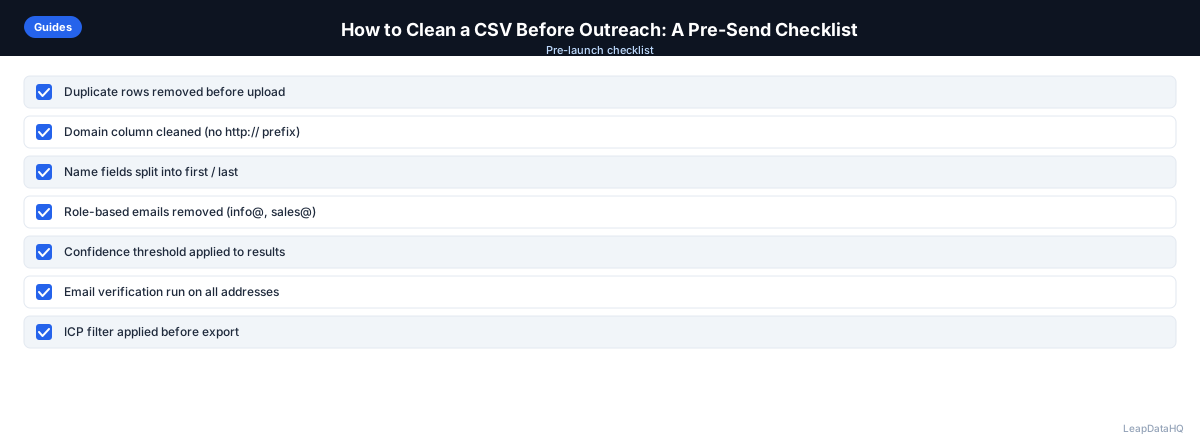
- Removed duplicate rows based on email address
- Checked all emails for valid formatting (one @ symbol, valid TLD)
- Removed role-based addresses (info@, support@, noreply@)
- Removed placeholder emails (test@test.com)
- Standardized first name and last name fields to proper case
- Split combined name fields into separate columns
- Verified all required personalization fields are populated
- Enriched records with missing data using CSV enrichment tool
- Normalized company names for consistent {{company}} personalization
- Removed existing customers and unsubscribes from the list
- Removed contacts already in active sequences
- Ran email verification on all addresses before importing
- Spot-checked 5-10 rows for accuracy after cleaning
Common Mistakes to Avoid
- Not removing duplicates before sending: Duplicate contacts receive the same sequence twice, generating spam complaints and wasting outreach. Always deduplicate on email address before loading into your sequencer.
- Skipping email verification: Formatting checks catch obvious errors but not closed mailboxes or inactive domains. Verification catches what formatting misses.
- Sending with missing personalization fields: "Hi , I noticed you're at " looks worse than no personalization at all. Either enrich missing fields or remove those rows from the campaign.
- Not standardizing name fields: "JOHN" and "john" in the same first_name column creates inconsistent personalization. Standardize to proper case.
- Forgetting to suppress existing customers: Sending cold outreach to existing customers creates confusion and damages relationships. Always cross-reference against your customer list.
- Not removing unsubscribes: Contacts who previously unsubscribed should never receive future campaigns. This is both a legal requirement and a deliverability best practice.
- Loading the CSV without a spot check: Always review 5-10 rows after cleaning to confirm formatting looks correct before launching the full campaign.
Practical Examples
Example 1: SDR Cold Outreach Preparation
An SDR prepares a list of 200 prospects for a cold email campaign. She removes 12 duplicates, fixes 8 formatting errors in email addresses, standardizes name fields, and enriches 15 records with missing company names. After verification, she removes 6 invalid emails and loads 179 clean contacts into her sequencer.
Example 2: Multi-Client Agency Campaign
An agency prepares outreach lists for three clients. For each client, they run the full cleaning checklist: deduplication, email formatting, name standardization, company name normalization, suppression list cross-referencing, and verification. Each client receives a clean, formatted CSV ready for their specific outreach tool.
Example 3: Post-Enrichment Cleaning
After enriching a list of 300 contacts, a marketing manager runs the cleaning checklist. She discovers 20 duplicate emails from the enrichment process, 10 role-based addresses that were appended, and 15 emails that fail verification. After cleaning, she loads 255 verified, deduplicated contacts into the campaign.
Example 4: Conference Follow-Up Campaign
A team has 150 contacts from a conference. They clean the CSV by removing 5 duplicates (people who visited the booth twice), standardizing names, enriching 30 records with missing company data, and verifying all emails. The cleaned list of 142 contacts receives a personalized follow-up referencing the conference.
Example 5: Re-Engagement Campaign Preparation
Before re-engaging a list of 500 dormant contacts, a team cleans the CSV: removes 25 duplicates, enriches 40 records with updated job titles, verifies all emails (finding 60 invalid), and suppresses 15 who previously unsubscribed. The cleaned list of 360 contacts receives a re-engagement sequence.
How LeapDataHQ Helps
If your CSV has missing email addresses, company data, or job titles before you get to the cleaning checklist, that's where LeapDataHQ fits. Upload your raw list, enrich to fill gaps, review confidence scores, and export — then run through this cleaning checklist before loading into your sequencer. The enrichment step fills in the data gaps that would otherwise cause missing personalization or failed delivery.
The enrichment step comes before the cleaning step in this workflow: enrich first to fill missing data, clean second to standardize what you have. LeapDataHQ's confidence scoring helps you filter to high-quality results before the cleaning process even begins, so your cleaning step starts with better raw data and produces cleaner final lists.
For teams running multiple campaigns per month, the credit-based pricing means you only pay for the records you enrich each time. No monthly seat fees or annual commitments. Visit /csv-email-enrichment and /enrich-csv-file to explore how enrichment fits into your pre-outreach cleaning workflow and helps you launch cleaner campaigns faster.
Next Steps
Before your next campaign, run your CSV through this cleaning checklist. Start with a list that needs enrichment — upload it to LeapDataHQ to fill gaps, then work through each cleaning step systematically. The 30-60 minutes you spend cleaning will save hours of deliverability recovery and ensure your campaign performs at its best from the first send. Clean data is the foundation of effective outreach — invest the time to get it right.
When to Use LeapDataHQ
If your CSV has missing email addresses, company data, or job titles before you get to the cleaning checklist, that's where LeapDataHQ fits. Upload your raw list, enrich to fill gaps, review confidence scores, and export — then run through this cleaning checklist before loading into your sequencer.
The enrichment step comes before the cleaning step in this workflow: enrich first to fill missing data, clean second to standardize what you have. LeapDataHQ's confidence scoring helps you filter to high-quality results before the cleaning process even begins.
For teams running multiple campaigns per month, the cleaning checklist becomes a repeatable process that ensures consistent quality across every outreach effort. Each campaign starts with enrichment (if needed), followed by systematic cleaning, and finishes with verification before loading.
For agencies preparing lists for multiple clients, the checklist ensures every deliverable meets the same quality standard regardless of the source data quality. Enrichment fills gaps, cleaning standardizes, and verification confirms deliverability.
Visit /csv-email-enrichment and /enrich-csv-file to explore how enrichment fits into your pre-outreach cleaning workflow.
Start Enriching LeadsFrequently Asked Questions
How many rows should I have in a cold email CSV?
There's no hard rule, but most sequencers recommend starting with smaller batches (50-200 contacts) to test deliverability and reply rates before scaling. Too large a batch launched too quickly can trigger spam filters.
Should I include unsubscribes in my CSV cleanup?
Always. Contacts who have previously unsubscribed from your outreach should be suppressed from every future campaign. Most sequencers maintain a suppression list automatically, but manually check before every import.
What should I do with contacts that have Gmail or Yahoo addresses?
Consumer email addresses (Gmail, Yahoo, Hotmail) in a B2B list typically mean the contact used a personal email for a form fill or the data is incorrect. For cold B2B outreach, focus on work email addresses at company domains.
How do I handle contacts where first name is missing?
Either enrich to find the name, use a fallback in your template (like "Hi there," instead of "Hi {{first_name}},"), or remove the contact from the sequence.
How long does it take to clean a typical outreach CSV?
For a list of 200-500 rows, a thorough cleaning takes 30-60 minutes if you follow a systematic checklist. Larger lists take proportionally longer but are faster per row because patterns repeat. The time investment is well worth it — a clean CSV prevents bounce rate issues, broken personalization, and spam complaints that can take days or weeks to recover from. Build the cleaning process into your campaign timeline so it happens consistently before every send.
Should I clean before or after enrichment?
Clean first to remove obvious problems (duplicates, formatting errors), then enrich to fill gaps, then clean again to standardize the enriched data. Finally, verify emails before loading into your sequencer.
What's the most important step in CSV cleaning?
Email verification is the single most impactful step. It catches invalid addresses that all other cleaning steps miss. Without verification, you're sending to emails that may bounce, damaging your sender reputation.