
Email bounce rates are the silent killer of cold outreach programs. When you send to email addresses that don't exist or can't receive mail, your hard bounce rate climbs — and once it passes 2-3%, email providers start treating your domain as suspicious. Your emails land in spam. Reply rates drop. Eventually the domain becomes unusable for outreach.
Email verification is the step that prevents this. It checks whether an email address is valid and deliverable before you send anything, so you're not burning your sender reputation on bad data.
This guide explains how verification works, when to do it, and how to build it into your workflow. You will learn about the different types of verification checks, how to interpret results, what to do with different verification statuses, and how to integrate verification into your enrichment and outreach process.
Understanding email verification is essential for anyone doing B2B outreach at scale. Whether you are sending 100 emails per week or 10,000, verification protects your deliverability and ensures your outreach reaches the intended recipients.
The cost of skipping verification is high — damaged sender reputation, reduced deliverability, and wasted outreach on addresses that never receive your message. The cost of verification is low — a few cents per email and a few minutes of processing time.
What Is Email Verification?
Email verification is the process of checking whether an email address is valid, exists on the mail server, and can receive messages — without actually sending an email. Verification tools use a combination of syntax checking, domain validation, and SMTP handshake techniques to determine deliverability.
The result is typically a status: valid (safe to send), invalid (will bounce), risky (catch-all or role-based address), or unknown (can't be determined). Most tools also return a confidence score or deliverability rating.
Verification is different from enrichment. Enrichment finds email addresses; verification confirms they are deliverable. Both steps are necessary for effective outreach — find the emails first, then verify before sending.
Why Verification Matters for Cold Outreach
Every email provider tracks sender reputation. If your sending domain generates too many bounces, it signals to mail providers that you're sending to unvetted lists. Your emails get filtered to spam, or blocked entirely.
The hard bounce threshold that triggers reputation damage is low — typically 2-3%. On a list of 1,000 contacts, that's 20-30 bad emails. If you're doing bulk enrichment without verification, it's easy to exceed this.
Sender reputation damage compounds over time. Once your domain is flagged, it takes weeks or months to recover — even after you fix the underlying data quality problem. Prevention through verification is far more efficient than recovery.
Types of Email Verification Checks
Syntax Check
Does the email follow a valid format? This catches obvious errors like missing @ symbols, double dots, or spaces. Every verification tool does this as a first pass.
Domain Validation
Does the domain exist and have a valid MX record configured? If the domain doesn't exist or isn't set up to receive email, any address at that domain will bounce.
SMTP Verification
The tool connects to the mail server and asks whether the specific mailbox exists, without sending a message. This is the most thorough check — it catches cases where the domain is valid but the individual address doesn't exist.
Catch-All Detection
Some domains accept any email sent to them, whether or not the mailbox exists. This makes SMTP verification inconclusive for those domains. Catch-all emails are flagged as risky because you can't confirm whether the individual address is real.
When to Verify Email Addresses
- Before importing a new list into your email outreach tool
- After enrichment — enriched emails should be verified before use
- Before re-activating an old list that hasn't been used in 6+ months
- When bounce rates rise on an active campaign
- Before launching a large cold email campaign
What to Do With Different Verification Results
Valid emails are safe to include in your campaign. Invalid emails should be removed immediately — they will hard bounce. Risky or catch-all emails should be used with caution; consider sending a small batch first to test deliverability. Unknown results should either be manually verified or excluded.
Building Verification Into Your Workflow
The most efficient approach is to verify emails as a batch step immediately after enrichment and before loading into your outreach tool. Build a consistent process: enrich → verify → review → import. Don't skip the verify step even when you're in a hurry.
For ongoing lists, set a trigger: when an email hard bounces in your outreach tool, mark it as invalid in your CRM immediately and don't retry.
What This Means for Your Deliverability
Email verification is the single most effective step you can take to protect your sender reputation and maintain deliverability. Every email you send to an invalid address damages your domain's standing with email providers. Over time, this damage accumulates and makes it harder for even your valid emails to reach the inbox.
Teams that verify before sending consistently maintain bounce rates under 2%, which keeps their domains in good standing. Teams that skip verification often see bounce rates climb to 5-10% or higher, triggering spam filtering and deliverability problems that affect all their outreach.
Ready to enrich your CSV list?
Upload a CSV, fill missing data, review confidence scores, and export clean records.
Upload a CSV — Start EnrichingThe ROI of verification is clear: a few cents per email in verification cost prevents the much larger cost of damaged deliverability, lost outreach opportunities, and domain reputation recovery. For teams sending thousands of emails per month, verification pays for itself many times over.
Who Should Verify Business Emails
Email verification is essential for anyone sending B2B outreach at scale:
- SDRs and sales reps: running cold email campaigns need verified addresses to protect deliverability and maintain connect rates
- Agencies: managing outreach for multiple clients must verify emails to protect client domains and maintain campaign performance
- Marketing teams: launching email nurture campaigns need verified addresses to ensure messages reach intended recipients
- Founders doing outbound: protecting their primary domain reputation is critical when sending from a small number of domains
- CRM managers: maintaining data quality requires verifying emails before importing to prevent bounces from existing records
- Anyone using enriched data: enrichment returns email addresses with varying confidence levels — verification confirms deliverability
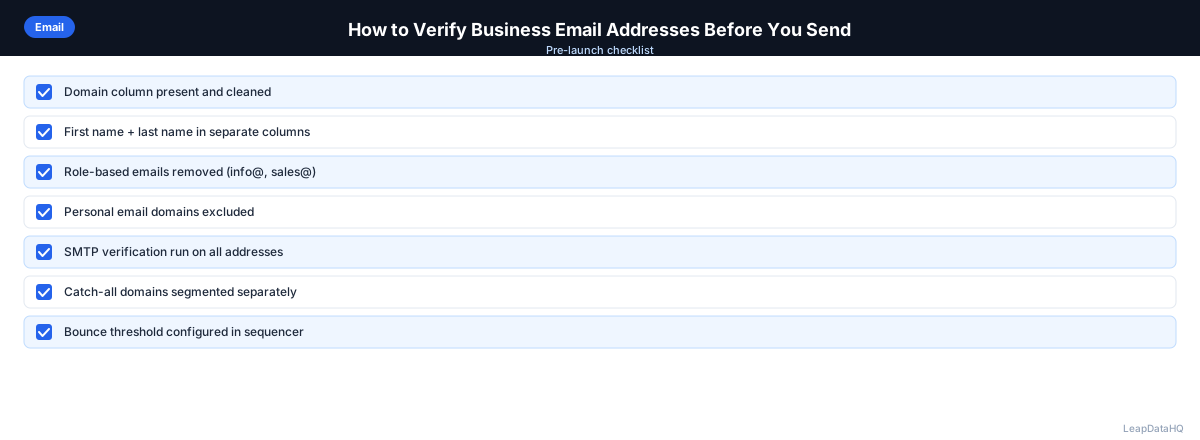
Checklist: Email Verification Process
Use this checklist to ensure thorough email verification before every outreach campaign:
- Ran all enriched emails through a dedicated verification tool before importing to outreach
- Removed all invalid emails from the list — these will hard bounce
- Flagged catch-all and risky emails for cautious use or exclusion
- Reviewed unknown verification results and decided whether to manually verify or exclude
- Checked domain validation status for all emails — removed emails at domains without valid MX records
- Verified emails from old lists (6+ months) before re-activating campaigns
- Set up bounce tracking in outreach tool to automatically mark bounced emails as invalid
- Established threshold: only importing emails with valid or probably-valid verification status
- Documented verification results and bounce rates by data source for future reference
- Scheduled re-verification for active lists every 90 days to catch email changes
- Created process for handling hard bounces — mark as invalid immediately, do not retry
- Tracked overall bounce rate by campaign to ensure it stays under 2% threshold
Common Mistakes to Avoid
These mistakes undermine email verification efforts and damage deliverability:
- Skipping verification after enrichment: Enrichment tools return emails with varying confidence levels. Confidence scores indicate pattern accuracy, not live deliverability. Always verify enriched emails before sending to catch closed mailboxes and inactive domains.
- Sending to catch-all emails without testing: Catch-all domains accept any email, making verification inconclusive. Sending to catch-all addresses without testing risks bounces. Send a small test batch first or exclude catch-alls from critical campaigns.
- Not removing invalid emails immediately: Every email you send to an invalid address damages your sender reputation. Remove invalid emails from your list immediately after verification. Do not retry or keep them for future campaigns.
- Verifying only some emails in the list: Partial verification leaves invalid addresses in your list. Verify all emails before importing to your outreach tool. Partial verification provides partial protection.
- Not re-verifying old lists: Email addresses change over time. A list verified six months ago may have significant inaccuracies today. Re-verify active lists every 90 days to maintain deliverability.
- Ignoring bounce rate tracking: Without monitoring bounce rates, you cannot detect deliverability problems early. Track bounce rates by campaign and data source. Investigate immediately if rates exceed 2%.
- Confusing verification with enrichment: Verification checks if an email is valid. Enrichment finds email addresses. You need both steps — enrich first to find emails, then verify to confirm deliverability. They are complementary, not interchangeable.
Practical Examples
Example 1: Pre-Campaign Verification
A sales team enriches 500 contacts for a new campaign. After enrichment, they verify all 500 emails. They find 420 valid, 45 invalid, and 35 catch-all. They remove the invalid emails, test the catch-alls with a small batch, and launch the campaign with 440 verified emails. Bounce rate stays under 1%.
Example 2: Recovering from High Bounce Rates
A team's campaign hits 8% bounce rate, triggering spam filtering. They stop the campaign, verify their entire list, remove 150 invalid emails, and relaunch with verified addresses only. Bounce rates drop to under 1% within a week, and deliverability recovers over the following month.
Example 3: Agency Client Email Verification
An agency enriches 800 contacts for a client. They verify all emails before delivery, finding 680 valid, 70 invalid, and 50 catch-all. They deliver 680 verified emails to the client with documentation of the verification process. The client launches campaigns with confidence.
Example 4: Re-Verification of Stale List
A team re-activates a prospecting list that is 8 months old. They re-verify all 300 emails and find that 45 are now invalid (contacts changed jobs). They remove the invalid emails and launch the campaign with 255 verified addresses, avoiding bounces from stale data.
Example 5: Ongoing Verification Workflow
A team builds verification into their standard workflow: every new list is enriched, verified, and filtered before import. They track bounce rates by campaign and re-verify active lists quarterly. Their bounce rates consistently stay under 1.5%, and their domain reputation remains strong.
How LeapDataHQ Helps
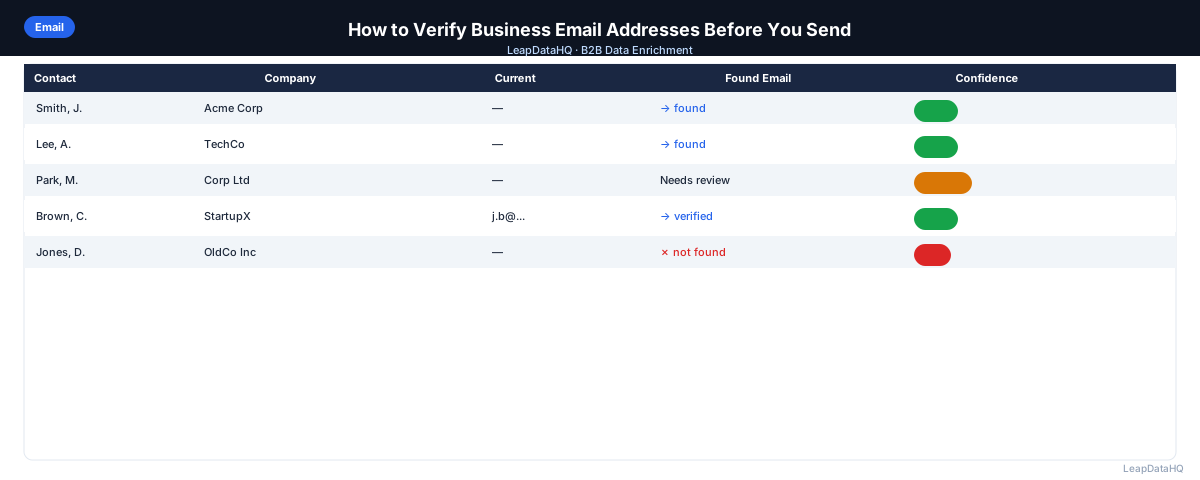
LeapDataHQ helps with the enrichment step that precedes verification. When you enrich contacts through LeapDataHQ, the platform returns confidence scores alongside each email address, giving you a first-pass quality filter before you even reach the verification step.
High-confidence emails from LeapDataHQ are typically safe to use after verification. Low-confidence results should be manually reviewed or excluded. The combination of LeapDataHQ enrichment with confidence scoring and a standalone verification step gives you the cleanest possible email list.
For teams building complete outreach workflows, LeapDataHQ handles the enrichment layer. Upload your CSV at /bulk-contact-verification, review confidence scores, export high-confidence results, then verify before importing to your outreach tool. The credit-based pricing at /pricing means you pay only for what you enrich. Explore /features for details.
Next Steps
If you are preparing an outreach campaign, make verification a mandatory step in your workflow. Enrich your contacts, verify all emails, remove invalid addresses, and only import verified emails to your outreach tool. Set up bounce tracking so you can immediately mark any emails that bounce as invalid and prevent future sends to those addresses.
LeapDataHQ helps with the enrichment step. Upload your CSV at /bulk-contact-verification, review confidence scores, and export clean data. Then verify before sending. The combination of enrichment with confidence scoring and dedicated verification produces the cleanest possible email list. Check /features and /pricing to see if the workflow fits your needs.
When to Use LeapDataHQ
LeapDataHQ returns confidence scores alongside enriched email addresses, which tells you how confident the tool is about each result before you export. High-confidence emails from LeapDataHQ are typically safe to use, but running an additional verification pass before loading into your sequencer is always a good practice for large campaigns.
If you're enriching a large list or targeting accounts where deliverability is critical, the combination of LeapDataHQ enrichment and a standalone verification step gives you the cleanest possible list.
The credit-based pricing means you pay only for what you enrich, making it cost-effective to enrich and verify in batches. No seat fees or annual contracts required.
LeapDataHQ confidence scores serve as a first-pass filter, helping you identify which enriched emails are likely reliable. The verification step then confirms live deliverability, catching closed mailboxes and inactive domains that confidence scores cannot detect.
For teams working through the complete outreach preparation workflow — from enrichment through verification, review, and import — LeapDataHQ provides the enrichment layer with confidence scoring that streamlines the verification process. Results depend on input data quality and the public data available for each contact.
Start Enriching LeadsFrequently Asked Questions
What is a hard bounce vs. a soft bounce?
A hard bounce is a permanent delivery failure — the email address does not exist or the domain is invalid. A soft bounce is temporary — the inbox is full or the server is temporarily unavailable. Hard bounces are the ones that damage sender reputation and must be removed immediately.
What bounce rate is acceptable for cold email?
Keep hard bounce rates below 2%. Most deliverability experts suggest targeting under 1% for sustained campaign health. Above 3%, you are at serious risk of sender reputation damage. Verification before sending is the most effective way to stay under this threshold.
Does email verification ensure delivery?
No. Verification confirms the address exists and can receive mail. It does not ensure your email will not land in spam, which depends on sender reputation, content, and engagement signals. Verification protects against bounces, not spam filtering.
How often should I re-verify my email list?
For active outreach lists, verify before each new campaign or every 90 days, whichever comes first. Email addresses become invalid as people change jobs or companies shut down. Regular re-verification maintains deliverability.
Is it worth verifying a list I bought?
Always. Purchased lists often have significant percentages of invalid emails. Verifying before sending can prevent a serious deliverability incident. The cost of verification is far less than the cost of damaged sender reputation.
What should I do with catch-all emails?
Catch-all emails are risky because you cannot confirm the individual address exists. Options: exclude them from critical campaigns, send a small test batch first to check deliverability, or flag them for manual research. Never send to catch-alls without some level of caution.
How does verification differ from enrichment confidence scores?
Confidence scores indicate how certain the enrichment tool is about the email pattern. Verification checks whether the mailbox actually exists and can receive mail. Confidence scores are a first-pass filter; verification confirms live deliverability. Both steps together produce the cleanest list.