
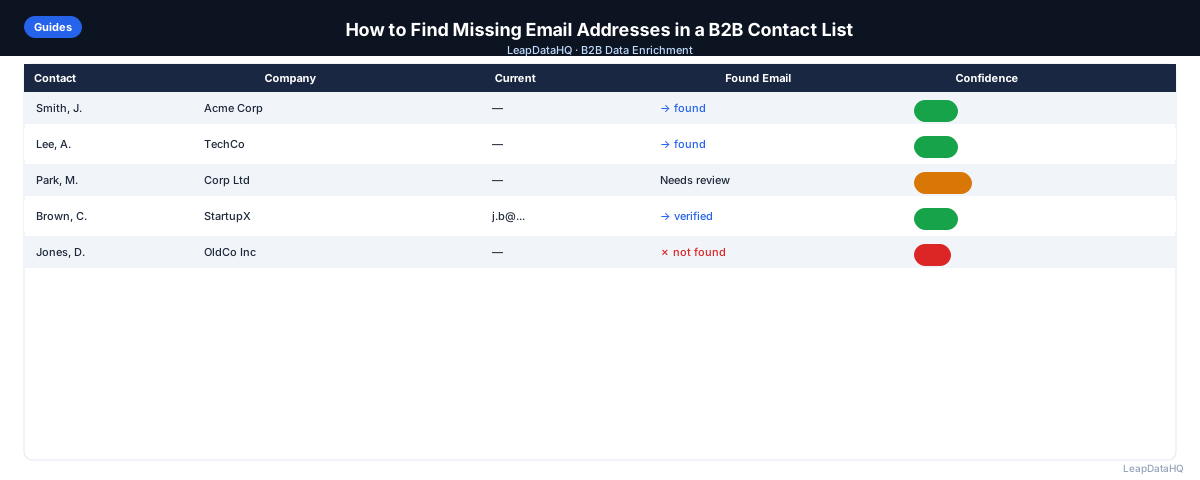
Missing emails are one of the most frustrating problems in B2B prospecting. You have a list of companies and contacts, but a third of the rows are missing email addresses — which means a third of your outreach stops before it starts.
Finding missing emails doesn't require guessing. There are systematic methods that work at scale, from email enrichment tools that append data in bulk to pattern-based lookup techniques you can apply manually for high-value targets.
This guide covers both approaches so you can choose what fits your workflow and the size of your list. You'll learn how to use bulk enrichment tools for large lists, identify email patterns for manual lookup, and verify emails before sending. Whether you're working with 30 contacts or 3,000, there's a method that fits your situation.
The key is understanding why emails are missing in the first place — then choosing the right method to fill those gaps efficiently. Some lists are missing emails because they came from sources that do not capture contact data (like LinkedIn exports). Others have emails that are outdated because contacts changed jobs. The root cause determines which finding method works best.
Many teams waste time trying to manually research emails that could be found in bulk, or vice versa. Matching your method to your list size and data situation saves hours of unnecessary work.
Why B2B Contact Lists Have Missing Emails
Most lists start incomplete for predictable reasons. CRM exports often have gaps from records created without email capture. LinkedIn exports don't include email addresses. Event attendee lists typically contain names and company names but no contact info. Purchased lists sometimes have high percentages of missing or outdated emails.
Understanding why emails are missing helps you choose the right method for finding them. A list of company domains with no contact names requires different enrichment than a list of full contact names with company affiliations.
The most common sources of missing emails are LinkedIn exports, conference attendee lists, CRM records created from business cards, and data imported from third-party sources that did not include email fields. Knowing your list source helps you anticipate the gaps and plan your enrichment approach.
What This Means for Your Outreach Pipeline
Missing emails create a bottleneck in your prospecting workflow. You can identify the right companies and the right contacts, but without email addresses, you cannot launch outreach campaigns. This gap between targeting and execution wastes time and delays pipeline generation.
The solution depends on your list size and data quality. For lists with 50+ contacts missing emails, bulk enrichment tools are the most efficient approach. For smaller lists or high-value targets where you need maximum accuracy, manual lookup methods work well. Most teams use a combination: bulk enrichment for the majority, manual research for priority contacts that do not match.
The cost of not finding missing emails is measurable. If you have a list of 300 contacts and 100 are missing emails, that is a 33% reduction in your outreach volume. For teams with ambitious pipeline targets, that gap directly affects revenue. Systematic email finding closes that gap efficiently.
Who Needs to Find Missing Emails
Different roles encounter missing emails in different contexts. Each situation requires a slightly different approach:
- Sales teams and SDRs: prospect lists from LinkedIn, conferences, or CRM exports often lack email addresses needed for cold outreach sequences
- Agencies: client-provided target lists need enrichment before outreach campaigns can launch on behalf of the client
- Founders and business development: building initial prospect lists without dedicated research support or expensive tool subscriptions
- Recruiters: candidate lists from LinkedIn or job boards need contact information for email outreach to passive candidates
- Marketers: event attendee lists and content download leads often have incomplete contact data that limits campaign reach
- CRM managers: existing contact databases accumulate gaps over time as data decays and contacts change roles
If you have a list of B2B contacts with missing emails, the methods in this guide help you fill those gaps systematically rather than resorting to guesswork or manual research for every contact.
Method 1: Bulk Email Enrichment Tools
The fastest approach for lists larger than 20-30 records is a bulk enrichment tool. You upload a CSV with company domain, first name, and last name columns. The tool queries its database and appends a work email address for each row it can match.
The quality of results depends on the tool's data coverage and how recently their data was updated. Most tools return a confidence score alongside the email — use this to filter out low-confidence results before importing into your CRM or email tool.
Bulk enrichment is most effective when your input data includes company domains. Domains are the most reliable lookup key for email finding. If your list only has company names, add domains first to improve match rates significantly.
What to Include in Your Input CSV
- Company domain (most reliable lookup key)
- First name and last name of the contact
- Job title (optional, but improves matching)
- LinkedIn URL of the contact (optional, improves accuracy)
Method 2: Email Pattern Guessing
Most companies use a consistent email format across all employees — typically first.last@company.com, flast@company.com, or first@company.com. If you can identify the pattern for one employee at a company, you can apply it to other contacts at the same company.
To identify the pattern: look up a known employee on LinkedIn, find their company email from a press release or conference speaker bio, and note the format. Then apply that format to the contacts you're missing.
Pattern guessing works well for companies with consistent formats, but it is not foolproof. Some companies use different patterns for different departments or have changed formats over time. Always verify guessed emails before adding them to your outreach list.
Common B2B Email Patterns
- firstname.lastname@company.com
- flastname@company.com (first initial + last name)
- firstnamelastname@company.com
- firstname@company.com (common at small companies)
Method 3: Manual LinkedIn Lookup (for High-Value Targets)
For high-priority contacts where a direct email is worth the effort, LinkedIn can surface contact information directly if the person has added it to their profile. Go to their profile, click "Contact info", and check if they've listed an email.
This method doesn't scale for lists larger than 20-30 contacts, but it's accurate and appropriate when the ROI of getting the right contact justifies the manual time.
Method 4: Company Website and WHOIS Lookup
Company websites often list email addresses for sales, support, or general inquiries. These role-based emails (sales@, info@, hello@) aren't useful for direct outreach, but the contact us page may list individual employee emails for department heads or founders.
WHOIS records sometimes list the domain registrant's email, which can be useful for reaching founders at very small companies.
How to Verify Emails After Finding Them
Finding an email address is only step one. Before adding it to your outreach tool, verify that it's active and can receive mail. Email verification tools check whether the mailbox exists without sending an actual message.
Sending to unverified emails increases your bounce rate, which damages your sender reputation and can get your domain flagged by email providers. Always verify before you send — especially for large lists.
Step-by-Step Workflow for Finding Missing Emails
Step 1: Assess Your Input Data
Before choosing a method, evaluate what data you have. Do you have company domains? Contact names? Job titles? The quality of your input determines which method works best. Company domains plus contact names give you the highest match rates for bulk enrichment.
Ready to enrich your CSV list?
Upload a CSV, fill missing data, review confidence scores, and export clean records.
Upload a CSV — Start EnrichingTake inventory of your columns. If you have domains and names, bulk enrichment is your best path. If you only have company names, you will need to add domains first. If you have names but no companies, you will need to research company affiliations before enrichment can work.
Step 2: Clean Your List
Remove duplicates, standardize company names, and ensure domains are formatted correctly (no http:// or trailing slashes). Clean input data improves match rates and prevents wasted enrichment credits on records that won't match.
Step 3: Choose Your Method Based on List Size
For lists with 50+ missing emails, use bulk enrichment tools. For lists with 10-50 missing emails, you can combine bulk enrichment with manual pattern guessing. For fewer than 10, manual LinkedIn lookup and company website research may be sufficient.
Step 4: Run Bulk Enrichment
Upload your cleaned CSV to an enrichment tool. Map your columns (company domain, first name, last name). Review the returned emails and confidence scores. High-confidence results are safe to use. Low-confidence results need verification or manual review.
Step 5: Apply Pattern Guessing for Remaining Gaps
For contacts where enrichment didn't return a high-confidence email, identify the company's email pattern from known employees. Apply that pattern to the missing contacts. This works well for companies with consistent email formats.
Step 6: Verify All Emails Before Sending
Run all found emails through a verification tool. Remove invalid addresses and treat catch-all domains as risky. This step protects your sender reputation and keeps bounce rates below 2-3%.
Step 7: Document Your Process
Track which methods worked best for different types of contacts. Note match rates by industry, company size, and data source. This helps you optimize your workflow for future lists and choose the right tools for different situations.
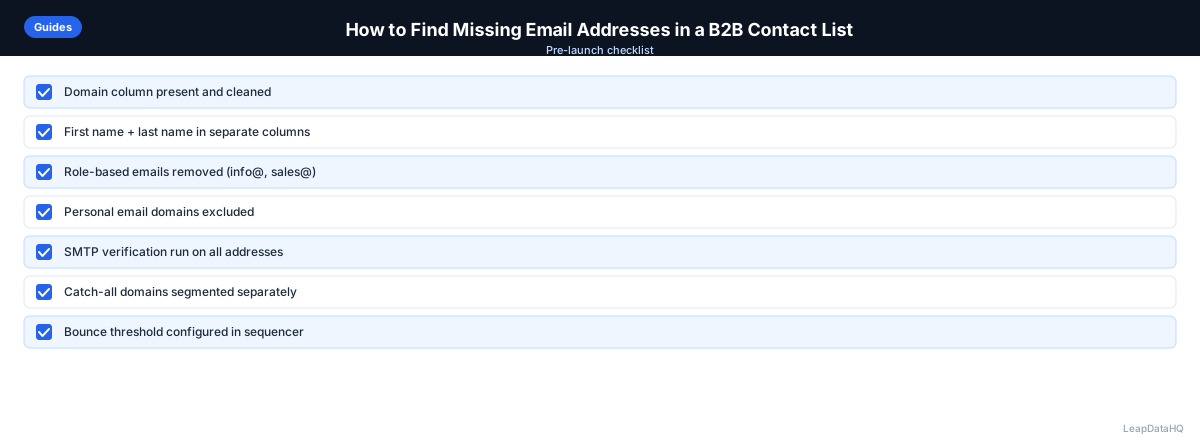
Checklist: Finding Missing Emails
Use this checklist to ensure you follow a complete and systematic process for finding missing email addresses:
- Assessed input data quality — confirmed you have domains, names, and titles where available
- Removed duplicates and standardized formatting across all columns
- Cleaned domain column by removing http://, https://, www, and trailing slashes
- Chose method based on list size — bulk enrichment for 50+, manual for smaller lists
- Added company domains to any rows that were missing them before running enrichment
- Ran bulk enrichment with properly mapped columns for maximum match rate
- Applied pattern guessing for contacts where enrichment did not return high-confidence results
- Verified all found emails through a dedicated verification tool before adding to outreach
- Removed invalid addresses and flagged catch-all domains as risky
- Documented match rates by industry, company size, and method used
- Updated CRM or outreach tool with verified emails and marked source of each email
- Set reminder to re-enrich stale contacts in 6-12 months to catch job changes
Common Mistakes to Avoid
These mistakes reduce the effectiveness of your email finding efforts and can create deliverability problems:
- Guessing emails without verification: Pattern guessing works, but unverified guessed emails increase bounce rates. Always verify guessed emails before sending, especially for large lists. A guessed email that looks correct may belong to a closed mailbox.
- Using role-based emails for personalized outreach: Emails like info@, sales@, or hello@ are not individual contacts. They rarely respond to personalized outreach and can trigger spam filters. Focus on finding individual work emails for better results.
- Not cleaning input data before enrichment: Dirty input data — duplicates, inconsistent company names, malformed domains — reduces match rates and wastes enrichment credits. Always clean your list before uploading to an enrichment tool.
- Skipping the verification step: Even high-confidence enriched emails should be verified before sending. Confidence scores indicate pattern accuracy, not live deliverability. Verification catches closed mailboxes and inactive domains.
- Expecting 100% match rates: Not every contact has a publicly discoverable email. Match rates of 60-80% are realistic for most datasets. For contacts that do not match, supplement with manual research or accept that some gaps are unavoidable.
- Using the same method for all list sizes: Manual LinkedIn lookup works for 10 contacts but does not scale to 1,000. Bulk enrichment is efficient for large lists but overkill for 5 contacts. Match your method to your list size and priorities.
- Not adding domains before enrichment: Company domains are the most reliable lookup key. Running enrichment without domains produces lower match rates. Spend a few minutes adding domains to your spreadsheet before uploading.
Practical Examples
Example 1: Conference Attendee List
You collect 150 business cards at a conference. You create a CSV with names and company names but no emails. You add company domains by searching each company website, then run bulk enrichment. You find emails for 120 contacts (80% match rate). After verification, you have 115 deliverable emails ready for follow-up outreach.
Example 2: LinkedIn Sales Navigator Export
You export 300 leads from Sales Navigator with names, titles, and companies but no emails. You add company domains manually for the top 100 priority contacts and run bulk enrichment. For the remaining 200, you identify email patterns from known employees and apply them manually. You end up with 260 verified emails across both methods.
Example 3: CRM Gap-Fill
Your CRM has 500 contacts missing email addresses. You export those records, clean the data, and run bulk enrichment. You find emails for 350 contacts (70% match rate). After verification and filtering to high-confidence results, you import 320 emails back into your CRM, filling the gaps without manual research.
Example 4: High-Value Target Research
You are targeting 15 specific accounts for an enterprise sale. For each account, you identify 2-3 decision makers. You use LinkedIn to find known employees, identify the email pattern, and apply it manually. You verify each email before adding to your outreach sequence. The manual approach takes more time but gives you maximum confidence for high-value targets.
Example 5: Agency Client Deliverable
An agency receives a list of 400 target contacts from a client. They clean the input data, add missing domains, and run bulk enrichment. They find emails for 300 contacts, verify them, and deliver 280 verified emails to the client formatted for their outreach tool. The remaining 120 contacts are flagged for manual research or alternative outreach methods.
How LeapDataHQ Helps
LeapDataHQ helps you find missing email addresses through its CSV enrichment workflow. You upload a spreadsheet with company domains and contact names, and the platform queries its data sources to append work email addresses for each matched record. Confidence scores accompany each result, so you know which emails are reliable before you export.
The workflow is designed for bulk email finding — lists of 50 to 5,000 contacts. You prepare your CSV, upload it at /find-missing-email-addresses, review the results with confidence scores, and export only the high-confidence matches. The credit-based pricing at /pricing means you pay only for the records you enrich.
After exporting from LeapDataHQ, run the enriched emails through a verification tool before loading them into your outreach platform. This two-step process — enrichment followed by verification — produces the cleanest possible email list for your campaigns. Explore /features to see the full workflow.
Next Steps
If you have a list of B2B contacts with missing email addresses, start by assessing your input data. Check that you have company domains and contact names, clean your CSV, and run a test batch through enrichment to see match rates on your specific data.
LeapDataHQ helps you find work emails in bulk. Upload your CSV at /csv-email-enrichment, review confidence scores, and export verified emails ready for your outreach campaigns. Check /features and /pricing to see if the workflow fits your needs.
When to Use LeapDataHQ
LeapDataHQ handles email append as part of its CSV enrichment workflow. Upload a CSV with company domains and contact names, and the tool returns work email addresses alongside confidence scores so you know which results to trust before exporting.
It's a practical option when you have a list of 50–5,000 contacts with missing emails and want to fill those gaps in bulk without manual lookup or setting up an API integration.
The credit-based pricing means you pay only for the records you enrich, making it cost-effective for teams with variable monthly volume. No seat fees or annual contracts required. You can enrich 100 contacts one month and 2,000 the next without paying for unused capacity.
LeapDataHQ returns confidence scores alongside each email address, giving you visibility into which results are reliable and which need verification. High-confidence emails are typically safe to use after verification. Low-confidence results should be manually reviewed or excluded from outreach.
For teams working through the complete email finding workflow — from input cleaning through enrichment, verification, and import — LeapDataHQ provides the enrichment layer without requiring developer integration or complex setup. Upload, enrich, review, verify, and export in a single workflow. Results depend on input data quality and the public data available for each target contact and company.
Start Enriching LeadsFrequently Asked Questions
Is finding someone's work email address legal?
Work email addresses used for B2B outreach are generally considered business contact information. Accessing and using them for legitimate business outreach is legal in most jurisdictions, subject to applicable anti-spam laws like CAN-SPAM and CASL. Always include an unsubscribe option and use the data for legitimate business purposes, not spam or unrelated marketing.
What's the difference between email finding and email verification?
Email finding (also called email append) discovers a missing email address for a contact. Email verification confirms that an email address you already have is valid and deliverable. Both steps are important — find first, then verify before sending. Finding gives you the email address; verification confirms it can receive mail.
How accurate are automated email finders?
Accuracy varies by tool and dataset. For contacts at established companies with consistent email patterns, accuracy rates are higher. For contacts at small businesses, startups, or non-English-speaking markets, expect more variation. Confidence scores help you filter out uncertain results. Always verify enriched emails before sending to protect deliverability.
What if I only have a person's name and company, not their domain?
You can usually find the company domain by searching the company name. Most enrichment tools can look up the domain from the company name, though accuracy decreases compared to starting with a known domain. For best results, add domains to your spreadsheet before running email enrichment. This improves match rates significantly.
What's a good bounce rate target for cold email?
Keep your hard bounce rate below 2-3%. Above that, your sender reputation degrades quickly. Email verification before sending is the most effective way to stay under this threshold. Some deliverability experts recommend targeting under 1% for sustained campaign health. Monitor bounce rates by campaign and data source to identify quality issues.
How do I handle contacts where enrichment doesn't find an email?
For high-value targets, supplement with manual research: check LinkedIn for email in the profile, look for public mentions in press releases or conference bios, or try email pattern guessing based on the company domain format. For lower-priority contacts, accept that some gaps are unavoidable and focus your manual research time on the highest-value targets.
Should I use personal email addresses for B2B outreach?
For B2B outreach, work email addresses are more appropriate and professional. Personal email addresses (Gmail, Yahoo, etc.) in a B2B list often indicate incorrect data or contacts who used personal emails for form fills. Work emails are tied to the person's current role and company, making them more relevant for business outreach.