
Email bounce rates are one of the most important metrics in cold outreach, and one of the most often ignored until it's too late. A high bounce rate doesn't just mean some emails didn't deliver — it signals to email providers that your sending domain is associated with low-quality lists, which can trigger spam filtering that affects your entire campaign.
The good news is that high bounce rates are almost always preventable. They come from predictable causes — outdated contact data, unverified emails, purchased lists without quality checks — and they're fixable with process changes.
This guide walks through the causes and the fixes. You'll learn the difference between hard and soft bounces, how to verify emails before sending, how to maintain list hygiene over time, and how to build a data intake process that prevents bounce rate problems from recurring. Whether you're managing a single sending domain or running campaigns across multiple seats, the principles are the same.
Let's go through each step so you can get your bounce rate under control and keep it there.
Understanding Hard Bounces vs. Soft Bounces
A hard bounce is a permanent delivery failure: the email address doesn't exist, the domain is invalid, or the server explicitly rejected the message as undeliverable. Hard bounces are the dangerous ones — they directly damage sender reputation and signal to email providers that your list quality is poor.
A soft bounce is a temporary failure: the inbox is full, the server is temporarily unavailable, or there's a size limit issue. Most email tools retry soft bounces automatically and don't treat them as permanent problems. However, if an address consistently soft bounces over multiple attempts, it should be treated as effectively invalid.
Understanding the distinction matters because your response to each type is different. Hard bounces require immediate removal from your list. Soft bounces require monitoring — a single soft bounce is not a problem, but repeated soft bounces from the same address indicate a permanent issue.
What This Means for Your Outreach
High bounce rates affect far more than just the emails that fail to deliver. When email providers see a pattern of bounces from your sending domain, they adjust their filtering behavior. This means even valid emails you send to good addresses may end up in spam folders or be silently dropped. The impact compounds over time as your domain reputation degrades.
For teams running cold outreach campaigns, bounce rates directly affect pipeline generation. A campaign that should reach 500 prospects might only reach 350 if bounce rates are high — and those 150 undelivered emails represent meetings that never happen and deals that never start. The cost of poor list quality is measured in lost pipeline, not just wasted email credits.
The practical takeaway is that bounce rate management is not a technical afterthought — it's a core component of your outreach strategy. Teams that treat list quality as a first-class concern consistently outperform teams that focus only on messaging and volume.
Who Should Use This Workflow
Bounce rate management is relevant for anyone running B2B email outreach at any scale. The specific practices may vary by team size and sending infrastructure, but the fundamentals apply universally.
- Sales development representatives (SDRs) running daily cold email campaigns
- Founders and solo salespeople doing outbound prospecting from a single domain
- Agencies managing email campaigns across multiple client accounts
- Marketing teams running nurture sequences to segmented lead lists
- RevOps and sales ops teams maintaining CRM data quality and deliverability
- Growth teams running product-led outreach to trial users or freemium accounts
- Recruiters doing candidate outreach via email
If you send B2B email to contacts you haven't previously corresponded with, bounce rate management should be part of your standard workflow. The cost of ignoring it grows over time as domain reputation damage accumulates.
What Causes High Bounce Rates?
- Sending to old lists with contacts who have changed jobs and abandoned their work email
- Using unverified emails from enrichment, purchase, or import without checking deliverability
- Including role-based addresses (info@, noreply@) that don't accept external mail
- Importing from forms that allowed fake email entries
- Reaching contacts at companies that have shut down or rebranded
- Using scraped email addresses that were never verified for deliverability
- Sending to contacts at companies with strict email filtering policies
Step 1: Verify All Emails Before You Send
The single most effective way to reduce bounce rates is email verification before sending. Run your list through a verification tool before every campaign, especially for lists sourced from external sources. Remove all invalid addresses — don't keep them "just in case." The cost of a verification tool is a fraction of the cost of damaged sender reputation.
Email verification checks whether the mailbox exists and can receive mail without sending an actual message. It catches addresses that look valid but belong to closed accounts, inactive domains, or typo-ridden entries. This step alone typically removes 10-25% of addresses from a typical prospecting list — addresses that would have bounced and damaged your reputation.
For catch-all domains (addresses that accept everything), treat them as risky. Send to a small test batch first. If that batch produces high bounce rates, suppress the entire catch-all domain from future campaigns. Catch-all domains are not inherently bad, but they require more careful handling than domains with standard email configurations.
Step 2: Maintain List Hygiene Regularly
Don't wait for bounce rates to spike to clean your list. Establish a regular cadence of list maintenance that prevents problems from accumulating. The longer a list sits without maintenance, the more addresses decay — people change jobs, companies get acquired, domains expire.
A practical maintenance schedule includes removing hard bounces immediately after every campaign, re-verifying lists that haven't been used in 6+ months before reactivating, re-enriching contacts who have been in your CRM for 12+ months without activity, and suppressing contacts from company domains that have repeatedly bounced. This ongoing maintenance prevents the gradual degradation that leads to deliverability problems.
- Remove hard bounces immediately after every campaign
- Re-verify lists that haven't been used in 6+ months before reactivating
- Re-enrich contacts who have been in your CRM for 12+ months without activity
- Suppress contacts from company domains that have repeatedly bounced
- Archive contacts who have soft bounced 3+ times in the past 90 days
- Update contact records when you receive bounce-back notifications with forwarding addresses
Step 3: Fix Your Data Intake Process
If bounce rates keep rising despite cleanup, the problem is likely in how new contacts enter your system. The data intake process is where most bounce rate problems originate — and where they can be prevented most effectively. A strong intake process catches bad data before it reaches your sending queue.
Review each source of new contacts and apply appropriate quality checks. List imports should be verified before loading. Forms should validate email format at submission. Enriched contacts should be verified before they're added to outreach queues. Contacts from purchased or scraped lists should receive additional scrutiny before they're used for outreach.
- Are list imports verified before loading?
- Do forms validate email format at submission?
- Are enriched contacts verified before they're added to outreach queues?
- Are contacts from purchased or scraped lists given additional scrutiny?
- Is there a documented process for handling bounce-back notifications?
- Are new data sources tested with a small batch before full integration?
Ready to enrich your CSV list?
Upload a CSV, fill missing data, review confidence scores, and export clean records.
Upload a CSV — Start EnrichingStep 4: Monitor Bounce Rate as a KPI
Set a bounce rate threshold — typically 1-2% — and treat any campaign that exceeds it as a signal to investigate. Don't just move on. Identify which email source or list segment produced the most bounces and fix the intake process for that segment. Tracking bounce rates by source helps you identify which data providers, enrichment tools, or sourcing methods produce the highest quality contacts.
Build a simple dashboard or report that shows bounce rate by campaign, by list source, and by time period. This data helps you identify trends early — a gradual increase in bounce rates from a particular source might indicate that the source's data quality is declining, or that your target market has shifted in ways that affect data freshness.
Bounce Rate Targets to Aim For
- Under 1%: excellent — your list quality and verification process are working
- 1-2%: acceptable but worth investigating the source of bounces
- 2-5%: concerning — review your verification and intake process immediately
- Over 5%: critical — pause campaigns and fix the data problem before continuing
- Over 10%: emergency — your domain reputation is likely already damaged
Checklist: Bounce Rate Prevention
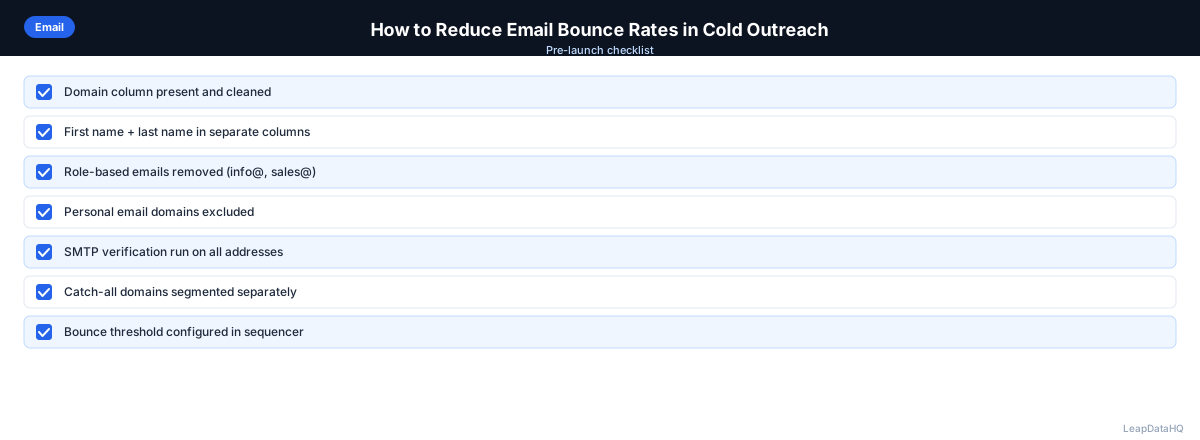
Use this checklist before every campaign launch to catch bounce rate risks:
- All email addresses have been verified through a verification tool
- Hard bounces from previous campaigns have been removed from the list
- Role-based addresses (info@, noreply@, admin@) have been filtered out
- Personal email domains (gmail.com, yahoo.com) have been removed from B2B lists
- Duplicate email addresses have been identified and removed
- Catch-all domains have been flagged and test batches sent where appropriate
- List has been deduplicated against existing CRM contacts and unsubscribes
- Email format validation has been run on all addresses
- Contacts at companies that have shut down or rebranded have been removed
- Sending volume matches domain warm-up capacity
- Bounce rate from previous campaign using similar list was under 2%
- List source and enrichment method are documented for future reference
Common Mistakes to Avoid
- Skipping email verification to save time. Verification takes 10-15 minutes for a typical list and prevents bounce rates that can take weeks to recover from. The time saved by skipping verification is never worth the reputational cost.
- Keeping bounced addresses "just in case they work next time." Hard bounces are permanent. Keeping them in your list means they'll be included in future campaigns and continue damaging your reputation.
- Not monitoring bounce rates by source. Without source-level tracking, you can't identify which data providers or enrichment tools produce the worst quality contacts. This makes it impossible to improve your intake process.
- Sending to old lists without re-verification. Contact data decays at 20-30% per year. A list that was clean six months ago may have significant bounce risk today. Always re-verify before reactivating old lists.
- Ignoring soft bounces that repeat. A single soft bounce is normal. Three or more soft bounces from the same address indicate a permanent problem. Archive these addresses rather than continuing to send.
- Using a new domain instead of fixing the data problem. Switching domains temporarily avoids the consequences of bad list quality but doesn't fix the underlying issue. The new domain will accumulate the same reputation damage.
- Not having a documented bounce handling process. Without a clear process, bounced addresses get handled inconsistently — some team members remove them, others don't. This leads to recurring problems.
- Launching campaigns too quickly from new domains. Even with a clean list, new domains need warm-up. Sending 500 emails on day one from a new domain triggers spam filters regardless of list quality.
Practical Examples
Example 1: SDR Team at a B2B SaaS Company
An SDR team seeing elevated bounce rates on cold campaigns often finds that a large share of bounces trace back to one unverified list source. Switching to a verified enrichment workflow and adding pre-send verification typically brings bounce rates down to a healthy range.
Example 2: Agency Managing Multiple Client Campaigns
An agency running outreach for several clients may see inconsistent bounce rates when some clients use purchased lists without verification. Implementing a standard process that requires every list to pass through enrichment and verification before launch helps bring all clients to a consistent, healthy bounce rate.
Example 3: Founder Doing Solo Outreach
A solo founder sending a high volume from a new domain too quickly often sees elevated bounce rates, especially when emails are unverified. Verifying addresses and using a gradual warm-up schedule that starts with a low daily volume is the standard way to bring bounce rates down.
Example 4: Enterprise Sales Team Re-Engaging Old Contacts
An enterprise sales team reactivating an older list without re-verification risks high bounce rates, because contact data decays over time. Removing hard bounces, re-verifying remaining addresses, and re-enriching contacts who may have changed jobs is the standard way to rebuild a stale list into a deliverable one.
Example 5: E-Commerce Company Running B2B Outreach
A B2B company building a list from trade show attendee data often finds many attendees registered with personal email addresses. Filtering out consumer email domains and verifying the remaining business emails before sending helps keep bounce rates low.
How LeapDataHQ Helps
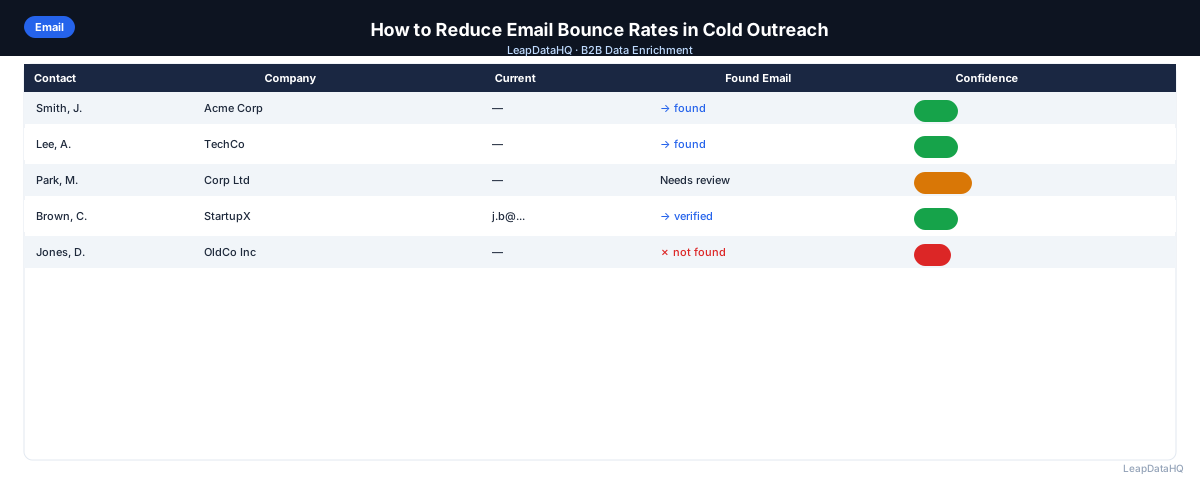
LeapDataHQ helps reduce bounce rates at the enrichment step. When you enrich a list with LeapDataHQ, confidence scores flag low-certainty email addresses before they reach your sequencer. Filtering to high-confidence results removes the emails most likely to bounce, protecting your sender reputation before campaigns launch.
For teams that have experienced high bounce rates from past campaigns, running existing lists through enrichment plus verification before re-engaging is an effective remediation approach. LeapDataHQ's enrichment process identifies outdated contacts, flags uncertain emails, and provides the data quality signals you need to make informed decisions about which contacts to include in outreach.
The credit-based pricing means you can run verification and enrichment on demand without committing to expensive monthly contracts. This is particularly useful for teams that need to remediate bounce rate problems quickly — upload your list, review confidence scores, filter to high-quality results, and export a clean list ready for sending.
Next Steps
If your bounce rates are above 2%, start by verifying your current list and removing all hard bounces. Then review your data intake process to prevent future problems. LeapDataHQ helps you enrich and filter lists with confidence scores so you can launch campaigns with confidence. Check our /features and /pricing to see if it fits your workflow.
When to Use LeapDataHQ
LeapDataHQ helps reduce bounce rates at the enrichment step. When you enrich a list with LeapDataHQ, confidence scores flag low-certainty email addresses before they reach your sequencer. Filtering to high-confidence results removes the emails most likely to bounce.
For teams that have experienced high bounce rates from past campaigns, running existing lists through enrichment plus verification before re-engaging is an effective remediation approach. The confidence scores returned during enrichment help you identify which contacts are most likely to deliver successfully and which should be excluded from outreach.
The credit-based pricing means you can run enrichment on demand — remediate a bounce rate problem this week, enrich a new list next month, and re-verify an old list the quarter after. No monthly commitments or seat fees. You pay only for what you enrich.
For teams managing multiple sending domains or running campaigns across multiple clients, LeapDataHQ provides a consistent enrichment workflow that produces quality signals you can use to filter before sending. This is more effective than sending everything and dealing with bounces after the fact.
Start Enriching LeadsFrequently Asked Questions
What bounce rate is considered high for cold email?
Above 2% is a warning sign for cold email. Above 3-5% is serious and likely already affecting deliverability. Some email platforms will pause your campaigns automatically if bounce rates exceed their thresholds. The safest target is under 1%, which indicates strong list quality and verification processes.
Do soft bounces affect sender reputation?
Soft bounces have minimal impact on sender reputation when they're genuinely temporary. However, if an address consistently soft bounces (suggesting a permanently full inbox or abandoned account), treat it as effectively invalid. Most email providers track soft bounce patterns over time, and repeated soft bounces from the same address contribute to reputation degradation.
How quickly does a high bounce rate affect deliverability?
Deliverability impact can happen within a single campaign if bounce rates are very high (over 5%). For moderate elevation (2-4%), the impact builds over time as email providers accumulate reputation signals about your domain. The damage is cumulative — each campaign with elevated bounce rates makes recovery harder.
Can I recover sender reputation after a high bounce rate incident?
Yes, but it takes time. Pause outreach, clean your list thoroughly, verify all emails, and then restart with a warm-up approach — sending small batches with high engagement to positive signals before scaling back up. Recovery typically takes 2-4 weeks depending on the severity of the reputation damage.
Does using a different sending domain fix a bounce rate problem?
Only temporarily. The root cause is list quality, not the domain. A new domain will have the same problem as soon as you start sending to the same bad list. Fix the data problem first — verify emails, remove bounces, improve your intake process — then consider domain strategy as a secondary concern.
How often should I re-verify my email lists?
Re-verify lists before every campaign launch. For lists that sit unused, re-verify after 3-6 months of inactivity. Contact data decays continuously, so a list that was clean last month may have developed bounce risk. Build verification into your standard workflow rather than treating it as an occasional cleanup task.
What's the difference between email verification and email enrichment?
Email verification checks whether an email address is deliverable — whether the mailbox exists and can receive mail. Email enrichment fills in missing data fields like job title, company size, and phone number. Both are important for list quality, but they serve different purposes. Verification prevents bounces; enrichment enables targeting and personalization.