
Email append and email verification are two different steps in the same workflow — but they're often confused, conflated, or skipped entirely. Getting them wrong leads to either missing contact data or high bounce rates.
Email append (also called email enrichment) solves the problem of missing emails: you have a contact but no email address. Email verification solves a different problem: you have an email address but don't know if it's valid.
Both steps matter, and understanding when to use each one is essential for building effective B2B outreach workflows. Skipping append means you can't reach contacts who are missing emails. Skipping verification means you're sending to addresses that may bounce — damaging your sender reputation and wasting outreach opportunities.
The two steps are complementary, not interchangeable. Append creates data you don't have. Verification validates data you do have. Together, they form a complete pipeline from partial contact records to deliverable email addresses ready for outreach. Skipping either step leaves gaps in your workflow that reduce campaign effectiveness and waste your outreach investment. Both steps are essential components of a professional B2B outreach process that delivers consistent, reliable results over time and across all your campaigns and outreach efforts.
This guide explains what each does, when to use it, and how to sequence them for the best results in your B2B outreach workflow.
What Is Email Append?
Email append (or email enrichment) is the process of finding a missing email address for a contact you already have. Starting from a name and company domain, an email append tool queries its database to return the most likely work email address for that person.
Example: you have "Sarah Chen, Director of Marketing at TechCorp (techcorp.com)". Email append returns "s.chen@techcorp.com" as the likely work email. The email is constructed by identifying the company's email pattern and applying it to the contact's name.
Email append tools use multiple data sources to determine the correct email: known email patterns at the company, public records, professional databases, and community-verified data. The quality of the result depends on the tool's data coverage and how recently their data was updated. Most tools return a confidence score alongside the result, indicating how certain they are about the email address.
What Is Email Verification?
Email verification is the process of checking whether an email address you already have is valid, active, and able to receive mail. It doesn't find a new email — it tests one you already have.
Example: you have the email "s.chen@techcorp.com". Email verification checks whether that mailbox exists and can receive messages, without actually sending an email. The tool connects to the mail server and confirms whether the specific address is active.
Verification uses syntax checking, domain validation, and SMTP handshake techniques to determine deliverability. The result is typically a status: valid, invalid, risky (catch-all), or unknown. This tells you whether it's safe to send to that address. Catch-all domains accept any email sent to them, making individual address verification inconclusive — these are flagged as risky because you can't confirm whether the specific mailbox exists.
The Key Difference
Email append creates data that didn't exist in your record. Email verification validates data you already have. Append comes first in the workflow; verification comes after.
- Email append: I have a contact, I need their email address
- Email verification: I have an email address, I need to know if it's real
- Both steps together: I find the email (append), then confirm it's deliverable (verify)
What This Means for Your Outreach
Getting the sequence right — append first, then verify — is essential for effective B2B outreach. Skipping either step creates problems that compound across your campaigns.
Without append, you have contacts you can't reach because you don't have their email addresses. Your outreach is limited to the contacts who already have complete data. Append expands your reachable universe by filling in missing emails.
Without verification, you're sending to emails that may or may not be valid. Some will bounce, damaging your sender reputation. Over time, high bounce rates trigger spam filtering that affects deliverability for your entire campaign. Verification protects your sender reputation by confirming deliverability before you send.
Who Needs to Understand Both Steps
Both email append and verification are relevant for anyone managing B2B outreach:
- SDRs and sales teams: building prospect lists that need complete, deliverable email addresses
- Agencies: delivering enriched and verified contact lists to clients
- Marketing operations: preparing email lists for campaigns without risking bounce rates
- CRM administrators: maintaining contact data quality for ongoing outreach
- Founders doing early sales: building outreach lists without dedicated research or data teams
- RevOps teams: ensuring clean data flows through the revenue technology stack
- Recruiters: finding and verifying candidate email addresses for sourcing outreach
When to Use Email Append
Use email append when you need to find email addresses for contacts you already have partial data on:
- You have a list of contacts with names and companies but no email addresses
- Your CRM has records imported from a source that didn't include email (LinkedIn, conference lists, event exports)
- You want to enrich a purchased list that has partial data
- You're building a prospect list from scratch and need to add contact information
Email append is most effective when you have a company domain and contact name as inputs. These two data points give the enrichment tool the best chance of identifying the correct email pattern and returning an accurate result. Adding a LinkedIn URL as an additional input signal further improves accuracy.
When to Use Email Verification
Use email verification whenever you have email addresses and need to confirm they're deliverable before sending:
- You have email addresses from any source and want to check deliverability before sending
- Your email list hasn't been used in 6+ months and may have gone stale
- You're about to launch a large cold email campaign and want to protect your sender reputation
- Your bounce rate is rising and you need to identify and remove invalid addresses
- After performing an email append — verify the addresses you found before using them
Email verification is especially critical before large campaigns where even a small percentage of invalid addresses can trigger deliverability issues. On a list of 1,000 contacts, a 3% bounce rate means 30 invalid addresses — enough to start damaging your sender reputation. Verification catches these before they cause problems.
Ready to enrich your CSV list?
Upload a CSV, fill missing data, review confidence scores, and export clean records.
Upload a CSV — Start EnrichingWhy You Need Both Steps
Email append gives you email addresses. Email verification confirms those addresses are usable. Running append without verification means you're sending to emails that may or may not be valid — which increases bounce rates.
Running verification without append means you have nothing to verify for contacts who are missing emails. The two steps work together: append first, verify second, then send.
Common Misconceptions
One common misconception: that a high-confidence email from an append tool doesn't need verification. Confidence scores reflect how certain the tool is about the email pattern — they're not live deliverability checks. Verification adds a real-time check that confidence scoring alone doesn't provide.
Another: that verification makes append unnecessary. Verification can't tell you what an email address is — it can only test one you already have. Both tools are complementary, not interchangeable. You need append to find emails and verification to confirm they work. Together, they form a complete pipeline from partial contact records to deliverable email addresses ready for outreach.
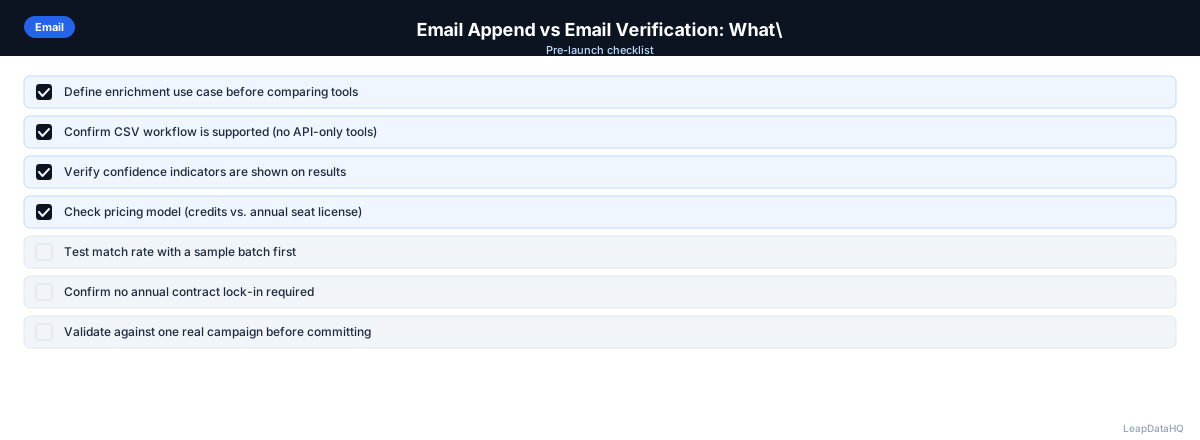
Checklist: Email Append and Verification Workflow
- Identified contacts missing email addresses in your list or CRM
- Prepared input CSV with company domain, first name, and last name
- Removed duplicates and standardized formatting in input file
- Ran email append to find missing email addresses
- Reviewed confidence scores on all appended emails
- Filtered to high-confidence results before verification
- Ran email verification on all appended emails
- Removed invalid addresses from your outreach list
- Flagged catch-all addresses as risky and tested with small batch
- Imported verified, deliverable emails into your CRM or sequencer
- Set up ongoing process to append and verify new contacts
- Scheduled re-verification for lists not used in 6+ months
Common Mistakes to Avoid
- Skipping verification after append: Confidence scores indicate pattern accuracy, not live deliverability. Without verification, you're sending to addresses that may bounce, damaging your sender reputation.
- Using verification when you need append: Verification can only test addresses you already have. If contacts are missing emails, you need append first to find the addresses before you can verify them.
- Importing all appended emails without filtering: Low-confidence append results are more likely to be incorrect. Filter to high-confidence results before verification and outreach.
- Not re-verifying stale lists: Email addresses become invalid over time as people change jobs. Lists not used in 6+ months should be re-verified before sending.
- Ignoring catch-all domains: Some domains accept all email regardless of whether the address exists. Catch-all results should be treated as risky and tested with a small batch before full deployment.
- Treating append and verification as optional: Both steps are essential for effective outreach. Skipping either one creates problems that compound across campaigns.
Practical Examples
Example 1: New Prospect List from LinkedIn
An SDR exports 200 leads from LinkedIn Sales Navigator with names and companies but no emails. She runs email append to find work email addresses, receiving 160 results (80% match rate). She filters to 140 high-confidence results and runs verification. Verification confirms 130 as valid. She imports the 130 verified emails into her sequencer.
Example 2: Re-Engaging an Old Contact List
A marketing team has a list of 500 contacts from a campaign 8 months ago. Before re-engaging, they run verification on all 500 email addresses. Verification reveals 60 are now invalid. They remove those and run append on 30 contacts missing emails. After verification, they launch the campaign to 470 verified contacts.
Example 3: CRM Data Gap-Fill
A CRM has 1,000 contacts with missing email addresses. The team runs email append, receiving 700 results (70% match rate). After filtering to high-confidence and verifying, they import 620 verified emails back into the CRM, enabling outreach to previously unreachable contacts.
Example 4: Agency Client Deliverable
An agency receives a list of 400 target contacts from a client. They run email append, filter to high-confidence results, verify all emails, and deliver 350 verified, deliverable contacts. The two-step process ensures the client receives a clean list.
Example 5: Pre-Campaign Quality Check
Before launching a campaign to 1,000 contacts, a team runs verification and discovers 80 invalid addresses (8%). They remove those, run append on 50 contacts missing emails, verify the appended results, and launch to 970 verified contacts with a bounce rate under 1%.
How LeapDataHQ Helps
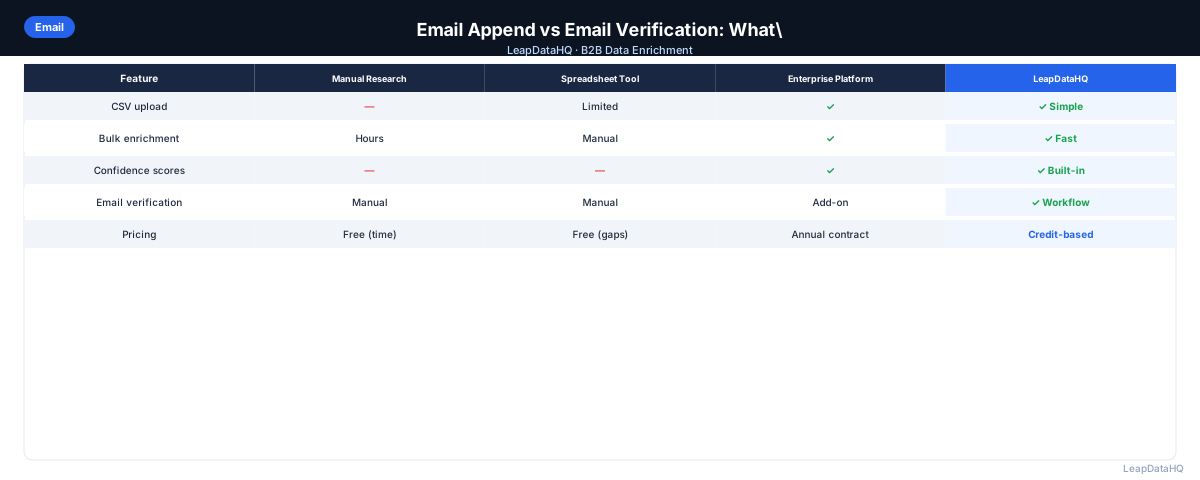
LeapDataHQ handles the email append step — finding email addresses for contacts you have. It returns confidence scores alongside appended emails, which serve as a first-pass quality filter. After exporting from LeapDataHQ, running a dedicated email verification pass before loading into your sequencer gives you the highest-quality list.
For SDRs and agencies building fresh lists from partial data, this two-step workflow (LeapDataHQ for append + a verification tool for deliverability checking) is a practical, cost-effective approach. The credit-based pricing means you only pay for the records you append.
Visit /find-missing-email-addresses and /bulk-contact-verification to learn more about how the append-verify workflow fits your outreach process.
Next Steps
If you have contacts missing email addresses, start with email append. Upload a batch of 50-100 contacts to LeapDataHQ with company domains and names, review the confidence scores, then verify the results before importing into your outreach tool. This two-step process ensures you have both complete and deliverable email addresses. The time investment in append and verification pays off in higher deliverability, better sender reputation, and more effective outreach campaigns.
When to Use LeapDataHQ
LeapDataHQ handles the email append step — finding email addresses for contacts you have. It returns confidence scores alongside appended emails, which serve as a first-pass quality filter. After exporting from LeapDataHQ, running a dedicated email verification pass before loading into your sequencer gives you the highest-quality list.
For SDRs and agencies building fresh lists from partial data, this two-step workflow (LeapDataHQ for append + a verification tool for deliverability checking) is a practical, cost-effective approach. The append step fills in missing emails; the verification step confirms they're deliverable.
The credit-based pricing model means you only pay for the records you append. No monthly seat fees or annual contracts. This makes LeapDataHQ practical for teams with variable append needs.
For teams that have experienced high bounce rates, the append-verify workflow addresses the root cause. Append fills in missing emails so you can reach more contacts. Verification ensures those emails are deliverable so your bounce rates stay below the 2% threshold.
For agencies delivering contact lists to clients, the two-step workflow ensures you're providing complete, verified data. Visit /find-missing-email-addresses and /features to explore how LeapDataHQ fits into your append-verify process.
Start Enriching LeadsFrequently Asked Questions
Can I use the same tool for both email append and verification?
Some tools offer both in a single workflow. Others specialize in one or the other. If your tool does both, use the verification step on every email before sending regardless of where it came from. LeapDataHQ handles the append step; pair it with a dedicated verification tool for the complete workflow.
How accurate is email append?
Accuracy depends on the tool and your target market. For contacts at established US companies with consistent email patterns, accuracy is high. For small companies or international contacts, expect more variation. Confidence scores indicate which results to trust — always filter to high-confidence results before verification.
What happens if I skip verification after append?
You risk sending to email addresses that are invalid or no longer active. This increases your bounce rate, which damages sender reputation. Over time, high bounce rates result in deliverability problems that affect even valid contacts on your list. Verification is a quick step that prevents these problems.
Does email verification cost the same as email append?
Typically no. Email verification is usually less expensive per record than email append, because it's simpler technically — it only needs to check whether an address exists, not find a new one. Some verification tools offer very low per-email pricing for large volumes, making verification affordable even for lists of thousands of contacts. The combined cost of append plus verification is still far less than the cost of manual research or the revenue impact of poor deliverability.
What should I do with emails that fail verification?
Remove them from your outreach list immediately. Mark them as invalid in your CRM so they're not accidentally re-used. Don't try to manually correct them unless you have a reliable way to find the correct address. For high-value contacts, consider re-appending to see if a different email is returned.
How often should I re-verify my email list?
For active outreach lists, verify before each new campaign or every 90 days, whichever comes first. Email addresses become invalid as people change jobs or companies shut down. Regular re-verification prevents accumulated stale addresses from damaging your deliverability. If you're running weekly campaigns, verify monthly. For quarterly campaigns, verify before each send. The key is not letting too much time pass between verification and sending.
Can I skip append if I already have email addresses?
If all your contacts already have email addresses, you don't need append — go straight to verification. Append is only needed when contacts are missing emails. However, if you have a mix of contacts with and without emails, append fills the gaps so your entire list is reachable.