
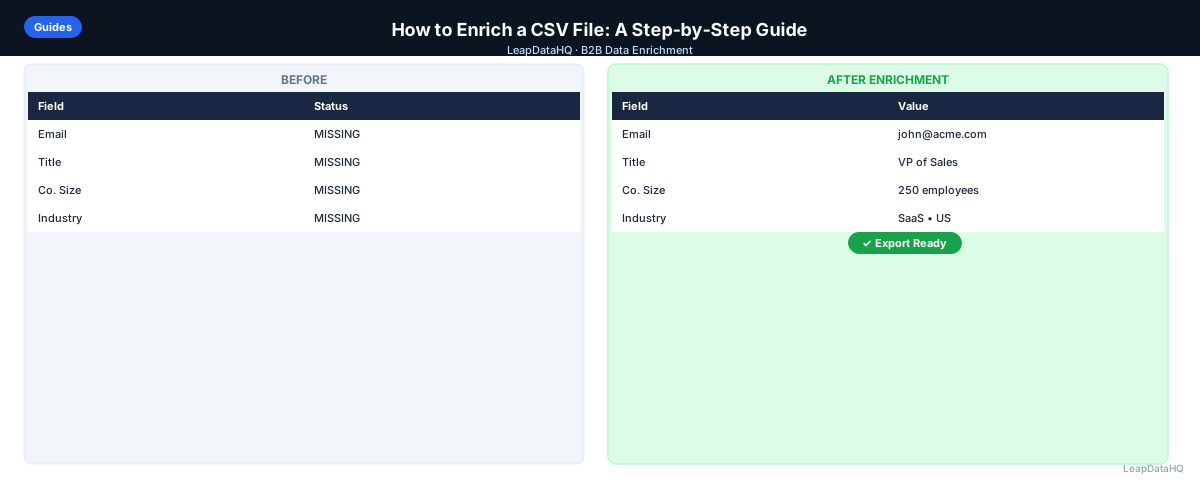
If you're doing B2B outreach, you've probably started with a spreadsheet that's missing half the data you need. Maybe you have company names but no emails. Or domains but no phone numbers. CSV enrichment fills those gaps automatically — without manual research.
This guide walks through exactly how to enrich a CSV file, what data you can add, and how to avoid the common mistakes that lead to bad CRM imports and high bounce rates. Whether you are working with a list sourced from a conference, a LinkedIn export, or a CRM gap-fill project, the workflow follows the same sequence of steps.
The process is straightforward once you understand the steps. You'll learn how to prepare your input file, choose the right enrichment tool, review confidence scores, and export clean data ready for your outreach campaigns. Whether you're enriching 50 records or 5,000, the workflow is the same. Understanding each phase — from input cleaning through verification and segmentation — is what separates teams that get value from enrichment from those that end up with more problems than they started with.
Many teams skip the preparation step and upload messy data, then wonder why match rates are low. Others skip the review step and import everything, then deal with bounces. The teams that get the best results treat enrichment as a multi-step workflow, not a single button press.
Let's go through it.
What Is CSV Enrichment?
CSV enrichment is the process of taking an existing spreadsheet — typically containing company names, domains, or partial contact records — and using data sources to fill in missing fields. Common fields added during enrichment include business email addresses, job titles, company size, industry, phone numbers, and LinkedIn URLs.
Unlike manual research, enrichment tools automate this process. You upload a file, the tool queries its data sources, and you download an augmented file with more complete records. The output is a new CSV with additional columns appended to each row.
The enrichment process works by matching your input data against large databases of business information. When you provide a company domain, the tool looks up that domain across its data sources to find associated contacts, company details, and other fields. The quality of the match depends on how much public data exists for each company and how recently the database was updated.
What This Means for Your Outreach Workflow
CSV enrichment transforms incomplete prospect lists into actionable outreach databases. Instead of manually researching each contact, you get structured data that integrates directly with your CRM, email sequencing tools, and outreach platforms. The time savings alone are significant — what used to take days of manual research now takes minutes of processing time.
The practical impact: you can take a list of 500 company names from a conference, a LinkedIn export, or a trade publication, and within minutes have a file with email addresses, job titles, company size, and other fields needed for personalized outreach. This turns days of manual research into a single workflow step. For teams running multiple campaigns per month, this efficiency compounds — each campaign cycle gets faster and more consistent.
For teams doing outbound prospecting, CSV enrichment is the bridge between identifying targets and actually reaching them. Without it, you're stuck with partial data that can't be used for email campaigns, CRM imports, or sales outreach. With it, you have complete records ready for your sequencing tools. The enrichment step also standardizes your data — instead of each SDR researching contacts differently, everyone works from the same enriched output with consistent fields and formatting.
Who Should Use CSV Enrichment
CSV enrichment serves multiple roles in B2B organizations. Any team that works with spreadsheets of contacts and needs to fill missing data fields benefits from this workflow:
- Sales teams and SDRs: enriching prospect lists before cold email campaigns or CRM imports to ensure every outreach attempt uses complete data
- Agencies: delivering enriched lead lists to clients as part of lead generation services, where data quality directly affects client retention
- Founders and solo salespeople: building outreach lists without hiring dedicated research staff or subscribing to expensive platforms
- RevOps and sales ops: maintaining CRM data quality by filling gaps in existing records and running periodic re-enrichment cycles
- Marketers: enriching event attendee lists, webinar registrants, or downloaded content leads before launching nurture campaigns
- CRM managers: cleaning and completing contact databases before major campaigns, migrations, or quarterly reviews
- Business development teams: preparing targeted outreach lists for partnership or channel development initiatives
- Recruiters: enriching candidate lists sourced from LinkedIn or job boards with contact details for email outreach
If you work with spreadsheets of B2B contacts and need to add missing data fields, CSV enrichment is the right approach. It's particularly valuable when you have lists of 50-5,000 records and need to enrich them on demand without committing to expensive annual contracts or complex API integrations. The workflow works whether you enrich once a quarter or every week.
What Data Can You Add When Enriching a CSV?
The data you can add depends on what you start with. If you have company domains, you can typically enrich:
- Business email patterns (e.g., first.last@company.com)
- Company name, size, and industry
- LinkedIn company page URL
- Revenue range and headcount
- Physical address and phone number
If you start with contact names and companies, you can add work email addresses, direct phone numbers, job titles, LinkedIn profiles, and seniority level.
The specific fields available depend on the enrichment tool and its data sources. Some tools specialize in email finding, others in company data, and some cover both. Understanding what you need before choosing a tool helps you select the right provider for your use case.
Step 1: Prepare Your CSV Before Uploading
Remove Duplicate Rows
Run a deduplication pass before uploading. Most enrichment tools charge per row, so sending 500 rows when 200 are duplicates wastes budget and inflates your output. In Excel or Google Sheets, use Remove Duplicates on your primary key column — usually company domain or email.
Duplicates cause problems beyond wasted credits. They can lead to double outreach in your campaigns, where the same contact receives your email twice — a common source of spam complaints. Deduplication protects both your budget and your sender reputation.
Standardize Key Fields
Check that company names and domains are consistent. If you have "Acme Corp", "ACME Corporation", and "acme.com" across different rows, the enrichment tool may produce inconsistent results. A clean domain column is the most reliable lookup key for company-level data.
Standardization also means removing formatting artifacts — domains should not include "http://" or "https://" prefixes, trailing slashes, or path components. Just the bare domain (e.g., "acme.com") produces the best match rates.
Remove Clearly Invalid Rows
Delete rows with placeholder emails like "noreply@", "info@", or "admin@". These are role-based addresses that rarely belong to a real contact. Also remove rows where the company name is blank or clearly generic.
Removing invalid rows before enrichment improves your overall match rate and ensures you are not spending credits on records that will never produce useful output. A clean input file is the single biggest factor in enrichment quality.
Step 2: Upload Your CSV to an Enrichment Tool
Once your file is clean, upload it to a CSV enrichment tool. Most tools will ask you to map your columns — for example, telling the tool which column contains the company domain, which contains first name, and so on.
After you map fields, the tool queues your file for processing. Depending on row count and the tool, processing takes anywhere from a few seconds to a few minutes. For files under a few hundred rows, most tools return results quickly.
Column mapping is a critical step. If you map the wrong column as the domain field, the tool will fail to match records. Take a moment to verify that each column is correctly assigned before starting the enrichment process.
Step 3: Review Confidence Scores
Not every enriched record is accurate. A good enrichment tool returns confidence indicators alongside the data — a score, flag, or label that tells you how certain the tool is about each piece of information.
High-confidence records are safe to use immediately. Low-confidence records should be reviewed manually before you include them in an outreach sequence. Skipping this step is one of the biggest causes of high bounce rates in cold email campaigns.
What to Do With Low-Confidence Records
You have a few options: exclude low-confidence rows from your export entirely, do a quick manual verification on LinkedIn or the company website, or flag them in your CRM for follow-up research rather than outreach.
The right choice depends on the value of the contact. For high-priority targets, manual verification is worth the time. For bulk lists, excluding low-confidence records is usually the better approach.
Step 4: Export and Use Your Enriched Data
Ready to enrich your CSV list?
Upload a CSV, fill missing data, review confidence scores, and export clean records.
Upload a CSV — Start EnrichingOnce you're satisfied with the results, export your file. Most enrichment tools let you download the enriched CSV with all original columns intact plus new columns appended. You can then import this file directly into your CRM, email sequencing tool, or outreach platform.
Before importing, do a quick spot check — pick 5-10 rows at random and verify the enriched data looks reasonable. Check that emails follow a valid pattern, company names match domains, and titles make sense for your target personas.
Step 5: Verify Emails Before Importing
Even high-confidence enriched emails should be verified before loading into your outreach tool. Email verification checks whether the mailbox exists and can receive mail, catching addresses that look valid but belong to closed accounts or inactive domains.
Run your enriched CSV through an email verification tool. Remove invalid addresses and treat catch-all domains as risky. This step protects your sender reputation and keeps bounce rates below the 2-3% threshold that triggers deliverability problems.
Step 6: Segment Your Enriched Data
Once you have enriched data, use the new fields to segment your list for more targeted outreach. Company size, industry, job title, and technology stack all enable better personalization and higher reply rates.
Create separate sequences for different segments: one for VPs at mid-market companies, another for founders at startups, another for directors at enterprise accounts. Even small messaging adjustments based on enriched data measurably improve performance.
Step 7: Import to Your CRM or Outreach Tool
With verified, segmented data ready, import into your CRM, email sequencer, or outreach platform. Map the enriched columns to the appropriate fields in your tool. Most platforms support CSV import with column mapping.
Before importing, do a final spot check on 5-10 rows to confirm the data looks correct. Check that emails follow valid patterns, company names match domains, and titles align with your target personas.
Step 8: Track Results and Iterate
After launching outreach from your enriched list, track performance metrics by data source and confidence level. If low-confidence records produce higher bounce rates, adjust your filtering threshold for future enrichments. If certain industries or company sizes perform better, prioritize those segments next time.
This feedback loop helps you refine your enrichment workflow over time, improving both data quality and campaign results with each batch.
Checklist: CSV Enrichment Quality
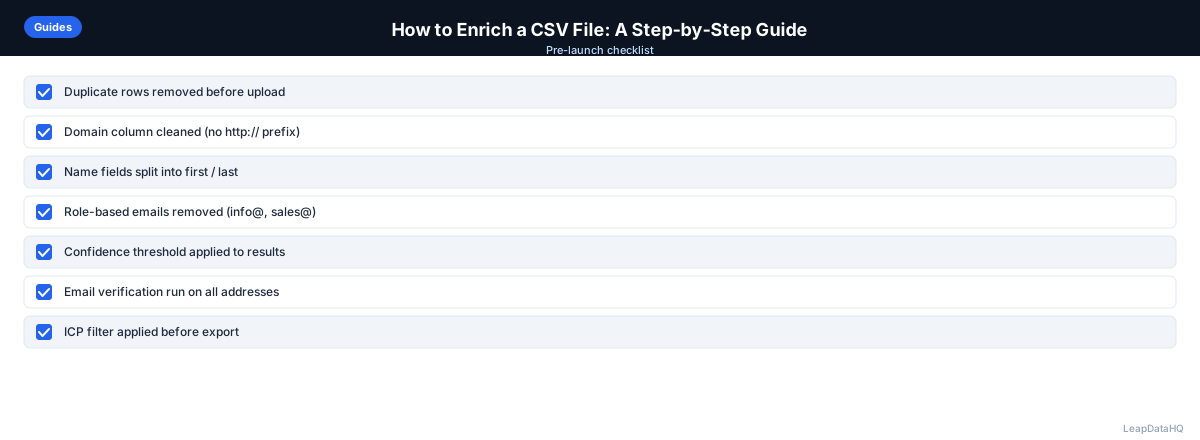
Use this checklist before and after enrichment to ensure quality at every stage of the process. Following this checklist systematically reduces errors, prevents wasted credits, and produces better outreach results:
- Removed duplicate rows from input CSV using email or domain as the primary key
- Standardized company names to a consistent format across all rows
- Cleaned domain column by removing http://, https://, and trailing slashes
- Removed role-based and placeholder emails (info@, noreply@, admin@)
- Mapped columns correctly in the enrichment tool before starting processing
- Reviewed confidence scores on all returned enriched records
- Filtered out low-confidence results before exporting the final file
- Verified email addresses through a dedicated verification tool before importing to outreach
- Segmented enriched data by industry, company size, or job title for targeted messaging
- Spot-checked at least 5-10 rows at random for accuracy and consistency
- Tracked bounce rates and reply rates by confidence level after launching campaigns
- Documented match rates and data quality notes for future enrichment batches
Common Mistakes to Avoid
These mistakes reduce enrichment quality, waste budget, and create downstream problems in your outreach. Being aware of them helps you build a more reliable enrichment workflow:
- Uploading dirty data without cleaning first: Garbage in, garbage out. If your input has duplicates, inconsistent company names, or placeholder emails, your enrichment results will be inconsistent. Always clean your CSV before uploading to avoid wasting credits on unmatchable records.
- Ignoring confidence scores: Importing all enriched records without reviewing confidence scores leads to high bounce rates. Low-confidence results should be manually verified or excluded from outreach entirely.
- Using company name instead of domain as lookup key: Company names are ambiguous — "Acme Corp" could match multiple companies across different regions. Domains are unique identifiers. Always include a domain column for better accuracy.
- Not deduplicating before and after enrichment: Duplicates waste enrichment credits and cause double outreach in your campaigns. Deduplicate your input file and check the output again before importing to your CRM.
- Expecting 100% match rates: Most enrichment tools return 60-80% match rates for email enrichment. Not every company has publicly discoverable contacts. Set realistic expectations and plan for manual research on high-value targets that don't match.
- Skipping email verification after enrichment: Enriched emails should be verified before sending. Confidence scores indicate pattern accuracy, not live deliverability. Verification catches closed mailboxes and inactive domains that confidence scores cannot detect.
- Not segmenting after enrichment: Enrichment adds data fields that enable better targeting. If you don't use company size, industry, and title data to segment your list, you're missing the primary value of enrichment beyond just filling email gaps.
- Reusing the same enriched list without refreshing: Contact data decays over time. A list enriched six months ago may have significant inaccuracies today. Re-enrich active lists periodically to maintain data quality.
Practical Examples
Example 1: Conference Attendee List
You attend a B2B SaaS conference and collect 200 business cards. You create a CSV with names and company names. After enrichment, you add email addresses, job titles, company size, and LinkedIn URLs. You filter to companies with 50-500 employees and import the enriched list into your outreach tool.
Example 2: LinkedIn Sales Navigator Export
You export 300 leads from Sales Navigator with names, titles, and companies but no emails. You add company domains manually or with a domain lookup tool, then enrich for email addresses. After verification, you have 240 deliverable emails ready for a targeted sequence.
Example 3: CRM Gap-Fill
Your CRM has 1,000 contacts missing email addresses. You export those records as a CSV, enrich them, review confidence scores, and import the high-confidence results back into your CRM. You've filled 650 email gaps without manual research.
Example 4: Agency Client Deliverable
An agency receives a list of 500 target companies from a client. The agency enriches for contact emails, company data, and job titles. After filtering to high-confidence results and verifying emails, they deliver 380 outreach-ready contacts formatted for the client's HubSpot instance.
Example 5: Trade Publication Mention List
You find 150 companies mentioned in an industry publication. You build a CSV with company names and domains, enrich for decision-maker contacts, and filter to companies in your target size range. You now have a targeted list of prospects who are actively engaged in your industry.
How LeapDataHQ Helps
LeapDataHQ helps you enrich CSV files through a straightforward upload-and-process workflow. You prepare your CSV with company domains, contact names, or partial records, then upload it to the platform. LeapDataHQ queries multiple data sources and returns enriched records with confidence scores attached to each field, so you know which results are reliable before you export.
The review step is where LeapDataHQ provides the most value. Rather than blindly appending data, you can filter results by confidence level, exclude low-quality matches, and export only the records you trust. This filtering step is what separates professional enrichment from simply adding columns to a spreadsheet and hoping for the best.
Once you have reviewed and filtered your results, you export the enriched CSV and import it directly into your CRM, email sequencer, or outreach platform. The credit-based pricing at /pricing means you pay only for what you enrich — no monthly seat fees or annual contracts. For teams enriching batches of 50 to 5,000 records, this model keeps costs aligned with actual usage. Explore the full workflow at /features.
Next Steps
If you have a spreadsheet of B2B contacts that needs enrichment, the next step is to prepare your input file and run a test batch. Clean your CSV, remove duplicates, and upload a small sample to see match rates and confidence scores on your actual data.
LeapDataHQ makes this straightforward — upload your CSV at /csv-email-enrichment, review confidence scores, and export clean data ready for your outreach campaigns. Check /features and /pricing to see if the workflow fits your team's needs.
When to Use LeapDataHQ
LeapDataHQ is built specifically for the workflow described in this guide. You upload a CSV of company names, domains, or partial contact records; the tool queries multiple data sources; returns enriched records with confidence signals; and lets you filter and export only what you're confident in.
It's designed for small teams and agencies who need to enrich CSV files on demand — not teams that need a full CRM platform or enterprise contracts. If you regularly enrich batches of 50–5,000 records and want to control what gets exported, LeapDataHQ fits that workflow.
The credit-based pricing means you pay only for what you enrich, with no monthly seat fees or annual commitments. This makes it practical for teams with variable enrichment needs — enriching 500 records one month and 3,000 the next without paying for unused capacity.
LeapDataHQ returns confidence scores alongside each enriched field, giving you visibility into which records are reliable and which need manual review. This filtering step is what separates high-quality enrichment from simply appending data and hoping for the best.
For teams working through the complete enrichment workflow — from input cleaning through verification and segmentation — LeapDataHQ provides the enrichment layer without requiring developer integration or platform-level commitments. You upload, enrich, review, and export in a single session. Whether you are enriching for cold email campaigns, CRM gap-fills, or agency client deliverables, the workflow stays consistent.
Start Enriching LeadsFrequently Asked Questions
How long does CSV enrichment take?
For most files under 1,000 rows, enrichment takes a few seconds to a few minutes. Larger files may take longer depending on the tool and data sources queried. Most enrichment tools process records in parallel, so a 5,000-row file does not take five times as long as a 1,000-row file. Processing time also depends on the complexity of the enrichment — email-only enrichment is faster than full contact plus company data enrichment.
What's the typical match rate for CSV enrichment?
Match rates vary by dataset quality and tool. For business domains with reasonable public data, you can expect 60-80% for email enrichment. Not every company will have publicly discoverable contacts. Match rates are higher for established companies in tech, finance, and professional services, and lower for very small businesses and non-profits. Results depend on input data quality and the specific industries you are targeting.
Can I enrich a CSV that only has company names?
Yes, though match rates are lower than when using domains. Company names are less precise — there can be multiple companies with similar names across different regions. Include the company domain as a lookup key when possible for better accuracy. If you only have company names, consider adding domains first using a company name-to-domain lookup before running enrichment.
Is enriched data compliant with GDPR and CAN-SPAM?
Compliance depends on how you collect and use the data. For B2B outreach, most jurisdictions allow contacting business contacts with legitimate interest. Always include an unsubscribe mechanism and follow applicable laws in your target regions. Enriched data should be used for legitimate business purposes, not spam or unrelated marketing. Consult legal counsel for your specific compliance requirements.
What file format should my CSV be in before uploading?
Standard UTF-8 CSV format works best. Make sure columns have clear headers, values are properly quoted if they contain commas, and there are no merged cells or Excel formatting that could confuse the parser. Remove any special characters or formatting that might interfere with data parsing. A clean, well-structured CSV produces the best enrichment results.
How do I handle low match rates on my enrichment?
Low match rates often indicate input quality issues — ambiguous company names, missing domains, or very small companies with limited public data. Clean your input file, add domains where missing, and filter to companies with sufficient public presence. For high-value targets that do not match, supplement with manual research on LinkedIn or company websites. Adjusting your input quality typically improves match rates significantly.
Should I enrich all my contacts or just high-priority ones?
Enrich contacts that match your ICP and are ready for outreach. Do not enrich contacts at companies outside your target market or records that are not outreach-ready. This focuses your enrichment budget on records that will generate pipeline. For large databases, enrich in segments based on priority and recency, starting with your most active prospect pools.