
Generic outreach is the most common reason cold campaigns fail. A message written for "everyone in B2B" is relevant to no one. Segmentation fixes this — by breaking your lead list into groups that share meaningful characteristics, you can write outreach that resonates with each segment rather than missing all of them.
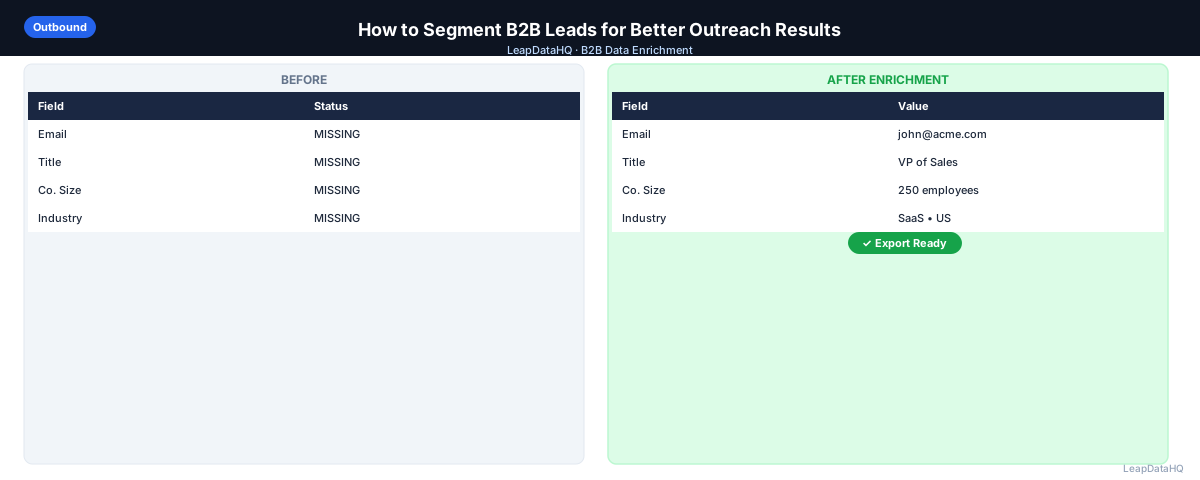
The data you need for segmentation is often sitting in enrichment output that goes unused. Company size, industry, job title, and technology stack are all segmentation signals — but only if you actually use them.
This guide covers the most effective ways to segment B2B leads and how to use each segment for more targeted outreach. You'll learn the five key segmentation dimensions, how to implement segmentation practically, and how to measure which segments perform best.
Whether you're running your first segmented campaign or optimizing an existing program, these principles will help you improve reply rates and pipeline quality.
Why Segmentation Improves Campaign Performance
Different companies have different pain points. A 10-person startup has different problems than a 500-person mid-market company. A VP of Sales at a financial services firm cares about different things than a VP of Sales at a SaaS company. When your messaging ignores these differences, it fails to resonate with anyone.
When your messaging speaks directly to the specific situation of the segment, reply rates improve. This isn't magic — it's the result of relevance. Relevance comes from knowing enough about who you're talking to before you send. Segmentation is the process of organizing your list so you can deliver that relevance systematically.
The impact of segmentation compounds. Better reply rates mean more meetings. More meetings mean more pipeline. More pipeline means more revenue. The time investment in segmentation pays for itself quickly through improved campaign performance.
Segmentation also improves the quality of your meetings. When prospects feel that your message understands their specific situation, they come to meetings more prepared and more interested. This leads to shorter sales cycles and higher close rates. The value of segmentation extends beyond just getting more replies — it improves the entire downstream sales process.
From a deliverability perspective, segmentation helps too. When your messages are relevant to recipients, they're more likely to be opened, read, and responded to rather than marked as spam. This positive engagement signals to email providers that your domain is sending wanted messages, which improves deliverability for all your campaigns over time.
What This Means for Your Outreach
Segmentation transforms your outreach from a scattergun approach to a targeted strategy. Instead of sending the same message to everyone and hoping it resonates with some, you send specific messages to specific groups knowing each message addresses their particular situation. This is the difference between 1% reply rates and 5% reply rates.
For teams running outbound campaigns, segmentation is the single highest-leverage improvement available. It doesn't require better copywriting skills or more sophisticated tools — it requires using the data you already have to write more relevant messages. Most teams have this data in their enrichment output but don't use it for segmentation.
The practical impact: a campaign of 500 contacts sent as one generic sequence might generate 5 replies. The same 500 contacts split into 3 segments with tailored messaging might generate 15-20 replies. The difference is segmentation, not volume.
Who Should Use Lead Segmentation
Lead segmentation is valuable for any team running B2B outreach campaigns to diverse audiences. The more varied your target market, the more impactful segmentation becomes.
- SDRs and sales teams running cold email campaigns to prospects across multiple industries
- Agencies managing outreach for clients in different verticals with different buyer personas
- Founders doing outbound prospecting to companies of varying sizes and maturity levels
- Marketing teams running nurture campaigns to leads at different stages of the buying journey
- Growth teams running product-led outreach to users with different usage patterns
- Account-based marketing teams targeting specific accounts with personalized messaging
- RevOps teams optimizing campaign performance through data-driven segmentation
If your outreach goes to contacts who have different roles, work at different types of companies, or face different problems, segmentation will improve your results. The effort to segment is modest compared to the performance improvement it delivers.
Segmentation Dimension 1: Industry
Industry is the most common segmentation dimension and often the most impactful for messaging. The same product has different value propositions for different industries — the benefits you lead with for a healthcare company are different from those for a retail company. Industry segmentation lets you speak the language of each vertical.
Industry segmentation also lets you use industry-specific language, reference common pain points in the industry, and cite relevant case studies or examples. A healthcare prospect responds to messaging about HIPAA compliance and patient outcomes. A retail prospect responds to messaging about inventory management and customer experience. The product may be the same, but the framing changes.
Segmentation Dimension 2: Company Size
Company size shapes the buying context: who the decision-maker is, how long the sales cycle is, what budget looks like, and which pain points are most acute. A founder at a 10-person company makes decisions differently than a VP at a 500-person company. Your messaging should reflect these differences.
Segment your list into tiers based on headcount:
- SMB (1-100 employees): founder or owner often makes decisions, speed and cost are top concerns, messaging should emphasize quick implementation and ROI
- Mid-market (100-1,000 employees): department heads and VPs are decision-makers, scalability and integration matter, messaging should emphasize enterprise features
- Enterprise (1,000+): committee buying, longer cycles, security and compliance requirements, messaging should emphasize risk reduction and strategic value
Segmentation Dimension 3: Job Title and Seniority
The same message written for a VP should not be sent to an Analyst. The VP cares about strategic outcomes and ROI; the Analyst cares about ease of use and time savings. Seniority level affects messaging tone, benefit emphasis, and even the call to action. A VP wants to discuss business impact; an Analyst wants to see a demo.
Segment by seniority to adjust your messaging accordingly. C-suite and VP-level messaging should be strategic and outcome-focused. Director-level messaging should balance strategy and execution. Manager and individual contributor messaging should be tactical and feature-focused.
Segmentation Dimension 4: Technology Stack
For products with integrations, technology stack is a powerful segmentation signal. Companies using Salesforce are different buyers from companies using HubSpot. Companies on AWS have different needs from companies on Azure. This data is often available through company enrichment and enables highly relevant messaging.
Technology stack segmentation lets you lead with integration compatibility, reference complementary tools in the prospect's stack, and avoid messaging that highlights incompatibilities. A prospect using Salesforce wants to hear how your product integrates with Salesforce — not how it replaces it.
Segmentation Dimension 5: Engagement and Behavior
For contacts already in your database, behavioral segmentation — who opened previous emails, who visited your website, who engaged with content — is highly valuable. Engaged contacts should be in different sequences than cold prospects who've never interacted with you. Their messaging should acknowledge the previous engagement.
Behavioral segments include: opened but didn't reply (warm, needs follow-up with different angle), visited pricing page (high intent, prioritize for outreach), downloaded content (interested but early stage, nurture sequence), existing user with low usage (adoption challenge, success-focused messaging). Each behavior signals a different level of interest and requires different messaging.
How to Implement Segmentation Practically
Implementation doesn't require sophisticated tools or complex workflows. The process is straightforward: enrich your list to add the fields you need for segmentation, define your segments, write tailored messaging for each, and run separate campaigns.
Ready to enrich your CSV list?
Upload a CSV, fill missing data, review confidence scores, and export clean records.
Upload a CSV — Start Enriching- Enrich your list to add the fields you need for segmentation (industry, size, title, tech stack)
- Define 2-4 meaningful segments based on your most important targeting dimensions
- Write a separate sequence for each segment — even small variations in value proposition and examples make a difference
- Load each segment into your sequencer as a separate campaign
- Analyze results by segment to understand which segments convert best
- Iterate on messaging for underperforming segments based on reply data
- Expand segmentation dimensions as you learn which factors most affect conversion
The key to successful segmentation is starting simple and iterating based on data. Your first segmented campaign won't be perfect, but it will give you baseline metrics for each segment. Use those metrics to refine your messaging and targeting over time. After 2-3 campaign cycles, you'll have a clear picture of which segments perform best and which messaging resonates most with each group.
Document your segmentation strategy and results. Track which dimensions you segmented by, how many contacts were in each segment, and the performance metrics for each. This documentation becomes valuable when onboarding new team members or when planning future campaigns. It also helps you identify patterns — for example, if healthcare companies consistently outperform other industries, you might prioritize healthcare in future list building.
Start with the segmentation dimension that matters most for your business. For most B2B companies, that's industry or company size. Once you've mastered segmentation on one dimension, add additional dimensions to further refine your targeting. The goal is continuous improvement, not perfection from day one.
Consider combining multiple segmentation dimensions for maximum impact. For example, segment by both industry and company size to create highly specific segments like "healthcare companies with 100-500 employees" or "SaaS companies with 10-50 employees." The more specific your segments, the more relevant your messaging can be — though be careful not to create segments so small that they're not worth the effort of dedicated messaging.
Measuring Segmentation Results
To understand whether segmentation is working, you need to track performance metrics by segment. The key metrics to monitor are reply rate, meeting set rate, and pipeline generated per segment. Compare these metrics to your previous unsegmented campaigns to quantify the improvement.
Segment-level tracking also helps you optimize your messaging over time. If one segment consistently underperforms, investigate whether the messaging needs adjustment or whether that segment is outside your ICP. If a segment significantly outperforms, consider allocating more resources to that segment in future campaigns. The goal is continuous improvement based on data, not assumptions.
Checklist: Segmentation Setup
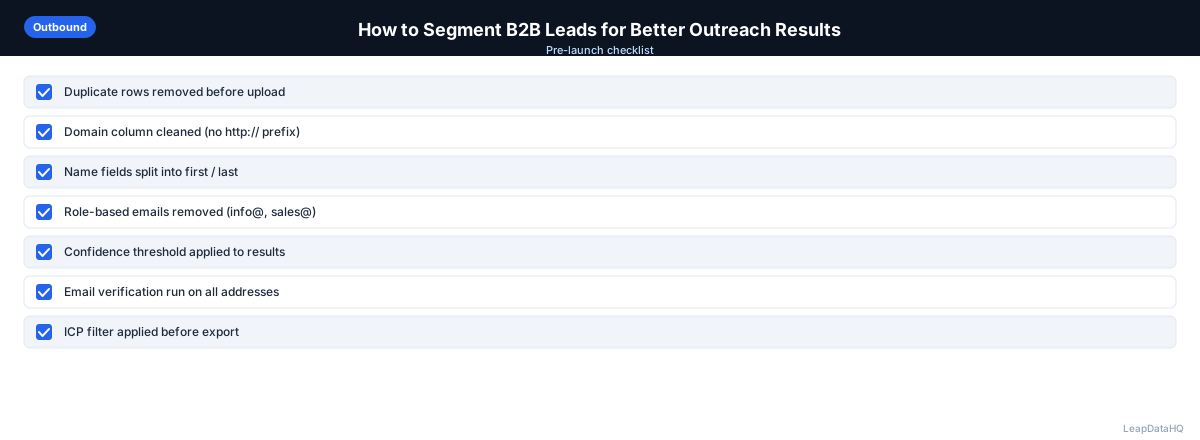
Use this checklist before launching a segmented campaign:
- List has been enriched with segmentation fields (industry, company size, job title)
- Segments are defined based on ICP and campaign goals
- Each segment has a dedicated sequence with tailored messaging
- Value proposition is adjusted for each segment's specific pain points
- Examples and case studies are relevant to each segment
- Call to action is appropriate for each segment's seniority level
- Sending volume for each segment matches domain capacity
- Segments are loaded as separate campaigns in your sequencer
- Tracking is configured to measure performance by segment
- A/B test plan is defined for optimizing segment messaging
Common Mistakes to Avoid
- Creating too many segments at once. Start with 2-4 segments. More than that becomes hard to manage and the marginal improvement diminishes. You can always add more segments after you've optimized the initial set.
- Not enriching before segmenting. You can't segment by industry or company size if your list doesn't have those fields. Enrichment provides the data that makes segmentation possible.
- Making only cosmetic changes between segments. Changing one sentence doesn't constitute real segmentation. Each segment should have meaningful differences in value proposition, examples, and pain point emphasis.
- Not measuring performance by segment. Without segment-level tracking, you can't learn which segments convert best or optimize messaging. Track reply rates, meeting set rates, and pipeline by segment.
- Ignoring the smallest segments. Even if a segment represents only 10% of your list, if it converts at 2x the rate of other segments, it deserves dedicated messaging. Don't sacrifice high-converting segments for the sake of simplicity.
- Using segments that don't affect messaging. If two segments would receive identical messaging, they shouldn't be separate segments. Segmentation should always translate to messaging differences.
- Not iterating based on segment performance data. Your first segmented campaign won't be perfect. Use reply data and conversion metrics to refine messaging for each segment over time.
- Segmenting by dimensions you don't have data for. Don't create segments based on assumptions about industry or size. Enrich your list first to get accurate segmentation data.
Practical Examples
Example 1: B2B SaaS Company Segmenting by Industry
A project management SaaS company segmented its outreach by industry — technology, professional services, and healthcare — and led each sequence with industry-specific pain points. Tailoring messaging to each segment generally improves reply rates compared with a single unsegmented sequence.
Example 2: Agency Segmenting by Company Size for Client
An agency running outreach for a B2B software client can segment by company size — SMB, mid-market, and enterprise — and emphasize different benefits to each: speed for SMB, scalability for mid-market, security for enterprise. Segmented messaging usually outperforms a one-size-fits-all campaign.
Example 3: SDR Team Segmenting by Job Title Seniority
An SDR team segmented their list by seniority: VP-level, Director-level, and Manager-level. VP messaging focused on strategic outcomes and ROI. Director messaging balanced strategy and execution. Manager messaging emphasized ease of use and time savings. Each seniority level responded better to messaging tailored to their priorities.
Example 4: Startup Segmenting by Technology Stack
A marketing automation startup segmented by CRM platform: Salesforce users, HubSpot users, and other/unknown. Each sequence led with integration compatibility and referenced the specific CRM in the messaging. The Salesforce segment typically replies at a higher rate than an unsegmented baseline, because the messaging references a platform the prospect already uses.
Example 5: Marketing Team Segmenting by Engagement Behavior
A marketing team segmented their nurture list by engagement: opened emails but didn't convert, visited pricing page, downloaded whitepaper, and no engagement. Each segment received different messaging — engaged segments got direct CTAs, unengaged segments got educational content. Conversion rates improved 40% across all segments.
How LeapDataHQ Helps
LeapDataHQ adds the data fields that make segmentation possible. After enrichment, your list has company size, industry, job title, and other attributes you can use to split the list into meaningful segments. Export from LeapDataHQ and filter in a spreadsheet or directly in your sequencer to create segment-specific campaigns.
For teams that have been running unsegmented campaigns, enrichment is the first step toward segmentation. You can't segment by industry or company size if you don't have that data. LeapDataHQ fills those gaps so you can implement segmentation immediately after enrichment.
The confidence scores returned during enrichment also help you prioritize which contacts to include in each segment. High-confidence contacts should be in your primary outreach segments. Low-confidence contacts may need manual verification before they're included in targeted campaigns.
For agencies managing campaigns across multiple clients, LeapDataHQ provides consistent enrichment data that enables segmentation for each client's specific targeting criteria. Different clients can have different segmentation dimensions based on their ICP and campaign goals. The credit-based pricing means you can enrich lists specifically for segmentation purposes without committing to expensive platforms.
The key advantage of using LeapDataHQ for segmentation is that enrichment and segmentation happen in the same workflow. You upload your list, get enrichment data back with confidence scores, filter to create segments, and export each segment for targeted outreach. This eliminates the need for separate enrichment and segmentation tools, streamlining your campaign preparation process.
Next Steps
If you've been running unsegmented campaigns, start by enriching your list to add the fields you need for segmentation. Define 2-3 segments based on your most important targeting dimensions. Write tailored messaging for each segment and measure the performance difference. LeapDataHQ helps you get the data you need to segment effectively. Check our /features and /pricing to get started.
When to Use LeapDataHQ
LeapDataHQ adds the data fields that make segmentation possible. After enrichment, your list has company size, industry, job title, and other attributes you can use to split the list into meaningful segments. Export from LeapDataHQ and filter in a spreadsheet or directly in your sequencer to create segment-specific campaigns.
For teams that have been running unsegmented campaigns, enrichment is the first step toward segmentation. You can't segment by industry or company size if you don't have that data. LeapDataHQ fills those gaps so you can implement segmentation immediately after enrichment.
The credit-based pricing means you can enrich lists specifically for segmentation purposes without committing to expensive platforms. Upload a list, get enrichment data back, filter to create segments, and export each segment for targeted outreach. This workflow is practical for teams of any size.
For agencies managing campaigns across multiple clients, LeapDataHQ provides consistent enrichment data that enables segmentation for each client's specific targeting criteria. Different clients can have different segmentation dimensions based on their ICP and campaign goals.
Start Enriching LeadsFrequently Asked Questions
How many segments should I create for a typical outbound campaign?
Start with 2-4 segments for your first segmented campaign. More than that becomes hard to manage and the marginal improvement diminishes. Once you've tested and optimized 2-4 segments, you can add more based on what you learn from performance data.
What's the most impactful segmentation change for cold email?
Industry segmentation typically produces the biggest improvement because it enables the most meaningful messaging changes. If you can only segment one way, segment by industry first. The ability to reference industry-specific pain points and case studies has the largest impact on reply rates.
Do I need different email copy for each segment?
At minimum, change the value proposition, the opening example or reference, and the pain point emphasis. You don't need to rewrite the entire email — adjusting 2-3 sentences per segment is enough to meaningfully improve relevance. The goal is for each recipient to feel the message was written for their situation.
How do I enrich a list that doesn't have industry or company size data?
Upload the list to an enrichment tool with company domains. Enrichment returns industry, headcount, and revenue range alongside email addresses. This data is then available for segmentation before you send. Domains are the most reliable lookup key for company-level enrichment data.
Is segmentation worth the extra time it takes?
For campaigns larger than 100 contacts, yes. The time investment in segmentation is offset by higher reply rates and better pipeline quality. Poorly segmented campaigns often produce low reply rates that require completely new lists and sequences anyway. Segmentation is an investment that pays for itself quickly.
Can I segment after I've already sent a campaign?
Yes, for future campaigns. Use the performance data from your unsegmented campaign to identify which segments might perform best. Then enrich your next list, segment it, and run targeted campaigns. You can also segment your existing list for follow-up campaigns even if the initial outreach was unsegmented.
What if my list is too small to segment?
Even lists of 50-100 contacts benefit from basic segmentation. Split into 2 segments based on your most important dimension (usually industry or company size). The performance improvement from segmentation is proportional, so even small lists see meaningful gains from targeted messaging.