
Reaching the wrong person is one of the most common reasons B2B outreach fails. A well-crafted email to an individual contributor who can't make a purchase decision is wasted effort. An email to a VP in the wrong department goes nowhere. An email to the right decision maker with the right message books a meeting.
Finding decision makers isn't just about title matching — it's about understanding the buying process at your target company type and identifying the specific person who has both the need and the authority to move forward.
This guide covers how to find decision makers at B2B companies systematically. You'll learn how to define what "decision maker" means for your sale, use LinkedIn and company websites to identify prospects, leverage enrichment tools for bulk discovery, and get contact information for the people you've identified.
Whether you're targeting a single account or building a list across hundreds of companies, these methods will help you reach the right people.
Define What "Decision Maker" Means for Your Sale
Decision makers vary by company size, deal size, and department. For a $500/month SaaS tool, the decision maker might be the department manager. For a $50,000 annual contract, it's likely a VP or C-suite. For anything touching security or data, IT or legal may have veto power. Understanding your specific buying context is the first step.
Define the decision-maker profile for your sale: title, seniority level, department, and any secondary stakeholders you need to involve. This profile guides your search. Without a clear profile, you'll waste time reaching people who can't move your deal forward.
Also consider the champion vs. economic buyer distinction. The champion is the person who advocates for your solution internally. The economic buyer is the person who approves the budget. You often need both. Your outreach strategy should identify and engage both roles.
What This Means for Your Outreach
Finding the right decision maker is half the battle in B2B outreach. Even perfect messaging fails when it reaches the wrong person. The time spent identifying the right contact is some of the highest-leverage work in your prospecting workflow.
For teams doing outbound prospecting, decision-maker discovery is the bridge between identifying target companies and actually reaching the people who can buy. Without it, you're sending emails into the void, hoping they reach someone with authority. With it, you're reaching specific people who can move deals forward.
The practical impact: higher meeting set rates, shorter sales cycles, and more efficient use of rep time. When reps reach decision makers directly, they don't waste cycles getting forwarded around the organization or waiting for internal champions to escalate.
Who Needs to Find Decision Makers
Decision-maker discovery is critical for any B2B team doing outbound prospecting or account-based selling.
- SDRs and sales reps building outreach lists for target accounts
- Founders doing early-stage business development at their companies
- Agencies building prospect lists for clients across different industries
- Account-based marketing teams targeting specific named accounts
- Business development teams identifying partnership opportunities
- Recruiters searching for hiring managers or department heads
- Customer success teams identifying expansion opportunities within existing accounts
If your outreach needs to reach people with purchasing authority, decision-maker discovery is a core part of your workflow. The methods in this guide help you identify and reach those people systematically.
Method 1: LinkedIn Search by Company and Title
LinkedIn is the most reliable source for finding decision makers by title at a specific company. Go to the company's LinkedIn page, click People, and filter by title keyword (e.g., "marketing", "sales", "operations"). LinkedIn shows you current employees matching the filter.
Look for people with the right title and seniority. Also note who reports to them or works closely with them — these stakeholders often influence purchasing decisions even if they don't have final authority. Building a map of the decision-making unit at each target company improves your outreach effectiveness.
For Sales Navigator users, the filtering capabilities are more sophisticated. You can filter by seniority level, function, years in current role, and other criteria that help identify the most relevant decision makers.
Method 2: Company Website and About Pages
Many companies list their leadership team on the About or Team page. This works well for finding founders, C-suite, and VP-level contacts at smaller companies. Department heads at larger companies are less likely to be featured on public pages but may be identifiable from blog posts, webinars, or conference speaker bios.
Company websites also reveal organizational structure through job postings. If a company is hiring a "VP of Marketing," you know that role exists (or is about to exist). If they have a "Head of Customer Success," that person is likely a decision maker for customer success tools.
Method 3: Enrichment Tools for Bulk Decision-Maker Finding
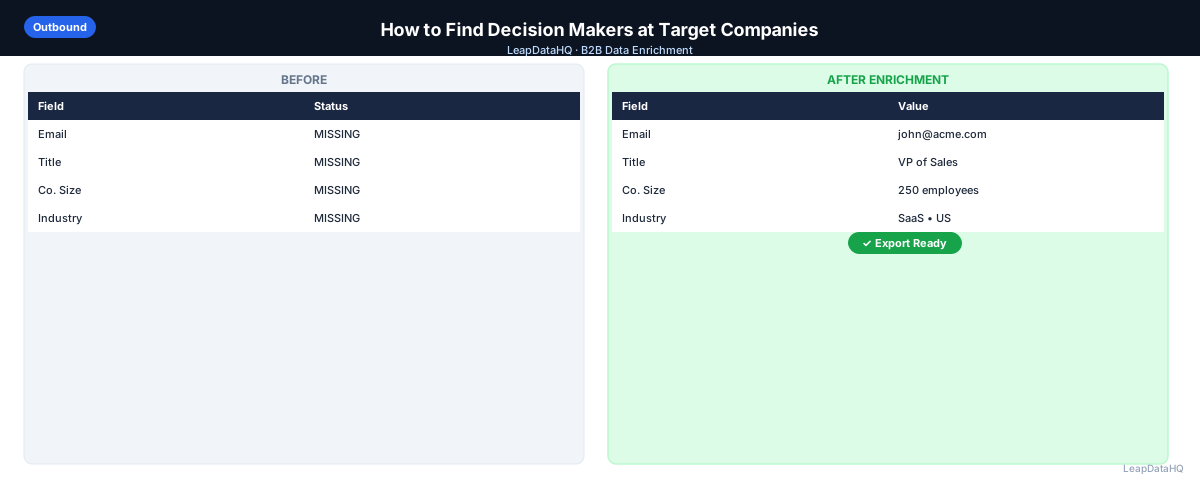
For large target account lists, manually finding decision makers on LinkedIn and company websites doesn't scale. Enrichment tools can return the contacts who hold specific titles at a list of companies, making it possible to identify decision makers at 100+ companies in minutes rather than hours.
Upload a CSV of target company domains. Request enrichment for specific title patterns (VP Marketing, Head of Sales, Director of Operations). Review the returned contacts and filter to those who match your buyer persona. This approach is essential for teams targeting more than 20-30 accounts.
The quality of results depends on the enrichment tool's data coverage and how recently their data was updated. Most tools return a confidence score alongside the contact information — use this to filter out low-confidence results before importing into your outreach tool.
Method 4: Press Releases and News Coverage
Press releases often name the executive behind an initiative — a new product launch, a partnership announcement, or a funding round. These names and titles are reliable and often link to more complete contact information. Set up Google Alerts for your target companies to catch these when they publish.
News coverage also surfaces decision makers through quotes and attributions. When a company is featured in industry publications, the quotes typically come from decision makers. These attributions give you both the name and the context for outreach.
Industry podcasts and webinars are another underutilized source for decision maker identification. Companies typically send their most senior or knowledgeable people to represent them on podcasts and at industry events. These appearances give you both the contact name and context about their expertise and current priorities.
Social media activity can also reveal decision makers. Look for people who actively post about their company's products, initiatives, or industry trends. These individuals are often in leadership or influential roles and are more accessible to outreach because they're already engaged in public conversation about their work.
Getting Contact Information for Decision Makers
Once you've identified the right person, you need to reach them. Email enrichment tools take the name and company domain and return the work email address. This is the most reliable approach for reaching decision makers outside of LinkedIn InMail.
Ready to enrich your CSV list?
Upload a CSV, fill missing data, review confidence scores, and export clean records.
Upload a CSV — Start EnrichingAlways verify enriched emails before adding them to your outreach tool. Decision makers' emails change when they change jobs, and sending to outdated addresses damages your sender reputation. Verification catches closed mailboxes and invalid addresses before they cause problems.
For high-value targets where email enrichment doesn't return results, consider alternative outreach channels. LinkedIn InMail allows you to message decision makers directly on LinkedIn, though response rates are typically lower than email. Phone outreach can be effective for decision makers who are accessible by phone. The key is to match your outreach channel to the decision maker's preferred communication style.
When reaching decision makers, lead with relevance. Reference something specific about their company, their role, or a recent initiative they're involved in. Decision makers can tell immediately whether you've done your research. Generic outreach gets deleted; relevant outreach gets read.
Reaching Decision Makers Who Don't Respond
Decision makers receive a lot of outreach. If your first email doesn't get a reply, persistence with different angles is often necessary.
- Follow up 2-3 times over 2-3 weeks with different angles
- Try an alternate contact at the same company (a direct report or a peer in another department)
- Engage with their LinkedIn content to create familiarity before sending another email
- Consider whether the timing or the message — not the contact — is the problem
- Reference recent company news or initiatives to show you've done your research
- Ask for a referral to the right person if you've reached someone adjacent to the decision maker
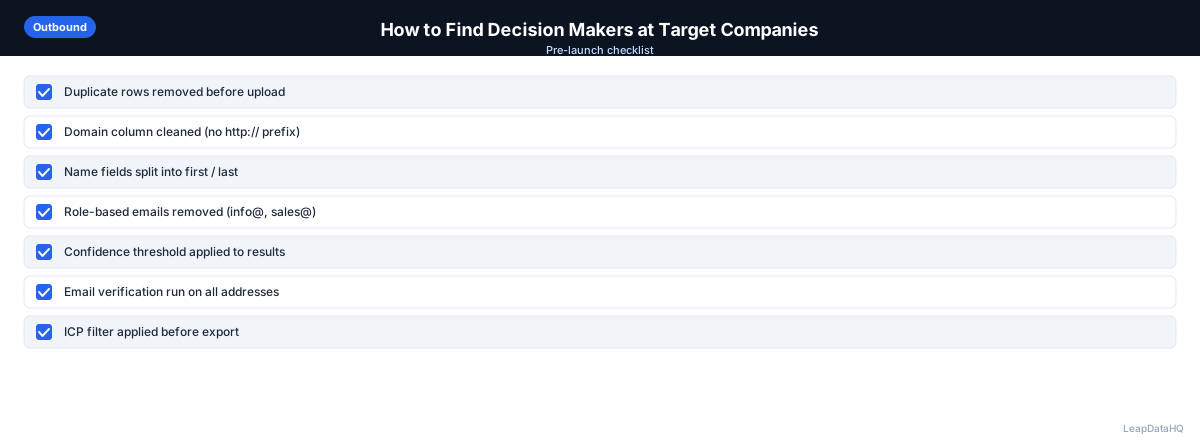
Checklist: Decision-Maker Discovery
Use this checklist when identifying decision makers at target companies:
- Decision-maker profile is defined (title, seniority, department)
- LinkedIn company pages are reviewed for current employees matching the profile
- Company websites and About pages are checked for leadership information
- Enrichment tools are used for bulk discovery across multiple companies
- Contact information is enriched for identified decision makers
- All emails are verified before adding to outreach tool
- Secondary stakeholders and influencers are identified alongside primary decision makers
- Recent company news is reviewed for context on current initiatives
- Outreach messaging is tailored to the specific decision maker's role and priorities
- Follow-up sequence is planned for decision makers who don't respond initially
Common Mistakes to Avoid
- Not defining the decision-maker profile before searching. Without a clear profile, you'll waste time reaching people who can't make purchasing decisions. Define the title, seniority, and department before you start searching.
- Only targeting the economic buyer. The economic buyer approves budget, but the champion advocates for your solution internally. You often need both. Identify and engage both roles in your outreach strategy.
- Relying only on title matching. Titles vary across companies. A "Director" at one company may be equivalent to a "VP" at another. Look for the person who does the function, not just the person with the exact title.
- Not verifying contact information before outreach. Decision makers change jobs frequently. Sending to outdated emails damages your sender reputation and wastes outreach opportunities. Always verify before sending.
- Sending generic messaging to decision makers. Decision makers receive大量 outreach. Generic messaging that doesn't reference their specific situation gets deleted. Personalize based on company context and their role.
- Giving up after one attempt. Decision makers are busy. A single email is unlikely to get a reply. Plan a follow-up sequence with 2-3 touches over 2-3 weeks using different angles.
- Not mapping the full decision-making unit. Reaching only one person at a company limits your options. Identify multiple stakeholders — the economic buyer, the champion, influencers — to increase your chances of engagement.
- Ignoring timing signals. Company news, funding rounds, and job postings signal when decisions are being made. Time your outreach to coincide with these signals for maximum relevance.
Practical Examples
Example 1: SDR Finding Marketing Decision Makers
An SDR at a marketing automation company needed to find marketing decision makers at 50 target accounts. They used LinkedIn to identify VP/Director-level marketing contacts at each company, then used enrichment tools to get email addresses. After verification, they had 42 decision-maker emails ready for targeted outreach. Meeting set rate was 8%, compared to 2% when reaching non-decision-makers.
Example 2: Founder Identifying CTOs at Target Companies
A founder selling developer tools needed to reach CTOs at 30 target companies. They used company websites and LinkedIn to identify CTOs, then enriched contact information. For 5 companies where the CTO wasn't publicly listed, they identified the VP of Engineering as an alternate. This multi-stakeholder approach ensured they reached someone with authority at every target account.
Example 3: Agency Building Decision-Maker Lists for Client
An agency needed to identify sales decision makers at 200 companies for a client. Manual LinkedIn research wasn't scalable, so they used enrichment tools to bulk-identify VP/Director-level sales contacts. After filtering to high-confidence results and verifying emails, they delivered 165 decision-maker contacts to the client.
Example 4: ABM Team Mapping Decision-Making Units
An ABM team targeting 20 enterprise accounts mapped the full decision-making unit at each company: economic buyer (VP), champion (Director), and technical evaluator (Manager). They created personalized outreach for each role, with strategic messaging for the VP, tactical messaging for the Director, and integration details for the Manager. This multi-threaded approach increased engagement rates by 70%.
Example 5: Startup Using News Signals for Timing
A startup selling sales tools set up Google Alerts for their 50 target accounts. When a target company announced a new VP of Sales, the startup reached out within 48 hours referencing the announcement and offering to help the new VP get up to speed quickly. This timely, relevant outreach booked 6 meetings from 50 target accounts.
How LeapDataHQ Helps
LeapDataHQ fits into the decision-maker discovery workflow for bulk outreach. Upload a list of target company domains, and the tool returns contacts including job titles and email addresses for key roles at those companies. Review confidence scores, filter to contacts matching your decision-maker persona, and export for outreach.
For agencies and SDRs building account lists for multiple clients, this saves significant time compared to manual LinkedIn research for every company. The enrichment workflow scales to hundreds of companies in a single upload, making it practical to identify decision makers across large target account lists.
The confidence scores returned during enrichment help you prioritize which contacts to include in outreach. High-confidence contacts are safe to use immediately. Low-confidence contacts may need manual verification on LinkedIn before they're added to your outreach queue.
For teams doing account-based selling, LeapDataHQ's enrichment workflow helps you map the decision-making unit at each target account. Upload your target account domains, get contact data for multiple roles at each company, and build multi-threaded outreach strategies that engage both economic buyers and champions. This comprehensive view of the decision-making landscape increases your chances of engagement.
The credit-based pricing means you pay only for what you enrich. You can run decision-maker discovery on 100 target accounts one month and 500 the next without committing to expensive platforms or annual contracts. This flexibility is valuable for teams with variable prospecting needs or agencies managing multiple client accounts.
Next Steps
If you need to identify decision makers at target companies, start by defining your decision-maker profile. Then use enrichment tools to bulk-discover contacts matching that profile across your target account list. LeapDataHQ helps you find decision makers and get their contact information efficiently. Check our /features and /pricing to see if it fits your workflow.
When to Use LeapDataHQ
LeapDataHQ fits into the decision-maker discovery workflow for bulk outreach. Upload a list of target company domains, and the tool returns contacts including job titles and email addresses for key roles at those companies. Review confidence scores, filter to contacts matching your decision-maker persona, and export for outreach.
For agencies and SDRs building account lists for multiple clients, this saves significant time compared to manual LinkedIn research for every company. The enrichment workflow scales to hundreds of companies in a single upload, making it practical to identify decision makers across large target account lists.
The credit-based pricing means you pay only for what you enrich. You can run decision-maker discovery on 100 target accounts one month and 500 the next without committing to expensive platforms or annual contracts. This flexibility is valuable for teams with variable prospecting needs.
For teams doing account-based selling, LeapDataHQ's enrichment workflow helps you map the decision-making unit at each target account. Upload your target account domains, get contact data for multiple roles at each company, and build multi-threaded outreach strategies that engage both economic buyers and champions.
Start Enriching LeadsFrequently Asked Questions
Should I reach out to the economic buyer or the champion first?
It depends on your sales motion. If your product requires the champion's buy-in before the economic buyer gets involved, start with the champion. If you sell top-down, go to the economic buyer first. For small companies, they're often the same person. For complex enterprise sales, you typically need both.
What titles should I target for common B2B sales?
For sales tools: VP/Head of Sales, Revenue Operations. For marketing tools: VP/Head of Marketing, Demand Gen, Marketing Ops. For HR tools: VP/Director of People, HR Director. For tech products: CTO, VP Engineering, IT Director. Adjust based on company size — smaller companies may combine functions.
What if a company doesn't have the title I'm targeting?
At smaller companies, functions are often combined. A 20-person company may not have a "VP of Marketing" but does have someone who handles marketing. Look for the person who does the function, not necessarily the person with the exact title. Check job postings and LinkedIn for clues about organizational structure.
Is it better to email the decision maker or the influencer first?
This varies by deal complexity and company culture. For simple, fast sales, go direct to the decision maker. For complex enterprise sales, building relationships with influencers first can make the eventual conversation with the decision maker warmer and more likely to succeed. Test both approaches and measure results.
How do I find the decision maker at a company where LinkedIn shows no leadership team?
Check the company website for the Team or About page. Search for the company name plus "CEO" or "founder" on LinkedIn. Look for the person managing their social media or blog content — they're often closely connected to decision-making. Press releases and news coverage also name decision makers.
How do I verify I've found the right decision maker?
Check their LinkedIn profile for responsibilities that match your buying context. Look for posts or articles they've written about relevant topics. Check if they're quoted in press releases about initiatives related to your solution. Their digital footprint should indicate they're involved in the decisions your solution addresses.
What if the decision maker doesn't respond to my outreach?
Plan a follow-up sequence with 2-3 touches over 2-3 weeks using different angles. Try reaching alternate contacts at the same company — a direct report or peer. Engage with their LinkedIn content to create familiarity. Consider whether the timing or message — not the contact — is the problem. Reference recent company news for relevance.