
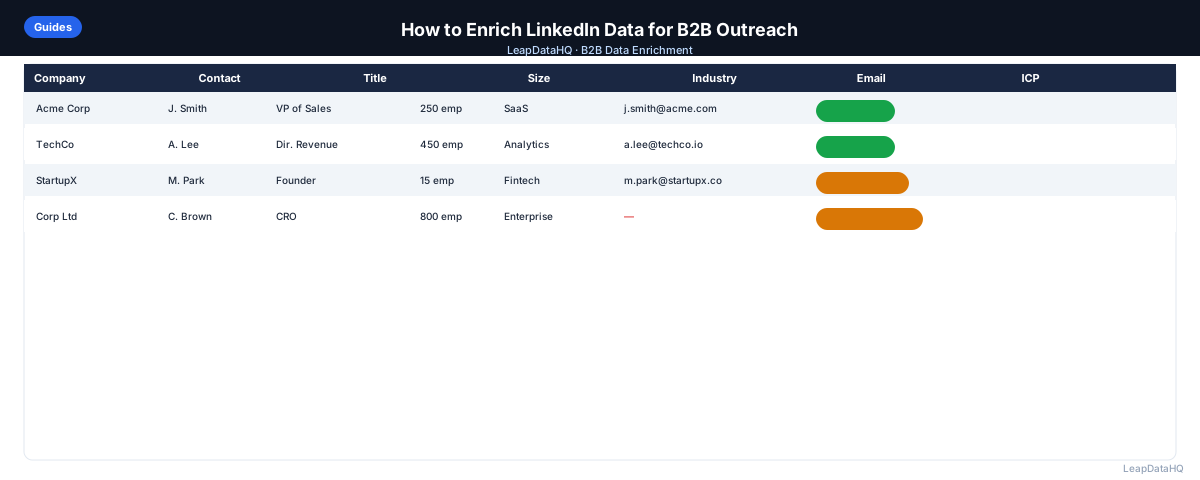
LinkedIn is one of the best places to identify B2B prospects. You can filter by job title, company size, industry, and geography. You can see who fits your ideal customer profile and pull a list of names. But LinkedIn data on its own isn't actionable for outreach — exports don't include email addresses, and direct messaging at scale isn't practical.
Enriching LinkedIn data means taking the names and company information you've identified on LinkedIn and appending the contact details you need to reach those people outside the platform. This transforms your LinkedIn prospecting into actual outreach capability.
This guide explains how to do that — from exporting LinkedIn data to enriching it in bulk. You will learn how to prepare your LinkedIn export, add company domains for better matching, run enrichment, review confidence scores, and export a list ready for your outreach tool.
The process works whether you are enriching 50 contacts from a Sales Navigator export or 2,000 from a large-scale prospecting project. The workflow is the same — clean the export, add domains, enrich, review, and export.
Many teams do the LinkedIn prospecting part well but struggle with the enrichment step. They end up with a great list of targets but no way to reach them. This guide closes that gap.
What LinkedIn Data Includes (and What It Doesn't)
LinkedIn exports from Sales Navigator or a manual connection export include: full name, job title, company name, location, and sometimes LinkedIn profile URL. This is useful for identifying prospects but not sufficient for outreach.
What LinkedIn exports don't include: work email address, direct phone number, company domain, company size, or revenue range. These are the fields you need to actually reach someone.
Understanding this gap is the first step. LinkedIn gives you the who and the where — the right people at the right companies. Enrichment gives you the how — the contact details needed to reach them via email, phone, or other channels.
Step 1: Export Your LinkedIn Data
LinkedIn Personal Export
LinkedIn allows you to export your connections. Go to Settings & Privacy > Data Privacy > Get a copy of your data, and select "Connections". You'll receive a CSV with first name, last name, company, position, and email address for connections who have allowed it.
Note: email addresses are only included for connections who have enabled "Allow your connections to download your email address" in their privacy settings. This is a minority of connections, so do not rely on this export for email addresses.
Sales Navigator Export
LinkedIn Sales Navigator allows you to save leads into lists and export them. The export includes profile data but not email addresses. You can use this as the starting point for an enrichment workflow.
Sales Navigator exports are the most common starting point for LinkedIn enrichment. They give you names, titles, companies, and LinkedIn URLs — everything you need for enrichment except company domains and email addresses.
Step 2: Clean Your LinkedIn Export
Before enriching, clean the export. Remove duplicate rows, standardize job title formatting if needed, and check that company names look correct. If you have the LinkedIn URL for each contact, keep that column — it can be used as an additional matching signal for enrichment.
Cleaning your export improves match rates and prevents wasted enrichment credits on records that will not match. Remove rows with obviously incorrect data, merge duplicates, and ensure company names are consistent.
Step 3: Add Company Domains
Most enrichment tools use company domain as the primary lookup key for email finding. If your LinkedIn export doesn't include domains (most don't), you need to add them.
You can do this manually for small lists (search the company name and find the website), or use a company enrichment tool that converts company names to domains automatically. Adding domains before email enrichment significantly improves match rates.
Step 4: Enrich for Email and Phone
Upload your cleaned LinkedIn export — with company domains added — to a CSV enrichment tool. Map the columns (first name, last name, company domain) and run the enrichment. The tool will return work email addresses and, depending on the tool, direct phone numbers.
Review confidence scores before exporting. Not every record will have a high-confidence email — filter to the records worth using and export those. The rest can be flagged for manual research or archived.
What You Can Enrich Beyond Email
- Company size and headcount (for ICP filtering)
- Revenue range (to prioritize by deal size)
- Industry and sub-industry classification
- Technology stack (for product-led targeting)
- Company LinkedIn URL (for personalization)
- Job seniority level
Important Notes About LinkedIn Data and Privacy
LinkedIn's terms of service restrict automated scraping of their platform. The methods described here — manual exports and enriching with third-party data sources — are consistent with legitimate use of the platform. Do not use unauthorized scraping tools that violate LinkedIn's terms.
When reaching out to contacts identified through LinkedIn, focus on business-to-business outreach for legitimate purposes. Include an easy way to opt out of future messages.
What This Means for Your Prospecting Workflow
Enriching LinkedIn data bridges the gap between identifying prospects and reaching them. Without enrichment, your LinkedIn prospecting is limited to InMail — which is expensive, limited, and often ignored. With enrichment, you can reach prospects via email, which typically has higher response rates for B2B outreach.
The enrichment step also adds company data that enables better segmentation and personalization. When you know company size, industry, and technology stack, you can tailor your messaging to each prospect's specific situation. This level of personalization is not possible with LinkedIn data alone.
Ready to enrich your CSV list?
Upload a CSV, fill missing data, review confidence scores, and export clean records.
Upload a CSV — Start EnrichingFor teams that use LinkedIn as their primary prospecting source, enrichment is not optional — it is the step that makes LinkedIn prospecting actionable. The time investment is minimal compared to the value of being able to reach identified prospects via email.
Who Should Enrich LinkedIn Data
LinkedIn enrichment is valuable for anyone who uses LinkedIn to identify B2B prospects:
- SDRs and sales reps: who use LinkedIn to identify prospects and need email addresses for outreach sequences
- Agencies: who prospect on LinkedIn for clients and need to deliver enriched contact lists
- Recruiters: who source candidates on LinkedIn and need work emails for candidate outreach
- Founders: who do their own prospecting on LinkedIn and need contact details to reach decision makers
- Business development teams: who identify partnership targets on LinkedIn and need emails for outreach
- Marketers: who use LinkedIn to identify event attendees or content engagers and need emails for follow-up
Checklist: LinkedIn Data Enrichment
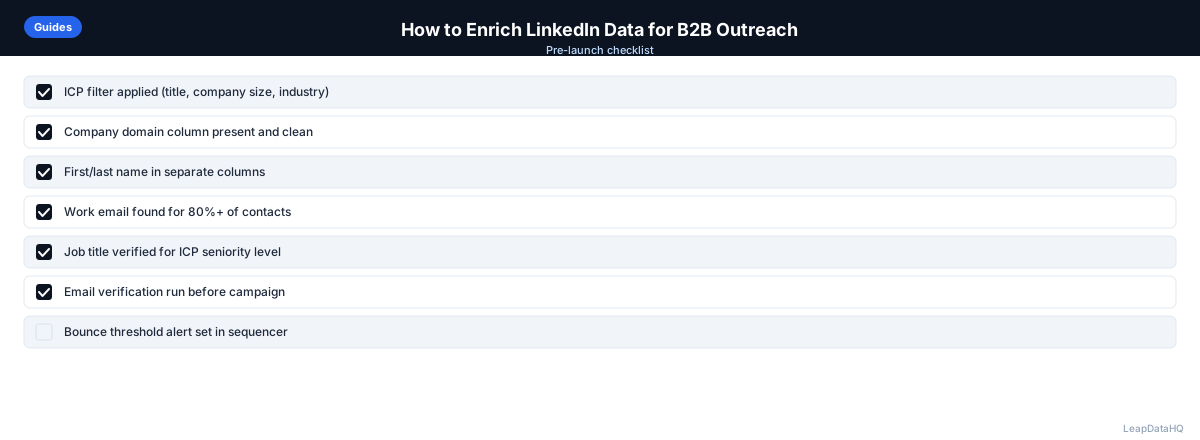
Use this checklist to ensure a complete LinkedIn enrichment workflow:
- Exported LinkedIn data using official export features (not scraping tools)
- Removed duplicate rows from the export
- Standardized company names for consistency across all rows
- Added company domains to all rows — manually for small lists or via company enrichment for larger lists
- Cleaned domain column by removing http://, https://, www, and trailing slashes
- Mapped columns correctly in enrichment tool (first name, last name, company domain)
- Ran enrichment and reviewed confidence scores on all returned records
- Filtered to high-confidence results before exporting the final file
- Verified email addresses before importing to outreach tool
- Used enriched company data (size, industry, tech stack) for segmentation
- Removed or flagged low-confidence records for manual research
- Documented match rates for future LinkedIn enrichment projects
Common Mistakes to Avoid
These mistakes reduce the effectiveness of LinkedIn data enrichment:
- Not adding company domains before enrichment: Domains are the most reliable lookup key for email finding. Running enrichment without domains produces significantly lower match rates. Always add domains before enriching for emails.
- Using unauthorized scraping tools: LinkedIn's terms of service restrict automated scraping. Using unauthorized tools risks account suspension. Use official export features and legitimate enrichment providers.
- Skipping the cleaning step: Dirty LinkedIn exports with duplicates, inconsistent company names, and formatting issues produce poor enrichment results. Clean your export before uploading to an enrichment tool.
- Importing all enrichment results without reviewing confidence scores: Not every enriched email is reliable. Low-confidence results should be manually verified or excluded from outreach to protect deliverability.
- Not verifying emails before sending: Even high-confidence enriched emails should be verified before adding to outreach campaigns. Verification catches closed mailboxes and inactive domains that confidence scores cannot detect.
- Not using enriched company data for segmentation: Enrichment adds company size, industry, and technology data. If you do not use these fields to segment your list, you are missing the personalization value of enrichment.
- Expecting 100% match rates: Not every LinkedIn contact has a publicly discoverable email. Match rates of 50-75% are realistic for LinkedIn exports. Plan for manual research on high-value targets that do not match.
Practical Examples
Example 1: Sales Navigator Export Enrichment
An SDR exports 200 leads from Sales Navigator with names, titles, and companies. They add company domains manually for the top 50 priority contacts and use a domain lookup tool for the remaining 150. After enrichment and verification, they have 170 deliverable emails ready for a targeted sequence.
Example 2: Conference Prospecting Follow-Up
A marketer identifies 100 conference attendees on LinkedIn who fit their ICP. They export the list, add company domains, and enrich for emails. After filtering to high-confidence results and verifying, they have 80 emails for personalized follow-up outreach referencing the conference.
Example 3: Recruiting Candidate Outreach
A recruiter sourcing candidates on LinkedIn for a senior role can enrich the list for work emails, review confidence scores, and verify all addresses, then reach out by email instead of InMail. Reaching contacts on a channel they actually monitor can produce a meaningfully higher response rate than an InMail campaign.
Example 4: Agency Client Prospecting
An agency identifies 300 prospects on LinkedIn for a client in the fintech space. They enrich the list, filter to high-confidence results, verify emails, and deliver 240 outreach-ready contacts formatted for the client's outreach tool. The client launches campaigns immediately.
Example 5: Account-Based Marketing
A marketing team identifies 50 target accounts on LinkedIn and finds 2-3 decision makers at each. They enrich for emails and company data, segment by company size, and create personalized email sequences for each segment. The enriched data enables messaging that references company-specific context.
How LeapDataHQ Helps
LeapDataHQ helps you enrich LinkedIn data through its CSV enrichment workflow. After you export your LinkedIn prospecting list and add company domains, you upload the CSV to LeapDataHQ. The platform enriches each record with email addresses and company data, returning confidence scores for each field.
You review the enriched results, filter to high-confidence records, and export a clean CSV ready for your outreach tool. The workflow is designed for LinkedIn exports specifically — you bring the prospecting data from LinkedIn, and LeapDataHQ fills in the contact details LinkedIn does not provide.
The credit-based pricing at /pricing means you pay only for what you enrich. For SDRs and agencies who run LinkedIn prospecting sessions regularly, this keeps costs aligned with actual usage. Explore /features and /b2b-contact-enrichment to see the full workflow.
Next Steps
If you have a LinkedIn export that needs enrichment, start by cleaning the data and adding company domains. Then run a test batch through enrichment to see match rates on your specific LinkedIn prospects.
LeapDataHQ makes LinkedIn enrichment straightforward. Upload your prepared CSV at /enrich-csv-file, review confidence scores, and export clean data ready for outreach. Check /features and /pricing to see if the workflow fits your prospecting process.
When to Use LeapDataHQ
LeapDataHQ works well as the enrichment step after a LinkedIn prospecting session. Once you have a cleaned export — with company names and domains — upload it to LeapDataHQ to append email addresses and company data. Review the confidence scores, filter to high-confidence records, and export a list that's ready for your outreach tool.
It's a practical option for SDRs, agencies, and recruiters who use LinkedIn regularly to identify prospects but need an efficient way to get contact details without manual lookup for every row.
The credit-based pricing means you pay only for what you enrich, making it cost-effective for teams with variable LinkedIn prospecting volume. No seat fees or annual contracts required.
LeapDataHQ returns confidence scores alongside each enriched field, giving you control over output quality. You filter to high-confidence results before exporting, rather than importing everything and dealing with bounces later.
For teams working through the complete LinkedIn enrichment workflow — from export cleaning through domain addition, enrichment, verification, and import — LeapDataHQ provides the enrichment layer without requiring developer integration or complex setup. Results depend on input data quality and the public data available for each contact.
Start Enriching LeadsFrequently Asked Questions
Is enriching LinkedIn data legal?
Using LinkedIn exports you have legitimately obtained and enriching them with third-party data sources is legal. What is not permitted is automated scraping of LinkedIn in violation of their terms of service. Use official export features and work with legitimate enrichment providers.
Why don't LinkedIn exports include email addresses?
LinkedIn restricts email visibility by design — it is a privacy and business decision. Members can choose to share their email with connections, but most do not. LinkedIn wants outreach to happen on-platform through InMail, which is their revenue model.
What's a realistic match rate when enriching LinkedIn exports?
For contacts at established companies with public contact information, expect 50-75% email match rates from a LinkedIn export. Contacts at very small companies, government organizations, or non-profits tend to have lower match rates. Results depend on input data quality.
Can I enrich LinkedIn data without a company domain?
It is harder. Enrichment tools use domain as the primary key for email pattern matching. Without a domain, the tool has to guess based on company name, which introduces more errors. Add domains before enriching when possible for significantly better results.
How do I scale LinkedIn prospecting beyond manual searches?
Sales Navigator's saved search and alert features let you build and monitor lists without repetitive manual searching. Export those lists periodically, enrich them for contact data, and feed them into your outreach workflow. This systematizes the prospecting process.
Should I use LinkedIn InMail or enriched email for outreach?
For B2B outreach, enriched email typically has higher response rates than InMail. InMail is expensive, limited, and often ignored. Email outreach is more cost-effective and allows for better personalization using enriched company data.
How often should I re-enrich my LinkedIn prospect lists?
Contact data decays over time. If you are prospecting the same targets over multiple months, re-enrich every 3-6 months to catch email changes and job transitions. For one-time campaigns, a single enrichment pass is sufficient.