
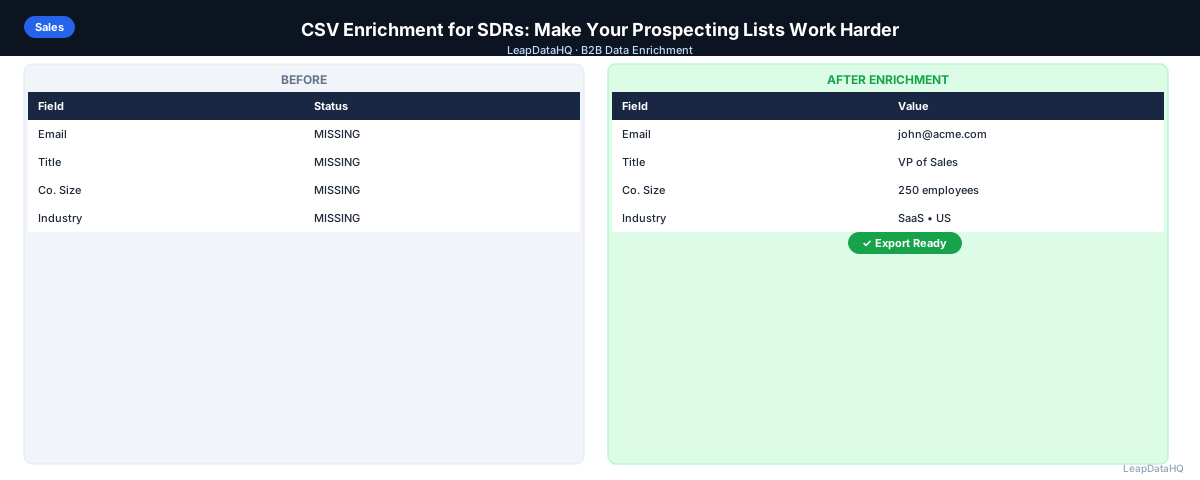
SDRs have two core jobs: build lists and book meetings. Most SDRs spend far too much time on the first job — manually researching contacts, looking up emails, and filling in company data one row at a time. That's time not spent on calls, sequences, and follow-ups.
CSV enrichment automates the tedious parts of list building. Instead of looking up 300 emails manually, you upload a file and get results back in minutes. The time you reclaim goes directly into outreach.
The reality for most SDRs is that list building consumes 40-60% of their weekly effort. Between LinkedIn searches, company website lookups, and spreadsheet management, the research process alone can consume an entire day. That's a massive opportunity cost when every hour spent on research is an hour not spent on conversations that could turn into pipeline.
CSV enrichment changes this equation. By automating the data-filling step, you shift your time allocation from research to outreach — from spreadsheets to sequences. The result is more touches, more conversations, and ultimately more meetings booked.
This guide covers how SDRs can use CSV enrichment to build better lists faster, with practical steps you can implement this week.
Why SDRs Spend Too Much Time on List Research
Most SDRs start with partial data: a list of company names from a target account list, a LinkedIn search with names but no emails, or a conference attendee export. Getting that partial data to a state where you can do outreach requires filling in what's missing.
Manual lookup is the default for many SDRs — it works but it's slow. Looking up one email manually takes 2-5 minutes. On a list of 200 contacts, that's 7-16 hours of research time that could be spent on something more valuable. Multiply that by four weeks in a month and you're looking at 28-64 hours of pure research time — nearly a full work week lost to spreadsheets.
The problem compounds because most SDRs need fresh lists every week or two. Target accounts get exhausted, sequences finish, and new batches need to be built constantly. Without automation, the research burden never goes away — it just repeats.
What CSV Enrichment Does for SDR Workflows
CSV enrichment replaces most of that manual research. Prepare a spreadsheet with company domain and contact name, upload it, and receive a file back with email addresses, phone numbers, and company data appended. What used to take hours now takes minutes.
The time investment drops from hours to minutes. You still review the output and filter low-confidence results, but the heavy lifting is done automatically. For an SDR enriching 200 contacts per week, the time savings compound into multiple hours of additional outreach time every single week.
Beyond time savings, CSV enrichment also improves data quality. Manual research is prone to errors — typos in email addresses, incorrect company associations, outdated job titles. Enrichment tools query structured databases that return consistent, standardized data. The combination of speed and accuracy makes CSV enrichment a force multiplier for SDR productivity.
What This Means for Your Outreach
When you reclaim the hours spent on manual research, you redirect that time into higher-value activities: writing personalized outreach, making calls, following up with prospects, and booking meetings. These are the activities that directly drive pipeline and revenue.
Consider the math: if CSV enrichment saves you 10 hours per week on research, and you use even half of that time for additional outreach touches, you're adding 20-30 more personalized touches per week. Over a quarter, that's 260-390 additional touches — a significant increase in your total outreach volume without working more hours.
The quality improvement matters equally. Enriched data means fewer bounces, better personalization, and more relevant targeting. Your emails land in the inbox instead of bouncing. Your {{company}} and {{title}} personalization tokens populate correctly. Your segmentation by industry and company size actually works. The net result is higher reply rates from every campaign you run.
Who Should Use CSV Enrichment for SDR Work
CSV enrichment serves multiple roles within sales organizations, and the benefits extend beyond just the SDR doing the research:
- Frontline SDRs: who build weekly prospecting lists and need to maximize outreach time over research time
- Sales team leads: who want their reps spending more time selling and less time on manual data entry
- Agency lead generation teams: managing prospecting lists for multiple clients simultaneously
- Founders doing early sales: who are building lists themselves without a dedicated research team
- Sales ops and RevOps: who need consistent, clean data flowing into CRM and outreach tools
- Business development reps: managing outbound campaigns across multiple verticals and personas
- Growth marketers: running account-based marketing campaigns that need enriched contact data
Building an SDR Enrichment Workflow
Step 1: Start with Your Target Account List
Build your account list from your ICP: industry, company size, geography. This becomes the company-level input for enrichment. Start with your company's defined ideal customer profile and use LinkedIn, Crunchbase, or industry directories to identify specific companies that match.
Be specific about your targeting criteria. A list of 200 well-matched accounts will outperform a list of 1,000 loosely targeted ones. Include the company domain for each account — this is the most reliable lookup key for enrichment and dramatically improves match rates.
Step 2: Add Decision Maker Names
Use LinkedIn to find the right titles at each target account. Add first name, last name, and job title for each contact. This takes 1-2 minutes per company for 2-3 contacts each. Focus on people with decision-making authority or direct influence over the purchase.
If you have the contact's LinkedIn URL, include it in your spreadsheet. LinkedIn URLs serve as an additional matching signal that improves enrichment accuracy. For each company, aim to identify 2-3 contacts across your target titles to give yourself options.
Step 3: Upload and Enrich
Upload your spreadsheet (company domain, first name, last name, title) to a CSV enrichment tool like LeapDataHQ. The tool appends email addresses, direct phone numbers, and additional company data. Processing typically takes minutes for lists under 500 rows.
After enrichment completes, review the confidence scores on each returned record. High-confidence emails are typically safe to use after verification. Low-confidence results should be flagged for manual review or excluded from your outreach list. This filtering step is what separates professional enrichment from simply appending data and hoping for the best.
Step 4: Filter and Import to Your Sequencer
Review confidence scores. Remove or flag low-confidence results. Run the remaining emails through a verification tool to confirm deliverability. Then import clean records into your email sequencer or CRM. You now have a ready-to-run list without 10+ hours of manual research.
Ready to enrich your CSV list?
Upload a CSV, fill missing data, review confidence scores, and export clean records.
Upload a CSV — Start EnrichingBefore importing, do a quick spot check on 5-10 rows to confirm the data looks correct. Check that emails follow valid patterns, company names match domains, and titles align with your target personas. This final quality gate catches any anomalies before they reach your outreach campaigns.
Enrichment Tips for SDRs
- Enrich in batches that match your weekly outreach cadence — don't enrich 1,000 contacts if you're only sending 200 emails this week
- Include the contact's LinkedIn URL when available — it improves match accuracy
- Re-enrich target accounts that didn't respond after 3-4 months — they may have changed email or title
- Use company-level enrichment (size, industry, tech stack) to improve personalization in your sequences
- Track your match rates by industry and company size to understand where enrichment works best for your targets
- Keep a running log of which data sources produce the best results for your specific ICP
How Much Time Can You Actually Save?
For an SDR enriching 200 contacts per week manually (2-5 min each), that's 7-16 hours of research. With CSV enrichment: 10 minutes to prepare the input, 5 minutes for processing, 10-15 minutes to review and filter. The time saving compounds weekly.
Over a month, that's 28-64 hours saved on research alone. Over a quarter, the cumulative time savings can equal multiple full work weeks. The key is redirecting that saved time into outreach activities that generate pipeline — not filling it with more research.
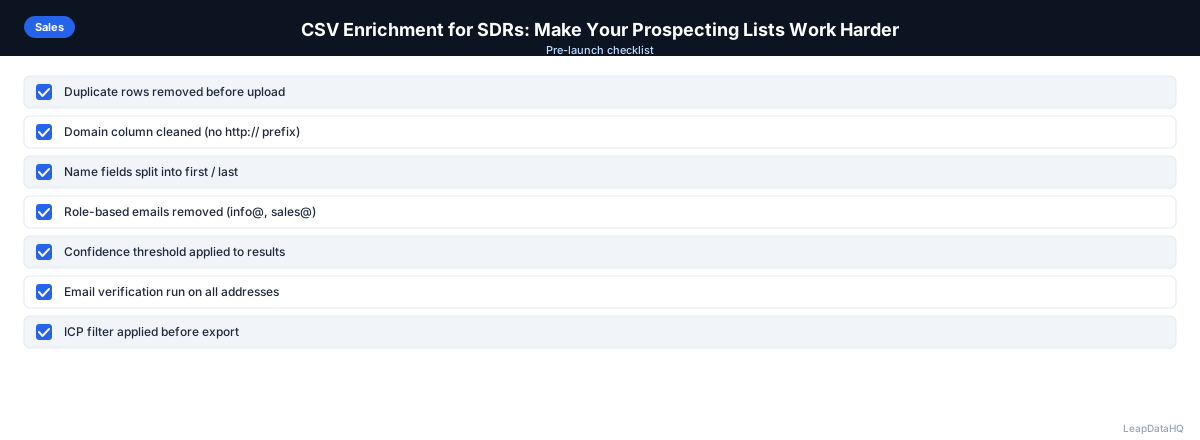
Checklist: SDR CSV Enrichment Workflow
- Defined ICP and targeting criteria before building list
- Built target account list with company domains included
- Identified 2-3 decision makers per target account on LinkedIn
- Prepared input CSV with domain, first name, last name, and title columns
- Removed duplicate rows and standardized formatting in input file
- Uploaded cleaned CSV to enrichment tool and mapped columns correctly
- Reviewed confidence scores on all returned records
- Filtered out low-confidence results before export
- Verified enriched email addresses before importing to sequencer
- Segmented enriched contacts by title, industry, or company size
- Spot-checked 5-10 rows for accuracy before launching campaign
- Tracked bounce rates and reply rates by enrichment confidence level
Common Mistakes to Avoid
- Enriching without cleaning input data first: Duplicates, inconsistent company names, and missing domains all reduce match rates and waste enrichment credits. Always clean your CSV before uploading.
- Importing all enriched records without reviewing confidence scores: Low-confidence emails increase bounce rates, which damages sender reputation. Filter to high-confidence results before importing.
- Using company name instead of domain as the lookup key: Company names are ambiguous. Domains are unique identifiers. Always include a domain column for better accuracy.
- Skipping email verification after enrichment: Confidence scores indicate pattern accuracy, not live deliverability. Verification catches closed mailboxes and inactive domains.
- Enriching too many contacts at once: Enriching 1,000 contacts when you only need 200 this week wastes credits on contacts that may go stale before you use them. Match batch size to your outreach cadence.
- Not segmenting after enrichment: Enrichment adds data fields that enable better targeting. If you don't use company size, industry, and title data to segment your list, you're missing the value of enrichment.
- Reusing the same enriched list without refreshing: Contact data decays over time. Re-enrich lists that are 3+ months old before reusing them for new campaigns.
Practical Examples
Example 1: Weekly Prospecting List for a Tech SDR
An SDR at a B2B SaaS company builds a weekly list of 150 contacts at mid-market tech companies. She identifies target accounts on LinkedIn, adds company domains, and uploads a CSV with contact names and titles. After enrichment, she receives 120 email addresses (80% match rate). After verification, 115 are deliverable. She segments by company size and imports into her sequencer — all in under 30 minutes instead of the 8 hours manual research would have taken.
Example 2: Account-Based Outreach for Enterprise Targets
An SDR targeting 30 enterprise accounts identifies 3 decision makers per account (90 contacts total). He enriches the list and receives 72 emails (80% match rate). Because these are high-value targets, he manually researches the 18 contacts where enrichment didn't return results, finding emails through LinkedIn and company websites. The combined approach gives him a complete, verified list for a high-touch ABM campaign.
Example 3: Multi-Vertical Campaign Preparation
An SDR running campaigns across healthcare, finance, and technology verticals builds separate lists for each. After enrichment, she uses the industry and company size data returned by the enrichment tool to further segment within each vertical. The enriched data enables personalized messaging referencing each prospect's specific industry challenges and company context.
Example 4: Re-Enrichment of a Stale Target List
An SDR has a list of 200 target contacts from 4 months ago that didn't convert. Before re-engaging, he re-enriches the list to check for job changes and email updates. The re-enrichment reveals that 15% of contacts have changed companies. He updates his CRM, removes the stale records, and launches a fresh campaign to the remaining 170 verified contacts.
Example 5: Conference Follow-Up List
After a trade conference, an SDR has 80 business cards with names and company names but no emails. She adds company domains by searching each company website, then enriches the full list. She receives 68 email addresses (85% match rate), verifies them, and loads the clean contacts into a follow-up sequence referencing the conference — all within an hour of the event.
How LeapDataHQ Helps
LeapDataHQ fits directly into the SDR enrichment workflow. Upload your target account and contact CSV, and the tool returns email addresses, phone numbers, and company data alongside confidence scores. You review the results, filter to high-confidence records, and export a file ready for your sequencer.
For SDRs who build new lists weekly or monthly, the credit-based pricing model means you pay for what you actually enrich rather than a fixed monthly seat fee. Enrich 200 contacts one week and 500 the next — you only pay for the credits you use. This flexibility matches how SDRs actually work, with variable list sizes depending on campaign needs.
The confidence scoring system gives SDRs visibility into which records are reliable and which need additional review. This filtering step helps protect sender reputation by ensuring only high-quality emails reach your outreach campaigns. Combined with a verification step, LeapDataHQ helps SDRs maintain bounce rates well below the 2% threshold that triggers deliverability problems. Check our /features and /pricing pages to learn more.
Next Steps
If you're an SDR spending more time on research than outreach, CSV enrichment can change that. Start by preparing a list of 50-100 target contacts with company domains, upload to LeapDataHQ, and see the match rates and confidence scores for your specific target market. The results will show you exactly how much time you can save and how much your list quality can improve.
When to Use LeapDataHQ
LeapDataHQ fits into Step 3 of this workflow. Upload your target account and contact CSV, get emails and company data back, review confidence scores, and export a file ready for your sequencer.
For SDRs who build new lists weekly or monthly, the credit-based model means you pay for what you actually enrich rather than a fixed monthly seat fee. This matches the variable nature of SDR work — some weeks you need 100 contacts enriched, others you need 500.
The confidence scoring system is particularly valuable for SDRs who need to protect their sender reputation. By filtering to high-confidence results before importing into a sequencer, you reduce bounce rates and improve deliverability across all your campaigns. This is especially important for SDRs managing multiple campaigns simultaneously, where a deliverability issue on one campaign can affect all others.
LeapDataHQ also supports the re-enrichment workflow that keeps target lists fresh. When contacts don't respond to initial outreach, re-enriching after 3-4 months catches job changes and email updates before you re-engage. This prevents wasting outreach on stale contacts and improves the efficiency of your follow-up sequences.
For teams looking to scale their prospecting without adding headcount, LeapDataHQ provides the enrichment layer that lets each SDR handle more accounts and build better lists in less time. Visit /sales-prospecting-data-tool and /csv-email-enrichment to explore how it fits your workflow.
Start Enriching LeadsFrequently Asked Questions
Can I enrich a target account list without knowing who to contact yet?
Yes — start with company-level enrichment. Upload company names and domains to get industry, size, headcount, and technology data. This lets you prioritize and filter accounts before doing contact-level enrichment. Company-level enrichment is faster and helps you focus contact enrichment only on accounts that match your ICP.
What should I do when enrichment doesn't find an email for a high-priority contact?
For high-value targets, supplement with manual research: check LinkedIn for email in the profile, look for public mentions in press releases or conference bios, or try email pattern guessing based on the company domain format. You can also check the company website's team or about page for contact information.
Is it better to enrich before or after segmenting my list?
Segment first when possible. Enriching only the accounts and contacts that fit your ICP — rather than the entire raw list — avoids spending credits on records you'll discard anyway. Use your targeting criteria to filter accounts first, then enrich the filtered list for maximum efficiency.
How do I handle contacts at the same company with different email patterns?
This is uncommon but happens at companies that have been through acquisitions or domain changes. When you see inconsistent patterns, verify each email individually before adding to your outreach list. If patterns conflict, treat the lower-confidence result as risky and verify manually.
What's the most common SDR mistake with enriched data?
Importing enriched data into a sequencer without reviewing confidence scores. Low-confidence emails increase bounce rates, which damages sender reputation. Always filter to high-confidence results and verify emails before loading into your outreach tool.
How often should I re-enrich my prospecting lists?
For active lists, re-enrich every 3-4 months. Contact data decays at roughly 20-30% per year, so a list from 6 months ago likely has outdated emails for some contacts. Re-enrichment before re-engaging catches job changes and email updates, improving deliverability and response rates.
What enrichment fields matter most for SDR personalization?
Job title, company size, and industry are the most consistently useful for personalization. Title data helps you adjust messaging tone and value proposition. Company size informs the buying context. Industry enables relevant pain point references. Tech stack data is valuable if your product has specific integrations.