
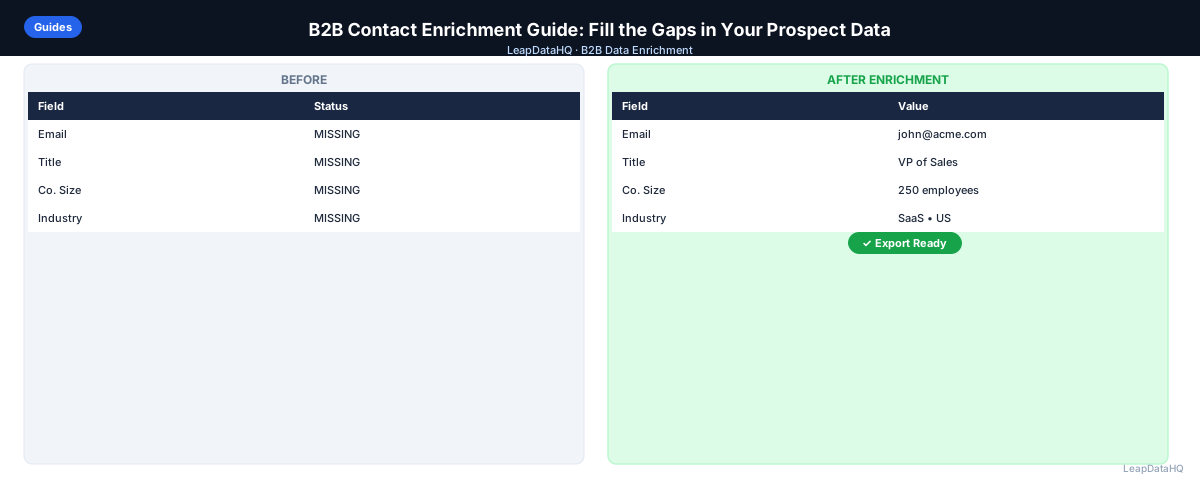
Contact enrichment is one of the highest-leverage activities in B2B sales and marketing. You invest time identifying the right prospects — then you need complete, accurate contact data to actually reach them. Enrichment bridges that gap.
The challenge is doing it well: choosing the right tool for your use case, understanding which data to trust, and building enrichment into your workflow so it happens consistently rather than ad hoc.
Without enrichment, your outreach is limited to the data you already have — which is often incomplete. LinkedIn exports don't include emails. CRM records accumulate gaps over time. Conference lists have names but no contact details. Enrichment transforms these partial records into complete, actionable contact data that enables personalized, targeted outreach.
The most effective enrichment workflows are systematic rather than sporadic. They happen at defined points in your sales process: when building new prospect lists, when refreshing stale CRM records, when preparing for campaigns, and when onboarding new leads. Building enrichment into these workflows ensures it happens consistently and produces reliable results.
This guide covers the full picture of B2B contact enrichment — from what it is to how to make it part of your regular process.
What Is B2B Contact Enrichment?
Contact enrichment is the process of appending missing or additional data to an existing contact record. Starting from what you already know — typically a name and company — enrichment adds email addresses, phone numbers, job titles, LinkedIn URLs, company size, industry, and other fields.
The enrichment happens automatically through tools that query databases of business contact information, company data, and public web records. The output is a more complete record ready for outreach, CRM import, or marketing segmentation.
Enrichment is distinct from prospecting. Prospecting identifies new contacts to reach. Enrichment completes the data on contacts you've already identified. Both are important, but they solve different problems.
Which Contact Fields Can Be Enriched?
A wide range of contact and company data fields can be enriched:
- Work email address
- Direct phone number
- Job title and department
- Seniority level
- LinkedIn profile URL
- Company name and domain
- Company headcount and revenue range
- Industry and sub-industry
- Company technology stack
- Funding stage and investors
What This Means for Your Team
Contact enrichment transforms partial prospect records into complete, actionable data. For sales teams, this means outreach that reaches the right person with the right message. For marketing teams, it means campaigns that target the correct audience with relevant content.
The time savings alone justify enrichment for most teams. Manual research to find a single contact's email takes 2-5 minutes. For a list of 200 contacts, that's 7-16 hours of research time. Enrichment reduces this to minutes, freeing your team to focus on higher-value activities like crafting personalized outreach and having conversations with prospects.
Who Should Use B2B Contact Enrichment
Contact enrichment serves multiple roles across B2B organizations:
- Sales teams and SDRs: enriching prospect lists before cold outreach and CRM imports
- Agencies: delivering enriched lead lists to clients as part of lead generation services
- Founders and business development: building outreach lists without dedicated research support
- Recruiters: finding candidate contact information for sourcing outreach
- Marketing operations: enriching event leads, webinar registrants, and content download leads
- CRM administrators: maintaining data quality by filling gaps in existing records
- RevOps teams: ensuring clean data flows through the revenue technology stack
Input Data: What You Need to Start
The quality of your enrichment output depends heavily on what you start with. Best inputs: company domain (most reliable lookup key), first name and last name, job title (optional but improves accuracy), and LinkedIn profile URL (significantly improves accuracy when available). Prepare your input data before enriching. Remove duplicates, standardize company names, and ensure domains are formatted correctly.
How to Evaluate Contact Enrichment Tools
Test With Your Actual Data
Every enrichment tool performs differently for different industries, company sizes, and geographies. The only reliable evaluation is to run a representative sample from your own dataset and measure match rate and accuracy.
Understand Confidence Signals
Good enrichment tools return a confidence score or status alongside each enriched field. Confidence scores let you filter to high-confidence results before importing into your CRM or outreach tool.
Check Pricing and Contract Terms
Per-record pricing is predictable and scales with your usage. Credit-based models offer the most flexibility — you pay for what you enrich without committing to monthly minimums or annual contracts.
Building Contact Enrichment Into Your Workflow
Ready to enrich your CSV list?
Upload a CSV, fill missing data, review confidence scores, and export clean records.
Upload a CSV — Start Enriching- Prospecting enrichment: identify target contacts on LinkedIn → add to CSV → enrich for email → import to sequencer
- CRM gap-fill: export CRM contacts with missing fields → enrich → import results back
- Inbound lead enrichment: new form fill → API enrichment → append data to CRM record automatically
- List refresh: contacts not engaged in 6+ months → re-enrich to check current email → re-activate or archive
Managing Enrichment Quality Over Time
Contact data decays continuously. Schedule periodic re-enrichment of your active contact database to maintain accuracy. For most teams, quarterly re-enrichment of active contacts and annual re-enrichment of the full database is a sustainable cadence.
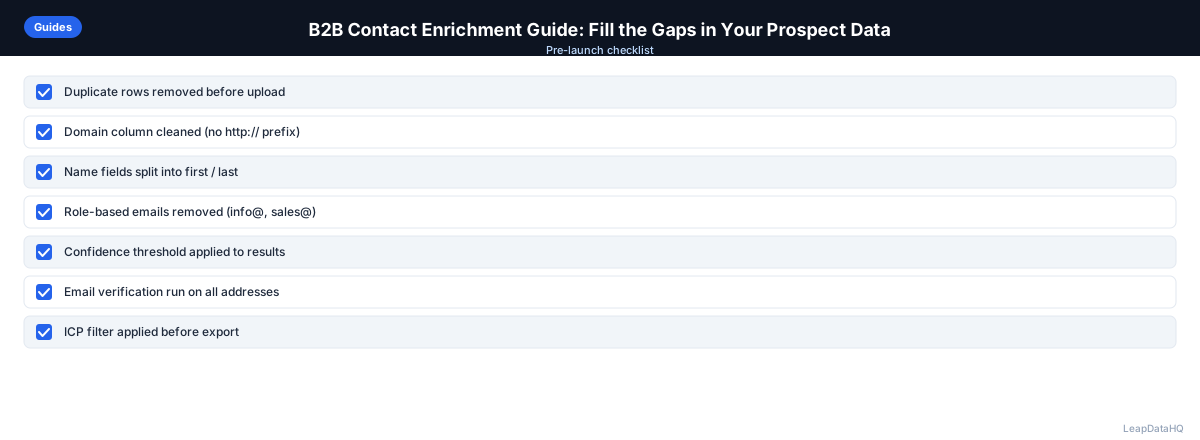
Checklist: B2B Contact Enrichment Workflow
- Defined which contact fields need enrichment (email, phone, company data)
- Prepared input CSV with company domain, first name, last name columns
- Removed duplicates and standardized formatting in input file
- Added LinkedIn URLs where available to improve match accuracy
- Selected enrichment tool and tested with representative sample
- Reviewed match rates and accuracy on test batch
- Uploaded cleaned CSV to enrichment tool with correct column mapping
- Reviewed confidence scores on all returned records
- Filtered to high-confidence results before export
- Verified enriched email addresses before importing to outreach tool
- Imported enriched data into CRM or sequencer with correct field mapping
- Set up quarterly re-enrichment schedule for active contacts
Common Mistakes to Avoid
- Not cleaning input data before enrichment: Duplicates, inconsistent company names, and missing domains reduce match rates and waste credits. Always clean your CSV before uploading to an enrichment tool.
- Importing all enriched records without review: Low-confidence results may be inaccurate. Filter to high-confidence records before importing into your CRM or outreach tool.
- Skipping email verification: Confidence scores indicate pattern accuracy, not live deliverability. Verification catches closed mailboxes and inactive domains that confidence scoring alone misses.
- Using enrichment as a one-time activity: Contact data decays continuously. One-time enrichment without periodic re-enrichment means your data goes stale within months.
- Not testing with actual data before committing: Every tool performs differently for different markets. Test with your specific target data before committing to a tool or large volume.
- Ignoring pricing structure mismatches: Annual seat fees don't make sense for teams with variable volume. Credit-based pricing aligns cost with actual usage.
Practical Examples
Example 1: SDR Weekly Prospecting
An SDR identifies 150 target contacts on LinkedIn each week. She exports the list, adds company domains, and enriches for email addresses. The enrichment returns 120 emails (80% match rate). After verification, she imports 115 deliverable contacts into her sequencer with personalized messaging based on enriched company data.
Example 2: CRM Gap-Fill Project
A CRM admin discovers that 2,000 contacts have missing email addresses. She exports those records, enriches them through a CSV enrichment tool, and reviews confidence scores. She imports 1,400 high-confidence email addresses back into the CRM, filling the gaps and enabling outreach to previously incomplete records.
Example 3: Event Follow-Up Enrichment
After a conference, a marketing team has 300 attendee names and companies but no emails. They add company domains, enrich the list, and receive 240 email addresses. After verification and segmentation by industry, they launch personalized follow-up sequences referencing the event.
Example 4: Quarterly Database Refresh
A RevOps team runs quarterly re-enrichment on their 5,000 active contacts. They export contacts not updated in 6+ months, enrich them to check for job changes and email updates, and import refreshed data back into the CRM. The quarterly refresh catches 15-20% of contacts who have changed roles or companies.
Example 5: Agency Client Deliverable
A lead generation agency receives a list of 500 target companies from a client. They enrich for decision-maker contacts, company data, and job titles. After filtering to high-confidence results and verifying emails, they deliver 380 outreach-ready contacts formatted for the client's CRM instance.
How LeapDataHQ Helps
LeapDataHQ is built for the prospecting enrichment and CRM gap-fill workflows described above. Upload a CSV with domains and contact names, get enriched records back with confidence scores, filter to high-confidence results, and export.
For teams that need enrichment as an on-demand capability rather than a continuous integration, LeapDataHQ's credit-based pricing model means you pay only for what you enrich. No monthly seat fees, no annual contracts, no minimum commitments.
The confidence scoring system gives you visibility into which records are reliable and which need additional review. Combined with a verification step, LeapDataHQ helps you maintain high-quality contact data. Visit /b2b-contact-enrichment and /features to explore how it fits your enrichment workflow.
Next Steps
If you have prospect records with missing data, start by preparing a batch of 50-100 contacts with company domains and names. Test enrichment with LeapDataHQ to see match rates and confidence scores for your specific target market.
When to Use LeapDataHQ
LeapDataHQ is built for the prospecting enrichment and CRM gap-fill workflows described above. Upload a CSV with domains and contact names, get enriched records back with confidence scores, filter to high-confidence results, and export.
It's particularly well-suited for teams that need enrichment as an on-demand capability rather than a continuous integration. The credit-based pricing model means you pay only for what you enrich — no monthly seat fees, no annual contracts, no minimum commitments.
For agencies managing enrichment across multiple clients, LeapDataHQ provides a single tool that works for different industries and geographies without requiring separate subscriptions per client. Run enrichment batches for different clients using the same account and export separate outputs for each.
For teams running quarterly re-enrichment cycles, LeapDataHQ makes periodic refreshes practical and cost-effective. Export stale contacts, enrich them to check for job changes and email updates, and import refreshed data back into your CRM.
For teams evaluating enrichment tools, LeapDataHQ offers a straightforward way to test with real data. Upload a sample batch and see match rates and confidence scores for your specific target market before committing to larger volumes. Visit /b2b-contact-enrichment and /pricing to explore how it fits your workflow.
Start Enriching LeadsFrequently Asked Questions
How accurate is B2B contact enrichment?
Accuracy varies by tool, industry, and company size. Email accuracy tends to be highest for contacts at established companies in tech, finance, and professional services. Accuracy decreases for very small companies and non-English-speaking international markets. Results depend on input data quality and the specific target market.
What's the difference between contact enrichment and company enrichment?
Contact enrichment appends data about an individual person — email, phone, title. Company enrichment appends data about an organization — industry, size, revenue, tech stack. Most tools support both but use different lookup keys. Contact enrichment requires name + domain; company enrichment requires domain or company name.
Can I enrich contacts from a list I purchased?
Yes. Purchased lists often have gaps — missing emails, outdated titles, incomplete company data. Enriching a purchased list is a common use case and can significantly improve usability of the original data. Always verify enriched emails before sending to protect deliverability.
How do I handle enriched data that turns out to be wrong?
Remove invalid emails from your CRM when they bounce. Update wrong titles if you discover them through replies. Track the accuracy of enriched data over time to evaluate tool performance. If accuracy is consistently poor for a specific market, consider testing a different enrichment tool.
Is contact enrichment the same as data appending?
"Data appending" is an older term used in email marketing contexts. "Contact enrichment" is more common in B2B sales. Both mean adding missing data to existing contact records. The terms are interchangeable, though enrichment often implies adding multiple fields while appending may refer to a single field.
How often should I re-enrich my contact database?
For active contacts, re-enrich quarterly to catch job changes and email updates. For the full database, annual re-enrichment is a sustainable cadence. Contacts not engaged in 6+ months should be re-enriched before re-engaging to ensure data is still current.
What input data produces the best enrichment results?
Company domain plus first name and last name gives the highest match rates. Adding LinkedIn URLs significantly improves accuracy. Job titles are optional but help with matching. The more accurate and complete your input data, the better your enrichment output will be.