
Apollo and ZoomInfo are two of the most commonly compared B2B data platforms. Both offer large contact databases, search and filtering tools, and CRM integrations. But they serve different use cases and come with very different pricing structures.
This guide looks at both tools neutrally — covering data quality, coverage, pricing transparency, and fit for different team sizes and use cases. The goal isn't to declare a winner but to help you understand which platform (if either) fits your specific situation.
If you're evaluating both and want a fair comparison, here's what matters. The right choice depends on your team size, budget, target market, and whether you need a prospecting database or an enrichment tool. These are fundamentally different use cases, and understanding the distinction helps you evaluate both platforms more effectively.
Many teams over-invest in a prospecting database when their actual need is enrichment of existing lists. Others under-invest in data tools when they need comprehensive prospecting capabilities. Understanding what each platform is designed for helps you make the right choice for your workflow.
This comparison also covers alternatives for teams whose needs fall outside what either platform is optimized for — particularly teams that need CSV-based enrichment without a full platform subscription.
What Both Platforms Do
Apollo and ZoomInfo both provide access to a database of B2B contacts and companies. You can search by criteria like industry, company size, job title, geography, and technology stack. You can then export contacts or push them into CRM and email sequencing workflows.
Both platforms also offer some form of enrichment — the ability to take a contact you already have and append missing data. And both offer direct integrations with common CRM platforms like Salesforce and HubSpot.
The fundamental similarity is that both are prospecting-first platforms. They are designed to help you find new contacts and build lists. Enrichment is a secondary capability. Understanding this helps you evaluate whether either platform fits your actual use case.
Data Quality and Coverage
ZoomInfo
ZoomInfo has historically positioned itself as a premium data provider, with a large proprietary database built through a combination of web crawling, data licensing, and community contributions. Coverage tends to be stronger for mid-market and enterprise companies in North America, particularly in technology, finance, and professional services.
The platform is generally recognized for breadth of coverage, though like any data platform, accuracy varies. Job title data and direct dials are areas where users typically see strong results; smaller company coverage and international data quality can vary more.
Apollo
Apollo has grown its database substantially. It aggregates data from multiple sources and relies on community contributions from its user base to improve accuracy. Coverage for startup and SMB contacts has expanded significantly, and international coverage has grown.
Apollo's approach tends to make it more accessible — lighter pricing tiers and more generous free plans — which has made it popular with early-stage teams and individual SDRs.
Pricing and Accessibility
ZoomInfo is generally positioned as an enterprise product. Pricing is not publicly listed and requires a sales conversation. Contracts are typically annual, and commitments tend to be higher. For small teams or individual users, the cost-per-record can be hard to justify.
Apollo offers publicly listed pricing tiers including a free plan. Paid plans start at a lower price point than ZoomInfo's typical minimums, making it more accessible for small teams. However, the specific features available at each tier matter — evaluate what you actually need versus what's locked behind higher tiers.
Ease of Use and Setup Time
Both platforms have invested in UX, but the setup and learning curve differs. Apollo is generally considered easier to get started with — you can search and export contacts within minutes of signing up. ZoomInfo's enterprise-grade platform has more features but typically requires more onboarding.
Which Use Cases Each Fits Best
ZoomInfo tends to fit:
- Enterprise sales teams with large budgets and high-volume prospecting needs
- Teams targeting mid-market and enterprise accounts in established industries
- Organizations that need deep CRM integration and workflow automation
- Teams that prioritize direct dial coverage
Apollo tends to fit:
- Early-stage and growth-stage companies with tighter budgets
- Individual SDRs and small outbound teams
- Teams targeting startups or SMBs
- Teams that want a single platform for both prospecting and sequencing
Alternatives to Consider for Specific Use Cases
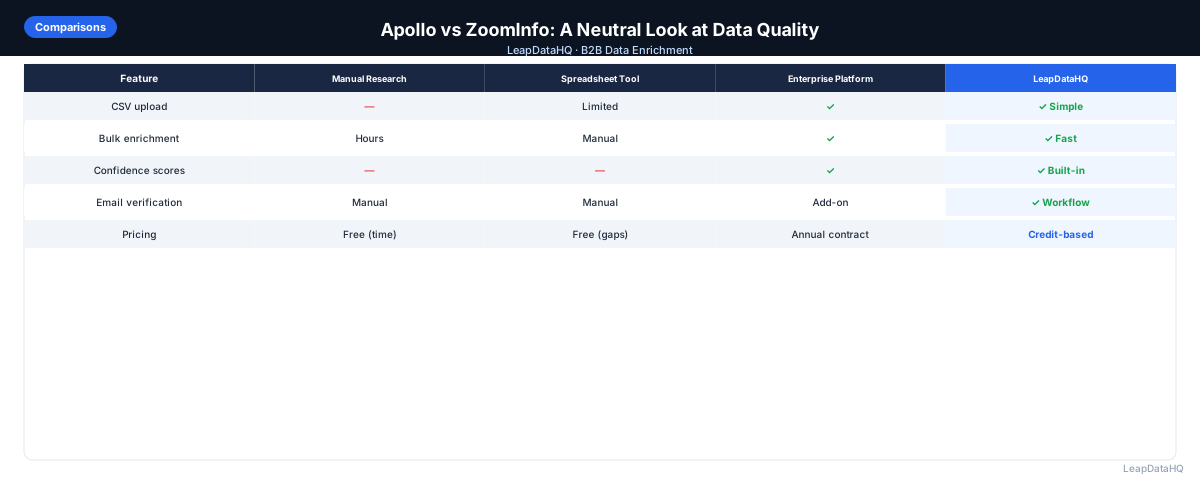
Neither Apollo nor ZoomInfo is the right choice for every team. If your primary need is enriching an existing CSV list rather than building a prospecting list from scratch, a lightweight enrichment tool may be more appropriate than a full platform subscription.
If you're doing agency work for multiple clients and need to enrich different types of lists on demand — without a single subscription that covers all client niches — a credit-based enrichment tool offers more flexibility.
What This Means for Your Tool Stack
Choosing between Apollo and ZoomInfo — or deciding that neither fits — affects your entire prospecting workflow. The wrong choice means paying for capabilities you do not use or lacking capabilities you need. The right choice integrates seamlessly into how your team already works.
For teams that already have prospecting lists and need enrichment, a full database platform may be overkill. For teams that need to build lists from scratch, a CSV-only enrichment tool is insufficient. Understanding your actual workflow determines the right tool category.
Ready to enrich your CSV list?
Upload a CSV, fill missing data, review confidence scores, and export clean records.
Upload a CSV — Start EnrichingMany teams find that their needs evolve. A startup may begin with a lightweight enrichment tool, grow into Apollo, and eventually need ZoomInfo as they scale. There is no single right answer — the right tool depends on your current stage and workflow.
Who Should Compare These Platforms
Different teams have different evaluation priorities when comparing B2B data platforms:
- Sales leaders evaluating tools for their outbound team and need to understand cost versus capability trade-offs
- SDRs and individual contributors comparing tools for personal prospecting workflows
- Agency owners determining which data platform to standardize on for client enrichment projects
- RevOps teams evaluating integration capabilities and data quality across platforms
- Founders at early-stage companies comparing affordable options for building initial prospect lists
- Operations managers assessing total cost of ownership including setup time, contracts, and ongoing maintenance
Checklist: Evaluating B2B Data Platforms
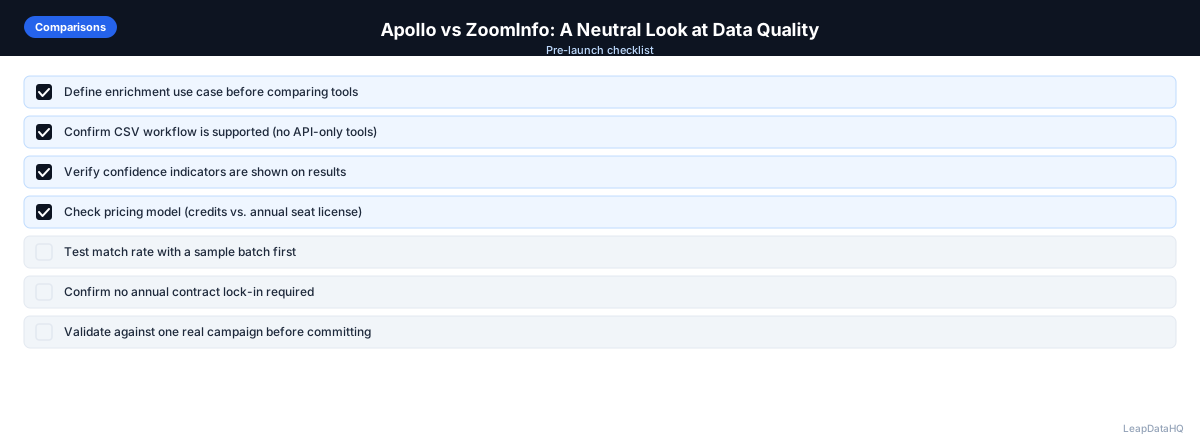
Use this checklist when comparing Apollo, ZoomInfo, or any B2B data platform:
- Tested match rates with your actual target market data, not just demo samples
- Understood the pricing model — per seat, per record, annual contract, or credit-based
- Confirmed data coverage for your target industries, company sizes, and geographies
- Evaluated whether you need prospecting (building lists) or enrichment (completing lists)
- Checked CRM integration compatibility with your specific instance
- Assessed setup time and whether you need developer support to get started
- Reviewed confidence scoring and export filtering capabilities
- Tested the user interface for ease of use by non-technical team members
- Calculated total cost of ownership including setup, subscription, and per-record costs
- Considered whether a lighter CSV-based enrichment tool might fit your actual needs
- Evaluated contract flexibility — monthly, annual, or pay-as-you-go options
- Checked support quality, documentation availability, and onboarding resources
Common Mistakes to Avoid
These mistakes lead to choosing the wrong platform or overspending on capabilities you do not need:
- Choosing a prospecting database when you only need enrichment: If you already have lists and just need to fill in missing data, a full database platform is overkill. A CSV enrichment tool is more cost-effective and simpler to use.
- Not testing with your actual data: Demo data and marketing claims do not reflect performance on your specific target market. Always test with a representative sample of contacts from your ICP before committing.
- Ignoring total cost of ownership: The subscription price is not the only cost. Setup time, integration complexity, training, and ongoing maintenance all contribute to the real cost. Calculate total cost based on your complete workflow.
- Committing to an annual contract without testing thoroughly: Annual contracts lock you in. If the tool does not perform well for your target market, you are stuck. Test extensively before committing to long-term agreements.
- Choosing based on brand recognition: Enterprise platforms with large marketing budgets are not necessarily the best fit for your team. Evaluate based on your specific requirements, test results, and budget.
- Not considering lighter alternatives: For teams enriching 50-5,000 records per month, CSV-based enrichment tools offer a simpler, more flexible alternative to full database platforms. Do not overlook these options.
- Evaluating tools your team will not actually use: The best tool is one your team will use consistently. If the platform is too complex for non-technical team members, it will not get adopted regardless of its capabilities.
Practical Examples
Example 1: Early-Stage Startup Choosing First Data Tool
A 5-person startup needs contact data for outbound prospecting. They evaluate ZoomInfo (too expensive for their stage), Apollo (fits their budget and prospecting needs), and a CSV enrichment tool (fits their list-building workflow). They start with Apollo for prospecting and use CSV enrichment for specific list projects.
Example 2: Mid-Market Team Evaluating Enterprise Options
A 30-person sales team needs a comprehensive data platform with CRM integration. They evaluate ZoomInfo for its enterprise features and direct dial coverage. After testing, they find ZoomInfo fits their needs for high-volume prospecting and commit to an annual contract.
Example 3: Agency Needing Flexible Enrichment
An agency enriches lists for 12 clients across different industries. Neither Apollo nor ZoomInfo fits because both require a single subscription that does not cover all client niches cost-effectively. They use a credit-based CSV enrichment tool that lets them run batches for different clients with the same account.
Example 4: SDR Comparing Tools for Personal Workflow
An SDR compares Apollo and ZoomInfo for personal prospecting. They find Apollo's free tier sufficient for testing, and the paid plan fits their budget. They use Apollo for list building and a CSV enrichment tool for enriching specific lists before campaigns.
Example 5: Company That Only Needed Enrichment
A company evaluated ZoomInfo for data enrichment but realized they already had prospecting lists — they only needed to fill in missing emails and company data. They switched to a CSV enrichment tool that was simpler, more cost-effective, and better matched their actual workflow.
How LeapDataHQ Helps
LeapDataHQ is designed for a different use case than Apollo or ZoomInfo. Rather than a searchable contact database, it is a CSV enrichment tool: you bring your own list and fill in missing data. If you have a list from a conference, a LinkedIn export, or a CRM export, LeapDataHQ helps you append emails, phone numbers, and company data.
The credit-based pricing at /pricing means you pay only for what you enrich — no annual contracts, no seat fees. This makes it practical for teams that need enrichment on demand without committing to a full platform subscription. Upload your CSV, review confidence scores, and export clean data.
LeapDataHQ is not a replacement for prospecting databases. It is for making the lists you already have more complete. If your primary need is enrichment rather than prospecting, explore /features to see if the CSV-based workflow fits your team.
Next Steps
If you are comparing Apollo and ZoomInfo, start by clarifying whether you need a prospecting database or an enrichment tool. Test each platform with your actual target market data before committing. If your primary need is enriching existing lists, consider lighter alternatives.
LeapDataHQ offers a straightforward way to test CSV enrichment with real data. Upload a sample at /enrich-csv-file, see match rates and confidence scores, and decide if the workflow fits. Check /pricing and /features to learn more.
When to Use LeapDataHQ
LeapDataHQ is designed for a different use case than Apollo or ZoomInfo. Rather than a searchable contact database, it's a CSV enrichment tool: you bring your own list and fill in missing data.
If you have a list from a conference, a LinkedIn export, or a CRM export, and you need to append emails, phone numbers, or company data without building a new list from scratch, LeapDataHQ fits that workflow. It's not a replacement for prospecting databases — it's for making the lists you already have more complete.
The credit-based pricing means you pay only for what you enrich, with no annual contracts or seat fees. This makes it practical for teams that need enrichment on demand — agencies working across multiple clients, startups with variable prospecting volume, or sales teams that build lists from multiple sources.
LeapDataHQ returns confidence scores alongside each enriched field, giving you control over output quality. You filter to high-confidence results before exporting, rather than importing everything and dealing with bounces later.
For teams evaluating whether they need a full database platform or just enrichment, LeapDataHQ offers a low-commitment way to test the enrichment workflow. Upload a sample CSV, see results on your actual data, and decide if the tool fits before scaling up. Results depend on input data quality and the public data available for each target.
Start Enriching LeadsFrequently Asked Questions
Can I use both Apollo and ZoomInfo together?
Technically yes, but it is expensive. Some large sales organizations use ZoomInfo for its database breadth and Apollo for its sequencing features. For most teams, one platform is sufficient. Evaluate your actual needs before committing to multiple subscriptions.
Which platform has more accurate direct dials?
Direct dial accuracy varies by industry and company size. Both platforms have invested in this area. The best way to evaluate is to test a sample of contacts from your specific target market against your own data. Results vary by market segment.
Is there a meaningful free tier on either platform?
Apollo offers a free plan with a limited number of credits per month, which is enough to evaluate the platform. ZoomInfo has historically not offered a meaningful free tier — pricing typically requires contacting sales. Test Apollo's free tier before evaluating paid options.
How often is the data in these platforms refreshed?
Both platforms refresh data continuously, but individual records may still be outdated. Job changes and company events create constant churn in B2B contact data. No platform can maintain real-time accuracy for all records at all times.
What should I test before committing to either platform?
Pull a sample of 50-100 contacts from your ideal customer profile using each platform's trial. Check email deliverability, title accuracy, and match rate for your specific target market before signing a contract. Testing with your data is the most reliable evaluation method.
When should I choose a CSV enrichment tool instead of either platform?
Choose a CSV enrichment tool when your primary need is completing existing lists rather than building new ones from scratch. If you already have prospecting lists from LinkedIn, conferences, or other sources and need to fill in missing data, a CSV tool is more cost-effective.
How do I evaluate data quality across platforms?
Test each platform with the same 50-100 contacts from your target market. Compare match rates, email accuracy, and confidence scores. The platform that performs best on your specific data is the right choice — regardless of marketing claims or brand reputation.