
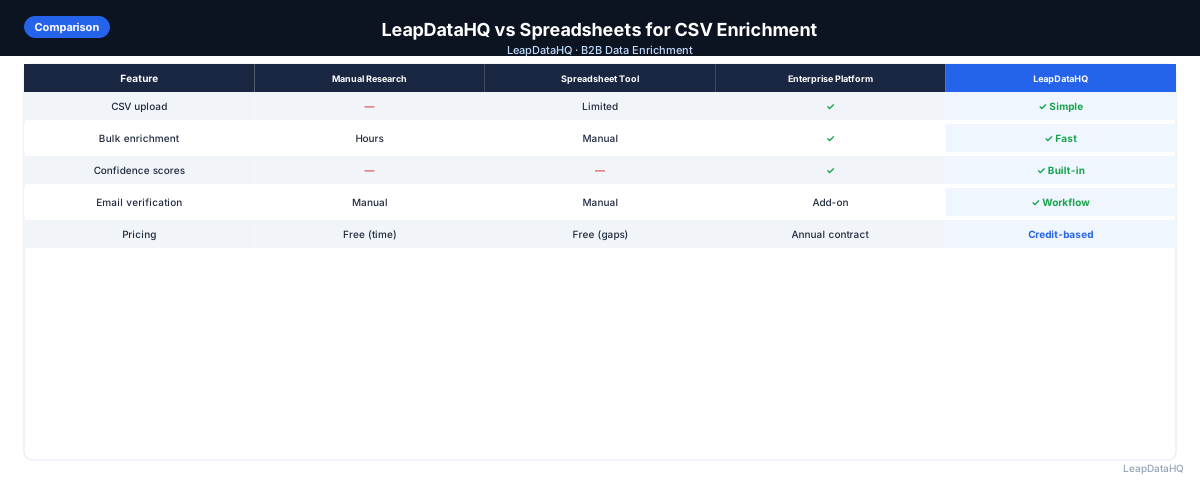
Many B2B sales teams attempt to manage their lead list enrichment using spreadsheets — manually looking up missing data, copy-pasting from multiple sources, and maintaining complex VLOOKUP formulas. While spreadsheets are familiar and free, they are not designed for enrichment workflows.
The spreadsheet approach typically involves: exporting a list from your CRM, manually adding columns for new data, researching each contact individually, copying results into your spreadsheet, and running VLOOKUP to match records. This works for very small lists but becomes unmanageable as volume grows.
LeapDataHQ is purpose-built for CSV enrichment. It automates the data lookup process, queries multiple data sources, returns structured results with confidence scores, and lets you export enriched data ready for your outreach tool.
This comparison examines both approaches — spreadsheets and LeapDataHQ — looking at time, accuracy, workflow efficiency, and the hidden costs of the manual approach.
The Spreadsheet Enrichment Workflow
Teams that enrich CSV data using spreadsheets typically follow this workflow:
- Export or compile a list of contacts in a spreadsheet
- Manually check each contact on LinkedIn, company websites, or other sources
- Copy email addresses, job titles, and other data into the spreadsheet
- Use VLOOKUP or INDEX-MATCH to merge data from multiple sheets
- Manually format and standardize the merged data for consistency
- Export the final spreadsheet for import into CRM or outreach tool
This workflow is manual at every step. Each contact takes 3-5 minutes to research. For a 500-contact list, that is 25-40 hours of manual work.
The LeapDataHQ Enrichment Workflow
LeapDataHQ automates the data lookup portion of the workflow:
- Export or compile your list as a CSV file
- Upload the CSV to LeapDataHQ and map your columns
- The platform processes all records automatically against its data sources
- Review confidence scores and filter results by quality
- Export the enriched CSV — all new fields are appended to your original data
The same 500-contact list that takes 25-40 hours with spreadsheets is processed by LeapDataHQ in minutes.
Key Differences
Time Efficiency
Spreadsheets: 3-5 minutes per contact. LeapDataHQ: 30-60 seconds for the entire list.
Ready to enrich your CSV list?
Upload a CSV, fill missing data, review confidence scores, and export clean records.
Upload a CSV — Start EnrichingData Accuracy
Spreadsheets: Human error from manual data entry — typos, wrong rows, copy-paste mistakes. LeapDataHQ: Consistent, structured data with confidence scores.
Scalability
Spreadsheets: Does not scale. LeapDataHQ: Scales efficiently — processing 5,000 records takes only slightly longer than 500.
The Hidden Costs of Spreadsheet Enrichment
- Opportunity cost: Hours spent on manual data entry are hours not spent on selling
- Error correction: Incorrectly entered data causes bounces and CRM issues
- Inconsistent quality: Different researchers produce different quality results
- Burnout: Manual data entry is tedious work that reduces team morale
- Scalability limits: When you need to scale from 50 to 500 contacts, spreadsheets break down
When Spreadsheets Make Sense
Spreadsheets are still useful for very small lists under 50 contacts, quick manual verification of a few records, or data requiring subjective judgment. For any larger volume, a dedicated enrichment platform is more efficient.
How LeapDataHQ Helps
LeapDataHQ replaces the manual VLOOKUP and copy-paste workflow with automated data enrichment. You upload your CSV, and the platform handles the data lookup, returning enriched records with confidence scores.
The credit-based pricing at /pricing means you pay only for what you enrich. LeapDataHQ supports the complete workflow in a single platform, eliminating the need to manage multiple spreadsheet tabs and manual data entry.
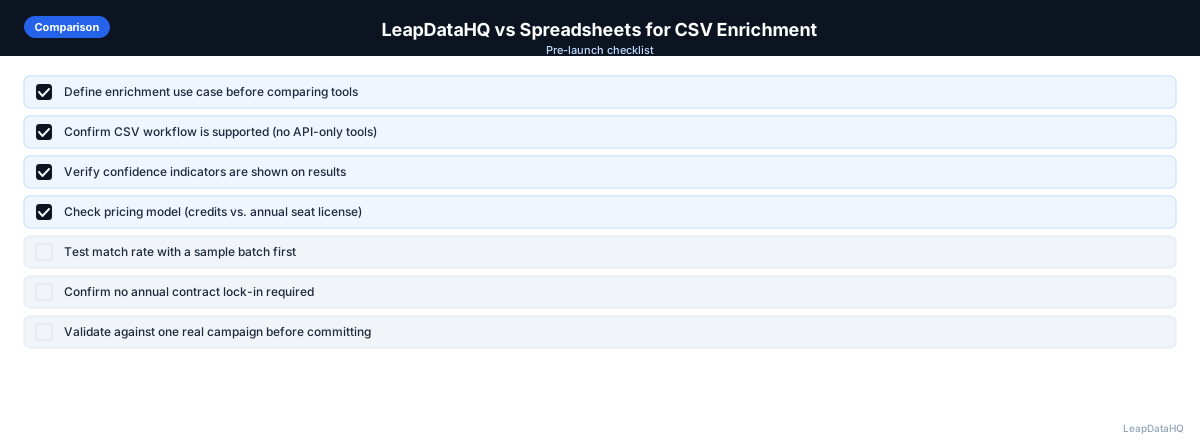
When to Use LeapDataHQ
LeapDataHQ is the right choice when your spreadsheet-based enrichment workflow is taking too much time or producing inconsistent results. It replaces the manual process with automated batch enrichment.
It is particularly valuable for teams that regularly process lists of 100-5,000 records — a volume where spreadsheets become inefficient but enterprise enrichment platforms are overkill.
LeapDataHQ returns confidence scores for every enriched field, so you can trust the results without manually verifying every record.
Start Enriching LeadsFrequently Asked Questions
Can I use LeapDataHQ alongside Google Sheets?
Yes. Many teams export their list from Sheets, enrich it in LeapDataHQ, and import the enriched CSV back into Sheets for final review before CRM import.
Does LeapDataHQ replace Excel entirely?
Not entirely. You may still use Excel for initial list compilation and final formatting. LeapDataHQ replaces the manual data lookup and enrichment portion of the workflow.
Is LeapDataHQ easier than VLOOKUP?
Yes. LeapDataHQ automates the data lookup that VLOOKUP was designed to manage. Instead of writing formulas, you upload your CSV and let the platform handle data matching.
What about very small lists — under 50 records?
For very small lists, spreadsheets may be faster. LeapDataHQ becomes more efficient than manual research at around 50-100 records.