
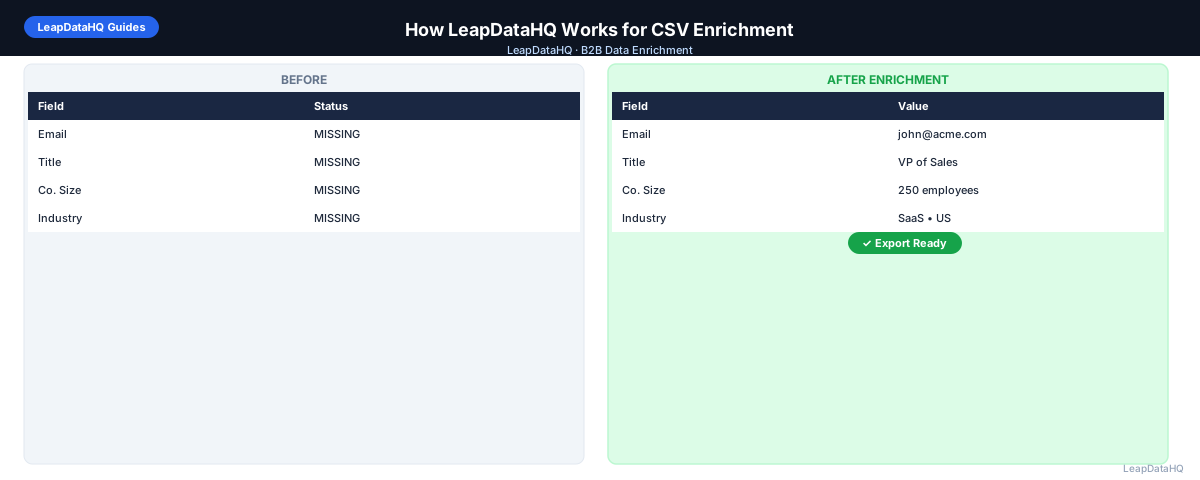
LeapDataHQ is a CSV enrichment platform designed for B2B sales teams, agencies, and RevOps professionals. It helps you take incomplete prospect lists — spreadsheets missing email addresses, job titles, company data, or other contact fields — and turn them into complete, outreach-ready datasets.
The platform is built around a straightforward workflow: upload your CSV, map your columns, enrich missing fields, review confidence scores, and export clean data. No developer integration required. No annual contracts. You pay only for the records you enrich.
This guide walks through exactly how LeapDataHQ works, step by step. Whether you are evaluating the platform or getting started with your first enrichment, understanding the workflow helps you get the best results.
LeapDataHQ is designed for batch enrichment of 50 to 5,000 records. It is a focused tool for one specific job: filling missing data fields in your existing CSV files.
Step 1: Prepare Your CSV File
Start by preparing your input file. While LeapDataHQ works with various data quality levels, cleaner input produces better enrichment results.
Recommended Preparation Steps
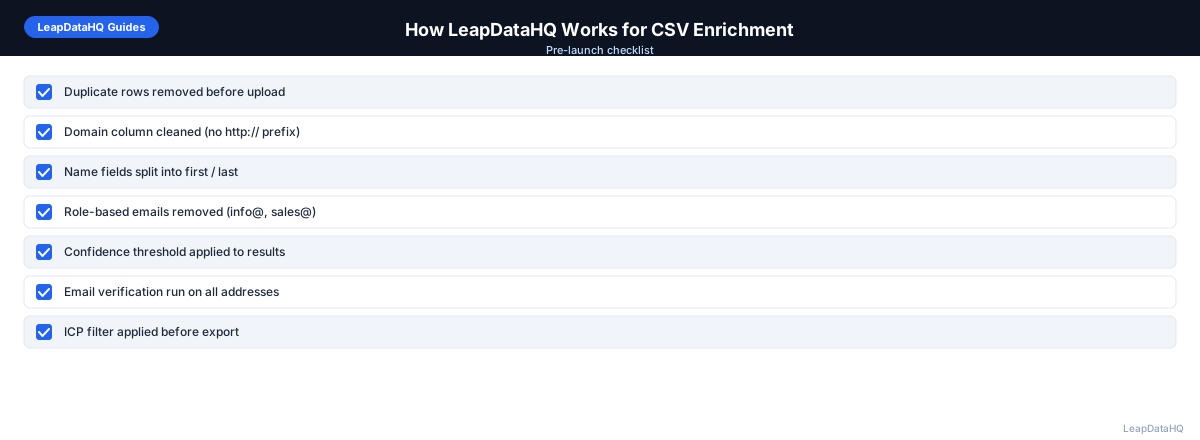
- Remove duplicate rows — deduplicate by email address or domain plus contact name
- Standardize company names — remove legal suffixes like Inc., LLC, Corp.
- Clean domain entries — remove http://, https://, and trailing slashes
- Remove role-based emails like info@, support@, admin@
- Remove rows with completely blank key fields
These steps are optional but recommended. Preparation improves match rates and prevents wasted credits on unenrichable records.
Step 2: Upload Your CSV
Upload your prepared CSV file to LeapDataHQ. The platform accepts standard UTF-8 CSV format with clear column headers. You can upload files directly through the web interface without any API setup.
LeapDataHQ automatically reads your CSV headers and presents them for column mapping.
Step 3: Map Your Columns
Column mapping is a critical step. LeapDataHQ scans your CSV headers and asks you to match each column to the appropriate data field. Accurate mapping is essential for good results.
The minimum required field is the company domain — the primary lookup key for enrichment. Additional fields like first name, last name, and job title improve match rates.
Step 4: Configure Your Enrichment
After mapping, configure which fields you want LeapDataHQ to enrich. You can choose to enrich only missing email addresses, or request full contact enrichment including job titles, company size, industry, and LinkedIn URLs.
Step 5: Process Your Enrichment
Ready to enrich your CSV list?
Upload a CSV, fill missing data, review confidence scores, and export clean records.
Upload a CSV — Start EnrichingStart the enrichment process. LeapDataHQ queries its data sources to find matching records for each row in your CSV. Records are processed in parallel for efficiency.
Most files under 1,000 rows process in under a minute. The platform shows progress so you can track your enrichment.
Step 6: Review Confidence Scores
After processing, LeapDataHQ presents results with confidence scores for each enriched field. High-confidence records are reliable and ready to use. Low-confidence records may need manual verification.
This review step is where LeapDataHQ provides the most value. You can filter by confidence level, exclude uncertain results, and export only the records you trust.
Step 7: Export Enriched Data
Once satisfied with the results, export your enriched CSV. The output file contains all your original columns plus new enriched fields. Import directly into your CRM, email sequencing tool, or outreach platform.
LeapDataHQ supports filtering before export — export only high-confidence records, only records with verified email addresses, or any combination that meets your campaign requirements.
Key Platform Features
- CSV upload and download — no API or developer setup required
- Automatic column detection and interactive column mapping
- Batch enrichment of 50 to 5,000 records per file
- Confidence scores for every enriched field
- Email verification integration to check deliverability
- Filtering by confidence level before export
- Credit-based pricing — pay only for records enriched
How LeapDataHQ Helps
LeapDataHQ is built for teams that need a simple, effective way to enrich CSV files without developer setup, annual contracts, or complex integrations. The platform handles the complete enrichment workflow from upload through export in a single session.
The credit-based pricing at /pricing means you pay only for what you enrich. No monthly seat fees, no minimum commitments. Enrich 100 records one month and 2,000 the next without changing your plan.
LeapDataHQ returns confidence scores for every enriched field. Get started at /how-it-works or explore the full feature set at /features.
When to Use LeapDataHQ
LeapDataHQ is the right tool when you have a CSV file of B2B contacts that needs enrichment. The platform is designed for teams that want to fill missing contact fields quickly without developer setup.
It is particularly valuable for sales teams preparing outreach lists, agencies enriching lead lists as part of client deliverables, RevOps teams running CRM gap-fill projects, and founders building prospect lists.
The platform handles files of 50 to 5,000 records efficiently. The credit-based pricing at /pricing makes it practical for teams with variable enrichment needs.
Start Enriching LeadsFrequently Asked Questions
What file format does LeapDataHQ accept?
LeapDataHQ accepts standard UTF-8 CSV files. Make sure your file has clear column headers, properly quoted values, and no merged cells or Excel formatting.
What input fields does LeapDataHQ need?
The minimum required field is the company domain. Adding first name, last name, and job title improves match rates and enables more complete enrichment.
How long does enrichment take in LeapDataHQ?
Most files under 1,000 rows process in under a minute. Processing time depends on file size and enrichment complexity. Records are processed in parallel.
Does LeapDataHQ verify email addresses?
Yes. LeapDataHQ includes email verification as part of the enrichment workflow. Each enriched email is checked for deliverability.
Can I filter results before exporting?
Yes. After enrichment, you can filter results by confidence level, verification status, and other criteria before exporting.