
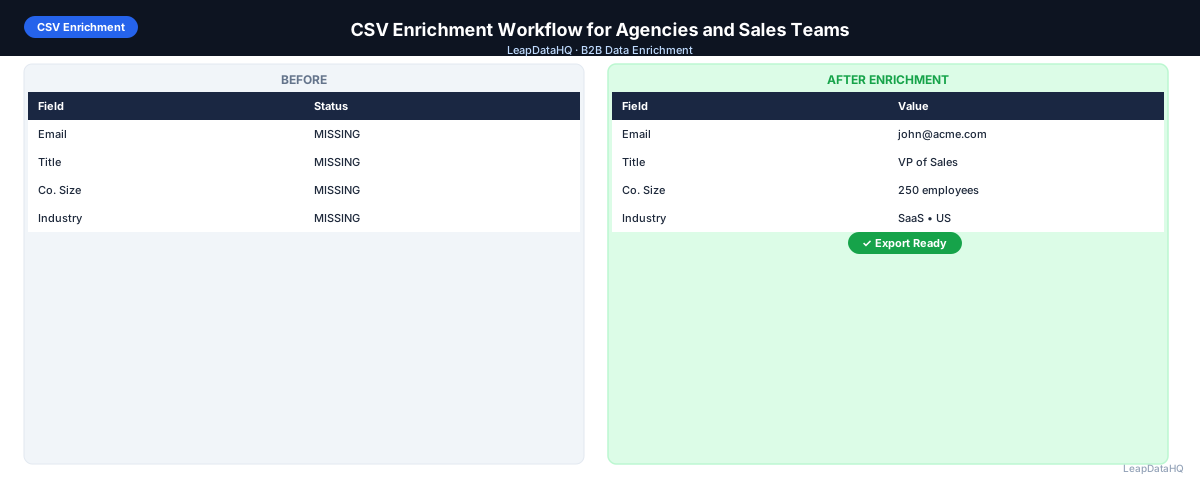
A structured CSV enrichment workflow is the difference between teams that consistently get good outreach results and teams that struggle with bounces, low reply rates, and wasted time. Without a repeatable process, each enrichment run becomes a new problem to solve.
For agencies and B2B sales teams that process prospect lists regularly, a standardized enrichment workflow saves time, improves data quality, and produces consistent results across every batch.
This guide lays out a complete CSV enrichment workflow covering every step from list acquisition through final export. It is designed for teams that process multiple enrichment runs per month and need a repeatable process that produces consistent, high-quality results every time.
The workflow covers six phases: preparation, cleaning, enrichment, verification, segmentation, and export. Each phase has specific steps and quality checks that build on the previous phase.
Phase 1: List Preparation
The preparation phase ensures you start with the best possible input data. Begin by identifying the source of your list — CRM export, LinkedIn Sales Navigator, conference attendance, trade publication, or client deliverable.
Check your list for obvious issues: missing headers, merged cells, non-UTF-8 encoding, or formatting that could confuse the enrichment tool. Ensure your file is saved as a standard CSV with clear column headers.
Preparation also means understanding what data you have and what you need. If your list has company names but no domains, plan for an additional domain lookup step. If it has contacts but no job titles, prioritize title enrichment.
Phase 2: Data Cleaning
Before enrichment, clean your data. This phase removes issues that would reduce enrichment quality or waste credits:
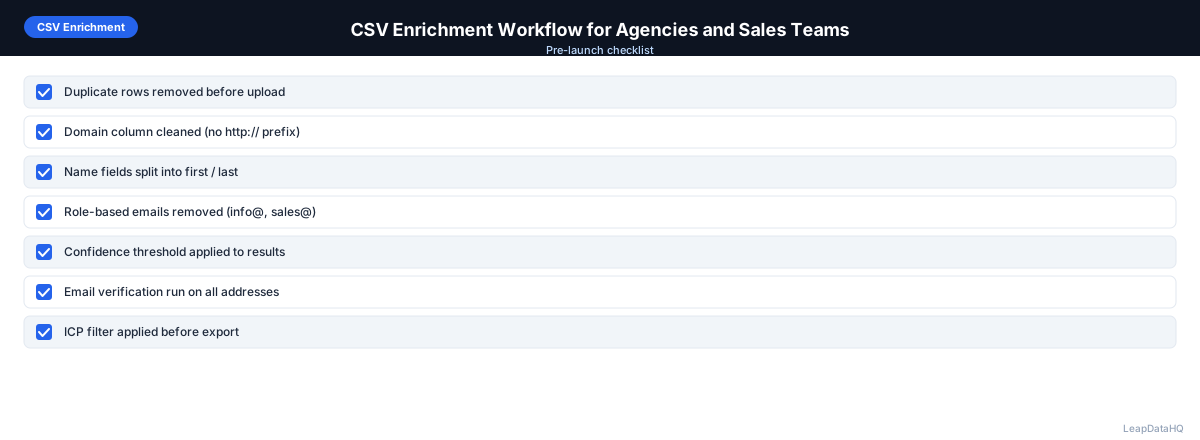
- Remove duplicate rows using email address or company domain plus contact name
- Standardize company names — strip legal suffixes, fix capitalization
- Clean domain entries — remove http://, https://, www., trailing slashes
- Fix contact name formatting — capitalize correctly, split combined names
- Remove role-based emails like info@, support@, admin@
- Remove rows with blank or unidentifiable key fields
Cleaning before enrichment typically improves match rates by 10-20% compared to enriching dirty data.
Phase 3: Enrichment
With clean data, run the enrichment process:
- Upload your cleaned CSV to the enrichment platform
- Map your columns to the platform's expected fields
- Configure which data fields you want enriched (emails, titles, company data)
- Start the enrichment process and monitor progress
- Review confidence scores on all returned results
- Filter out low-confidence records before moving to verification
The enrichment phase is where missing fields are filled. Most platforms process records in parallel, so larger files scale efficiently.
Phase 4: Verification
Enriched email addresses need verification before use. Run your enriched list through email verification to check deliverability:
Ready to enrich your CSV list?
Upload a CSV, fill missing data, review confidence scores, and export clean records.
Upload a CSV — Start Enriching- Verify every enriched email address for deliverability
- Remove invalid addresses from your export list
- Flag catch-all domains as high-risk for separate handling
- Keep bounce rate projections under 2% by excluding risky addresses
Verification is the step that most teams skip, and it is the most common cause of high bounce rates in cold email campaigns.
Phase 5: Segmentation
With clean, enriched, verified data, segment your list for targeted outreach. Use the newly enriched fields to build focused segments:
- Segment by company size: small business, mid-market, enterprise
- Segment by industry: technology, healthcare, finance, manufacturing
- Segment by job title: C-level, VP, Director, Manager, Individual Contributor
- Segment by seniority or decision-making authority
- Segment by geography or target market region
Segmentation transforms a generic list into a strategic asset. Each segment receives messaging tailored to their specific needs and context.
Phase 6: Export and Import
Export your segmented, enriched data from the platform. The output should include all original columns plus enriched fields and verification statuses.
Import the final CSV into your CRM, email sequencing platform, or outreach tool. Map the enriched fields to the appropriate fields in your target system before importing.
Common Workflow Mistakes
- Skipping the cleaning phase: Dirty input produces poor enrichment results
- Skipping the verification phase: Unverified emails cause bounces and domain damage
- Skipping the segmentation phase: Unsegmented lists produce generic, low-reply campaigns
- Rushing the review step: Confidence scores exist to guide your review — use them
How LeapDataHQ Helps
LeapDataHQ supports the complete CSV enrichment workflow from cleaning through export. You upload your raw CSV, clean and standardize data, enrich missing fields, review confidence scores, verify email addresses, and export segmented results — all in one platform.
Rather than stitching together separate tools for cleaning, enrichment, and verification, LeapDataHQ provides a unified workflow that saves time and reduces errors. The credit-based pricing at /pricing means you pay only for enrichment credits.
When to Use LeapDataHQ
LeapDataHQ is designed for teams that need a complete CSV enrichment workflow in a single platform. It supports agencies and sales teams through the entire process — from cleaning and standardization through enrichment, verification, and export.
The platform handles batches of 50 to 5,000 records efficiently and returns confidence scores for every enriched field. The credit-based pricing at /pricing means you pay only for what you enrich, with cleanup and workflow features included.
For teams that process multiple enrichment runs per month, LeapDataHQ provides the repeatable workflow needed to produce consistent, high-quality results every time.
Start Enriching LeadsFrequently Asked Questions
How long does the complete CSV enrichment workflow take?
For a 1,000-row list, the complete workflow — cleaning, enrichment, verification, and segmentation — takes 15-30 minutes. Processing time varies based on list quality and the number of fields being enriched.
What is the most important phase of the workflow?
Every phase is important, but the most commonly skipped is verification. Enriched emails that go unverified are the leading cause of high bounce rates in B2B cold email campaigns.
Can I skip the cleaning phase if my data looks clean?
Even clean-looking data often has hidden issues — inconsistent formatting, hidden duplicates, or placeholder entries. Running a quick cleaning pass before enrichment is always recommended.
How do I handle records that fail verification?
Remove invalid addresses from your campaign list. For high-value contacts, consider alternative outreach channels like LinkedIn or phone. Never send to unverified addresses.
Should I segment before or after enrichment?
Segment after enrichment. The enriched fields (company size, industry, job title) provide the data you need for meaningful segmentation. Segmenting before enrichment limits your segmentation options.