
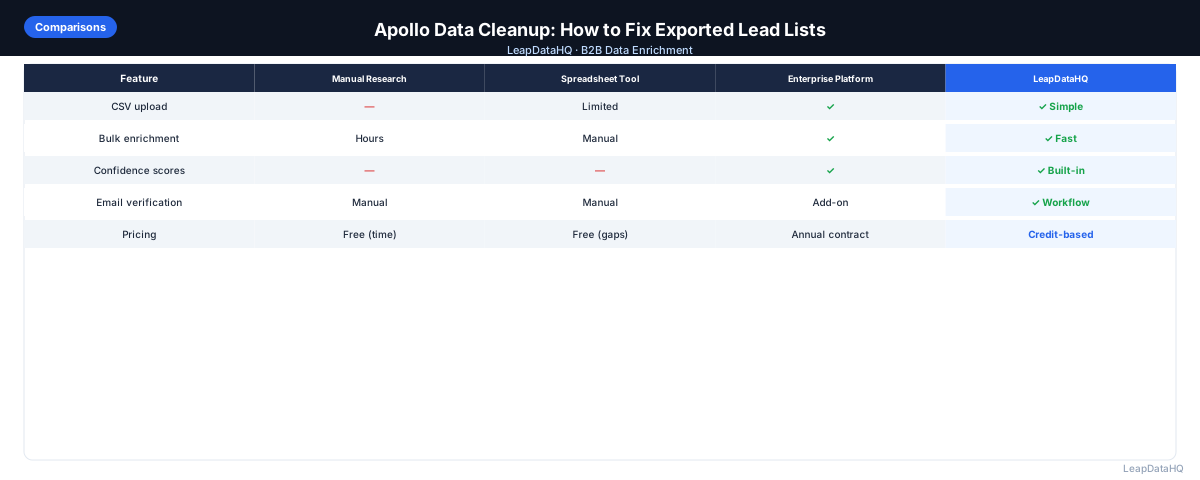
Apollo.io is widely used for B2B prospecting — it offers a large contact database with search filters, email sequencing, and CRM integrations. Many teams export Apollo contact lists as a starting point for outreach campaigns. But Apollo data, like all database-sourced contact data, requires cleanup before it's ready for outreach at scale.
Common problems with Apollo exports include contacts who have since changed jobs, email addresses that are outdated or generated with low confidence, company data that doesn't match the actual company size or industry, and duplicate records when the same contact appears in multiple saved searches.
This guide covers how to clean and enrich Apollo lead exports — not to criticize Apollo as a platform, but to give you a practical workflow for improving data quality before loading a list into your sequencer. These same principles apply to any prospecting database export.
The amount of cleanup an Apollo export needs depends heavily on how you built the list. A tightly filtered search for current employees at companies in a specific industry, with email confidence set to high, will produce cleaner exports than a broad search with loose filters. But even well-constructed Apollo exports benefit from verification and enrichment because Apollo's data freshness varies by segment and the confidence indicators Apollo provides are based on its own internal scoring, not on live mailbox verification.
Understanding where Apollo's data comes from helps you know where to focus cleanup effort. Apollo's email coverage is strongest for well-known companies with large online presences. For smaller companies, international markets, or niche industries, Apollo's coverage may rely more on pattern-based email generation than verified database entries. Those segments benefit most from cross-referencing with a second data source and performing live verification before sending.
Why Apollo Exports Need Cleanup
Apollo aggregates data from multiple sources including web crawling, data licensing, and community contributions from its user base. This means data quality varies by company, industry, and contact seniority. Common quality issues in Apollo exports:
- Outdated email addresses: contacts who have changed employers since the data was indexed
- Inconsistent email confidence: some contacts have verified emails, others are pattern-generated guesses
- Stale job titles: titles reflect when the data was collected, not current roles
- Incomplete company data: headcount, revenue, and industry fields aren't always populated
- Duplicate contacts: same person appearing multiple times from different saved searches
- Consumer email addresses in a B2B list: personal Gmail or Yahoo addresses for some contacts
Advanced Apollo Export Cleanup Techniques
For teams processing Apollo exports regularly, building a repeatable cleanup workflow saves significant time per campaign. Create a master spreadsheet template with the columns you need, pre-configured formulas for formatting standardization (TRIM, PROPER), conditional formatting for confidence score thresholds, and automated checks for common problems like role-based email domains or consumer email addresses.
This template lets you import any Apollo export and immediately see which rows pass quality checks and which need attention. The time invested in building the template once pays off every time you process a new export.
Another advanced technique is segment-based enrichment. Instead of enriching your entire Apollo export uniformly, segment contacts by email confidence level and enrich only the segments that need it. Contacts that Apollo already scores with high confidence may not need re-enrichment. Contacts with low confidence scores or missing emails benefit most from cross-referencing through a separate enrichment tool, and you can allocate enrichment budget where it has the most impact.
For Apollo exports that will be used across multiple campaigns, maintain a master contact database with cleanup status tracked per record. When a contact is verified and enriched once, flag that record so subsequent exports don't reprocess the same contact unnecessarily. This reduces both cleanup effort and enrichment costs over time.
Common Apollo Data Quality Patterns and How to Address Them
One pattern to watch for is systematic email quality differences by company size. Apollo often has strong coverage of enterprise companies where email patterns are standardized and data is frequently refreshed. For SMB contacts, coverage may rely more on pattern generation and less on verified data. If your target list is heavily SMB, budget more cleanup and verification effort per contact.
Another pattern is title drift in Apollo exports. A contact's title in Apollo reflects when the data was collected, not necessarily their current role. For contacts in fast-moving industries or high-turnover roles (SDRs, account executives), title information may be several months behind. Cross-referencing through enrichment or LinkedIn research for high-priority contacts catches these discrepancies.
LeapDataHQ supports the cross-enrichment step in this cleanup workflow. After removing obvious problems from your Apollo export, upload the cleaned list to LeapDataHQ to append current email addresses and company data. The confidence scores returned tell you which records matched with high reliability and which need manual review, giving you a clear triage path for the rest of your list.
Step 1: Assess Your Apollo Export
Open your Apollo export in a spreadsheet tool and look at:
- Email quality indicators: does the export include any confidence or verification status columns?
- Completeness: what percentage of rows have all required fields (email, name, company, title)?
- Duplicate check: are there repeated email addresses or names at the same company?
- Consumer emails: any rows with Gmail, Yahoo, or personal email domains?
- Company data: are Industry, Headcount, and Revenue fields populated?
Ready to enrich your CSV list?
Upload a CSV, fill missing data, review confidence scores, and export clean records.
Upload a CSV — Start EnrichingStep 2: Remove Obvious Problems
- Remove duplicate rows (deduplicate on email address)
- Remove rows with consumer email addresses (Gmail, Yahoo, Hotmail, etc.)
- Remove rows with role-based emails (info@, noreply@, support@, admin@)
- Remove rows where required fields (first name, last name, email) are blank
- Remove rows marked as bounced or invalid if Apollo provides this status
Step 3: Verify Email Addresses
Email verification is the single most impactful step for improving Apollo export quality. Run your cleaned list through an email verification tool before loading into your outreach platform. Remove invalid addresses and treat catch-all domains with caution.
Target a bounce rate under 2% for cold email campaigns. If your Apollo export has a high percentage of invalid emails after verification, that's a signal to re-evaluate the export criteria or target a different segment.
Step 4: Enrich to Fill Gaps and Verify Current Status
For contacts with low-confidence emails in Apollo or contacts where you want to verify current employment status, run the list through a separate enrichment tool. This cross-checks Apollo's data against another source and can surface more current email addresses for contacts who have changed jobs.
This step is particularly useful for Apollo exports that include contacts sourced from older data — if someone in your Apollo export left their company 6 months ago, a current enrichment query may return their new employer's email or flag that no match was found.
Step 5: Standardize and Segment
Before loading into your sequencer:
- Standardize first name formatting (proper case, no extra characters)
- Check company name formatting (no all-caps, consistent use of legal suffixes)
- Filter to contacts matching your target ICP (company size, industry, title seniority)
- Create separate segments for different company sizes or industries
- Suppress any existing customers or recent unsubscribes
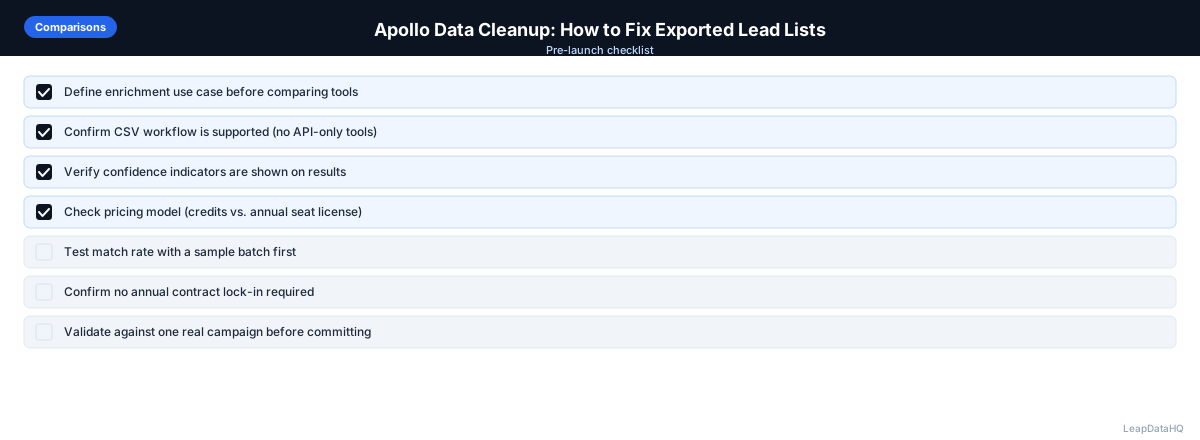
Apollo Data Cleanup Checklist
- Assessed export for completeness and quality indicators
- Removed duplicate rows on email address
- Removed consumer email addresses and role-based addresses
- Removed rows with blank required fields
- Run email verification — invalid addresses removed
- Catch-all domains flagged as risky
- Cross-enrichment run to surface updated emails for stale contacts
- First name and company name formatting standardized
- ICP filter applied: company size, industry, title match requirements
- Existing customers and unsubscribes suppressed
- List segmented before loading into sequencer
When to Supplement Apollo Data with Additional Enrichment
Consider additional enrichment for your Apollo export when:
- Your bounce rate on Apollo-sourced lists has been higher than 3% in past campaigns
- You're targeting a market or industry where Apollo's coverage is known to be thinner
- The export includes contacts at companies that have recently been acquired or restructured
- You need company data fields (industry, headcount) that weren't populated in Apollo's output
- The export includes contacts who were sourced from older Apollo data (6+ months old)
When to Use LeapDataHQ
LeapDataHQ can be used as a cross-enrichment step for Apollo exports — running your Apollo contact list through LeapDataHQ to verify and supplement email addresses, fill missing company data, and surface current contact information for people who may have changed jobs since Apollo indexed them.
This isn't about replacing Apollo as a prospecting source, but about improving the quality of the list before it reaches your outreach tool. The combination of Apollo for contact discovery and LeapDataHQ for enrichment verification gives you better data quality than either source alone.
Start Enriching LeadsFrequently Asked Questions
Should I verify Apollo emails before sending?
Yes. Apollo provides email confidence indicators, but these don't replace live email verification. Always verify before sending to any significant volume. Apollo's confidence scores reflect data patterns, not current mailbox status — an email that was valid when indexed may have become invalid if the contact changed jobs.
What's a typical bounce rate from Apollo exports?
This varies significantly based on how recent the data is and how well-targeted the export criteria are. Well-prepared Apollo exports with verification typically produce bounce rates well under 2%. Unverified or older Apollo exports can produce higher bounce rates, particularly for contacts at startups or fast-growing companies with higher turnover.
Can I enrich Apollo data to find more current emails?
Yes. Running your Apollo export through a separate enrichment tool like LeapDataHQ can surface more current email addresses for contacts where Apollo's data may be outdated. This is particularly useful when you have a high-priority list where maximum accuracy matters.
Is it worth using multiple data sources for the same list?
For high-value outreach campaigns, yes. Different data providers have different coverage and freshness for different market segments. Cross-checking two sources for critical lists helps surface inconsistencies and gives you higher confidence in the data you send to.
How do I know if my Apollo export quality is getting worse over time?
Track your bounce rate per campaign and tag campaigns by data source. If Apollo-sourced campaigns start showing higher bounce rates, that's a signal to investigate — either the data is getting staler, or you're targeting segments with lower Apollo coverage.