
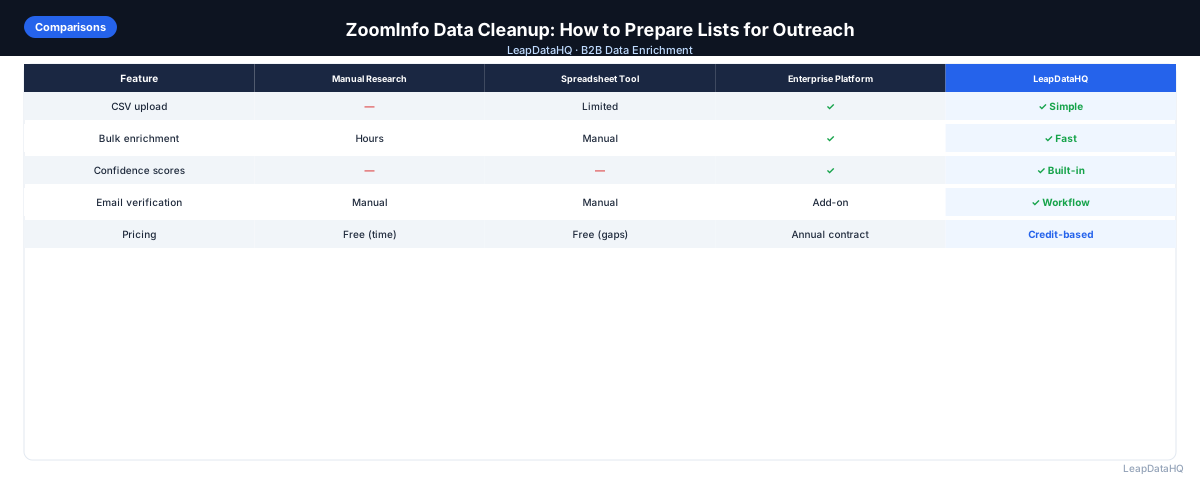
ZoomInfo is one of the largest and most established B2B contact databases, used by enterprise sales teams for prospect discovery and contact data. ZoomInfo has invested significantly in data accuracy and verification infrastructure, but like any database of hundreds of millions of contacts, the data isn't uniformly perfect across all markets, company sizes, and contact types.
When you export a list from ZoomInfo for an outreach campaign, the list quality depends on how targeted your export criteria are, how recently those specific contacts were verified, and whether the contacts are in a market segment where ZoomInfo has strong coverage.
This guide covers how to prepare ZoomInfo exports for outreach — the cleaning, verification, and enrichment steps that help you get the most from the platform's data. These aren't ZoomInfo-specific criticisms but universal best practices for working with any database export.
One reason ZoomInfo exports require cleanup is the platform's approach to data collection. ZoomInfo aggregates contact information from multiple sources — company websites, SEC filings, press releases, and its network of partner data providers — and these sources update at different frequencies. A contact's email address may have been verified six months ago and still be valid, or the contact may have changed jobs since the last verification pass. The data's freshness varies by contact, company, and industry segment, and the export provides limited visibility into which contacts were recently verified versus which have not been re-checked in months.
Understanding this variation is important for planning your cleanup workflow. Contacts at large public companies where data is relatively stable may require minimal verification, while contacts at startups or recently acquired companies may need more thorough cross-checking. Rather than treating all ZoomInfo export records the same, prioritize verification effort based on company stability and time since the contact's data was last updated.
Common Quality Issues in ZoomInfo Exports
Even with ZoomInfo's data verification efforts, you'll encounter quality variations in exports:
- Contacts at companies that have been acquired, restructured, or shut down since data was collected
- Contacts who have left or changed roles at a company since ZoomInfo's last verification
- Direct dial numbers that are no longer active or forwarded to a different person
- Company firmographic data (employee count, revenue) that doesn't reflect recent changes
- International contacts with more limited verification compared to US contacts
- Contacts at very small businesses where job stability and email patterns are less predictable
Step 1: Assess Export Quality Before Cleanup
Open your ZoomInfo export and check:
- Does ZoomInfo indicate email verification date or confidence for the export fields?
- What percentage of contacts have direct dials vs. company main numbers?
- Are company firmographic fields (size, industry, revenue) populated for most records?
- Are there any obvious data anomalies — wrong industry, implausible company sizes?
- Is this export fresh (recent ZoomInfo search) or older data from a saved list?
Step 2: Standard Cleanup Steps
- Deduplicate on email address — remove any rows where the same email appears twice
- Remove role-based emails (info@, noreply@, admin@, support@)
- Filter to contacts matching your ICP criteria (size, industry, title seniority)
- Suppress existing customers, current prospects in pipeline, and recent unsubscribes
- Standardize name formatting if needed (proper case for personalization)
- Verify company domain is present for contacts you want to additionally enrich
Step 3: Email Verification
Run your cleaned ZoomInfo export through an email verification tool before loading into your sequencer. Even ZoomInfo's verified emails can become invalid as people leave jobs — verification provides a current deliverability check that the database export cannot.
Remove invalid emails from your outreach list. Flag catch-all domains for limited testing before full deployment. The goal is to keep your bounce rate below 2% to protect your sender reputation.
Step 4: Segment for Targeted Messaging
ZoomInfo exports typically include company firmographic fields. Use these for segmentation before importing into your sequencer:
- Split by company size tier: SMB (1–100), mid-market (100–1,000), enterprise (1,000+)
- Split by industry: different industries respond to different value propositions
- Split by title seniority: VP-level messaging differs from manager-level messaging
- Create priority tiers based on ICP fit score if applicable
Ready to enrich your CSV list?
Upload a CSV, fill missing data, review confidence scores, and export clean records.
Upload a CSV — Start EnrichingStep 5: Supplement with Additional Enrichment
For high-priority targets where you need maximum accuracy, consider cross-enriching ZoomInfo data with another source. This is most useful for:
- Contacts at rapidly-changing companies (startups, high-growth, recently-acquired)
- International contacts where ZoomInfo coverage is thinner
- Contacts where ZoomInfo's email is marked as lower confidence
- Campaigns where your deliverability requirements are very strict
ZoomInfo Export Cleanup Checklist
- Export assessed for completeness and freshness
- Duplicates removed on email address
- Role-based emails removed
- ICP filter applied: company size, industry, title
- Customers, pipeline, and unsubscribes suppressed
- Name formatting standardized
- Email verification completed — invalid addresses removed
- Catch-all domains flagged and handled separately
- Segments created by size, industry, or seniority
- Final list spot-checked (10+ rows) before loading
Getting the Most From ZoomInfo Data
The quality of ZoomInfo data is highest when your export criteria are specific and your use of the data is timely. The less time between export and outreach, the fresher the data. The more specific your target criteria (specific industry, specific title seniority, specific company size range), the higher the data quality you can expect.
ZoomInfo is most valuable as a discovery tool — finding companies and contacts that match your ICP. The cleanup and verification steps described here apply to ZoomInfo exports the same as to any database export. Good data hygiene practices are universal, not tool-specific.
Common Mistakes When Cleaning ZoomInfo Exports
One common mistake is assuming that all fields in a ZoomInfo export are equally reliable. The direct dial number is often the least reliable field — numbers get reassigned, employees switch to cell-only communication, and company phone systems reroute calls. Relying on direct dials without verification leads to sales reps making awkward calls to wrong contacts. A better approach is to verify direct dials against the contact's company website contact page or a secondary data source before calling.
Another mistake is skipping the deduplication step when combining ZoomInfo exports with data from other sources. Teams that use ZoomInfo alongside LinkedIn Sales Navigator, conference attendee lists, or CRM exports often end up with the same contact appearing multiple times with slightly different data. Deduplication should be done on email address as the primary key, with a secondary pass on first name plus last name plus company domain to catch contacts with multiple email addresses.
Teams also frequently fail to segment their ZoomInfo export before enrichment and verification. Running the entire export through the same cleanup process treats all contacts equally, but enterprise contacts at stable companies need less verification than SMB contacts at high-turnover businesses. Segmenting by company size before cleanup lets you apply different verification rigor to each segment, saving time and credits on contacts that already have high-quality data.
Building a Repeatable ZoomInfo Export Workflow
A repeatable workflow for cleaning ZoomInfo exports follows a standard pipeline: export, assess, deduplicate, filter by ICP, verify emails, segment, and enrich gaps. The key to making this workflow repeatable is documenting each step with clear criteria and using tools that support batch processing rather than manual row-by-row review. Teams that document their export cleanup process can train new team members faster and maintain consistent data quality across different users running different campaigns.
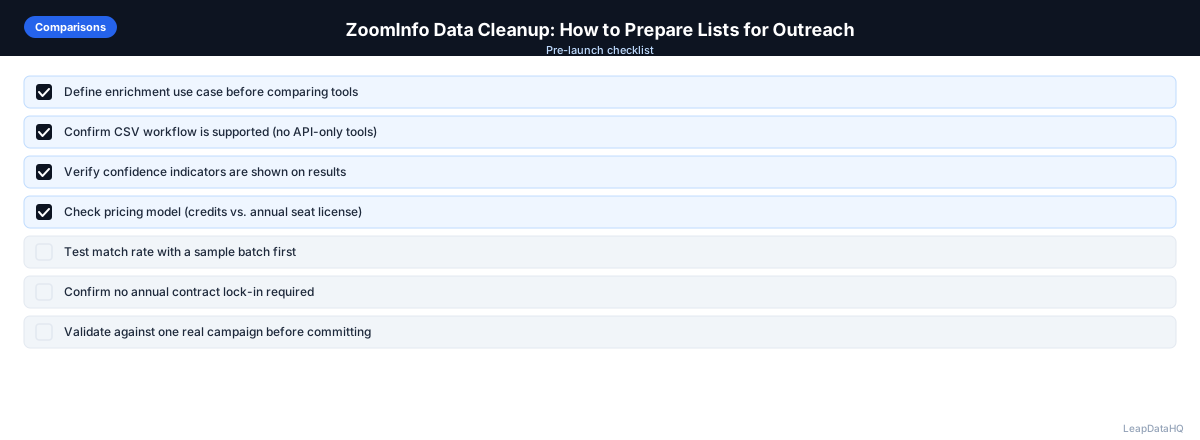
When to Use LeapDataHQ
LeapDataHQ can be used to supplement ZoomInfo data — particularly for filling gaps in company data fields, cross-verifying email addresses for high-priority targets, or enriching contacts where ZoomInfo indicates lower confidence.
This is most useful when you have ZoomInfo as your primary prospecting source but want additional verification or enrichment for critical campaigns where data accuracy is especially important.
Start Enriching LeadsFrequently Asked Questions
Is ZoomInfo data good enough to use without additional verification?
ZoomInfo has strong data verification infrastructure, but no database can guarantee accuracy across all contacts at all times. For campaigns where deliverability is critical, email verification before sending is always recommended regardless of the data source.
How often should I re-export from ZoomInfo vs. reusing an old export?
For active outreach campaigns, always re-export rather than reusing lists older than 90 days. Contact data changes rapidly — job changes, company acquisitions, and email address updates mean that a list that was accurate 3 months ago may have meaningful degradation.
What's a good bounce rate to expect from a well-prepared ZoomInfo export?
With proper verification and cleanup, ZoomInfo-sourced campaigns should achieve bounce rates well under 2%. Higher bounce rates typically indicate either insufficient verification, older data, or targeting of market segments with lower ZoomInfo coverage.
Is ZoomInfo better than Apollo for data quality?
Both platforms have strengths in different segments. ZoomInfo has historically had stronger enterprise and mid-market coverage, particularly for direct dial data. Apollo has improved significantly in SMB and startup coverage. The best approach is to test both against your specific target market rather than relying on general reputation.
Can I combine ZoomInfo data with other enrichment sources?
Yes. Using ZoomInfo for initial contact discovery and a separate tool for verification or supplementary enrichment is a common approach for high-priority outreach. Different tools have different coverage, so combining them can surface data that neither would find alone.