
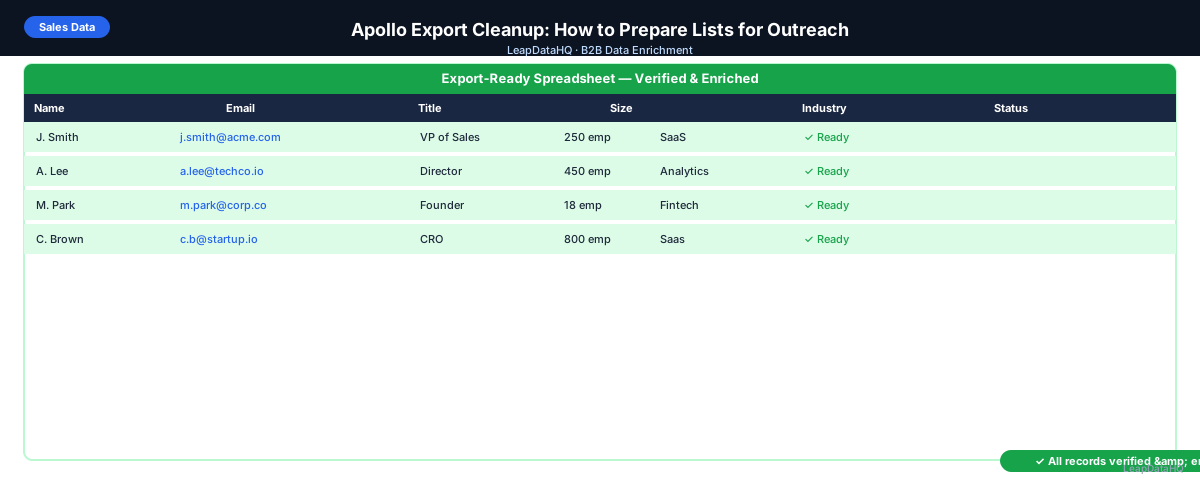
Apollo.io is a popular prospecting platform, but the CSV files it exports are rarely outreach-ready without some cleanup. Common issues: duplicate contacts when the same person was added to multiple sequences, missing fields that weren't populated in Apollo's database, email addresses that haven't been verified since they were added, and formatting inconsistencies from merging lists across different searches.
Apollo export cleanup is the process of reviewing and fixing these issues before loading the export into an email sequencer or CRM. Done right, it turns a raw Apollo export into a high-quality outreach list with lower bounce rates, better personalization, and cleaner CRM records.
This guide covers the most common Apollo export problems and a step-by-step workflow to clean them efficiently.
Common Apollo Export Problems
Duplicate Contacts
When you run multiple searches in Apollo and export across sessions, the same contact may appear multiple times. This happens especially when contacts appear in multiple filters (same person fits "VP of Sales at SaaS company" and "VP of Sales in New York") and you export each search separately.
Missing or Low-Quality Emails
Apollo includes email addresses for most contacts, but not all are verified at the time of export. Some contacts show emails with a lower confidence indicator. Others may have email addresses that were accurate when Apollo last updated them but have since changed as people moved jobs.
Outdated Contact Data
Apollo's database is updated continuously, but individual contact records may lag behind real-world changes. A contact who left a company six months ago may still show their old title and email in Apollo. This is especially common for mid-size companies where turnover is harder to track.
Missing Fields for Personalization
Apollo exports often have blank fields for personalization variables — company description, industry segment, tech stack, or recent news. If your outreach sequences use these as personalization tokens, blank fields produce broken copy ("I noticed [company description]…").
Step 1: Export Your Apollo List to CSV
In Apollo, select your contacts or people list and use the Export function to download a CSV. Include all available fields — even ones you don't plan to use immediately, since they're useful for filtering and review. Save the file with a descriptive name and date stamp.
Step 2: Detect Missing and Problem Fields
Open the export in a spreadsheet. Run a deduplication check on the email column first — any email appearing more than once is a duplicate. Count blank cells in key columns: email, title, company domain, phone number. Identify any obvious data quality issues in a visual scan of the first 50 rows.
Ready to enrich your CSV list?
Upload a CSV, fill missing data, review confidence scores, and export clean records.
Upload a CSV — Start EnrichingStep 3: Enrich Contacts with Missing Data
For contacts with missing fields, run enrichment using a CSV enrichment tool. Upload the Apollo export CSV, map columns (first name, last name, company domain), and request missing fields. Enrichment can fill blank email addresses, job titles, and company data that Apollo didn't return.
Enrichment also provides a second data source opinion on the data Apollo returned. If Apollo has a contact's title as "Director" but enrichment returns "VP," that discrepancy is worth investigating before outreach.
Step 4: Review Confidence Scores
Review enrichment results by confidence score. High-confidence enriched data can fill Apollo's blank fields reliably. Low-confidence results should be reviewed manually or excluded from the outreach campaign.
Step 5: Fix Bad Rows
- Remove duplicate rows (keep one record per unique email address)
- Remove contacts outside your ICP (wrong title level, wrong company size)
- Remove role-based emails (info@, sales@, support@)
- Flag contacts where Apollo email domain doesn't match company domain
- Standardize title formatting for personalization tokens
- Remove contacts at companies outside your target geography or industry
Step 6: Verify Emails Before Outreach
Run email verification on all addresses in your cleaned export — both original Apollo emails and any enriched emails. Email verification catches addresses that have gone inactive since Apollo last updated them, which is the main source of bounces in Apollo-sourced campaigns.
After verification: remove invalid addresses, flag catch-all addresses as higher-risk, and segment your list by verification status before loading into your sequencer.
Step 7: Export and Load to Outreach Tool
Export your reviewed, verified list. Load into your email sequencer or CRM. For email sequences, create separate lists for high-confidence verified contacts vs. catch-all domain contacts if you want to test different sending cadences for each segment.
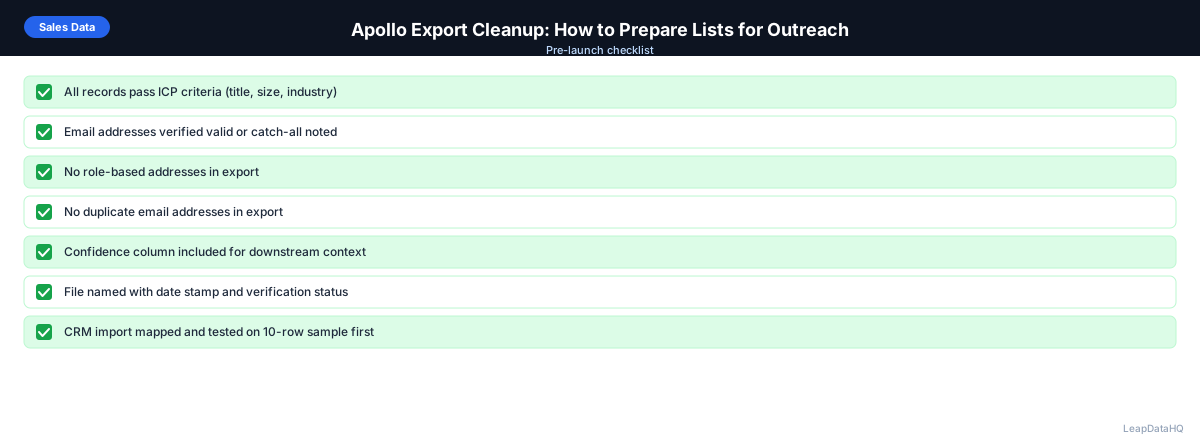
Apollo Export Cleanup Checklist
- Export downloaded with all available fields and date-stamped
- Deduplication run on email column
- ICP filter applied (title, company size, industry match)
- Role-based emails removed
- Missing fields enriched from secondary source
- Enrichment confidence threshold applied
- All email addresses verified (original Apollo + enriched)
- Invalid addresses removed
- Catch-all addresses segmented separately
- Title and company name formatting standardized for personalization tokens
- Final file exported and loaded to sequencer or CRM
When to Use LeapDataHQ
LeapDataHQ works well as a secondary data source for Apollo export cleanup. When Apollo returns contacts with missing fields, upload the export to LeapDataHQ to fill gaps — email addresses where Apollo returned none, job titles that are blank, and company data that's missing. Review with confidence scores and export a cleaner file for your outreach tool.
This isn't about replacing Apollo — it's about adding a review and enrichment step between your Apollo export and your outreach launch, which consistently improves deliverability and personalization quality.
Start Enriching LeadsFrequently Asked Questions
Why does my Apollo export have duplicate contacts?
Duplicates in Apollo exports typically happen when the same contact appears in multiple lists or searches and you export each separately without deduplication. Apollo's own export UI doesn't automatically deduplicate across exports. Run deduplication on the email column after combining exports to catch all duplicates before outreach.
Are Apollo's email addresses already verified?
Apollo verifies emails as part of its data quality process, but the verification timestamp may be old for some contacts. Apollo email data quality is generally good, but running a fresh verification pass before a major outreach campaign is worth doing — especially for contacts who may have changed jobs since Apollo last updated them.
How do I handle Apollo contacts with no email address?
Filter contacts with blank email to a separate segment. Run enrichment on this segment using a CSV enrichment tool to find work emails. If enrichment returns a high-confidence email, add it to the contact and include in outreach. If no email is found, these contacts may be better reached through LinkedIn or phone.
What's the best way to combine multiple Apollo exports?
Combine the CSV files in a spreadsheet (paste all rows together into one sheet). Run deduplication on email address. Remove duplicates, keeping the row with the most complete data. Then proceed with enrichment and verification on the combined, deduplicated list.
How does Apollo export cleanup compare to using Apollo sequences directly?
Using Apollo sequences keeps contacts inside the Apollo platform, which simplifies tracking but limits flexibility. Exporting and cleaning gives you more control: you can use enrichment to add data Apollo doesn't have, apply your own quality filters, and load into any sequencer rather than being limited to Apollo's email sending. Both approaches are valid — the best choice depends on your stack.