
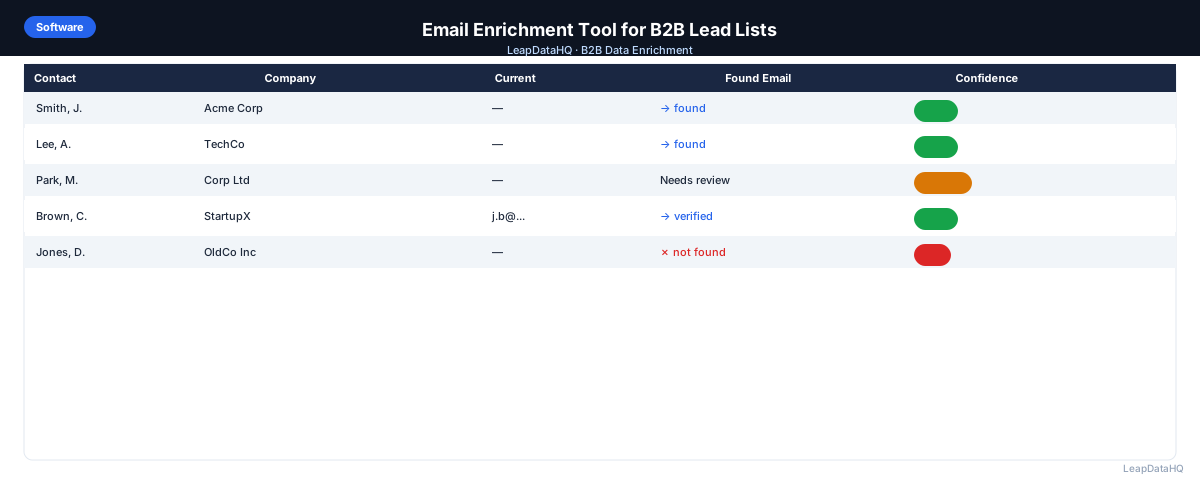
An email enrichment tool is specialized software that takes a B2B lead list with missing email addresses and fills those gaps by querying business contact databases. If you have a spreadsheet of prospect names and company domains but no email addresses, an email enrichment tool is the most efficient way to complete your records for outreach.
The problem is common: you have a list of target accounts and decision-makers from a LinkedIn export, conference attendee list, or trade publication mention. But a significant percentage of rows are missing the one field you need most — the email address. Without it, you cannot start your outreach sequence.
Email enrichment tools solve this by matching your partial contact data against databases of verified business emails. You upload your CSV, the tool processes it against its data sources, and you download an enriched file with email addresses appended to your records.
This guide covers what email enrichment tools do, how to evaluate and choose the right one, and how to integrate email enrichment into your B2B outreach workflow.
What Is an Email Enrichment Tool?
An email enrichment tool is a software application that appends missing email addresses to existing contact records. You provide input data — typically a company domain and a contact name — and the tool searches its database for a matching business email address, returning the result along with confidence indicators.
These tools differ from email finders in that they typically work in batch mode, processing hundreds or thousands of records at once through CSV upload, rather than requiring single-record lookups. This makes them suitable for preparing complete lead lists for campaigns.
The underlying technology varies. Some tools maintain proprietary databases built from public sources and data partnerships. Others aggregate from multiple third-party providers. The data source affects coverage, accuracy, and freshness.
How Email Enrichment Tools Work
The typical workflow for an email enrichment tool follows these steps:
- Upload your CSV file with contact names and company identifiers
- Map your spreadsheet columns to the tool's expected fields (first name, last name, domain)
- The tool queries its database, matching each record against known business email records
- Results are returned with confidence scores indicating reliability
- You review the results, filter by confidence level, and export the enriched file
Most tools process files in seconds to minutes, depending on row count. Records are typically processed in parallel, so larger files scale reasonably well.
What to Look For in an Email Enrichment Tool
Match Rate for Your Target Market
Match rate is the percentage of input records that return an enriched email address. A tool with strong coverage in your target industries and geographies is essential. Test with a representative sample of your actual target market before committing.
Confidence Scoring
The tool should indicate how confident it is in each email address it returns. Confidence scores let you separate reliable results from uncertain ones, reducing the risk of importing bad data into your outreach campaigns.
Email Verification Capability
Ready to enrich your CSV list?
Upload a CSV, fill missing data, review confidence scores, and export clean records.
Upload a CSV — Start EnrichingThe best email enrichment tools include or integrate with email verification. Verification checks whether each enriched email address can actually receive mail, catching invalid mailboxes before they cause bounces.
CSV-Based Workflow
For most B2B sales teams and agencies, CSV upload and download is the most practical workflow. Look for tools that let you upload a file, map columns visually, process, and download enriched results without writing code or integrating an API.
How to Integrate Email Enrichment Into Your Workflow
Email enrichment fits into your lead list preparation workflow after cleaning and deduplication, but before email verification and import to your outreach tool:
- Source your prospect list from LinkedIn, conference attendance, or CRM export
- Clean the list: remove duplicates, standardize company names, clean domain formats
- Upload to an email enrichment tool to fill missing email addresses
- Review confidence scores and filter out low-confidence results
- Run email verification on the enriched addresses to check deliverability
- Segment the list by industry, company size, or job title for targeted outreach
- Import to your CRM or email sequencing platform
Common Mistakes With Email Enrichment Tools
- Uploading uncleaned data: Dirty input produces inconsistent enrichment results. Always clean your CSV before uploading.
- Ignoring confidence scores: Importing all enriched emails without filtering by confidence leads to high bounce rates.
- Skipping email verification: Enriched emails can look valid but point to inactive mailboxes. Verification catches these.
- Not testing with real data: Marketing claims and demo data do not reflect actual performance on your target market.
- Over-relying on a single tool: Different tools have different coverage. For high-priority campaigns, cross-reference results.
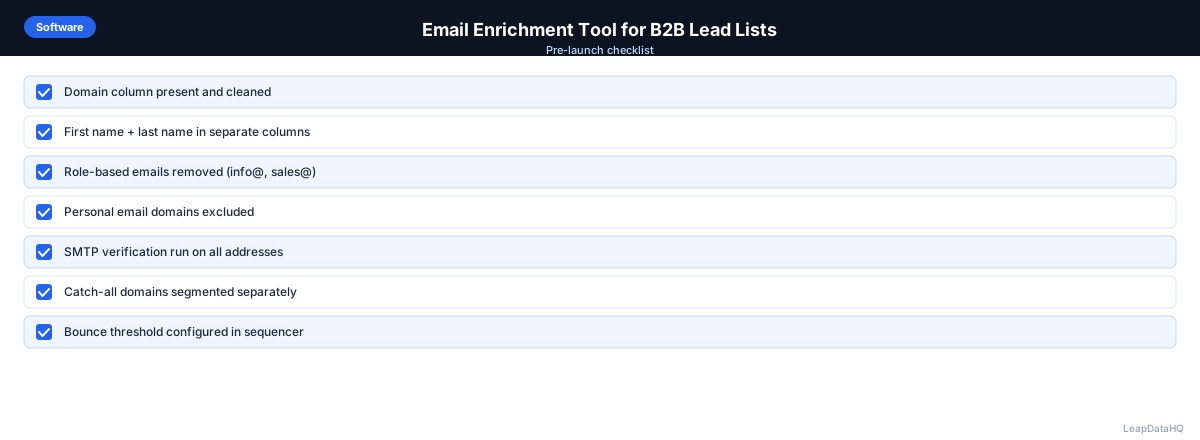
Email Enrichment Tool Checklist
Before choosing an email enrichment tool, verify it meets these criteria:
- Match rate tested with your actual target market data
- Confidence scores provided for every enriched email
- Email verification included or integrated
- CSV upload and download supported
- Pricing fits your volume — per-record or credit-based
- No long-term contract required
- Free trial or sample available for testing
How LeapDataHQ Helps
LeapDataHQ provides email enrichment as part of a complete CSV enrichment platform. You upload your lead list, map your columns, and LeapDataHQ queries its data sources to fill in missing email addresses. Each enriched email is returned with a confidence score so you know which results are reliable.
LeapDataHQ also includes email verification, so you can confirm deliverability in the same workflow rather than using a separate tool. This streamlines the enrichment-to-verification pipeline.
The credit-based pricing at /pricing means you pay only for the records you enrich, with no seat fees or annual contracts. Learn more about the enrichment workflow at /features.
When to Use LeapDataHQ
LeapDataHQ is built for teams that need an email enrichment tool to fill missing addresses in B2B lead lists. It is designed for the specific workflow of uploading a CSV, enriching missing email fields, reviewing confidence scores, and exporting clean data ready for outreach.
It fits best when you are working with batch enrichment — files of 50-5,000 records — rather than single-record lookups. The platform processes records in parallel so larger files are handled efficiently.
LeapDataHQ returns confidence scores and verification status for every enriched email, giving you control over output quality. You filter to deliverable, high-confidence results before exporting, protecting your sender reputation from the start.
Start Enriching LeadsFrequently Asked Questions
What input data do I need for email enrichment?
The minimum requirements are a company domain and a contact name. Match rates improve significantly when both are provided. Lists with only domains and no names will return fewer results.
What is a reasonable match rate for email enrichment?
For clean B2B lists with domains and contact names, 60-80% is typical. Rates vary by industry, geography, and company size. Established companies in technology tend to have higher match rates.
Do email enrichment tools verify the email addresses they return?
Some tools include verification; others return only the email address pattern. Check whether the tool you are evaluating includes verification or requires a separate step.
Is enriched email data compliant with privacy regulations?
B2B email enrichment for legitimate business purposes is generally compliant with regulations like GDPR and CAN-SPAM, provided you include unsubscribe mechanisms and follow applicable laws.
How do I handle low match rates on my enrichment?
Low match rates often indicate input quality issues. Clean your domains, add contact names where missing, and ensure your target companies have sufficient public presence.