
Missing email addresses are the most common problem in B2B prospect lists. You have a company name, maybe a job title, maybe even a LinkedIn URL — but no way to actually reach the person. Without an email address, the contact is unusable for outreach until you find one.
Missing email enrichment is the process of taking contacts without email addresses and using enrichment tools to look up or generate the correct work email based on the available information. Done well, it turns an incomplete list into an actionable one. Done poorly, it fills your list with guesses that bounce and damage your sending reputation.
This guide covers how missing email enrichment works, what data you need to run it effectively, how to evaluate the results, and how to handle the records that don't get matched.
Why Prospect Lists Have Missing Emails
Missing emails happen for several reasons. LinkedIn exports don't include work email addresses — they include name, title, company, and sometimes a personal connection, but not a deliverable business email. Conference scan lists typically capture name and company but not email. CRM records often have contact names added without email addresses, especially when contacts were added from business cards or phone calls. Trade publication subscriber lists may have name and company but not email.
The result is that many B2B teams sit on large lists of contacts they can identify but can't reach. Email enrichment closes that gap by querying data sources to find the work email pattern for a given domain and contact name.
How Missing Email Enrichment Works
Enrichment tools find missing emails through a combination of pattern inference and database lookup. Pattern inference works by identifying the email format used at a given company domain (e.g., firstname.lastname@domain.com) and applying it to the contact's name. Database lookup checks known verified addresses across the tool's data sources.
The strongest match comes from tools that combine both approaches: verify the pattern against actual known addresses at the domain, rather than inferring the pattern and guessing. Pattern-only tools produce more errors and higher bounce rates.
What You Need Before Running Missing Email Enrichment
- First name and last name for each contact (or a full name column)
- Company domain — this is the strongest key for email pattern lookup
- Company name — can be used if domain is not available, though domain is more reliable
- Job title — helpful context but not required for email finding
Domain is the most important field for email enrichment. If your list has company names but not domains, you can often derive domains manually for the most important targets or use a company-level enrichment tool to look them up first, then run email enrichment as a second pass.
Step 1: Upload Your CSV and Identify Missing Email Rows
Upload your list to your enrichment tool. If the tool supports filtering, use it to isolate rows where the email column is blank — these are the rows that need enrichment. Processing only the rows that are missing emails is more efficient than re-processing the entire list.
If your enrichment tool processes the full file and skips rows that already have emails, that's fine too. Just confirm that existing email values won't be overwritten by the enrichment process — you want to fill gaps, not replace known-good addresses with new ones.
Step 2: Detect and Map Available Fields
Map your columns correctly before running enrichment. Tell the tool which column is first name, which is last name, which is company domain. Incorrect mapping — for example, mapping the company name column as domain — produces zero matches.
Step 3: Run Email Enrichment
Ready to enrich your CSV list?
Upload a CSV, fill missing data, review confidence scores, and export clean records.
Upload a CSV — Start EnrichingSubmit the file for processing. The tool looks up each row, attempts to find or infer a work email address, and returns results with confidence indicators. Processing time varies by row count and tool — a few hundred rows typically returns in under a minute.
Step 4: Review Confidence Scores on Returned Emails
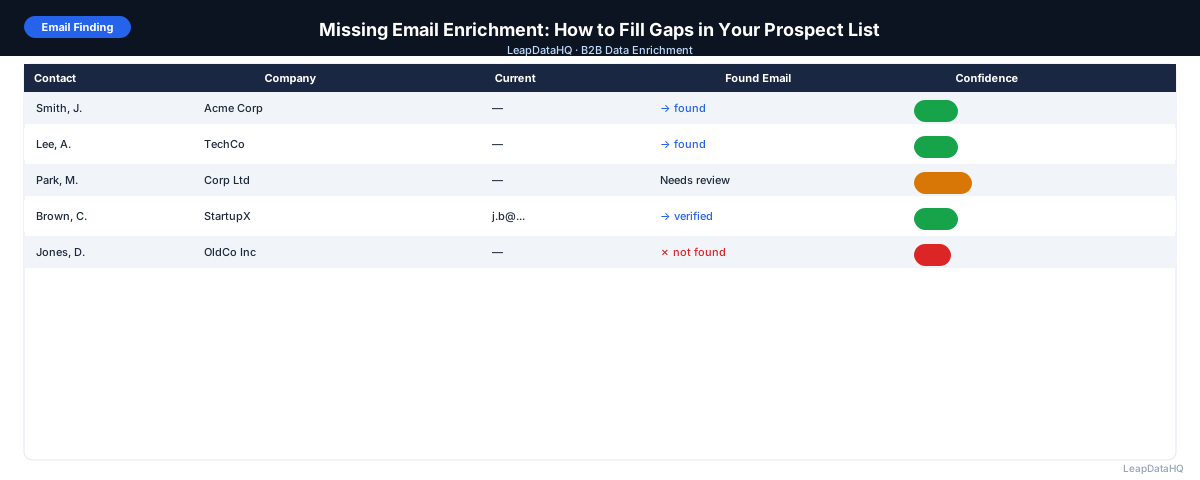
Not all returned emails are equally reliable. Review confidence scores carefully. High-confidence matches are verified against known data sources. Low-confidence matches are often pattern inferences that haven't been verified against a known address.
Segment the results: high-confidence emails go directly to outreach. Low-confidence emails go to a secondary verification pass or are held back from cold email and used only for lower-risk channels like LinkedIn outreach or phone follow-up.
Step 5: Fix Bad Rows and Handle Unmatched Records
Some records won't get matched. This happens when the contact is not in the enrichment tool's data sources, when the domain is unusual or very new, or when the name provided is ambiguous. For these rows, your options are:
- Manual lookup: check the company website or LinkedIn to find the email pattern, then apply it to the contact
- Domain pattern test: send a test to the assumed email pattern and check if it bounces
- Skip: remove unmatched contacts from the campaign and revisit later
- Use alternative channel: approach via LinkedIn message if email isn't available
Step 6: Verify Emails Before Outreach
Run a verification pass on all enriched emails before uploading to an outreach tool. Email verification confirms whether the mailbox exists and is accepting mail. This step catches addresses that look valid but belong to defunct accounts, employees who have left, or domains with changed patterns.
After verification, remove invalid addresses and flag catch-all domains. Catch-all domains accept all email regardless of whether the mailbox exists — verification can't confirm delivery on these, so treat them as higher-risk for cold email.
Step 7: Export and Use the Completed List
Export the verified, enriched file. The output should have your original columns plus the new email column, confidence score, and verification status. Import into your CRM or sequencer, segment by confidence level if needed, and launch your campaign.
Common Mistakes in Missing Email Enrichment
- Using company name instead of domain as the lookup key: produces lower match rates
- Skipping confidence review: high bounce rates follow from using all returned emails without filtering
- Skipping email verification: enriched emails are more likely to be accurate than cold guesses, but verification is still necessary
- Treating catch-all verification results as confirmed: catch-all means any address at that domain appears valid
- Running enrichment on the same rows repeatedly: track which rows have been processed to avoid wasting credits
Missing Email Enrichment Checklist
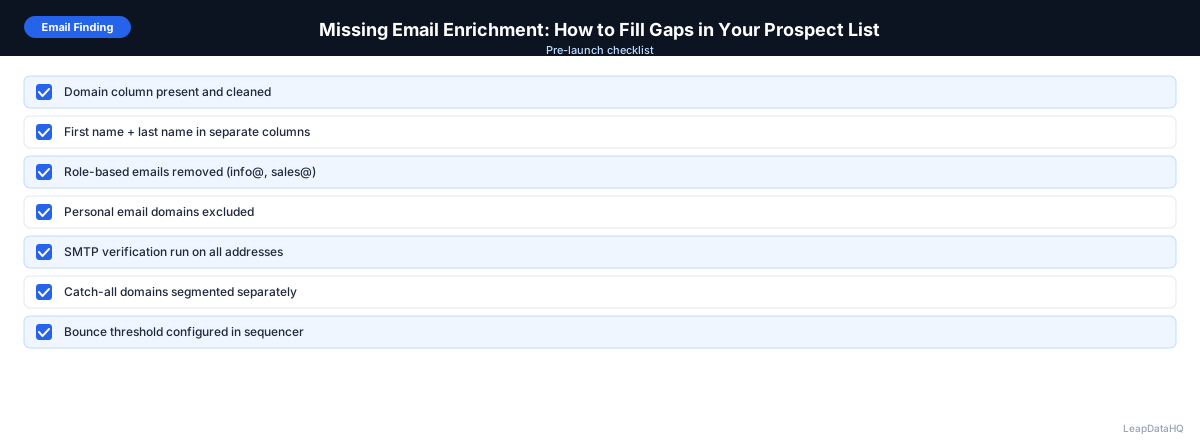
- List has first name, last name, and company domain for each contact
- Rows with existing emails excluded from enrichment processing (or confirmed not to be overwritten)
- Columns mapped correctly before submission
- Results reviewed by confidence score
- Low-confidence records segmented separately
- Email verification run on all enriched addresses
- Invalid addresses removed
- Catch-all domains flagged
- File exported with verification status column
- List segmented before campaign launch
When to Use LeapDataHQ
LeapDataHQ handles missing email enrichment as part of its core CSV workflow. Upload a file with contacts that are missing email addresses, let the tool look up and append emails with confidence scores, review the results, and export only the high-confidence records.
For teams that regularly receive lists without emails — conference exports, LinkedIn scrapes, CRM contacts added from business cards — LeapDataHQ provides a repeatable workflow that doesn't require developer support or expensive annual subscriptions. Credit-based pricing means you only pay for matched records.
Start Enriching LeadsFrequently Asked Questions
What match rate should I expect for missing email enrichment?
Match rates vary by list quality and data source coverage. Well-formatted lists with clean domains and full contact names typically see 60–80% match rates on high-confidence emails. Lists with ambiguous company names or unusual domains see lower rates. No enrichment tool matches 100% of records.
Can I find emails without a company domain?
You can, but match rates are lower. Company name alone is a weaker key than domain because the same company name may map to multiple domains, or the name may not exactly match how it appears in the enrichment tool's database. Whenever possible, derive or look up the domain before running email enrichment.
What should I do with contacts that don't get matched?
For high-priority targets, manual lookup on LinkedIn or the company website is worth the time. For lower-priority contacts, set them aside in a separate segment for future enrichment attempts or alternative outreach channels. Don't delete unmatched rows — they represent contacts you may be able to reach later.
Is email enrichment legal?
B2B email enrichment is generally permitted under CAN-SPAM (US) and GDPR (EU) for legitimate business purposes, provided outreach is professional and includes an unsubscribe mechanism. GDPR requires a lawful basis for processing — legitimate interest in a B2B context is the most common basis used. Always consult with your legal team for specific guidance on your use case and geography.
How accurate are enriched emails compared to verified emails?
Enriched emails are more accurate than cold guesses but are not guaranteed to be deliverable. High-confidence enriched emails from reputable tools have lower bounce rates than low-confidence ones, but running email verification on all enriched addresses before outreach is still the best practice.