
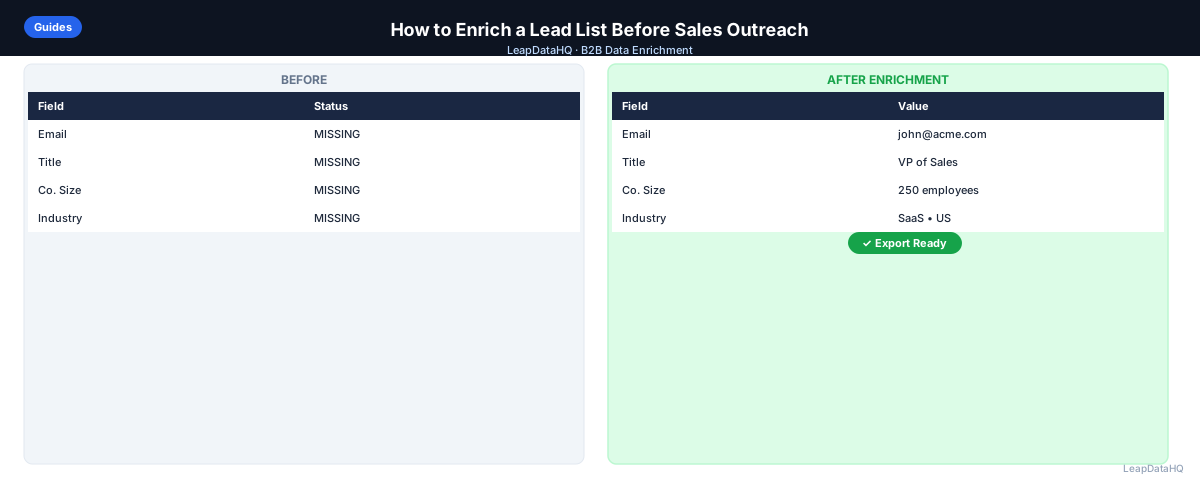
A lead list with missing fields is not ready for outreach. Before you load contacts into an email sequencer or CRM, the list needs to be complete: verified email addresses, accurate job titles, current company names, and other fields your campaigns depend on. Enriching a lead list fills those gaps automatically, using data sources to append what's missing so you can run outreach without manual research.
This guide walks through the complete lead list enrichment workflow — from preparing your input file through reviewing results and exporting clean data. Whether you're working with 100 contacts from a LinkedIn export or 2,000 records from a trade show scan, the process is the same.
The biggest mistake teams make is skipping the preparation step. Uploading a messy file produces messy output. The second biggest mistake is skipping the confidence review — importing every enriched record without checking quality leads to high bounce rates and damaged sender reputation. This guide covers both.
Why Lead List Enrichment Matters Before Outreach
Outreach tools require complete data. Email sequencers need valid addresses. CRM imports need consistent fields. Personalization variables need populated values. A lead list with missing or incorrect fields produces campaigns that bounce, fail to personalize, or import with broken records.
Enrichment solves this by taking what you have — company names, domains, partial contact records — and querying data sources to fill in missing fields. The result is a more complete file that's ready for the next step in your workflow, whether that's a CRM import, an email campaign launch, or a sales call queue.
What a Lead List Enrichment Workflow Looks Like
A complete enrichment workflow has seven steps. Each step catches a different class of problem that would otherwise show up during outreach.
Step 1: Upload or Import Your CSV
Start with your existing lead list — typically a CSV or spreadsheet exported from a CRM, LinkedIn, a contact database, or a manual research effort. Before uploading, verify the file has the key columns your enrichment tool needs: at minimum, a company domain or company name plus contact name.
Remove any rows where these key fields are blank. Enrichment tools match records by looking up the domain or name — without either, there's nothing to match against. These blank rows will consume credits and return no useful data.
Step 2: Detect Missing Fields
Before running enrichment, audit what's missing in your file. Open the CSV in a spreadsheet and check each column. Common missing fields include email address, job title, phone number, company size, and LinkedIn URL. Understanding what's missing tells you which enrichment fields to request and helps you evaluate the output quality later.
A quick audit also reveals data format problems — domains with "https://" prefixes, names in all-caps, or inconsistent column headers. Fix these before uploading. Clean input consistently produces better match rates than messy input.
Step 3: Enrich Contact and Company Data
Upload your cleaned file to a lead enrichment tool. Map your columns — tell the tool which column is the company domain, which is first name, which is last name. This mapping is how the tool knows what to look up for each row.
The tool queries its data sources for each record and appends the fields you requested. Common fields returned include verified email addresses, job titles, company size, industry, revenue range, phone number, and LinkedIn profile URLs. Processing time depends on row count — most tools return results for a few hundred rows in under a minute.
Step 4: Review Confidence and Quality
Ready to enrich your CSV list?
Upload a CSV, fill missing data, review confidence scores, and export clean records.
Upload a CSV — Start EnrichingA good enrichment tool returns confidence scores or quality flags alongside the data. High-confidence matches are reliable. Low-confidence matches may be inaccurate — a guessed email pattern rather than a confirmed address, or a title that hasn't been updated recently.
Review the results before exporting. Sort by confidence score and apply a threshold: use high-confidence records for primary outreach and either exclude or separately handle low-confidence ones. The specific threshold depends on your tolerance for bounce risk, but filtering below 70% confidence is a common practice.
Step 5: Fix Bad Rows
After applying your confidence threshold, review the remaining records for obvious data quality issues. Enrichment tools can return incorrect information — especially for companies with unusual names, recent rebrands, or common words in their name.
- Check email domains match company domains: if the company is acme.com but the email returned is @acmecorp.com, investigate
- Check job titles are plausible: if your ICP is VP-level but titles returned are "intern" or blank, those rows need attention
- Remove role-based emails: noreply@, info@, support@ — these are not real decision-maker contacts
- Remove duplicate contacts: the same person at the same company appearing twice wastes outreach budget
Step 6: Export Clean Data
Once you've reviewed and cleaned the results, export the file. Your export should contain only the rows you're confident in, with all original columns plus the enriched fields appended. Keep a copy of the pre-enrichment file for reference — if you need to re-enrich later, having the original prevents you from re-processing rows you already handled.
Name your export file with a date stamp and enrichment status: "prospect-list-2025-08-01-enriched.csv". This naming convention makes it easy to track which version of a list is current when managing multiple campaigns.
Step 7: Use the List for Outreach or CRM Updates
Import the enriched file into your CRM, email sequencer, or outreach tool. Before launching any campaign, run a final email verification pass — enriched emails are more accurate than guessed emails, but verification confirms the mailbox is active. Targeting is the final step: use the enriched company size, industry, and title fields to segment the list for more targeted messaging.
Common Mistakes to Avoid
- Skipping deduplication before enrichment: paying to enrich the same contact twice
- Using domains with "http://" or "www." prefixes: causes lower match rates
- Importing everything without reviewing confidence scores: leads to high bounce rates
- Not verifying emails after enrichment: enriched emails still need verification
- Over-enriching a list for a small campaign: enrich in batches matched to your sending volume
- Ignoring catch-all domains: these domains accept all addresses, so verification can't confirm individual delivery
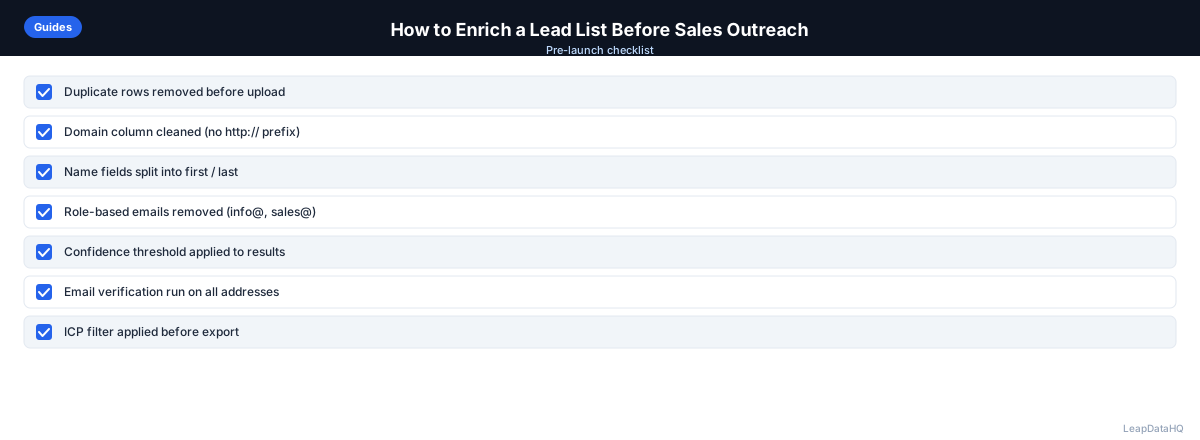
Lead List Enrichment Checklist
- Input file has domain or company name column
- Duplicate rows removed before upload
- Domain column cleaned (no http://, trailing slashes)
- Role-based emails removed (noreply@, info@)
- Blank key-field rows removed
- Enrichment fields mapped correctly
- Results reviewed by confidence score
- Low-confidence rows filtered or set aside
- Role-based and invalid emails removed from output
- Final email verification run
- File exported with date stamp
- List segmented by enriched fields before campaign launch
Who Benefits Most from Lead List Enrichment
Sales development reps use enrichment to prepare cold email lists before each campaign cycle. Agencies enrich client lead lists as part of their list delivery workflow. Founders use enrichment to build initial outreach lists without dedicated research resources. RevOps teams use enrichment to fill gaps in CRM records during periodic data quality reviews. Any team working with spreadsheets of incomplete B2B contacts benefits from a structured enrichment workflow.
When to Use LeapDataHQ
Use LeapDataHQ when you have a CSV of incomplete lead records — company names, domains, or partial contacts — and need to fill missing fields before outreach. Upload your file, map columns, review enriched results with confidence scores, and export only the rows you trust.
LeapDataHQ is built for this exact workflow: credit-based pricing means you only pay for matched records, the confidence review interface makes quality checks straightforward, and the export is ready for CRM import or email sequencer upload without additional formatting steps.
Start Enriching LeadsFrequently Asked Questions
How many records should I include per enrichment batch?
There's no strict limit, but starting with batches of 200–500 records makes the review step manageable. Once you're confident in the workflow, you can process larger batches. The review step is where quality control happens, so don't make batches so large that reviewing each row becomes impractical.
What's the minimum data needed to enrich a lead list?
You need at minimum a company domain or a combination of company name and contact name. Domain is the strongest key for company-level enrichment. First name plus last name plus company name is the strongest key for contact-level enrichment. Without at least one of these, match rates will be very low.
Should I enrich before or after email verification?
Enrich first, then verify. Enrichment adds email addresses to records that don't have them. Verification confirms whether those addresses are deliverable. Running verification on your raw file before enrichment won't help rows that don't have emails yet.
What confidence score threshold should I use?
Most teams use 70–80% as their threshold for including records in outreach. Records above that threshold go to active campaigns. Records below get a secondary review pass or are excluded. For high-value accounts where you're doing personalized outreach, manual verification of borderline records is worth the time.
How often should I re-enrich a lead list?
B2B contact data decays at roughly 25–30% per year as people change jobs. If a list is more than six months old, re-enriching before launching a new campaign is worth doing. Annual re-enrichment of your full CRM contact database is a common RevOps practice.