
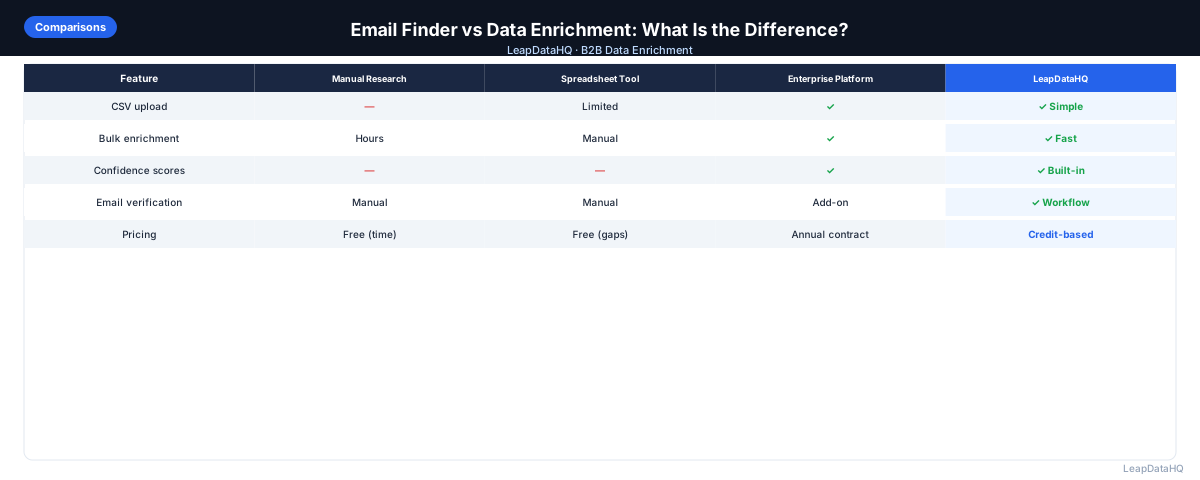
Email finder and data enrichment are often used interchangeably, but they're not the same thing. Email finder tools have one job: find an email address given a person's name and company. Data enrichment tools do more: they take an incomplete contact record and fill in multiple missing fields, of which email is just one.
The distinction matters because choosing the wrong tool for your workflow creates gaps. If you only need email addresses and nothing else, a dedicated email finder may be the more efficient choice. If you need email addresses plus job titles, company size, industry, and LinkedIn URLs — all in one pass — a data enrichment tool is more practical.
This guide explains what each type of tool does, where they overlap, when to use each, and how they work together in a complete B2B outreach workflow.
Understanding the distinction helps teams avoid two common workflow mistakes: paying for a multi-field enrichment tool when only email finding is needed, or using a single-field email finder on a list that needs complete record enrichment. Neither mistake is catastrophic, but both waste either money or time on the wrong tool for the actual job.
What an Email Finder Does
An email finder takes a person's first name, last name, and company domain as input and returns a work email address as output. That's the core function. Most email finders also return a confidence score indicating how certain they are that the returned email is correct.
Email finders work through a combination of pattern inference (identifying the email format used at a given company) and database lookup (checking known confirmed emails at the domain). The best finders use both approaches and return verification-backed results rather than just pattern inferences.
Common email finder tools typically provide: email address, confidence score, email pattern used, and basic validity indication. What they don't provide: job title, company size, industry, LinkedIn URL, phone number, or other contact and company fields.
What Data Enrichment Does
Data enrichment takes an incomplete contact or company record and fills in multiple missing fields from data sources. Email address is one of those fields — but enrichment also adds job title, seniority level, department, company size, revenue range, industry, headquarters location, LinkedIn URL, phone number, technology stack, and funding status, depending on the tool and what you request.
The input for enrichment is typically a CSV with partial contact data — company names, domains, or contact names with companies. The output is the same file with additional columns appended for each enriched field.
Where They Overlap
The overlap is email finding. Many data enrichment tools include email finding as one of their enrichment capabilities. So if you're using a data enrichment tool, you're often using email finding as one component of it. The reverse isn't true — email finders typically don't return the wider set of company and contact fields that enrichment tools do.
When to Use an Email Finder
- You already have complete contact records (name, title, company) but are missing email addresses
- You need email addresses only — you don't need title, company size, or other fields
- You're enriching one contact at a time via a browser extension or single-contact lookup tool
- You want to verify an email pattern for a specific company domain before sending to a list
- Your workflow already has title and company data and only email is missing
When to Use Data Enrichment
Ready to enrich your CSV list?
Upload a CSV, fill missing data, review confidence scores, and export clean records.
Upload a CSV — Start Enriching- Your contact list is missing multiple fields — not just email but also title, company size, industry
- You need to enrich many contacts in a single batch (bulk enrichment via CSV)
- You need company-level data (headcount, revenue, industry) in addition to contact-level fields
- You want to use enriched fields for ICP qualification and segmentation, not just for outreach
- You're enriching CRM records where multiple fields may be blank or outdated
- You're building outreach lists from domains or company names without contact information
How They Work Together in a B2B Outreach Workflow
A typical B2B outreach workflow uses both in sequence:
- Start with a list of target companies or contacts (LinkedIn export, conference list, CRM segment)
- Run data enrichment to fill multiple missing fields: title, company size, industry, and email address
- Review enriched results by confidence score — apply your threshold
- For contacts that didn't get matched in enrichment, try a dedicated email finder with just name and domain as input
- Run email verification on all email addresses (from both enrichment and email finder)
- Segment the verified, enriched list by company size or industry for tailored outreach
- Export and load to your sequencer or CRM
Comparing Email Finders and Data Enrichment Tools
- Fields returned: Email finder → email only. Data enrichment → email plus multiple contact and company fields.
- Primary use case: Email finder → point lookup or small batch email finding. Data enrichment → bulk CSV enrichment of incomplete records.
- Input required: Email finder → name + domain. Data enrichment → name + domain, or domain alone, or company name.
- Output format: Email finder → email + confidence score. Data enrichment → multiple new columns appended to your original CSV.
- Pricing: Email finders often charge per lookup. Enrichment tools often charge per matched record or per credit.
- Verification included: Some email finders include verification. Enrichment tools vary — some include it, others don't.
Common Mistakes When Choosing Between the Two
- Using an email finder when you need multiple fields: you'll need to run multiple tools when enrichment would have done it in one pass
- Using data enrichment when you only need email: paying for enrichment capability you don't use
- Treating enrichment and email finding as alternatives: they're often complementary — enrichment fills most fields, email finder handles contacts that enrichment missed
- Skipping email verification after both: neither tool confirms current deliverability — verification is always a separate step
- Expecting either tool to match 100% of contacts: no tool has complete coverage of all B2B contacts globally
Which Should You Start With?
Start with data enrichment if you have CSV files of incomplete contacts that need multiple fields filled. The enrichment pass covers email finding as part of its output, plus adds the other fields you need for segmentation and personalization. Start with a dedicated email finder if you have complete contact records and only need email addresses added — it's simpler and may be faster for that specific task.
Evaluating Tool Coverage for Your Specific Market
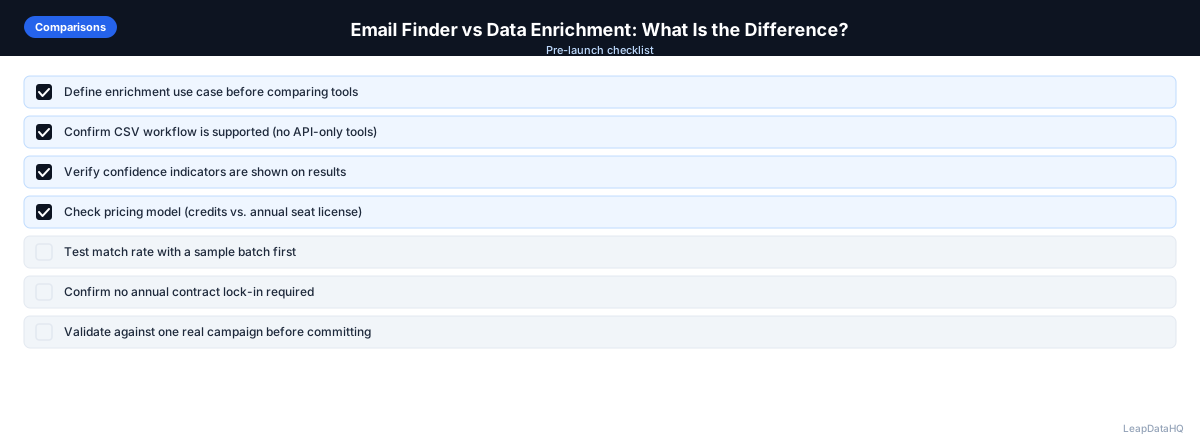
Coverage varies significantly between tools based on geography, company size, and industry. An email finder that performs well for US-based tech companies may have very limited coverage for European manufacturing contacts or Asian SMBs. Similarly, an enrichment tool with strong company-level data for mid-market firms may have weaker data for very small businesses or large enterprises. The only reliable way to evaluate coverage is to test each tool with a sample of contacts from your actual target market before committing to a specific tool for your workflow.
When evaluating tools, test for the specific fields that matter most in your workflow. If email is the only missing field, test email finder accuracy on your target market. If you need title and company size alongside email, test the enrichment tool's completeness for all three fields. Testing with your own data rather than relying on published match rates gives you a realistic picture of what each tool will deliver for your specific use case.
When to Use LeapDataHQ
LeapDataHQ is a data enrichment tool — it fills multiple missing fields from a CSV upload, including email addresses, as part of its enrichment output. If you need email addresses plus job titles, company size, industry, and other fields in one pass, LeapDataHQ handles the full enrichment workflow.
For contacts where enrichment doesn't find a match, running a dedicated email finder with just the name and domain as input is a practical complement — not a replacement for enrichment, but a secondary pass for hard-to-match contacts.
Start Enriching LeadsFrequently Asked Questions
Is data enrichment more expensive than email finding?
Generally yes, because enrichment does more. Per-record enrichment costs tend to be higher than per-lookup email finder costs because enrichment returns multiple fields and queries multiple data sources. However, if you need multiple fields, enrichment is more cost-effective than running several separate tools for each field individually.
Can I use an email finder to get company data too?
Most email finders are focused on finding email addresses and don't return company data like headcount, revenue, or industry. Some finding tools include basic company association, but for firmographic data (company size, industry, revenue), you need a data enrichment tool with company-level enrichment capability.
Do email finders verify the emails they return?
It depends on the tool. Some email finders include real-time SMTP verification as part of their lookup. Others return the email with a confidence score based on their database match quality, which is not the same as live verification. Check the specific tool's documentation to understand whether their returned emails are verified or estimated.
Why would enrichment miss an email that a finder finds?
Different tools have different data sources and coverage. An enrichment tool and an email finder may not share the same underlying database. Running a second tool on unmatched records from the first often finds additional contacts, because different providers have different strengths in terms of industry coverage, company size coverage, and geography.
Can I use email enrichment and data enrichment together?
Yes. A common workflow: run data enrichment on your full list for all fields. Contacts that get matched receive email, title, and company data in one pass. For contacts that didn't match (particularly those missing emails), run a dedicated email finder as a secondary pass. This two-step approach maximizes coverage without over-spending on contacts that enrichment already handled.