
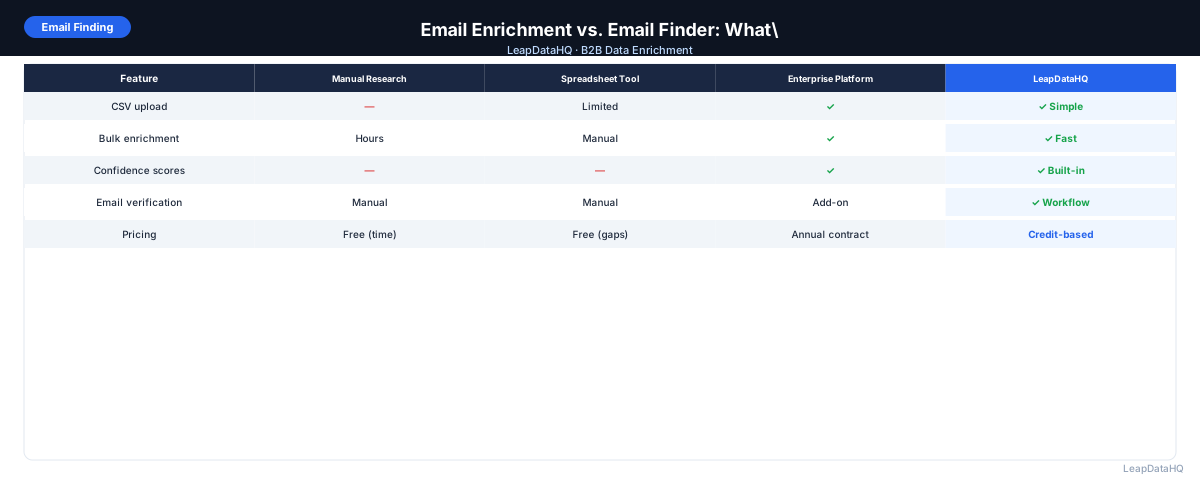
Email finder tools and email enrichment tools both return work email addresses for B2B contacts. The difference is in how they work and what scale they support.
Email finder tools are designed for single-contact lookup. You search for one specific person by name and company, and the tool returns an email. Email enrichment tools are designed for bulk operations — you upload a list of hundreds or thousands of contacts, and the tool appends email addresses across the whole list.
The right choice depends on your workflow: individual research needs a finder; list-based campaign preparation needs enrichment.
Many teams start with an email finder because it's the more familiar tool. An SDR researching a specific prospect at a target account naturally reaches for a browser extension or single-lookup tool. The challenge comes when that same SDR needs to prepare a campaign list of 500 contacts — clicking through each one individually doesn't scale. That's where teams discover enrichment tools as a distinct category.
The confusion between the two categories persists because some platforms offer both capabilities. But the underlying architecture, pricing model, and optimal use case differ significantly. Understanding which tool fits which part of your workflow helps you avoid paying for features you don't need or, worse, using the wrong tool for the job and wasting hours on manual work.
The practical test for most teams is straightforward: if you spend more than 20 minutes manually looking up individual email addresses for a list that's larger than 50 contacts, you're using the wrong workflow for that job. At that point, a bulk enrichment tool saves time and reduces the per-contact lookup variability that comes from switching between browser tabs and finder tools.
How Email Finder Tools Work
Email finder tools are designed for lookup of individual contacts. You provide a first name, last name, and company name or domain. The tool searches its database and returns the most likely email address for that person, usually with a confidence score or verification status.
Email finders are optimized for the use case where you already know the specific person you're looking for — before a targeted outreach, during sales research, or when you need to contact a specific person at a company.
A common scenario that highlights the difference: an SDR researching twenty target accounts might need to find emails for three or four decision-makers per account. That's 60 to 80 individual lookups. An email finder would require manually searching each one, reading results, and compiling output. An enrichment tool processes the list of names and domains in a single upload and returns all matches in one export. The time difference is the difference between an hour of manual searching and five minutes of file processing.
Email finder tools are designed for lookup of individual contacts. You provide a first name, last name, and company name or domain. The tool searches its database and returns the most likely email address for that person, usually with a confidence score or verification status.
Email finders are optimized for the use case where you already know the specific person you're looking for — before a targeted outreach, during sales research, or when you need to contact a specific person at a company.
How Email Enrichment Tools Work
Email enrichment tools are designed for bulk list processing. You upload a CSV with many contacts — potentially hundreds or thousands of rows — and the tool processes the entire list, returning email addresses for as many rows as it can match.
Enrichment tools process lists in parallel, which is why they handle large volumes quickly. You get back a file with all your original data plus an email column and often other fields like company size, industry, or phone number.
Key Differences Side by Side
- Input: email finders accept one contact at a time; enrichment tools accept full CSV files
- Scale: email finders suit 1–20 contacts per session; enrichment handles 100–50,000+
- Output: email finders return one email; enrichment returns a full augmented spreadsheet
- Speed: email finders are instant per lookup; enrichment takes minutes for a large file
- Additional fields: enrichment tools often return multiple fields; finders typically return email only
- Workflow: finders are manual; enrichment is a batch process that fits automated workflows
When to Use an Email Finder
- Researching specific individuals for highly targeted outreach (executives, investors, key decision-makers)
- Finding contact information for a small list of prospects (under 20)
- Ad hoc research during a sales conversation — you just learned about a potential buyer
- Verifying a specific contact before sending a high-stakes email
When to Use Email Enrichment
Ready to enrich your CSV list?
Upload a CSV, fill missing data, review confidence scores, and export clean records.
Upload a CSV — Start Enriching- Preparing outreach lists before loading into an email sequencer
- Filling missing email fields in your CRM after an import
- Processing LinkedIn or event export files with contact names but no emails
- Weekly or monthly batch enrichment of newly added CRM contacts
- Providing enriched lists to clients as part of an agency deliverable
Can the Same Tool Do Both?
Some tools offer both single-lookup and bulk enrichment in the same platform. If you need both workflows, a tool that handles both is more convenient than switching between platforms. If your primary need is bulk enrichment, a tool optimized for that workflow typically delivers better match rates and faster processing.
What About Email Verification?
Email verification is a third category: it checks whether an address you already have is valid and deliverable. Verification doesn't find new emails — it checks existing ones. A complete workflow often involves all three: finder for individual research, enrichment for bulk lists, and verification to confirm deliverability before sending.
How Data Quality Affects Both Workflows
Whether using a finder or enrichment tool, the quality of your input data directly determines the quality of your output. An email finder that receives an incorrect company name will return the wrong email. An enrichment tool processing a list with malformed domains or missing last names will produce lower match rates.
For enrichment workflows specifically, data quality issues compound at scale. If 10% of your uploaded CSV has incorrect company domains, that's 100 contacts per thousand that enrichment will fail to match. Fixing those input errors before enrichment — standardizing domain formats, verifying company names — directly improves match rates.
Email verification adds another dimension. Finder and enrichment tools can find or generate email addresses, but neither guarantees deliverability. An email that was valid when indexed may have become invalid if the contact changed jobs. Always verify after finding or enriching, regardless of which tool you used.
Building a Combined Workflow
The most effective B2B outreach teams use both tools in sequence. For initial list building and campaign preparation, enrichment tools fill missing emails across hundreds or thousands of contacts in minutes. For high-priority target accounts where the enrichment tool didn't find a match, an email finder provides a second pass with manual research.
LeapDataHQ handles the bulk enrichment leg of this workflow. Upload your CSV with contact names and company domains, get emails returned with confidence scores, then proceed to verification and segmentation. For the individual finder use case — researching specific decision-makers at key accounts — dedicated email finder browser extensions or lookup tools serve that purpose.
This combined approach gives you efficiency (bulk enrichment for volume) and precision (individual lookups for your highest-priority targets) without overpaying for a platform that tries to do both and doesn't optimize for either workflow.
Decision Checklist
- List under 20 contacts with no time pressure? → Email finder for individual lookup
- List of 50+ contacts, part of a campaign workflow? → Email enrichment tool
- Already have emails but not sure they're valid? → Email verification tool
- Building a process your team runs repeatedly? → Enrichment tool for scale and consistency
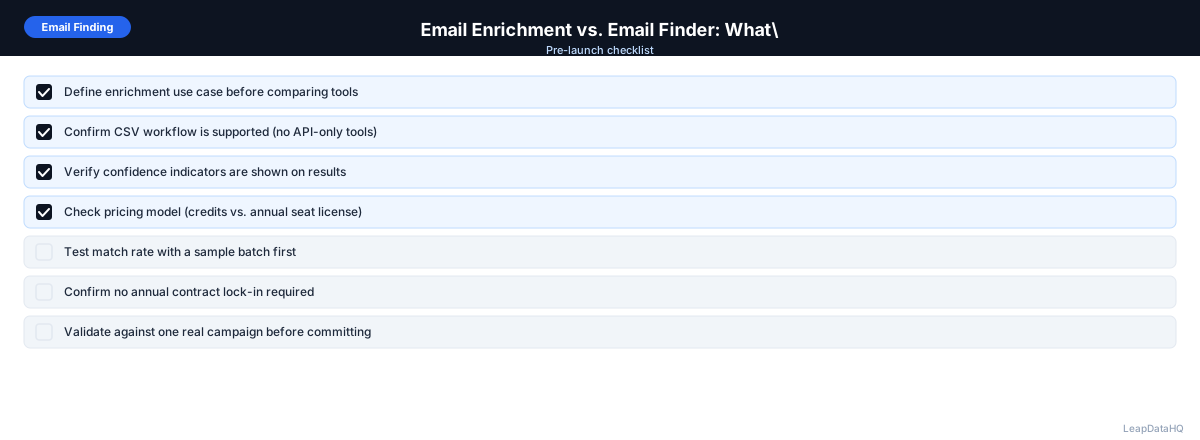
When to Use LeapDataHQ
LeapDataHQ is an email enrichment tool: built for bulk list processing where you need to fill missing emails across a large number of contacts. If you have a CSV with contact names and company domains and need work email addresses appended to the whole file, that's what LeapDataHQ does.
For individual, one-off email lookups, an email finder tool may be a simpler fit. For team-scale outreach preparation with lists of 100 or more, LeapDataHQ's bulk enrichment workflow is faster and more consistent.
Start Enriching LeadsFrequently Asked Questions
Is an email finder or email enrichment tool more accurate?
Accuracy depends more on the data provider and methodology than the tool type. Both finders and enrichment tools draw from similar underlying sources. The distinction is primarily about workflow scale, not underlying accuracy.
Can I use an email enrichment tool as an email finder for single contacts?
Yes, most enrichment tools will process a one-row CSV just as easily as a thousand-row file. It's not the most efficient use of credits for single lookups, but it works fine.
What's better for outreach agencies — enrichment tools or finders?
Enrichment tools are significantly better for agencies. Client deliverables are almost always bulk files, not individual lookups. Enrichment tools also return additional company and contact fields beyond just email, which agencies typically include in deliverables.
What should I do when neither finds the email I need?
When both finders and enrichment tools can't find an address, options include: checking the company website for contact patterns, LinkedIn InMail, guessing the email pattern and verifying before sending, or reaching out via other public channels.