
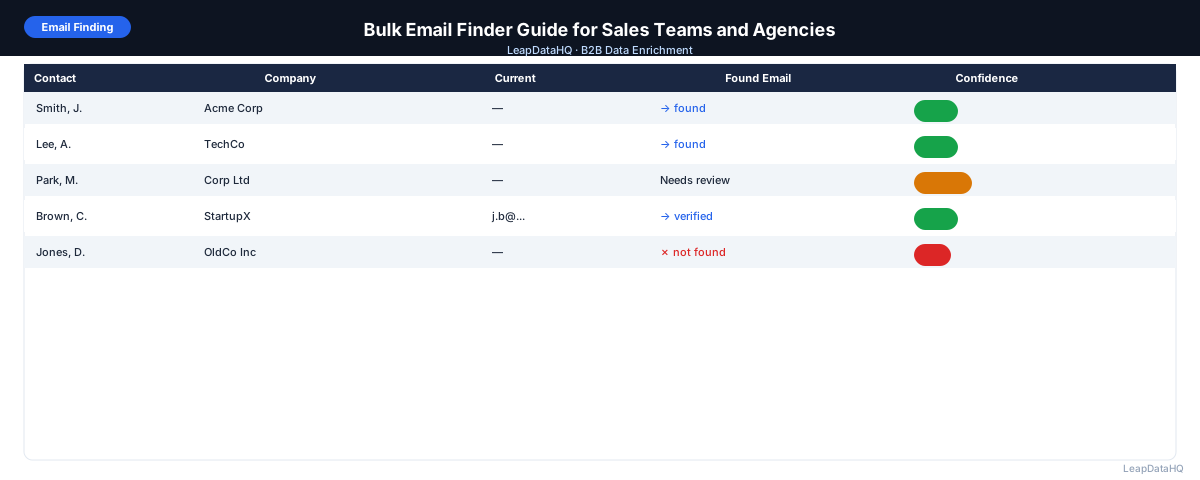
Finding work email addresses for a list of B2B contacts used to mean looking up each person manually — on LinkedIn, company websites, or through trial-and-error pattern guessing. For a list of 300 contacts, that process could take an entire day.
Bulk email finding automates this. You provide a list of contacts with names and company domains, and the tool finds and returns work email addresses for each record it can match — typically within minutes. The result is a list that would have taken hours to research manually.
This guide covers how bulk email finders work, what you need to get good results, how to evaluate the quality of the emails returned, and how to build bulk email finding into your prospecting workflow. Whether you're an SDR building weekly lists, an agency delivering enriched data to clients, or a founder doing your own outreach, the process is the same.
How Bulk Email Finders Work
A bulk email finder takes a list of contact records — typically including first name, last name, and company domain — and queries a database of email addresses to find the most likely work email for each person. The tool identifies the email format commonly used at that domain (e.g., first.last@company.com or f.lastname@company.com) and constructs a candidate email based on the contact's name.
Better tools verify the constructed email against the mail server before returning it, checking whether the specific mailbox exists. This two-step process — pattern construction plus server verification — is what separates accurate bulk email finders from tools that just guess email patterns without checking.
What You Need for Bulk Email Finding
The key inputs for bulk email finding:
- Company domain (required): this is the primary lookup key. Domains are more reliable than company names because they're unique identifiers
- First name (required): needed to construct the email pattern
- Last name (required): needed alongside first name to build the email address
- Job title (optional): some tools use title information to improve matching accuracy, especially for common names
- LinkedIn URL (optional): significantly improves accuracy when available, as it confirms the person's association with the company
Building Your Input List
Most teams building bulk email finding input lists follow this process:
- Define your target company list (from LinkedIn search, Crunchbase, directories, or your CRM)
- Add company domains for each target (search company website or LinkedIn company page)
- Identify 1–3 decision maker names and titles per company (using LinkedIn People search)
- Organize in a spreadsheet: domain | first_name | last_name | title (optional)
- Clean the file: remove duplicates, standardize domain format, check for missing values
- Upload to your bulk email finder and map columns
Evaluating Bulk Email Finder Results
Match Rate
The percentage of your input records that returned an email. Realistic match rates are 60–80% for a well-prepared list of established B2B contacts. Lower match rates often indicate input quality issues (bad domains, ambiguous company names) or limited tool coverage for your target market.
Confidence Scores
Good bulk email finders return a confidence score alongside each email. High confidence means the tool has strong evidence this email is correct. Low confidence means the tool is guessing or has conflicting signals. Filter to high-confidence emails before using your list for outreach.
Verification Status
Some tools include live email verification as part of the finding process. Others return raw email guesses without verification. If your tool doesn't verify, run the output through a standalone email verification tool before sending — this step protects your sender reputation.
Using Bulk Email Results for Outreach
After finding and verifying emails, your workflow continues:
- Filter output to emails with high confidence scores
- Run verification pass if not already included in the finding tool
- Segment by company size, industry, or title for targeted messaging
- Import into your CRM or email sequencer with correct field mapping
- Set up your sequence with appropriate sending limits for your domain
- Monitor bounce rates per campaign — above 2% signals list quality issues
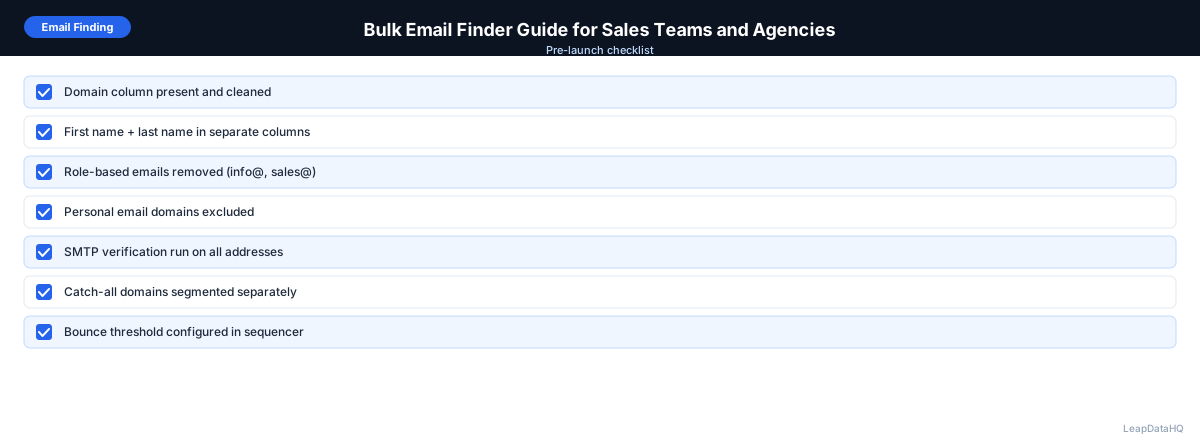
Bulk Email Finding Checklist
- Input file has company domain, first name, and last name for every row
- Domains are formatted as bare domain (acmecorp.com, not www.acmecorp.com)
- Duplicate rows removed before uploading
- Columns mapped correctly in the bulk email finder
- Output reviewed: match rate and confidence distribution checked
- High-confidence filter applied before export
- Email addresses verified (in-tool or via separate verification)
- Invalid and catch-all addresses removed
- List segmented before loading into outreach tool
- Bounce rate threshold set in sequencer (pause if above 2%)
Common Mistakes with Bulk Email Finders
Using Company Name Instead of Domain
"Acme Corporation" could match dozens of companies. "acmecorp.com" matches exactly one. Always use the company domain as your primary identifier for email finding.
Ignoring Confidence Scores
Uploading all found emails to a sequencer without reviewing confidence produces high bounce rates. Low-confidence results need verification or manual review before use.
Skipping Verification After Finding
Finding and verification are different steps. An email finder tells you what an email is likely to be; verification tells you whether that specific mailbox is live. Both steps together give you the best data quality.
Not Testing Match Rates on Your Actual Target Market
Bulk email finder performance varies significantly by market. A tool with excellent US tech company coverage might have poor coverage for European SMBs. Always test with a representative sample of your actual target market before committing.
Bulk Email Finder vs. Manual Email Research
Ready to enrich your CSV list?
Upload a CSV, fill missing data, review confidence scores, and export clean records.
Upload a CSV — Start EnrichingManual email research (LinkedIn contact info, company website lookup, email pattern guessing) makes sense for fewer than 20 contacts or high-value targets where maximum accuracy justifies the time investment. For lists of 50+ contacts, bulk email finding is more efficient and often more accurate than manual research at scale.
The two approaches complement each other: use bulk finding for your primary list, then use manual research for high-priority contacts where the tool didn't return a match.
Start Finding Emails in Bulk
LeapDataHQ supports bulk email finding as part of its CSV enrichment workflow. Upload your contact list with domains and names, get work email addresses back with confidence scores, and export a verified list ready for outreach. See how it works or review pricing to get started.
What This Means for Your Outreach
Having accurate work email addresses at scale changes what your outreach operation can accomplish. Instead of spending hours manually researching 30 contacts and sending a small batch, you can build lists of hundreds or thousands of verified contacts and run targeted campaigns across well-defined segments. The bottleneck shifts from finding emails to writing relevant messaging and managing sending infrastructure — which are higher-leverage activities for most sales teams and agencies.
Bulk email finding also makes it practical to test and iterate on your prospecting. You can build a list, run a campaign, measure response rates by segment, refine your targeting, and run another batch the following week. This cycle of testing and refinement is what separates high-performing outbound teams from those who send the same message to the same broad list every quarter. For guidance on preparing your lists before outreach, see our guide on how to prepare a lead list for cold email.
The economics change as well. When you can find emails for 500 contacts in the time it previously took to research 30, the cost per qualified outreach drops dramatically. This means you can afford to be more selective about who you target — focusing on higher-value accounts and writing more personalized messages — while still maintaining the volume needed to generate consistent pipeline. The combination of volume and selectivity is what makes bulk email finding a strategic capability rather than just a convenience.
Who Should Use a Bulk Email Finder
Bulk email finding is useful for any team or individual that needs to reach B2B contacts at scale without spending hours on manual research per person. It works best when you already have a defined target audience and need to fill in the missing contact information that lets you reach them. The most common users include:
- Sales development representatives (SDRs) building weekly prospecting lists for outbound campaigns
- Account executives researching decision makers at target accounts before personalized outreach
- Lead generation agencies delivering enriched contact lists to multiple clients on a recurring basis
- Founders and early-stage sales teams doing their own prospecting without dedicated research support
- Marketing teams enriching event attendee lists, content download leads, or webinar registrants for follow-up
- Recruiters finding work email addresses for candidate outreach at scale
Checklist: Bulk Email Finding
- Define your target audience and build a contact list with names and company domains
- Clean the input file: remove duplicates, standardize domain format, verify name fields
- Map columns correctly in the bulk email finder (domain, first name, last name)
- Run the enrichment and review the overall match rate
- Check confidence score distribution across returned results
- Filter to high-confidence emails before exporting
- Run email verification on the filtered output (in-tool or via a separate verification service)
- Remove invalid addresses and flag catch-all domains as risky
- Segment the verified list by industry, company size, or title for targeted messaging
- Import into your CRM or sequencer and set a bounce rate monitoring threshold
Common Mistakes
Not Cleaning Input Data Before Uploading
Uploading a raw list with duplicates, inconsistent domain formats, and missing name fields reduces your match rate and wastes credits. Always deduplicate, standardize domains to bare format, and ensure first and last names are in separate columns before uploading.
Accepting All Results Without Filtering
Bulk email finders return results with varying confidence levels. Exporting and using all results — including low-confidence guesses — leads to high bounce rates and sender reputation damage. Always apply a confidence threshold and only use records that meet it.
Confusing Email Finding With Email Verification
An email finder constructs likely email addresses based on known patterns. A verifier checks whether the specific mailbox is live and can receive mail. These are two separate steps, and skipping verification after finding is one of the most common causes of deliverability problems in outbound outreach.
Using the Tool for the Wrong Market Without Testing
Coverage varies by geography, industry, and company size. A tool that performs well for US-based technology companies may have limited coverage for European SMBs or contacts in emerging markets. Always test with a representative sample of your actual target market before committing to a large batch.
Ignoring Bounce Rate Signals After Sending
If your campaign bounce rate exceeds 2%, something is wrong with your list quality — even if you filtered by confidence scores. Monitor bounce rates per campaign and pause sending to investigate when thresholds are exceeded. Persistent high bounce rates can damage your domain reputation.
Not Segmenting Before Sending
Sending the same message to every contact on a bulk-found list wastes the segmentation data you have. Use the company size, industry, and title fields available after enrichment to write targeted messaging for each segment. Even basic segmentation measurably improves reply rates.
Failing to Monitor and Maintain List Quality Over Time
Email addresses decay continuously as people change jobs and companies update their email infrastructure. A list you built and verified six months ago may have a significant portion of invalid addresses today. For active prospecting lists, plan to re-verify emails quarterly and re-enrich contacts annually to maintain deliverability and response rates.
How LeapDataHQ Helps
LeapDataHQ handles bulk email finding as part of its CSV enrichment workflow. Upload a spreadsheet with company domains and contact names, and the platform finds work email addresses alongside confidence scores for every match. You review the results, filter to the records you trust, verify the emails, and export a clean list ready for import into your CRM or outreach sequencer.
The credit-based pricing means you pay only for the records you actually enrich — no per-seat fees, no annual contracts, and no minimum monthly spend. Whether you're enriching 100 contacts for a targeted campaign or 5,000 for a large quarterly push, the cost scales with your volume. For teams and agencies that work with spreadsheets regularly, this makes bulk email finding a practical, recurring part of the prospecting workflow rather than a platform investment.
Results depend on input data quality — clean domains and accurate contact names produce the best match rates. The platform returns confidence scores alongside each result so you can make informed decisions about which records to use. See our bulk email finder tool or check pricing to get started with your first list.
When to Use LeapDataHQ
LeapDataHQ handles bulk email finding as part of its enrichment workflow. You upload a CSV with company domains and contact names, the tool finds and returns work email addresses alongside confidence scores, and you export the records you trust.
This is the right tool when you have a list of contacts — from LinkedIn, a conference, a CRM export, or a client brief — and need to find their work emails in bulk without manual research per contact.
The credit-based pricing scales with your volume. Enrich 100 contacts for a targeted campaign, or 3,000 for a large outreach push — you pay for what you actually use without a fixed monthly seat fee.
For sales teams and agencies doing regular list building, LeapDataHQ fits into a weekly or monthly enrichment cycle: build the contact list, upload for email finding, review confidence scores, verify, and export for outreach.
Start Enriching LeadsFrequently Asked Questions
How many emails can I find in one bulk upload?
Most enrichment tools handle files from dozens to tens of thousands of rows per upload. For most sales teams and agencies, batches of 100–5,000 records per upload is typical. Processing time scales with file size but modern tools process records in parallel, so larger files take proportionally less time per record.
What's the difference between a bulk email finder and an email verifier?
A bulk email finder discovers missing email addresses for contacts you have. An email verifier checks whether email addresses you already have are valid and deliverable. Both are important steps: find first, then verify before sending. Some tools do both; others specialize in one or the other.
Can I find emails for contacts at very small companies?
Match rates are lower for very small companies (under 10 employees) because there's less public data about email patterns and individual contacts. For small company targets, supplement bulk finding with manual research on LinkedIn and company websites for the contacts that don't match.
Is it legal to use bulk email finders for B2B outreach?
Finding and using business email addresses for relevant B2B outreach is legal in most jurisdictions when done for legitimate business purposes. Always include an unsubscribe option in your outreach, comply with applicable regulations (CAN-SPAM, CASL, GDPR), and use the data for legitimate business contact rather than spam.
What should my input data look like for the best match rates?
The best input includes: the exact company domain (not the company name), the contact's first name and last name in separate columns, and optionally their job title or LinkedIn URL. Clean your data before uploading: remove duplicates, standardize domain format, and check for obvious errors in name fields.
How do I handle the emails that weren't found?
For high-value targets where the bulk finder didn't return a match, use manual research: check LinkedIn for contact info in the profile, look for the company email pattern from known employees, or search for the person's name plus company name in Google. For lower-priority targets, accept that some contacts aren't publicly discoverable.
How does bulk email finding integrate with my existing CRM workflow?
Most teams export contacts from their CRM, upload the CSV to a bulk email finder, review and filter the results, then import the enriched records back into the CRM. The process fits into a weekly or monthly list-building cycle. Some CRMs also support API-based enrichment that updates records automatically, though CSV upload remains the most common approach for teams that want to review results before importing.