
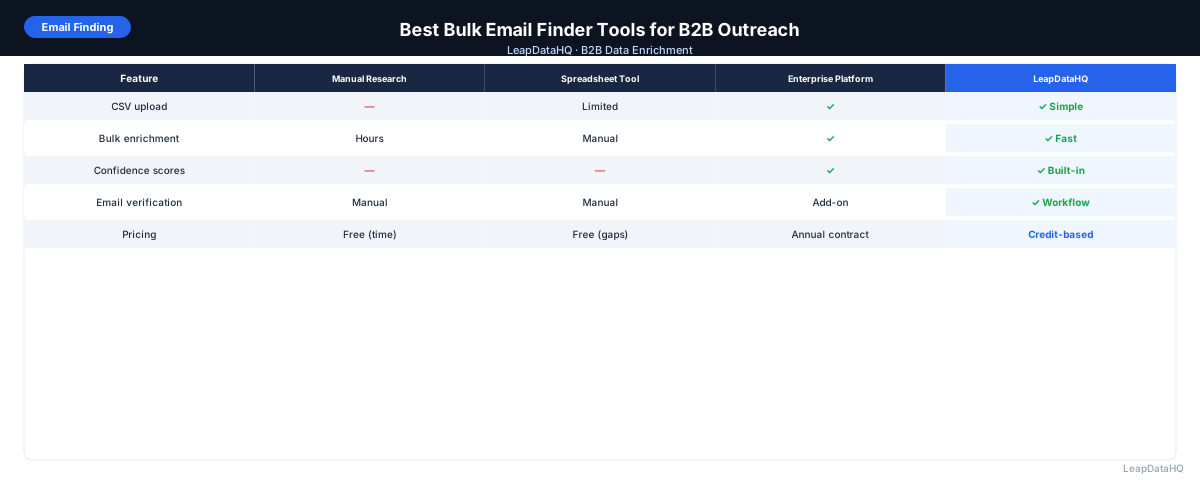
A bulk email finder takes a list of B2B contacts — names and company domains — and returns work email addresses for as many as it can match. Where a single-contact email finder requires you to search one person at a time, a bulk finder processes hundreds or thousands of records in a single upload.
For outreach teams, this is the difference between spending hours on manual research and spending minutes on a file upload. For agencies, it's the difference between per-client research projects and a scalable, repeatable process.
This guide covers how bulk email finder tools work, the key factors to evaluate, and how to choose the right tool for your specific workflow.
The emphasis here is on practical evaluation rather than feature comparison. Most bulk email finders have similar feature lists — the real differences show up in match rate for your specific target market, accuracy on the confidence thresholds you apply, and how well the tool fits into your existing list preparation process rather than requiring you to adapt your workflow around it.
How Bulk Email Finders Work
Bulk email finder tools accept a CSV file with contact names and company domains as input. They run each row against a database of known email addresses, attempt to verify or pattern-match the email address for each contact, and return the results in a downloadable file.
The best tools return a confidence score for each result, so you can filter to high-quality matches before using the data in outreach. Processing speed varies: a 1,000-row file typically returns results in 1–5 minutes on most platforms.
Key Factors to Evaluate
Match Rate
The percentage of uploaded contacts that receive a returned email. Varies by tool and by target market. For well-prepared B2B contact lists with company domains, expect 50–75% for most tools on US/UK contacts. Lower for niche markets or international contacts with limited data coverage.
Accuracy and Verification
A high match rate is only valuable if the returned emails are accurate. Look for tools that include confidence scoring, syntax verification, and ideally mail server verification in the enrichment pass. Some tools return unverified pattern guesses; others return confirmed or near-confirmed addresses.
Field Coverage Beyond Email
Some bulk email finders return only email. Others return phone numbers, job title, company size, industry, and additional company data alongside the email. If you need multiple fields from a single enrichment pass, check what the tool returns beyond just the email address.
Ready to enrich your CSV list?
Upload a CSV, fill missing data, review confidence scores, and export clean records.
Upload a CSV — Start EnrichingPricing Model
Common pricing models: per-successful-match (you only pay when an email is found), per-upload-row (you pay regardless of match), monthly subscription with a credit allowance, and annual plans with discounts. Per-match pricing is the most transparent for variable-volume use.
Processing Speed
For teams working on tight turnarounds, processing speed matters. Most bulk finders process 1,000 rows in under 5 minutes. For very large files (10,000+ rows), check the tool's processing time upfront.
Bulk Email Finder vs. Sales Intelligence Platform
Sales intelligence platforms like Apollo.io and ZoomInfo include bulk email finding as a feature but combine it with a searchable contact database, CRM integrations, sequence tools, and more. They're appropriate for teams that want an all-in-one sales platform.
Purpose-built bulk email finders are better suited for teams that already have contact lists (from LinkedIn, events, or manual research) and need to fill in email addresses — without needing the broader platform features or the associated costs.
How to Test a Bulk Email Finder Before Committing
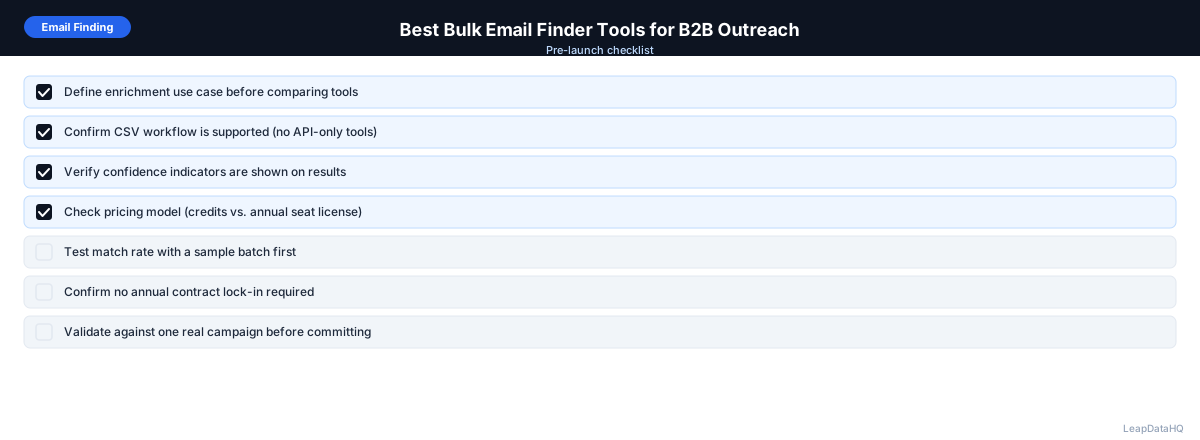
- Prepare a test file of 50–100 contacts from your actual target market, with company domains included
- Upload to the tool and note the match rate and confidence distribution
- Spot-check 10–15 results by verifying the email against the company's email pattern
- Send to a small batch and monitor bounce rate in your outreach tool
- Calculate cost-per-matched-email at your expected monthly volume
- Compare the result quality and cost across 2–3 tools before deciding
Bulk Email Finder Workflow Checklist
- Input file prepared: company domain, first name, last name in separate columns
- Domains formatted correctly (no http://, no www.)
- Duplicates removed from input file
- File uploaded to bulk finder and columns mapped correctly
- Match rate and confidence distribution reviewed
- High-confidence filter applied before export
- Exported results run through email verification
- Invalid addresses removed before importing to sequencer
- Bounce rate monitored after first outreach campaign
When to Use LeapDataHQ
LeapDataHQ is a bulk email finder built for the CSV upload workflow. You upload a contact list with company domains and names, get email addresses returned with confidence scores, filter to high-quality results, and export for outreach. Credits are charged per match, not per upload row.
For teams enriching regular outreach lists, agency professionals delivering enriched files to clients, and SDRs building prospecting lists from LinkedIn exports, LeapDataHQ provides the bulk email finding workflow without an annual contract or platform commitment.
Start Enriching LeadsFrequently Asked Questions
What's the difference between a bulk email finder and email verification?
A bulk email finder finds email addresses you don't have. Email verification checks whether email addresses you do have are valid and deliverable. They're different steps in the same workflow: find emails with a bulk finder, then verify before sending.
How accurate are bulk email finders?
Accuracy varies by tool and by target market. For well-prepared input with company domains on established B2B contacts, expect 50–75% match rates with good accuracy on high-confidence results. Lower match rates are common for very small companies, international markets, and niche industries with limited public data coverage.
Do I need to verify emails after using a bulk finder?
Yes, for outreach campaigns where deliverability matters. Enrichment confidence scores tell you how likely an email pattern is correct, but mail server verification confirms whether the specific mailbox is currently active. Run verification after enrichment and before loading into your outreach sequence.
What input does a bulk email finder need?
Most bulk finders need: company domain (most important), first name, and last name. Some tools can match on company name instead of domain, but accuracy is lower. Domain is the most critical input — having it versus not having it is the single largest factor in match rate.
Can I use a bulk email finder for international contacts?
Yes, but match rates are generally lower for international markets outside the US and UK. Data coverage varies by region. If your primary target market is in a specific country, test the tool with a sample from that market before committing to a large enrichment run.