
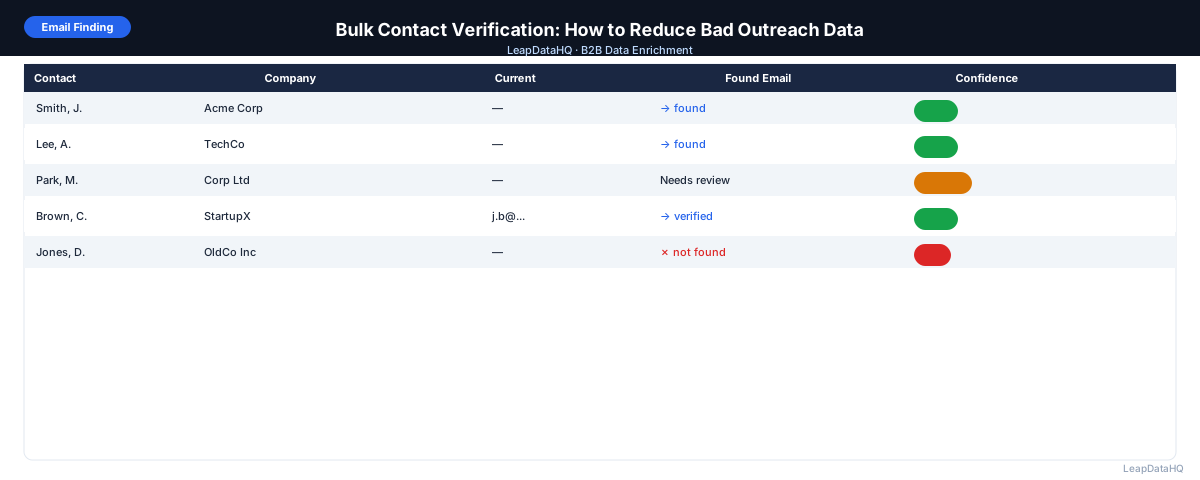
Bulk contact verification is the process of checking a large list of email addresses for deliverability before sending any outreach. Instead of discovering that addresses are invalid when they bounce, verification runs a check against the mail server ahead of time — so you can remove invalid addresses before they ever enter your outreach tool.
This matters for a concrete reason: email providers track sender reputation. If your domain produces too many hard bounces, it gets treated as a source of low-quality email, and your messages start landing in spam — not just for the bounced contacts, but for everyone on your list. A 5% bounce rate can damage deliverability in a single campaign. Verification prevents that from happening.
This guide covers how bulk verification works, what the different result categories mean, how to build verification into your outreach workflow, and what to do with different verification outcomes.
Email verification is often misunderstood as an optional quality check rather than an essential step in the outreach process. In practice, verification is the single most impactful action you can take to protect your email sending infrastructure. A single campaign sent to unverified addresses can generate enough bounces to permanently damage your domain's sending reputation, requiring weeks or months of gradual reputation recovery through carefully managed sending volumes. The cost of verification is negligible compared to the cost of recovering from a deliverability incident.
Understanding verification results requires more nuance than simply labeling addresses as valid or invalid. Different verification outcomes require different handling strategies, and knowing how to respond to each category — valid, invalid, catch-all, unknown — determines how effective your verification workflow will be. Many teams make the mistake of treating all non-valid results the same way, either discarding potentially usable contacts or including risky addresses without proper precautions.
How Bulk Email Verification Works
Email verification tools check three things for each address: syntax (is the format valid?), domain (does the domain have valid mail server records?), and mailbox (does the specific mailbox exist and can it receive mail?). The most important check is the mailbox check, which connects to the mail server via SMTP and asks whether the address can accept messages.
The verification process doesn't actually send an email — it just asks the server. This is why it's a safe pre-send check rather than a live test. Some mail servers block or obfuscate verification queries, which is why some results come back as "unknown" rather than definitively valid or invalid.
Verification Result Categories
Valid
The address exists, the mailbox is active, and it can receive mail. These addresses are safe to send to. This is the category you want for your outreach list.
Invalid
The address doesn't exist, the domain doesn't accept mail, or the mailbox has been permanently deactivated. These will hard bounce if you send to them. Remove them from every list immediately and mark them as invalid in your CRM.
Catch-All
The domain accepts all email sent to it, whether or not the specific mailbox exists. This makes it impossible to verify the individual address. Treat catch-all addresses as risky — send to a small sample first and monitor bounce rates before deploying at scale.
Unknown
The mail server blocked or timed out the verification query, so the tool can't determine deliverability. Use caution with these addresses — either test a small batch or exclude them from large campaigns.
When to Run Bulk Verification
- Before every new cold email campaign: verify any list from an external source before loading into your sequencer
- After enrichment: enriched emails should be verified even if they come back with high confidence scores
- Before re-activating an old list: lists not used in 6+ months likely have meaningful decay
- When bounce rates are rising: verify your active lists to identify and remove invalid addresses
- Before importing a purchased list: purchased lists often have significant percentages of invalid emails
- Before CRM imports: verify emails before they enter your CRM to prevent bad data accumulation
How to Handle Each Verification Category in Your Workflow
- Valid: include in outreach — these are confirmed deliverable
- Invalid: remove from all lists, mark as invalid in CRM, do not retry
- Catch-all: test a 10–20% sample of your catch-all addresses first; if bounce rate is low, proceed with caution
- Unknown: exclude from large campaigns; if these are high-priority contacts, use alternative outreach methods
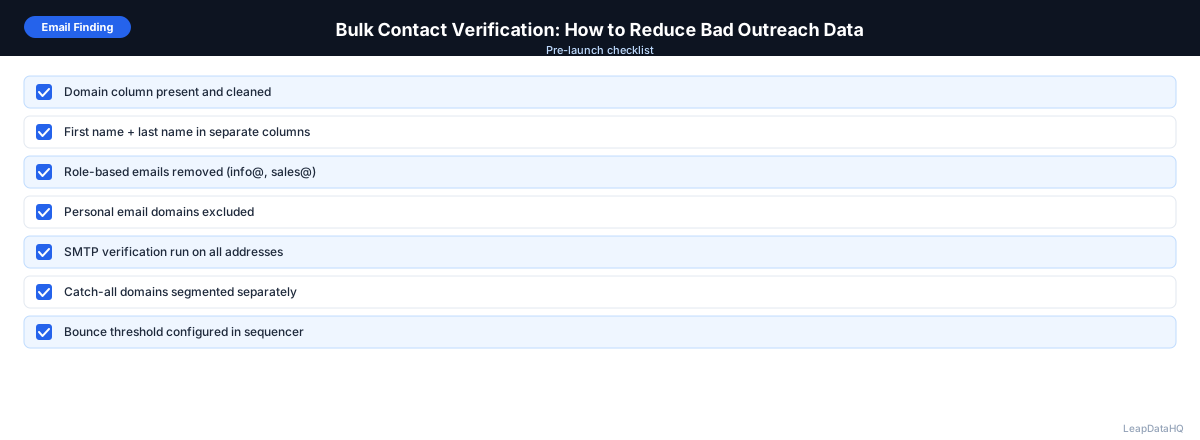
Bulk Verification Checklist
Ready to enrich your CSV list?
Upload a CSV, fill missing data, review confidence scores, and export clean records.
Upload a CSV — Start Enriching- List cleaned before verification (duplicates removed, formatting standardized)
- Verification tool selected and credits available
- CSV uploaded with email column correctly identified
- Verification completed and results downloaded
- Invalid addresses removed from outreach list
- Invalid addresses marked in CRM to prevent re-use
- Catch-all addresses isolated for small-batch testing
- Unknown addresses handled per campaign guidelines
- Valid addresses imported to outreach tool
- Bounce rate threshold set in sequencer (pause if above 2%)
Common Bulk Verification Mistakes
Skipping Verification to Save Time
The time saved by skipping verification is immediately offset by the time spent dealing with a deliverability incident. A single high-bounce-rate campaign can take weeks to recover from. Verification is a 10-minute step that prevents that outcome.
Not Updating the CRM After Verification
Removing invalid addresses from one campaign list without marking them invalid in your CRM means they'll be re-used in future campaigns. Always propagate verification results back to your CRM.
Treating Catch-All as Valid
Catch-all domains look like valid addresses but behave unpredictably. Some will deliver fine; others will bounce silently. Always test a small batch before sending to catch-all addresses at scale.
Verifying Once and Never Re-Verifying
Email validity changes over time as people change jobs. An address verified 12 months ago may be invalid today. Re-verify lists before each new campaign or at minimum every 6 months.
Bulk Verification vs. Email Enrichment
These are two different steps that both contribute to data quality. Enrichment finds email addresses you're missing. Verification confirms that addresses you have (from enrichment, purchase, or manual research) are valid and deliverable. You need both: find first, verify second.
Verification Frequency and Timing
How often you verify determines how effective your verification program is. For outreach lists, verify every list before every campaign — never assume a list that was verified three months ago is still clean. For CRM databases, run a full verification pass quarterly to catch addresses that have degraded since the last check. For high-priority contacts in active sequences, consider re-verification every 30-60 days since job changes happen frequently and an address that was valid at the start of a sequence may be invalid by the time you reach that contact in later follow-ups.
The timing of verification within your workflow also matters. Verify after enrichment but before loading into your sequencer. This sequence ensures you're only verifying addresses that enrichment has found for you — there's no point verifying blanks. The standard workflow is: clean your list, enrich to find missing emails, verify the enriched emails, filter to valid results, then load into your outreach tool. Skipping any step in this sequence reduces the quality of your final outreach list.
Building a Verification-First Outreach Culture
The teams with the best deliverability outcomes are those that treat verification as a non-negotiable step rather than an optional quality check. Building a verification-first culture means establishing policies that verification must be completed before any list enters the outreach tool, that no campaign launches without a verified list, and that any list without verification results is treated as unusable. These policies protect sender reputation at the team level, not just the individual campaign level.
Enforcing verification policies requires the right tooling and workflow design. If verification adds significant friction to the list preparation process, teams will find ways to bypass it. Choose verification tools that integrate smoothly with your existing workflow, whether through API integration with your enrichment tool, automated verification as part of your list import process, or simple CSV upload interfaces that complete verification in minutes. The less friction verification creates, the more consistently your team will use it.
When to Use LeapDataHQ
LeapDataHQ returns confidence scores alongside enriched email addresses, which provides a first-pass quality filter. For outreach campaigns where deliverability is critical, following up LeapDataHQ enrichment with a dedicated bulk verification pass gives you the highest-quality list.
Use LeapDataHQ for enrichment (finding missing emails with confidence scores), then run a bulk verification tool on the output before loading into your sequencer. This two-step approach — enrichment plus verification — is the standard for professional B2B outreach teams.
Start Enriching LeadsFrequently Asked Questions
Does email enrichment replace bulk verification?
No. Enrichment confidence scores reflect how likely an email pattern is correct, not whether the specific mailbox is currently live. Verification checks live mailbox status. Both steps serve different purposes and both are recommended for production outreach.
How long does bulk verification take?
For lists under 1,000 emails, most bulk verification tools return results in minutes. Larger lists may take 10–30 minutes depending on the tool and mail server response times. Some servers are slow to respond to verification queries, which can extend processing time for specific domains.
What bounce rate should I aim for after verification?
With proper verification, your hard bounce rate should be under 1%. If you're seeing bounce rates above 2% on verified lists, investigate catch-all addresses, re-enriched contacts who have changed jobs, or domains where your verification tool had trouble querying the mail server.
Is bulk verification expensive?
Bulk email verification is generally less expensive per record than enrichment. Most verification tools offer pricing from a fraction of a cent to a few cents per email. For a list of 1,000 emails, verification typically costs a few dollars — a worthwhile investment to protect your sending reputation.
Should I verify my entire CRM or just outreach lists?
For a CRM-wide initial verification: run it once to identify and clean up existing invalid addresses. For ongoing use: verify outreach lists before every campaign and verify new contacts before importing. Whole-CRM verification is most useful as part of a periodic data quality audit.