
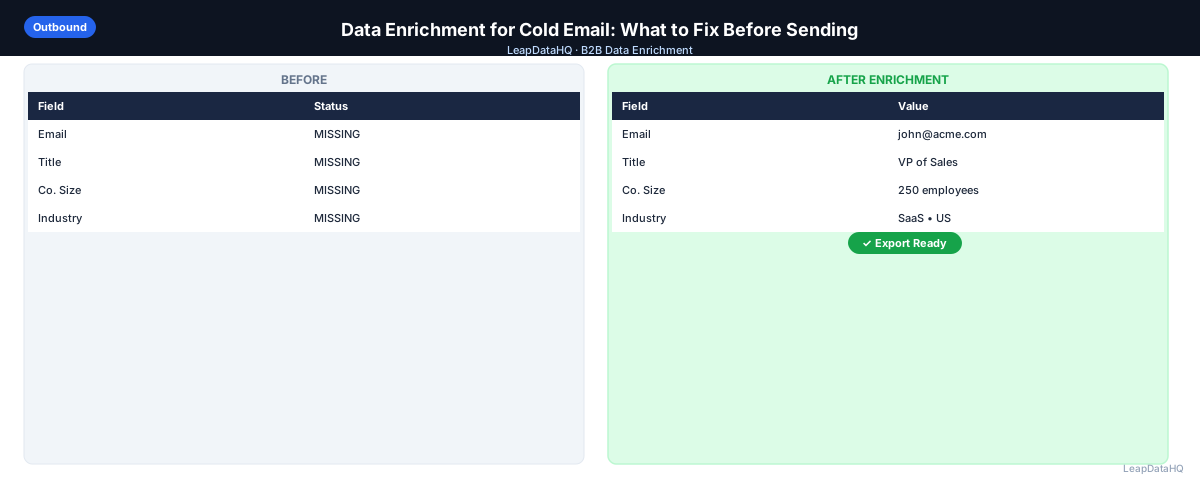
Cold email performance is directly tied to the quality of the data you send to. Low-quality data produces high bounce rates, generic copy that fails to personalize, and campaigns targeting people who don't fit your ICP. Data enrichment fixes the specific data problems that cause cold email campaigns to underperform.
Enrichment for cold email is different from general CRM enrichment. The goal is narrower: fill the specific fields your campaign sequences depend on, verify that the addresses are deliverable, and segment the list so your messaging can be tailored to each segment. You're not enriching for the sake of complete records — you're enriching to make the outreach actually work.
This guide covers what data enrichment does for cold email campaigns specifically, what to fix before sending, and how to build the enrichment step into your campaign workflow.
Why Data Quality Determines Cold Email Results
Cold email lives and dies on deliverability and personalization. Deliverability depends on sending to valid addresses — invalid addresses bounce, and a bounce rate above 2–3% damages your sender reputation. Personalization depends on having accurate data in the fields your sequences use — a blank title or wrong company name produces broken copy that signals mass automation.
Data enrichment addresses both. It fills the missing fields that enable personalization and provides verified email addresses that reduce bounces. Teams that enrich before sending consistently outperform teams that send to raw, unenriched lists — in reply rates, bounce rates, and deliverability over time.
What to Enrich Before a Cold Email Campaign
Email Addresses
The most basic enrichment need for cold email: verified work email addresses. If your list has contacts without emails — LinkedIn exports, conference lists, CRM records added from business cards — enrichment finds the work email before you can include those contacts in a campaign.
Job Titles
Job title drives two things in cold email: ICP qualification (is this person the right level of seniority?) and personalization ("As a VP of Sales at a growing team…"). Blank or incorrect titles break both. Enrich titles to confirm you're targeting the right people and to enable title-based personalization.
Company Size and Industry
Company size and industry enable segmentation. Different company sizes have different pain points — a 10-person startup and a 500-person enterprise have very different processes, even for the same function. Enriched company data lets you split your list into segments and write distinct messages for each.
Company Name (Standardized)
Personalization tokens that pull company name fail when the company name is "ACME CORP" or "acme corporation" in different rows. Standardize company names as part of enrichment so personalization tokens pull clean, correctly formatted values.
Step 1: Upload Your Campaign Contact List
Start with your prospecting list for the upcoming campaign — whether sourced from a database export, LinkedIn, a conference list, or a CRM segment. Upload to your enrichment tool and map columns.
Ready to enrich your CSV list?
Upload a CSV, fill missing data, review confidence scores, and export clean records.
Upload a CSV — Start EnrichingStep 2: Detect What's Missing Before Enrichment
Before enrichment runs, identify what fields are incomplete. This tells you which enrichment fields to request and sets your baseline for measuring what enrichment improved. Count blank email rows, blank title rows, and missing company size rows.
Step 3: Enrich Contact and Company Data
Run enrichment to fill missing fields. After processing, review confidence scores and apply your threshold. High-confidence enriched data goes directly into the campaign. Low-confidence data gets reviewed manually for high-value contacts or excluded for lower-priority contacts.
Step 4: Review and Filter by ICP Fit
After enrichment adds company size, industry, and title data, apply ICP filters. Remove contacts who don't fit your target profile even if they were in your initial sourcing. Enriched data often reveals ICP mismatches that weren't visible from the original list.
Step 5: Fix Bad Rows
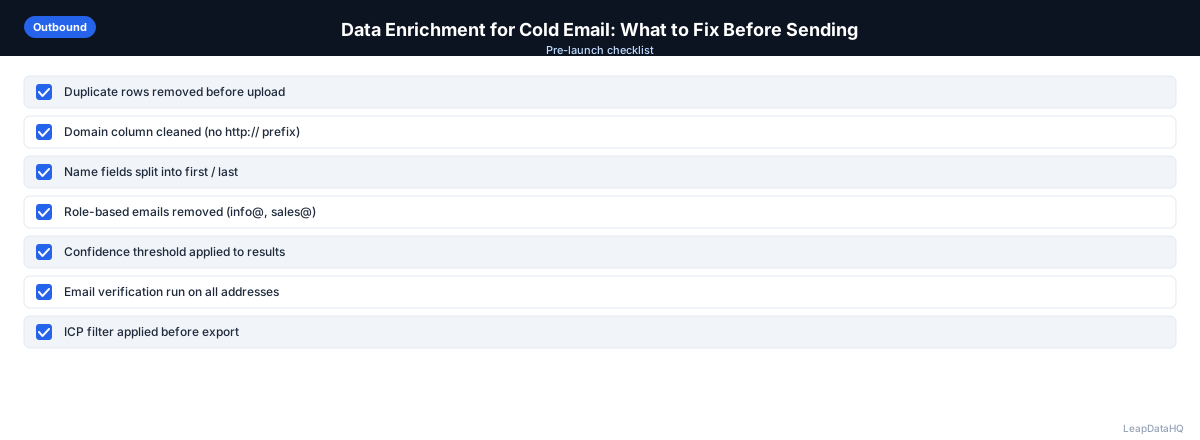
Remove duplicates, role-based emails, and contacts where enriched data reveals they're outside your ICP. Standardize company names and titles for personalization tokens. The goal is a list where every row has the fields your campaign sequence depends on, formatted consistently.
Step 6: Verify All Email Addresses
Run email verification on all addresses — both original and enriched. Verification confirms deliverability. Remove invalid addresses. Segment catch-all addresses for a separate, lower-volume test sequence. Verified addresses go to your primary campaign.
Step 7: Export and Launch
Export the enriched, verified, ICP-filtered list. Segment by company size or industry for tailored messaging. Import to your sequencer and configure bounce threshold alerts. Monitor bounce rate on the first send day — if it exceeds 2%, pause the campaign and investigate before continuing.
Data Enrichment Checklist for Cold Email
- ☐ Contact list has domain or company name for enrichment lookup
- ☐ Enrichment run for email, title, company size, and industry
- ☐ Confidence threshold applied to enriched data
- ☐ ICP filter applied using enriched company size and title
- ☐ Role-based and duplicate emails removed
- ☐ All email addresses verified
- ☐ Invalid addresses removed from campaign list
- ☐ Catch-all addresses segmented separately
- ☐ Company names and titles standardized for personalization tokens
- ☐ List segmented by company size or industry for tailored messaging
- ☐ Bounce threshold alert configured in sequencer
- ☐ Sending domain SPF/DKIM/DMARC verified
When to Use LeapDataHQ
LeapDataHQ handles the enrichment step in this workflow. Upload your campaign contact list, request missing fields (email, title, company size, industry), review confidence scores, and export a cleaner list ready for email verification and sequencer upload.
For teams that run cold email campaigns regularly, LeapDataHQ provides a repeatable enrichment step that fits between list sourcing and campaign launch. Credit-based pricing means you enrich what you need for each campaign without committing to a fixed monthly subscription.
Start Enriching LeadsFrequently Asked Questions
How much does data enrichment improve cold email reply rates?
Enrichment itself doesn't directly improve reply rates — what improves reply rates is sending to the right people with relevant messaging. Enrichment enables this by providing the data for ICP qualification and personalization. The combination of enrichment-based segmentation and personalization typically improves reply rates significantly compared to unsegmented, un-personalized outreach.
Should I enrich the whole list or just the contacts with missing fields?
Enrich the whole list if you want to ensure consistency across all contact records. Enrich only contacts with missing fields if you're optimizing for credit efficiency. A practical approach: enrich the full list for key fields (email, title) to catch any inaccuracies in existing data, and use enrichment to fill blanks for secondary fields (company size, industry).
What personalization fields should I prioritize enriching?
First name and last name (should already be populated), company name (standardized), job title (for title-based personalization), company size (for segment-based messaging), and industry (for vertical-specific pain points). These five fields enable meaningful personalization without requiring enrichment of every possible field.
Is it worth enriching a list of under 50 contacts?
Yes if missing fields are preventing outreach. If you have 40 contacts without email addresses, enrichment is worth running regardless of list size. If you have 50 contacts with complete data, enrichment adds less value. The question is what you need, not how many rows are in the list.
Can I use data enrichment for LinkedIn outreach as well as email?
Enrichment adds LinkedIn profile URLs as a field, which enables LinkedIn outreach in addition to email. Some teams use enrichment data to create a multi-channel sequence: email from the verified address, LinkedIn connection request to the enriched LinkedIn URL. Having both channels enriched increases the total number of touchpoints available for each contact.