
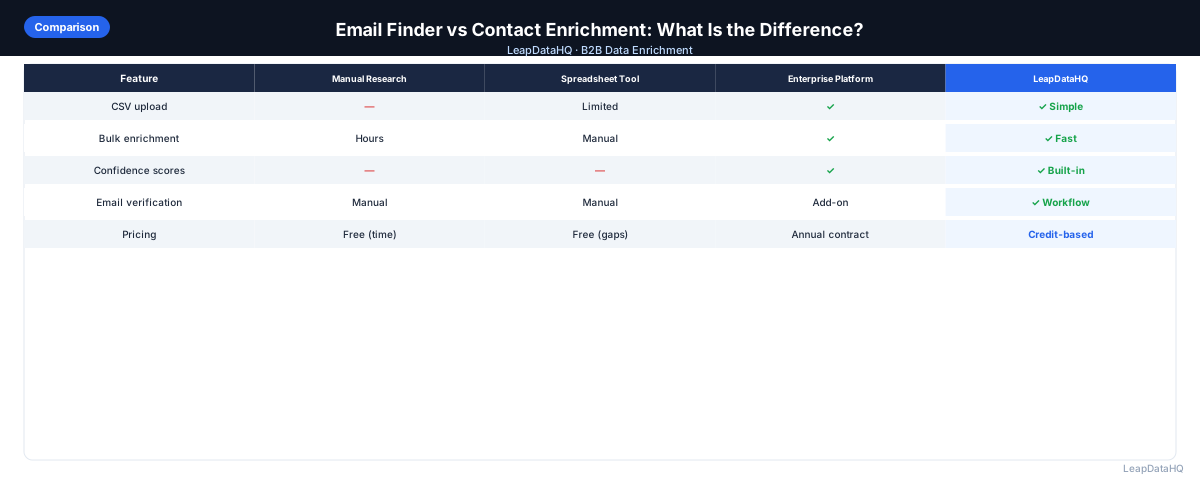
Email finder tools and contact enrichment platforms are often grouped together, but they serve fundamentally different purposes in the B2B sales workflow. Understanding the difference helps you choose the right tool for your specific data preparation needs.
An email finder is designed for one task: finding a single email address for a given contact. You provide a name and a company domain, and the tool returns what it believes is the correct email address. These tools are useful for researching individual prospects.
A contact enrichment platform, by contrast, processes entire lists in batch. You upload a CSV with hundreds or thousands of records, and the platform returns enriched data for all of them at once. Beyond email addresses, enrichment platforms typically provide job titles, company size, industry, LinkedIn URLs, and other fields.
This guide explains the key differences between email finders and contact enrichment platforms, when to use each, and how they can complement each other in a complete B2B sales data workflow.
What Is an Email Finder Tool?
An email finder tool is designed to discover or verify a business email address for a specific contact. You typically enter a first name, last name, and company domain, and the tool returns what it determines to be the most likely email address.
Email finders work by combining multiple techniques: pattern detection, database lookup against known email records, and verification checks. Some tools return multiple potential addresses ranked by confidence.
The primary use case for email finders is individual prospect research. They are less suited for batch processing large lists.
What Is a Contact Enrichment Platform?
A contact enrichment platform is designed to process entire contact lists in batch. You upload a CSV file with your existing records and the platform queries its databases to fill in missing fields across all records simultaneously.
Enrichment platforms typically return more than just email addresses. They append job titles, company size, industry, LinkedIn URLs, phone numbers, and other data points with confidence scores.
Key Differences at a Glance
- Volume: Email finders process one record at a time. Enrichment platforms process hundreds or thousands in batch.
- Data returned: Email finders return one or more email addresses. Enrichment platforms return emails plus job titles, company data, LinkedIn URLs, and more.
- Workflow: Email finders require manual entry for each contact. Enrichment platforms use CSV upload for batch processing.
- Confidence signals: Email finders may show a confidence percentage. Enrichment platforms provide per-field confidence scores.
- Pricing: Email finders charge per lookup or per month. Enrichment platforms charge per-record or per-credit for batch processing.
- Use case: Email finders are for individual research. Enrichment platforms are for preparing complete lists for campaigns.
When to Use an Email Finder
Ready to enrich your CSV list?
Upload a CSV, fill missing data, review confidence scores, and export clean records.
Upload a CSV — Start Enriching- You need to look up fewer than 50 contacts at a time
- You are researching individual decision-makers for a targeted account list
- You want to verify or cross-check email addresses found through other means
- You need a quick email lookup during call preparation
When to Use a Contact Enrichment Platform
- You have an existing list of 100-5,000 contacts that needs missing fields filled
- You need more than just email addresses — job titles, company data, LinkedIn URLs
- You are preparing a batch for a campaign and need consistent data across all records
- You want to review confidence scores and filter results before importing to your CRM
Can You Use Both?
Yes, and many teams do. Use a contact enrichment platform for the primary list, then use an email finder for high-priority contacts that did not match or returned low confidence. This combined approach maximizes efficiency.
Which One Does Your Team Need?
If your primary workflow is researching individual prospects one at a time, an email finder may suffice. If you work with existing lists and need to batch-enrich them for campaigns, a contact enrichment platform is the right choice.
How LeapDataHQ Helps
LeapDataHQ is a contact enrichment platform, not an email finder. It is designed for batch processing — upload a CSV, and the platform enriches all records at once, returning email addresses, job titles, company data, and confidence scores.
This makes LeapDataHQ the right choice when you have an existing list that needs enrichment for a campaign. The credit-based pricing at /pricing means you pay per record enriched, with no seat fees or annual contracts.
When to Use LeapDataHQ
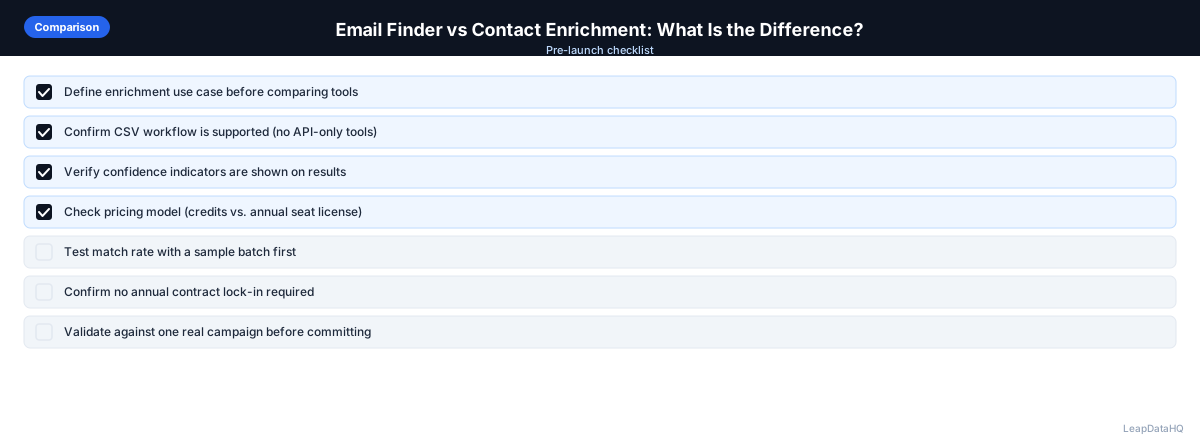
LeapDataHQ fits the contact enrichment platform category in this comparison. It is designed for teams that need to batch-enrich existing CSV lists. If your workflow involves uploading a file, enriching all records, reviewing confidence scores, and exporting clean data, LeapDataHQ is built for that use case.
For teams that also need individual email lookups for high-priority contacts that did not match in batch enrichment, LeapDataHQ's batch-first approach means you can focus manual research time only on remaining targets.
Start Enriching LeadsFrequently Asked Questions
Is an email finder more accurate than an enrichment platform?
Not necessarily. Both rely on similar underlying data sources. Email finders may verify each lookup individually. Enrichment platforms process in bulk but typically include verification steps.
Can I use an email finder to enrich a full list?
Technically yes, but it is inefficient. Looking up 500 contacts one at a time takes hours. An enrichment platform processes the same 500 records in minutes.
Do enrichment platforms only add email addresses?
No. Enrichment platforms typically add job titles, company size, industry, revenue range, LinkedIn URLs, phone numbers, and other data fields.
Which tool is more cost-effective for small teams?
For teams processing fewer than 50 contacts per month, an email finder may be more cost-effective. For 100+ contacts regularly, a credit-based enrichment platform provides better value.
Should I use both tools together?
Many teams do. Use an enrichment platform for primary batch enrichment, then use an email finder for high-value contacts that did not match or returned low confidence.