
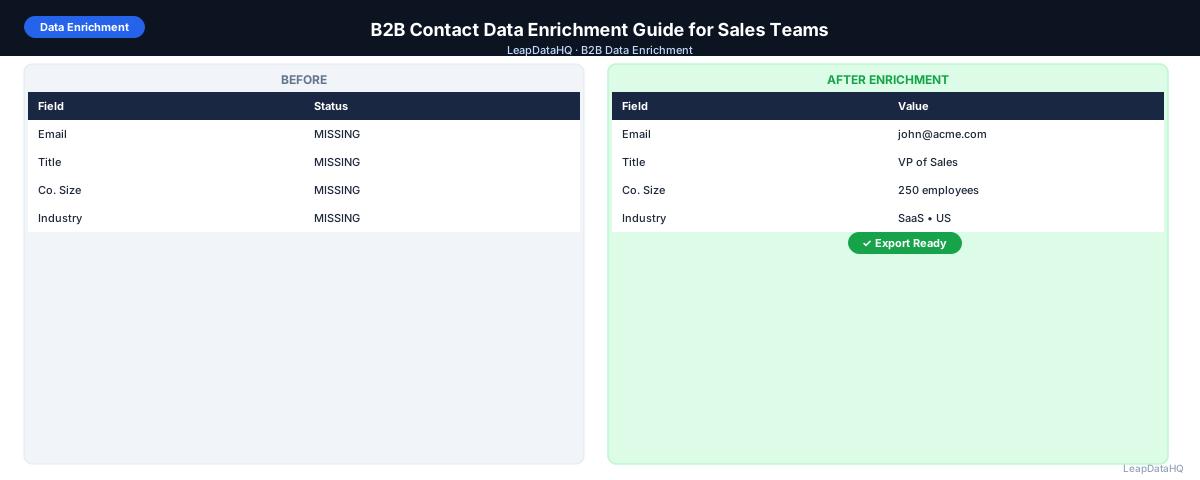
B2B contact data enrichment is the process of taking incomplete records — contacts without email addresses, leads without job titles, company entries without size or industry — and using enrichment tools to fill those gaps automatically. For sales teams, it's the step between identifying who you want to reach and actually being able to reach them.
The output of B2B contact enrichment is a more complete contact record: confirmed work email, accurate job title, company headcount, industry, revenue range, LinkedIn URL, and any other fields your outreach or CRM workflow depends on. Without enrichment, these fields have to be researched manually — a time-consuming process that doesn't scale.
This guide walks through how B2B contact data enrichment works, what fields you can enrich, and how to build the workflow into your team's outreach process.
What B2B Contact Data Enrichment Covers
Contact-level enrichment adds fields specific to an individual: email address, direct phone number, job title, seniority level, LinkedIn profile URL, and department. Company-level enrichment adds fields about the organization: company size, industry, revenue range, headquarters location, technologies used, and funding status.
Most B2B enrichment workflows need both. A sales rep who knows a contact's email but doesn't know the company size can't segment outreach by ICP fit. One who knows the company is a 200-person SaaS company but doesn't have the VP of Sales's email can't actually send an email.
Who Uses B2B Contact Data Enrichment
- SDRs and AEs: enriching prospect lists before cold email campaigns to ensure complete, accurate contact records
- Sales ops and RevOps: filling CRM gaps during quarterly data quality reviews and before major campaign pushes
- Lead generation agencies: delivering enriched contact records to clients as part of list building services
- Marketers: enriching webinar registrant, event attendee, and content download lists for nurture campaigns
- Founders and solo salespeople: building outreach-ready prospect lists without dedicated research staff
- Business development teams: enriching lists of target partnership contacts before outreach
Step 1: Prepare Your CSV for Upload
Start with your raw contact list. The minimum useful input for B2B contact enrichment is a combination of contact name (first and last) plus company domain. With those two fields, most enrichment tools can look up or infer a work email address and basic company data.
Before uploading, clean the input: remove duplicates (same contact at same company appearing twice), standardize domains (remove http://, www., trailing slashes), and delete rows where both name and domain are blank. These steps improve match rates and avoid wasting credits on records that can't be enriched.
Step 2: Map Columns and Run Enrichment
Upload your file to your enrichment tool and map the columns — first name, last name, company domain, and any other fields you're providing. Correct mapping is critical: if you map the wrong column as "domain," the tool can't look up company data.
After mapping, submit for enrichment. The tool appends the fields you requested — emails, titles, company data — to each row where it finds a match. Rows that don't match any record in the data source return empty or low-confidence fields.
Step 3: Review Confidence Scores
Enrichment tools return confidence indicators alongside data. High-confidence results come from verified records in the tool's database. Low-confidence results may be inferred or estimated — an email pattern derived from a known format rather than a confirmed address in the database.
Apply a confidence threshold: most teams use 70–80% as the cutoff for including records in outreach. Records below the threshold go to a secondary review queue rather than being included directly in campaigns. This keeps bounce rates and bad data out of your primary outreach sequences.
Step 4: Validate Specific Fields
Ready to enrich your CSV list?
Upload a CSV, fill missing data, review confidence scores, and export clean records.
Upload a CSV — Start EnrichingEmail Addresses
After enrichment, run a verification pass on all returned email addresses. Verification confirms the mailbox is active and accepting mail. Even high-confidence enriched emails benefit from verification — people change jobs, companies change domains, and inboxes go inactive.
Job Titles
Check that returned titles match your ICP target level. If you're targeting decision-makers and the returned titles are "analyst" or "coordinator," those contacts may not be the right level for your outreach. Flag them for manual review rather than including them in your primary campaign.
Company Size and Industry
Verify that company size and industry match your target profile. These fields are used for segmentation — a contact at a 5,000-person enterprise needs different messaging than one at a 15-person startup, even if they share the same job title.
Step 5: Fix Bad Rows
After quality review, remove or fix rows with clear data problems: mismatched email domains, role-based addresses (info@, support@), titles that don't fit your ICP, or company sizes outside your target range. This filtering step is what separates a raw enrichment output from a genuinely useful outreach list.
Step 6: Export and Import to CRM or Sequencer
Export the reviewed, filtered list. Import into your CRM to update existing records or create new ones, or load directly into your email sequencer for campaign launch. Map the enriched fields to the correct CRM properties to ensure data lands in the right fields.
Step 7: Use for Outreach and Track Results
Launch your enriched contact list as a campaign. Track open rates, reply rates, and bounce rates. Bounce rates above 2% suggest a problem with your email quality — either the confidence threshold was too low or verification was skipped. A well-enriched and verified list typically produces hard bounce rates under 1%.
Common B2B Contact Enrichment Mistakes
- Using company name instead of domain as the lookup key
- Skipping the confidence review and importing everything
- Not running email verification after enrichment
- Treating all confidence scores the same regardless of field type
- Enriching personal (non-work) email addresses as if they were work addresses
- Not updating enriched data periodically — B2B contact data decays roughly 25–30% annually
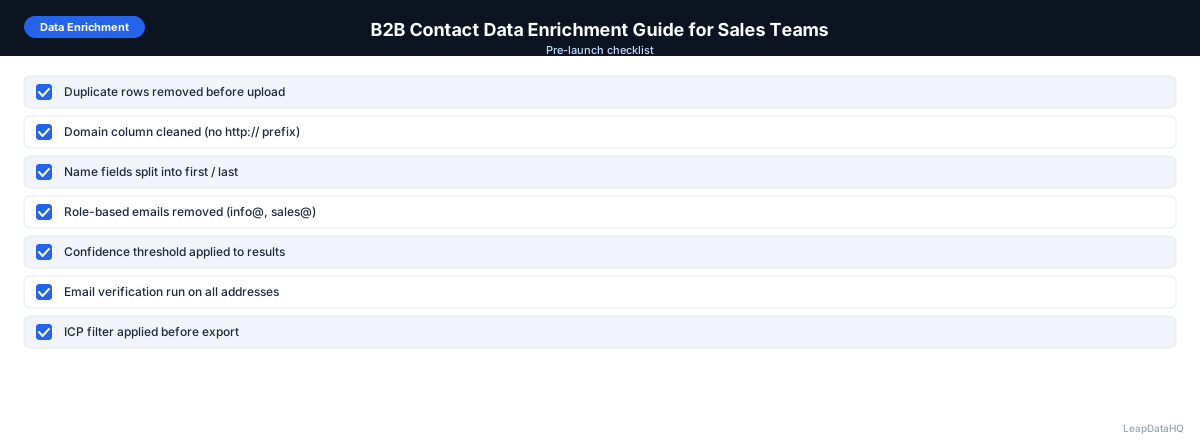
B2B Contact Data Enrichment Checklist
- Contact list has first name, last name, and company domain for each row
- Duplicates removed before upload
- Domains standardized (no http://, www., trailing slashes)
- Blank key-field rows removed
- Columns mapped correctly in enrichment tool
- Confidence threshold applied (70–80% or higher)
- Email verification run on all returned addresses
- Role-based and invalid addresses removed
- Job titles checked against ICP target level
- Company size and industry verified against target profile
- CRM or sequencer import mapping reviewed before import
- Campaign bounce rate monitored post-launch
When to Use LeapDataHQ
LeapDataHQ is built for B2B contact data enrichment via CSV. Upload your incomplete contact list, select the fields to enrich, review results with confidence scores, and export the records you trust. The workflow handles both contact-level fields (email, title) and company-level fields (size, industry) in one pass.
For sales teams running regular outreach, LeapDataHQ fits as the enrichment step between list sourcing and campaign launch. For RevOps teams, it works as the tool for periodic CRM gap-fill passes. Visit the features page or pricing to see what fits your team's volume.
Start Enriching LeadsFrequently Asked Questions
How long does B2B contact enrichment take?
Processing time depends on row count and the tool. Most enrichment tools process a few hundred rows in under a minute. Larger files (1,000+ rows) may take a few minutes. The review step after processing typically takes longer than the processing itself — budget 10–20 minutes of review time for a 200-row file if you're checking each record carefully.
What fields are most important to enrich?
Email address is the most critical field for outreach — without it, a contact isn't actionable. Job title is second, because it drives personalization and ICP qualification. Company size and industry are third, enabling segmentation. Everything else (phone, LinkedIn URL, revenue) is useful but secondary.
Can I enrich existing CRM records, not just new lists?
Yes. Export your CRM contacts as a CSV, run enrichment to fill gaps, and re-import the enriched file. Most CRMs support CSV import with "update existing records" mode that matches on email or contact ID rather than creating duplicates.
How do I know if a returned email is a work email vs. personal?
Check whether the email domain matches the company domain. If the company is acme.com but the returned email is @gmail.com or @yahoo.com, that's a personal email — it may reach the person but it signals the contact was not found at their work address.
What happens to contacts that don't get matched?
Unmatched contacts can be set aside for manual research, targeted through alternative channels (LinkedIn, phone), or held for a future enrichment pass with a different tool. Don't delete them — the contact may still be valuable even if one enrichment tool couldn't match it.