
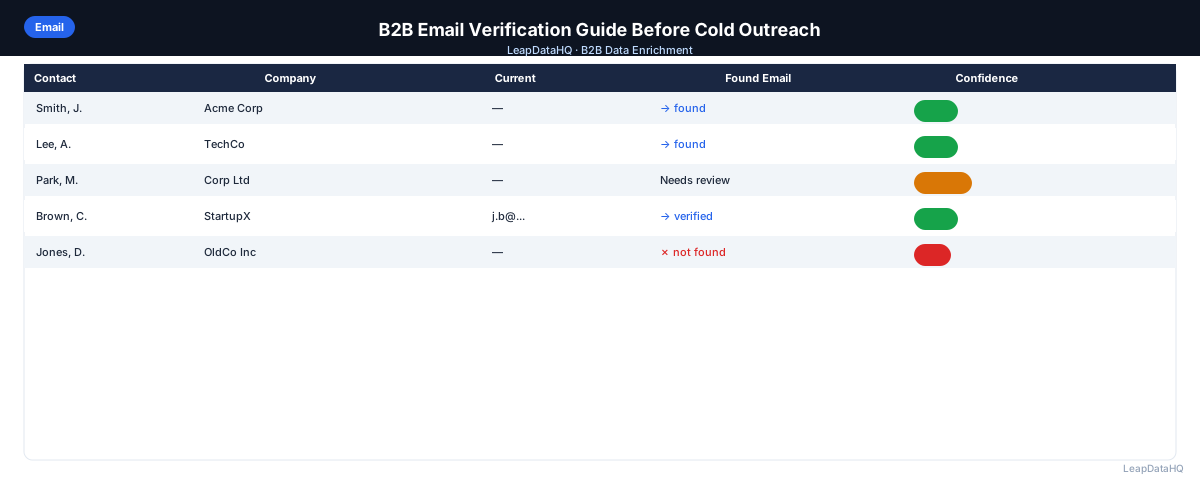
Email verification is the step that tells you whether an email address will actually deliver before you send to it. For B2B cold outreach, this isn't optional hygiene — it's the specific action that separates campaigns with low bounce rates from campaigns that damage your sending domain.
B2B email addresses are particularly prone to going stale. People change jobs, companies merge, domains get abandoned. An address that was valid when you built your list may produce a hard bounce six months later. Email verification catches these before they occur as real bounces in a live campaign.
This guide covers how B2B email verification works technically, what the different verification results mean, how to use the results in your outreach workflow, and what to do with each category of result.
How B2B Email Verification Works
Email verification works at two levels. Format validation checks whether the email address is syntactically correct — does it have an @ symbol, a valid domain format, and a top-level domain? This catches obvious errors but doesn't confirm the address exists.
SMTP verification goes further. The verification tool connects to the email server for the address's domain and simulates the first steps of delivering a message (the SMTP handshake), without actually sending anything. If the server confirms the mailbox exists, the address is marked valid. If the server rejects it, the address is marked invalid.
Catch-all detection is a third check. Some domains are configured to accept all incoming email regardless of whether the specific mailbox exists — these are catch-all domains. Verification tools detect this configuration and flag affected addresses as catch-all rather than confirmed-valid or confirmed-invalid.
What B2B Email Verification Results Mean
Valid (Deliverable)
The mailbox exists and is accepting email. Include in your campaign. Note that "valid" reflects the state at the time of verification — an address valid today may not be valid in three months if the person changes jobs.
Invalid (Undeliverable)
The server rejected the address — the mailbox doesn't exist or has been deactivated. Remove from your campaign immediately. Sending to invalid addresses produces hard bounces, which damage sender reputation rapidly.
Catch-All
The domain accepts all email, so verification can't confirm this specific mailbox. The address may be valid or may bounce. Handle catch-all contacts by: sending to them at lower volume, monitoring bounce rates carefully on this segment, or excluding from cold email and pursuing via LinkedIn instead.
Unknown / Timeout
The verification server didn't respond or gave an ambiguous result. Treat as risky — exclude from primary campaign and include at low volume in a secondary send with careful bounce monitoring.
Role-Based
Some verification tools flag role-based addresses (info@, sales@, support@) as a separate category. Even if technically deliverable, these shared inboxes are not appropriate for individual outreach. Remove from the campaign.
Ready to enrich your CSV list?
Upload a CSV, fill missing data, review confidence scores, and export clean records.
Upload a CSV — Start EnrichingStep 1: Upload Your Email List to Verify
Before running verification, do a quick pre-clean: remove obvious role-based addresses, run format validation to catch malformed emails, and deduplicate on the email column. These steps take a few minutes and improve the efficiency of the verification pass.
Step 2: Detect Missing Fields Before Verification
Verify only contacts that have email addresses. For contacts with blank emails, run enrichment first to find email addresses, then run verification on the enriched results. Verification and enrichment address different problems: enrichment finds missing emails; verification confirms whether found emails are active.
Step 3: Run Email Verification
Upload your list to a B2B email verification service. Most accept CSV upload with an email column and return results with status codes. Processing time is typically a few seconds per address; a 500-address list returns in a minute or two.
Step 4: Review and Apply Verification Results
Segment your list by verification result: valid addresses to the primary campaign, catch-all to a secondary segment, invalid to removal, unknown to a hold queue. Document the result in a status column in your export — this is useful context for anyone who uses the file later.
Step 5: Fix Remaining Issues After Verification
For contacts whose emails came back invalid: if you have name and domain, run enrichment to try to find a current work email. For contacts at catch-all domains: consider LinkedIn outreach as an alternative. For contacts with unknown results: retry verification after 24 hours — sometimes server timeouts resolve.
Step 6: Export Verified List
Export the verified file with verification status as a column. Primary campaign: valid addresses. Secondary campaign: catch-all (if you choose to include). Excluded: invalid and role-based. Keep a record of excluded contacts for future re-enrichment attempts.
Step 7: Use for Cold Outreach
Load verified contacts into your sequencer. Set bounce threshold alerts. For sending domains under 30 days old, start at under 50 emails/day and ramp up. For established sending domains, follow your sequencer's recommended ramp schedule. Monitor bounce rates daily for the first week of a new campaign.
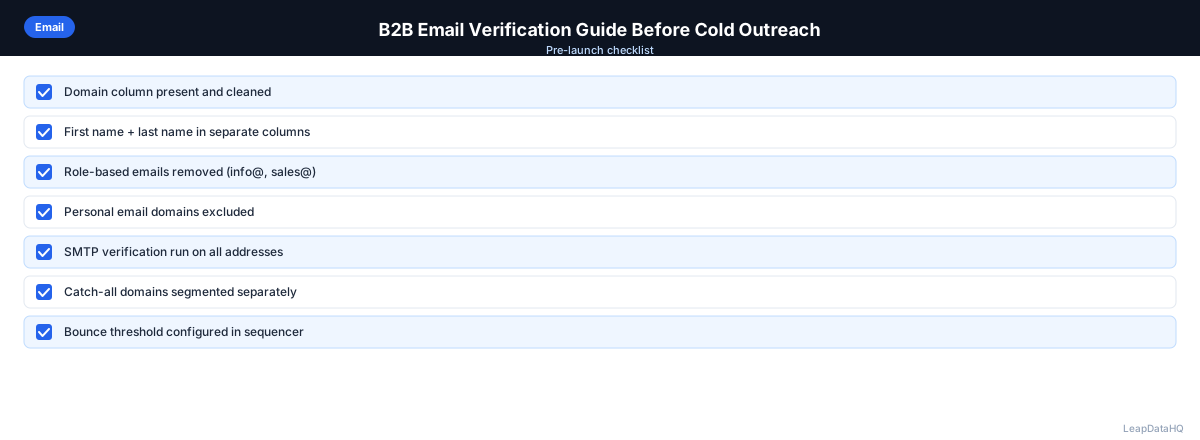
B2B Email Verification Checklist
- ☐ Role-based addresses removed before verification
- ☐ Format validation run (invalid format emails removed)
- ☐ Deduplication run on email column
- ☐ Email verification run on all remaining addresses
- ☐ Valid addresses → primary campaign
- ☐ Catch-all addresses → secondary segment or excluded
- ☐ Invalid addresses removed (not sent to)
- ☐ Role-based addresses from verification report removed
- ☐ Contacts with invalid emails sent to enrichment for updated email lookup
- ☐ Verification status recorded as a column in export
- ☐ Bounce threshold alert configured in sequencer (pause at >2%)
- ☐ Sending domain SPF/DKIM/DMARC confirmed before send
When to Use LeapDataHQ
LeapDataHQ handles the enrichment side of email preparation — finding missing email addresses that then need to be verified. After enrichment returns email addresses with confidence scores, run those addresses through a dedicated email verification tool to confirm deliverability. The two tools work in sequence: enrichment finds emails, verification confirms them.
If contacts came back from enrichment with invalid emails on verification, LeapDataHQ can attempt to re-enrich those contacts to find updated addresses.
Start Enriching LeadsFrequently Asked Questions
Do I need to verify emails from a paid contact database?
Yes. Even reputable contact databases have stale records — verification timestamps from the database may be weeks or months old. Running fresh verification before each campaign catches addresses that have changed since the database last updated them. The cost of verification is small compared to the cost of a deliverability incident.
How often does a B2B email address go invalid?
B2B contact data decays at roughly 25–30% annually. At that rate, a list of 1,000 contacts can expect 60–75 addresses to go invalid every quarter. This is why re-verification before reusing a list is necessary, not optional.
Can I send to catch-all addresses?
You can, but with caution. Catch-all addresses may be valid or may bounce — verification can't tell you which. If you include them in cold email, send at lower volume and monitor bounce rates carefully. If your bounce rate on catch-all contacts exceeds 3–5%, stop sending to that segment. Many teams exclude catch-all addresses entirely from cold email and pursue those contacts via LinkedIn instead.
What bounce rate should I target after email verification?
A properly cleaned and verified list should produce hard bounce rates under 1%. If you're seeing 1–2% even after verification, investigate: are you including catch-all addresses in the primary campaign? Are some "valid" results from a verification tool that uses a less rigorous check? Is the list old enough that some addresses have changed since verification?
What's the difference between email verification and email validation?
Email validation typically refers to format checking — is the address syntactically correct? Email verification goes further and confirms the mailbox actually exists and can receive email, using SMTP verification. Validation catches format errors; verification catches stale or inactive addresses. Both are useful at different stages of the workflow.