
Email list cleaning is the step between building a contact list and actually sending to it. For B2B sales teams, it means finding and removing the addresses that will bounce, the duplicates that will annoy contacts with double outreach, and the formatting errors that will prevent messages from being delivered at all.
Done before every campaign, email list cleaning keeps bounce rates low, sender reputation intact, and outreach workflows clean. Skipped, it creates a slow accumulation of deliverability problems that eventually affect all campaigns on your sending domain — not just the one that triggered the damage.
This guide covers a practical email list cleaning workflow for B2B sales teams, with specific steps for each category of problem.
What Email List Cleaning Fixes
- Invalid email formats: missing @, wrong domain structure, extra spaces, special characters from copy-paste
- Hard bounce addresses: emails that have been confirmed invalid by previous sends or verification
- Role-based addresses: info@, sales@, support@, admin@ — shared inboxes that rarely reach decision-makers
- Personal email addresses: gmail.com, yahoo.com, outlook.com — not appropriate for B2B work outreach (unless specifically targeted)
- Catch-all domain addresses: domains that accept all email regardless of mailbox existence
- Duplicate contacts: same email appearing on multiple rows in the file
- Stale addresses: email addresses that have gone inactive since the contact was added
- Do-not-contact and unsubscribed addresses: contacts who have opted out of outreach
The Cost of Not Cleaning Your Email List
Each category of problem in an uncleaned list has a specific consequence. Invalid emails produce hard bounces. A bounce rate above 2–3% triggers deliverability flags from ESPs (email service providers). Role-based emails generate spam complaints when real people at shared inboxes mark your message as spam. Duplicate contacts generate spam complaints when the same person receives your message twice. Catch-all addresses produce unpredictable bounce rates that are hard to diagnose.
These consequences compound. A single campaign that sends to a dirty list can damage sender reputation that takes months to rebuild. The time cost of email list cleaning (30–60 minutes for a typical list) is small compared to the recovery cost of a deliverability incident.
Step 1: Upload Your Email List and Run an Initial Audit
Open the email list in a spreadsheet. Count blank email cells. Count emails that start with known role-based prefixes. Count emails at personal domains (gmail.com, yahoo.com, hotmail.com). Run a deduplication count on the email column. This audit tells you what you're working with before any cleaning starts.
Step 2: Detect Missing and Problem Fields
Beyond email addresses, check the other fields your campaign depends on. Blank first names produce "Hi [blank]!" copy. Blank company names produce broken personalization. Missing job titles prevent title-based segmentation. Document how many rows have each type of gap — these are enrichment candidates after the cleaning step.
Step 3: Normalize Email Format
Fix email formatting problems: convert all emails to lowercase, TRIM() to remove spaces, remove any non-email characters that got included through copy-paste. Run a format validation check — a basic regex check flags emails missing @, domains without a dot, and other structural errors.
Ready to enrich your CSV list?
Upload a CSV, fill missing data, review confidence scores, and export clean records.
Upload a CSV — Start EnrichingStep 4: Enrich Missing Contact Data
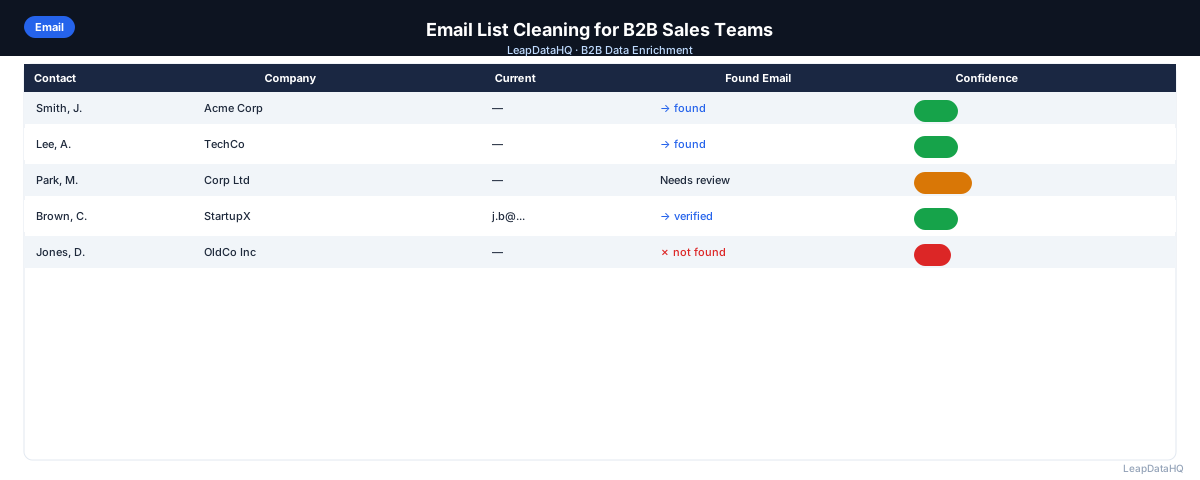
For contacts with blank email addresses, run enrichment to find their work email. Upload the file to an enrichment tool, map name and domain columns, and request email addresses for rows where the email field is blank. Review enriched email results with confidence scores before adding them to the campaign list.
Step 5: Review Confidence and Quality of All Addresses
For enriched addresses, apply your confidence threshold. For existing addresses (not enriched), the next step (verification) provides the quality signal. The confidence review step is specifically for enriched data — it tells you how reliable the enriched emails are before you run verification on them.
Step 6: Fix Bad Rows
- Remove role-based emails
- Remove personal email domains (unless specifically targeting consumers)
- Remove emails that failed format validation
- Remove duplicate rows (keep one per unique email)
- Remove contacts on your unsubscribe or do-not-contact list
- Segment catch-all domain contacts separately
Step 7: Run Email Verification on Remaining List
Run all remaining email addresses through an email verification tool. This confirms whether each mailbox currently exists and is accepting mail. Remove invalid addresses returned by verification. Flag catch-all addresses for separate handling. The verified-valid segment is your primary campaign list.
Step 8: Export and Use for Outreach
Export your cleaned, verified list. Set bounce threshold alerts in your sequencer (pause at 2% hard bounce rate). Monitor the first 24 hours of sending carefully — unexpected bounces in the first day signal a problem in the cleaning workflow that can be caught before the full campaign sends.
Email List Cleaning Checklist for B2B Sales
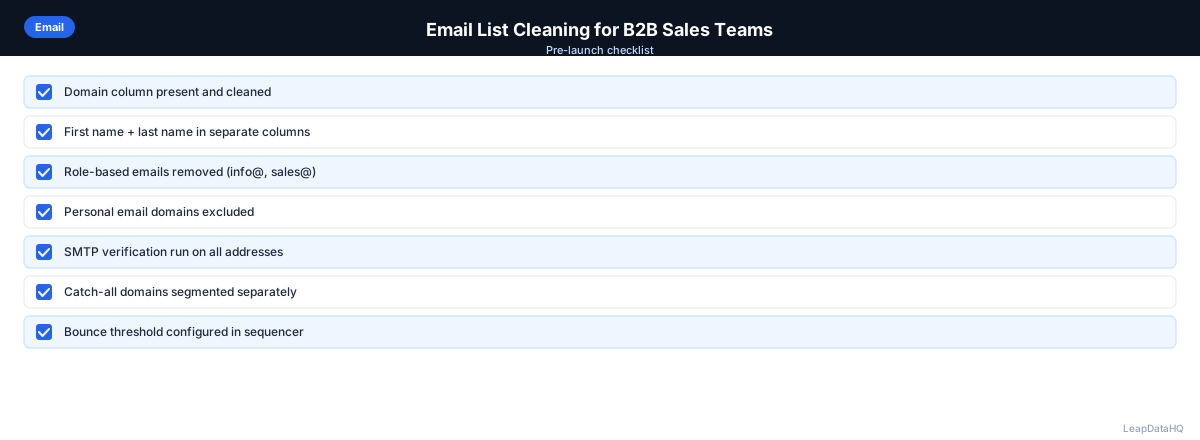
- ☐ Email column audited (blank count, role-based count, personal domain count)
- ☐ Email format normalized (lowercase, trimmed)
- ☐ Format validation run (invalid format emails flagged)
- ☐ Role-based addresses removed
- ☐ Personal email domains removed (if not targeting consumers)
- ☐ Enrichment run for contacts with blank email
- ☐ Confidence threshold applied to enriched emails
- ☐ Deduplication run on email column
- ☐ Do-not-contact / unsubscribe list checked
- ☐ Email verification run on all remaining addresses
- ☐ Invalid verification results removed
- ☐ Catch-all addresses segmented
- ☐ File exported with date stamp and verification status column
- ☐ Bounce threshold configured in sequencer before send
When to Use LeapDataHQ
LeapDataHQ handles the enrichment step in your email list cleaning workflow. After your initial format cleanup and deduplication, upload the file to LeapDataHQ to find missing email addresses. Review enriched results with confidence scores, apply your threshold, and export for email verification and campaign send.
For B2B sales teams running regular campaigns, pairing LeapDataHQ's enrichment with a dedicated email verification tool covers the full cleaning workflow without requiring expensive annual contracts or complex integrations.
Start Enriching LeadsFrequently Asked Questions
How often should B2B sales teams clean their email lists?
Before every campaign. B2B email addresses change frequently as people move jobs. A list clean last month may have 2–5% address turnover already. Even lists in active use need a verification pass before each major send. Make email list cleaning a standard pre-campaign checklist item, not an occasional task.
Does cleaning an email list reduce its size?
Usually yes. Cleaning removes invalid, role-based, duplicate, and unsubscribed addresses. A list that starts at 500 contacts may be 350–450 usable contacts after cleaning, depending on its initial quality. This is the right outcome — you want to know your true sendable count before campaign launch, not discover it through bounces.
Is it better to clean or rebuild a bad email list?
Depends on the extent of the problems. If 30% or more of a list's emails are invalid, and the contacts themselves aren't strongly targeted, rebuilding from a cleaner source may be more efficient than cleaning. If the contacts are well-targeted but the data quality is poor, cleaning and enrichment is worth the investment.
What's a catch-all email domain and how should I handle it?
A catch-all domain is configured to accept any incoming email, regardless of whether the specific mailbox exists. When you run email verification on a catch-all domain address, the verification result is "catch-all" — it can't confirm whether that specific mailbox exists. Send to catch-all domain contacts at lower volume and monitor bounce rates more carefully than for fully verified contacts.
Can I automate B2B email list cleaning?
Partially. Format validation, deduplication, role-based address removal, and email verification can all be handled with tools and scripts. The manual steps — reviewing borderline confidence scores, investigating unexpected data mismatches, applying ICP judgment — still benefit from human review. Automating the systematic checks saves the most time; manual review focuses on edge cases.