
CRM data quality degrades over time without active maintenance. Contacts change jobs. Companies get acquired. Duplicate records accumulate from multiple import sources. Fields filled in manually end up inconsistently formatted. Email addresses go stale.
The result is a CRM that produces unreliable reports, wastes SDR time on bad contacts, and undermines confidence in data across the organization. CRM data cleaning addresses these issues: deduplicating records, standardizing field values, removing outdated contacts, and flagging records that need manual review.
This guide covers the main categories of CRM data problems, which tools help with which issues, and how to build a sustainable CRM data quality program.
The financial impact of dirty CRM data is easy to underestimate. Every SDR who spends time researching a contact that turns out to be a duplicate or at the wrong company loses billable hours. Every campaign sent to an outdated list costs in wasted sequencing credits and domain reputation damage. Over a year, these costs accumulate to significantly more than the investment required to maintain clean data proactively.
Most CRM data problems fall into predictable patterns. Understanding which problems affect your CRM lets you apply the right tooling. Deduplication addresses duplicate records. Field standardization fixes formatting inconsistencies. Email verification handles invalid addresses. Enrichment fills missing fields. No single tool solves all problems, and knowing which combination your data needs is the first step toward an effective cleaning program.
A practical starting point is to run a CRM data audit that measures the prevalence of each problem type in your specific instance. Export a representative sample of 500 records and check for duplicate percentages, field completion rates, email bounce rates on recent sends, and formatting consistency in job title, industry, and company name columns. The results tell you which problems are worth investing in and which you can deprioritize.
The Main CRM Data Quality Problems
CRM data problems fall into several categories, each requiring a different approach. Understanding which categories affect your data helps you choose the right tools and sequence the work efficiently.
Duplicate Records
Duplicates occur when the same contact or company is entered multiple times from different sources. They cause confusion in reporting and mean multiple reps may contact the same person without knowing it.
Outdated Contact Information
B2B contacts have a 30–35% annual job change rate, which means about one-third of a contact database becomes outdated every year. A contact at a company they left 18 months ago is no longer a useful lead.
Inconsistent Field Formatting
Job titles entered as "VP, Sales," "VP of Sales," "Sales VP," and "V.P. Sales" are all the same role but show as four different values in CRM filters. Inconsistent formatting makes segmentation unreliable.
Missing Required Fields
Contacts added via quick imports often have missing fields — company, job title, industry, or email. These incomplete records can't be properly segmented or used in automations that require those fields.
Invalid Emails
Invalid email addresses cause bounce rates to spike when you send campaigns. If emails haven't been verified since they were added, a significant percentage may no longer be deliverable.
Evaluating CRM Data Cleaning Tools
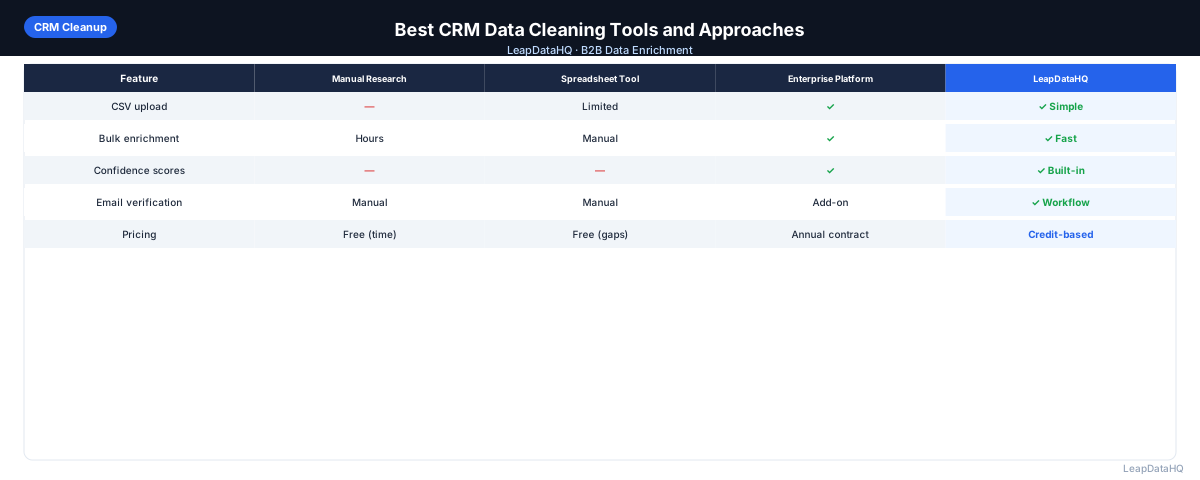
When evaluating tools for CRM data cleaning, consider what types of problems they solve and whether they fit your CRM platform. Some tools are CRM-native (Salesforce or HubSpot only), while others work across platforms. A tool that only deduplicates but doesn't help with field standardization or enrichment means you'll need multiple tools for a complete cleanup.
Look for tools that provide clear error reports and audit trails. When a deduplication tool merges records, you need to know which records were merged and what data was preserved. Similarly, when an enrichment tool adds fields, you need confidence scores and source attribution to evaluate result quality.
The best approach for most teams is a layered tool stack: CRM-native features for deduplication and validation rules, a spreadsheet for field standardization and manual review, an enrichment tool for filling missing fields, and a bulk email verification tool for verifying deliverability. This layered approach lets you use the best tool for each job without over-investing in an all-in-one platform that may not excel at any single task.
Ready to enrich your CSV list?
Upload a CSV, fill missing data, review confidence scores, and export clean records.
Upload a CSV — Start EnrichingSetting Up a CRM Data Quality Scorecard
A data quality scorecard helps you track progress over time and identify which problems need attention. Key metrics include: percentage of contacts with verified email addresses, percentage of contacts with complete company data (headcount, industry, revenue), number of duplicate records identified and merged per quarter, and bounce rate on recent campaigns segmented by data source.
Track these metrics quarterly. If bounce rates are trending up, that's a signal to prioritize email verification in your next cleaning pass. If the percentage of complete records is declining, focus on enrichment and import validation rules. The scorecard turns data cleaning from a reactive fire drill into a proactive management discipline.
Tools for CRM Data Cleaning
CRM-Native Deduplication
Both Salesforce and HubSpot include native deduplication features. Salesforce has Duplicate Management rules. HubSpot has built-in duplicate contact and company identification. Start with native features before using external tools.
Third-Party Data Quality Tools
Tools like Dedupely, Syncari, and RingLead specialize in CRM data quality. These offer more sophisticated deduplication logic and field standardization than CRM-native features. Best for teams with large databases or complex multi-source data problems.
Enrichment Tools for Missing Fields
For missing fields (email, company size, industry), enrichment tools are the solution. Export records with blank fields, enrich, and re-import. This is distinct from deduplication and formatting cleanup.
Email Verification Tools
For invalid and outdated email addresses, bulk email verification identifies which addresses are still deliverable. Run verification on your entire email database periodically and update CRM records with verification results.
CRM Data Cleaning Workflow
- Audit: export your CRM data and assess what types of quality problems exist
- Prioritize: identify which problems most impact current workflows (often: duplicates and invalid emails)
- Deduplicate: use CRM-native or third-party tools to merge duplicate records
- Standardize fields: normalize job titles, company names, and other high-variability fields
- Verify emails: run bulk verification and update invalid records in CRM
- Enrich missing fields: identify records with high-priority missing fields and enrich
- Set up prevention: configure validation rules to prevent quality problems at entry
- Schedule maintenance: quarterly deduplication, annual enrichment refresh
Preventing CRM Data Problems
- Set required fields that must be filled before a record can be saved
- Use dropdown picklists for fields prone to inconsistency (industry, status, company size)
- Configure duplicate detection rules to alert reps when creating a likely duplicate
- Set up regular job change monitoring to flag contacts who have changed companies
- Establish import procedures that require cleaning before bulk imports are loaded
When to Use LeapDataHQ
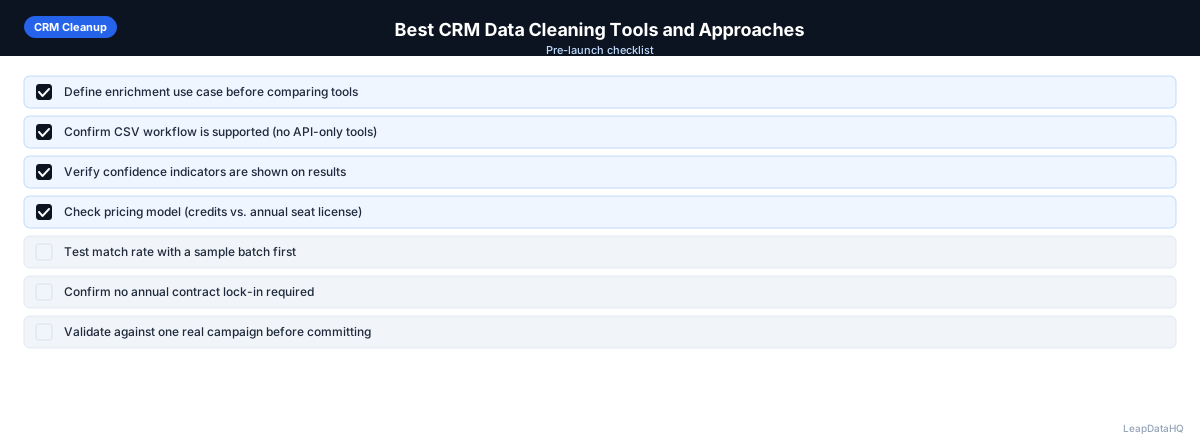
LeapDataHQ supports the enrichment component of CRM data cleaning. After deduplication and field standardization, export records with missing email addresses or company data, enrich through LeapDataHQ, and re-import. This pattern works well for HubSpot and Salesforce users doing quarterly data quality maintenance.
Combine CRM-native deduplication with LeapDataHQ enrichment and a bulk email verification pass: deduplication for duplicate records, enrichment for missing fields, verification for invalid emails.
Start Enriching LeadsFrequently Asked Questions
How often should I clean my CRM data?
At minimum, run a full data quality audit annually. For active sales CRMs, quarterly deduplication and semi-annual email verification are more appropriate. Set a calendar reminder rather than waiting for data quality to visibly degrade.
What's the most common CRM data quality problem?
Duplicate records are the most universally common problem across teams of all sizes. Outdated email addresses are the most impactful in terms of day-to-day outreach effectiveness. Most teams have both issues and benefit from addressing duplicates first.
Should I clean data in the CRM or export to a spreadsheet first?
For deduplication and field standardization: CRM-native tools are usually more efficient. For enrichment and email verification: export-clean-reimport is typically necessary since these require external tools.
How do I find outdated contacts in my CRM?
Filter for contacts where the last activity date is over 12 months ago, or where email has bounced. Re-enrich those contacts to find updated job titles and company associations. Mark contacts who've changed companies as inactive until you have current contact information.