
Data enrichment and data cleaning are often mentioned in the same conversation about data quality, but they do very different things.
Data enrichment adds information to records that are missing it. If your CRM has a contact's name and company but no email address, enrichment finds the email and appends it.
Data cleaning fixes problems with data that already exists. If job titles are formatted inconsistently, cleaning standardizes them. If duplicate records exist, cleaning deduplicates. If email addresses are syntactically invalid, cleaning flags or removes them.
Most CRM and prospect data problems involve both. This guide explains how to diagnose which problem you're dealing with — and why the sequence (clean first, then enrich) matters.
Confusing the two leads to wasted effort. Teams that invest in enrichment before cleaning end up enriching duplicate records, paying to append data to contacts they'll later delete, and getting lower match rates because dirty company domains can't be matched against enrichment sources. Teams that only clean without enriching end up with tidy but incomplete records — well-formatted fields that are still missing critical data.
The most cost-effective approach treats cleaning and enrichment as complementary phases of a single data quality workflow. Cleaning removes the noise that would otherwise consume enrichment budget on low-value records. Enrichment then fills the gaps that cleaning alone can't address. Understanding where your data sits on the clean-to-enrich spectrum is the first step toward an efficient data quality program.
A straightforward test for deciding which phase to prioritize: take a sample of 100 records from your CRM and count how many are duplicates, how many have invalid or missing email addresses, and how many have inconsistent formatting in your most-used filterable fields. If your duplicate rate is above 5%, start with cleaning. If your email fill rate is below 70%, start with enrichment. For most CRMs that have been in use for more than a year, the answer is that you need to do both — but the sequence and budget allocation depend on which problem is more severe.
What Data Enrichment Does
Data enrichment is the process of adding new information to existing contact or company records. You have a partial record — a name and company, for example — and enrichment fills in the gaps: email address, phone number, job title, company revenue, industry, technology stack.
Enrichment is additive. It takes what you have and makes it more complete. It doesn't fix problems with the data you already have — it adds data where gaps exist.
Enrichment adds new fields to existing records by querying external data sources. The core use cases are: adding email addresses to contacts that only have a name and company, adding company size and industry to records that only have a name and domain, and adding revenue range, phone numbers, or job titles when those fields are blank.
Enrichment is about filling in what's missing. The existing data is assumed to be correct — you're adding more information, not fixing what's there.
Real-World Examples of Clean vs. Enrich Decisions
Consider a CRM export where 20% of contacts are missing email addresses, 15% are duplicates of the same person, and 30% have job titles with inconsistent formatting. The instinct might be to enrich everything at once. The better sequence: deduplicate first (removing 15% of wasted effort), then standardize titles, then enrich only the unique, cleaned records for missing emails.
Another scenario: a company database where industry fields are populated but inconsistent — "Software," "Software & Services," "Computer Software" all referring to the same classification. An enrichment tool won't fix this because the field isn't missing, it's just inconsistent. A cleaning pass to map variations to a standard taxonomy must come first.
For email lists being prepared for a campaign: cleaning removes invalid syntax emails and role-based addresses, verification checks deliverability of remaining addresses, and enrichment fills in missing emails for contacts that had none. Each step addresses a different problem with a different tool.
Building a Data Quality Program Around Both
Sustainable data quality requires both cleaning and enrichment on a recurring schedule. Most teams clean annually and enrich at campaign time. A better approach: quarterly cleaning passes to catch duplicate accumulation and formatting drift, with enrichment applied on-demand when preparing specific outreach lists. This separates the ongoing maintenance cost (cleaning) from the campaign-specific cost (enrichment).
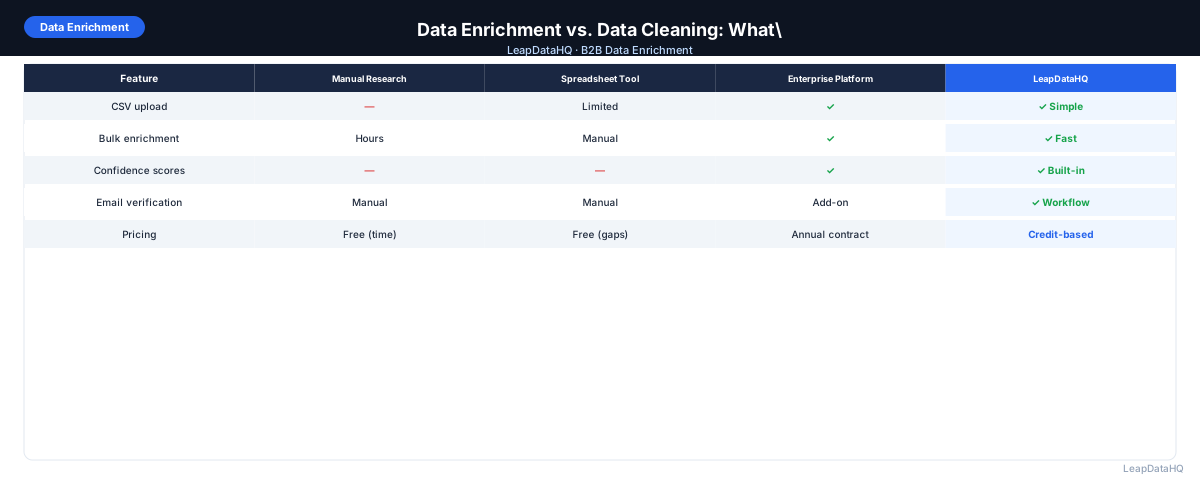
LeapDataHQ handles the enrichment phase of this cycle. After cleaning and deduplication, upload your records to append missing email addresses, phone numbers, and company data. The confidence scores and enrichment metadata that come back also serve as a quality signal for the cleaning phase — records that enrichment can't match may be candidates for further cleaning or removal.
Enrichment adds new fields to existing records by querying external data sources. The core use cases are: adding email addresses to contacts that only have a name and company, adding company size and industry to records that only have a name and domain, and adding revenue range, phone numbers, or job titles when those fields are blank.
Enrichment is about filling in what's missing. The existing data is assumed to be correct — you're adding more information, not fixing what's there.
What Data Cleaning Does
Cleaning corrects, standardizes, and deduplicates data that already exists. The core use cases include: standardizing job title formatting across a database with inconsistent entries, removing duplicate contact records for the same person, fixing email address syntax errors, removing invalid email addresses, normalizing company name formatting, and removing outdated records.
Ready to enrich your CSV list?
Upload a CSV, fill missing data, review confidence scores, and export clean records.
Upload a CSV — Start EnrichingThe Key Difference
Enrichment assumes the data you have is correct and adds to it. Cleaning assumes some data you have may be incorrect, outdated, or inconsistent and fixes it.
An email address in the wrong column is a cleaning problem. A contact with no email address is an enrichment opportunity. A job title formatted inconsistently is a cleaning issue. A contact with no job title is an enrichment opportunity.
Why the Sequence Matters: Clean First, Then Enrich
When you're doing both, order matters. If you enrich before cleaning, you may:
- Enrich duplicate records (wasting credits on the same contact twice)
- Enrich contacts with malformed company domains (enrichment will fail or return wrong results)
- Pay for enrichment results you'll then discard during cleanup
- Get results attached to records that will be merged or deleted
Cleaning first ensures your enrichment runs on accurate, deduplicated records — which means higher match rates and less wasted spend.
Diagnosing Your Data Problem
Audit a sample of 50–100 records and ask:
- Are fields missing (blank cells where you need data)? → Enrichment needed
- Are fields present but inconsistently formatted? → Cleaning needed
- Are there duplicate records for the same contact? → Cleaning (deduplication)
- Are there records with outdated information? → Cleaning needed
- Are email addresses syntactically invalid? → Cleaning (validation)
- Are email addresses valid-looking but unverified? → Verification needed
Combined Workflow
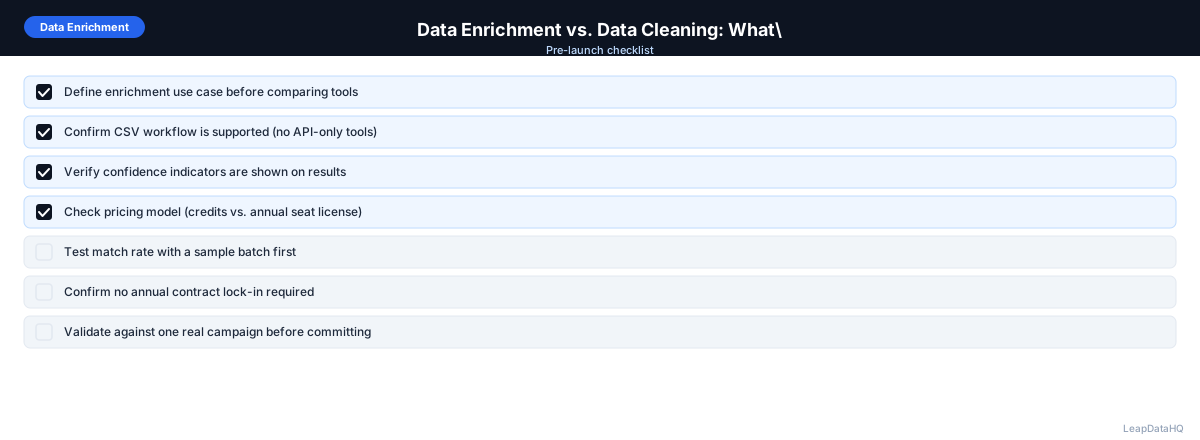
- Audit a sample to identify what types of problems exist
- Deduplicate records first
- Fix formatting issues: titles, company names, domains
- Remove clearly invalid data
- Run enrichment to add missing fields to clean records
- Verify email deliverability on enriched addresses
- Import cleaned, enriched, verified records
- Set a maintenance schedule: re-clean quarterly, re-enrich annually
Common Mistakes
Enriching Before Cleaning
The most common mistake is running enrichment on a dirty dataset. You end up paying to enrich contacts that are duplicates, have wrong company associations, or will be deleted in cleanup. Clean first.
Treating Verification as Enrichment
Email verification and email enrichment are different. Enrichment finds emails you don't have. Verification checks if emails you do have are deliverable. You need both — in sequence: enrich, then verify.
When to Use LeapDataHQ
LeapDataHQ handles the enrichment step of this workflow. After you've cleaned your data and ensured company domains are accurate, upload to LeapDataHQ to append missing email addresses, phone numbers, and company data to your records.
For CRM cleanup specifically, LeapDataHQ works well as part of a structured data quality initiative: clean and deduplicate your CRM records first, then run enrichment on the cleaned dataset to fill missing fields.
Start Enriching LeadsFrequently Asked Questions
Can I do enrichment and cleaning at the same time?
Some tools try to do both simultaneously, but it's generally better to sequence them. Cleaning removes inaccurate and duplicate records that would otherwise consume enrichment credits. At minimum, deduplicate and fix company domains before enriching.
What happens if I enrich data that hasn't been cleaned?
The main risks: you pay to enrich duplicate records, enrichment fails on malformed domains, and you get results attached to records that will be deleted in cleanup. The output is harder to QA because source inconsistencies make it harder to spot enrichment errors.
Is CRM data enrichment different from list enrichment?
The process is the same — you're adding missing fields from external sources. CRM enrichment implies you're working with data inside a CRM and may involve native integrations. List enrichment typically involves exporting to CSV, enriching, and re-importing. The underlying enrichment logic is identical.
Do I need a dedicated data cleaning tool?
For many teams, spreadsheets with formulas are sufficient: TRIM for whitespace, PROPER for capitalization, Remove Duplicates for deduplication. Dedicated cleaning tools make sense when you have tens of thousands of records or need ongoing automated cleaning.