
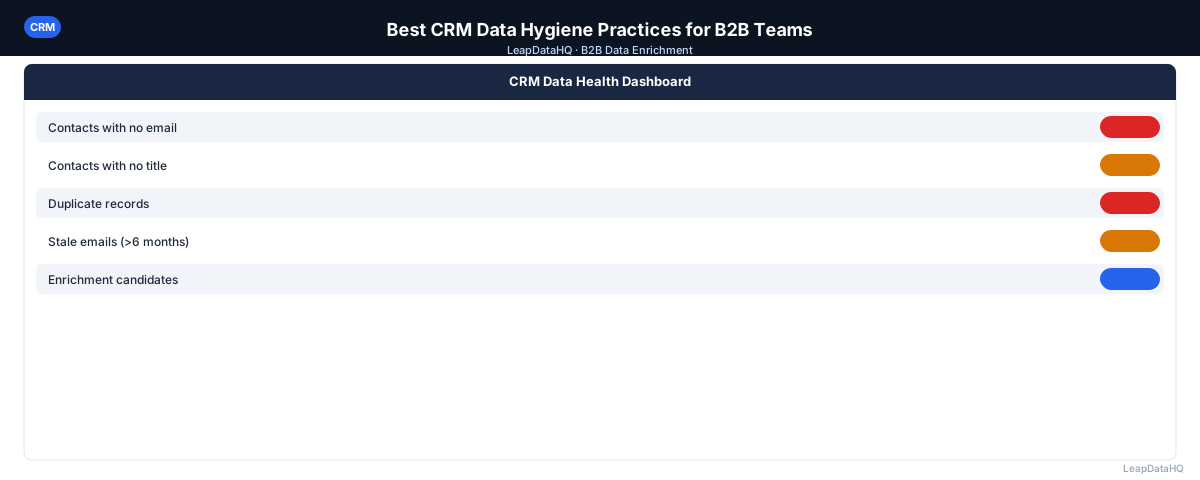
CRM data hygiene is the set of practices that keep your database clean, accurate, and useful over time. It's not a project you complete — it's a set of ongoing habits that prevent the gradual degradation that turns a useful CRM into a liability.
The teams that maintain good data hygiene don't spend weeks on massive cleanup projects every year. They prevent the accumulation of bad data through consistent, lightweight practices that run in the background.
Here are the best CRM data hygiene practices for B2B teams. You'll learn how to enforce data quality at record creation, maintain deduplication schedules, handle email bounces, run re-enrichment passes, and build a culture of data ownership. These practices apply whether you're using Salesforce, HubSpot, or any other CRM platform.
Let's walk through each practice and how to implement it in your organization.
Practice 1: Enforce Required Fields at Record Creation
The most effective hygiene practice is preventing bad data from entering your CRM in the first place. Require a minimum set of fields for every new record: email address and company name at minimum, with job title and company domain strongly recommended. Records missing these fields should not be considered outreach-ready.
Use field validation rules to enforce email format — no spaces, must contain @, must have a valid TLD. This catches obvious errors at entry rather than weeks later when you're trying to use the data. Most CRM platforms support validation rules that prevent record creation until required fields are properly formatted.
The upfront cost of requiring more fields is offset by the downstream cost savings. A record created without an email address will require manual research later — or worse, it will be used in a campaign without verification and produce a bounce. Prevention is always cheaper than remediation.
Practice 2: Deduplicate on a Regular Schedule
Run deduplication monthly, not annually. Use your CRM's native duplicate detection tool for email-based exact matches. Supplement with a quarterly manual review of fuzzy duplicates — contacts with similar names at the same company that automated tools might miss.
Duplicates cause real problems: the same contact receives outreach twice (triggering spam complaints), pipeline gets double-counted in reports, and rep assignments become confused. Monthly deduplication catches these issues before they create relationship damage or reporting errors.
Practice 3: Act on Email Bounces Immediately
When an email bounces in your outreach tool, update the CRM record the same day. Mark the email as invalid, add a note with the bounce date, and flag the record for re-enrichment or archiving. Letting bounced addresses sit in your CRM means they get re-used in future campaigns.
Build an automated workflow if possible: connect your email tool to your CRM so that bounce notifications trigger CRM record updates automatically. If automation isn't available, assign bounce handling as a daily task for a specific team member. The key is speed — the longer bounced addresses remain active, the more damage they cause.
Practice 4: Run a Quarterly Re-Enrichment Pass
Export contacts that haven't been updated in 6-12 months and run them through an enrichment tool to check whether emails are still current and people are still at the same company. Import updated results back into your CRM. This prevents gradual decay from accumulating unnoticed.
Professional contact data decays at roughly 20-30% per year. People change jobs, companies get acquired, email addresses are abandoned. A quarterly re-enrichment pass catches this decay before it affects your outreach. Focus on contacts that are still in active prospecting segments — there's no need to re-enrich archived records.
Practice 5: Use Picklists for High-Value Fields
Free-text fields for industry, company type, lifecycle stage, and country are a data quality disaster. Convert these to picklists or dropdowns that enforce a standard set of values. Existing records with inconsistent values in these fields should be standardized as part of the conversion.
Picklists prevent the "SaaS" vs "Software" vs "Software as a Service" problem where the same concept is entered differently by different users. They also make reporting and segmentation reliable — you can filter by picklist values with confidence that you're capturing all relevant records.
Practice 6: Set Up a Data Quality Dashboard
Create a recurring report that tracks: percentage of contacts with valid emails, percentage missing company association, number of records not updated in 12+ months, and duplicate rate. Review it monthly. Trends in these metrics tell you whether your hygiene practices are working.
A data quality dashboard makes the invisible visible. Without it, data quality problems accumulate silently until they become obvious through high bounce rates, poor campaign results, or rep complaints. With it, you can identify and address problems early, before they affect business outcomes.
Practice 7: Define Data Ownership
Someone needs to own CRM data quality. This doesn't require a full-time data steward on a small team — it can be a hat that the sales ops, RevOps, or marketing ops person wears. But without ownership, hygiene practices don't get prioritized.
Data ownership includes responsibility for the data quality dashboard, enforcement of data entry standards, coordination of quarterly re-enrichment passes, and response to data quality issues when they're identified. Make this ownership explicit in someone's role description and performance metrics.
Practice 8: Train New Users on Data Standards
Data quality problems often originate from new users who haven't been trained on your standards. Include data entry standards in onboarding: how to format phone numbers, which fields are required, how to handle duplicates, how to log activity. A 30-minute training prevents months of cleanup.
Document your data standards in a shared reference guide that new users can consult. Include examples of correct and incorrect entries for common fields. Make this guide part of your CRM onboarding process so every new user understands the expectations before they create their first record.
What This Means for Your Team
Good CRM data hygiene directly affects your team's ability to sell and market effectively. When your CRM data is clean, reps spend time on real prospects instead of chasing invalid contacts. Marketing campaigns reach the right people with the right messaging. Sales forecasts are based on accurate pipeline data.
Ready to enrich your CSV list?
Upload a CSV, fill missing data, review confidence scores, and export clean records.
Upload a CSV — Start EnrichingThe cost of poor data hygiene is scattered across the organization but adds up quickly. Reps waste hours on manual research that enrichment could handle in minutes. Campaigns underperform because they're targeting contacts with outdated information. Management makes decisions based on reports that don't reflect reality.
The teams that invest in data hygiene practices see compounding returns. Each quarter of consistent maintenance makes the next quarter more productive. The alternative — periodic massive cleanup projects — is more expensive and less effective than ongoing lightweight practices.
Who Should Use These CRM Hygiene Practices
CRM data hygiene is relevant for any B2B organization that uses a CRM for sales, marketing, or customer success. The specific practices may vary by team size and CRM complexity, but the fundamentals apply universally.
- Sales teams that rely on CRM data for prospecting and pipeline management
- Marketing teams that use CRM data for segmentation and campaign targeting
- RevOps and sales ops teams responsible for data quality and reporting accuracy
- Customer success teams that need accurate contact data for onboarding and support
- Founders and small business owners managing their own CRM without dedicated ops support
- Agencies that manage CRM data on behalf of multiple clients
- Growing teams transitioning from spreadsheet-based tracking to a formal CRM
If your team uses a CRM for any customer-facing activity, these hygiene practices will improve your data quality and the effectiveness of your sales and marketing efforts.
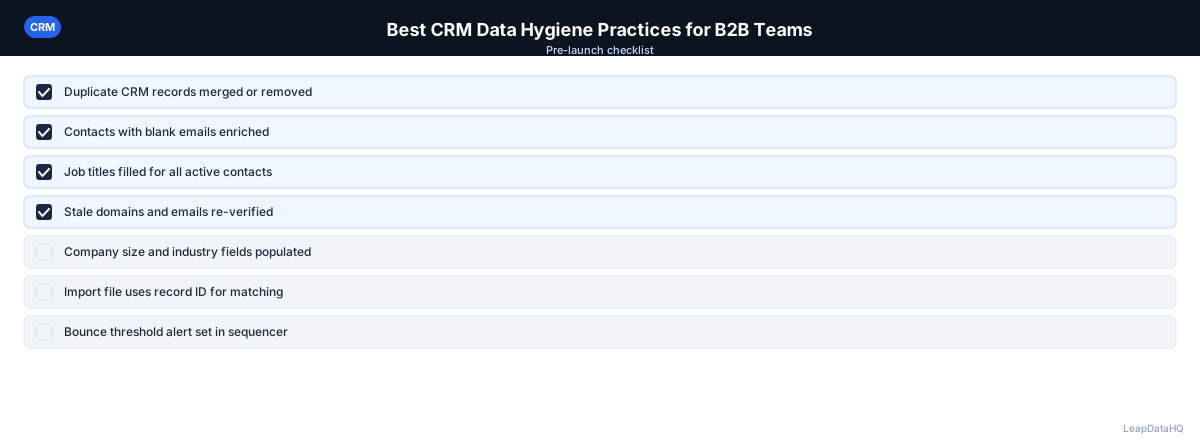
Checklist: CRM Data Hygiene Audit
Use this checklist to audit your current CRM data quality and identify improvement areas:
- Required fields are enforced at record creation (email, company name at minimum)
- Email format validation rules are active on email fields
- Monthly deduplication process is documented and being followed
- Bounced emails are updated in CRM within 24 hours of notification
- Quarterly re-enrichment pass is scheduled and has been run in the past 90 days
- High-value fields (industry, lifecycle stage, country) use picklists instead of free text
- Data quality dashboard is reviewed monthly by the data owner
- Data ownership is assigned to a specific role or person
- New user onboarding includes CRM data standards training
- Data standards documentation exists and is accessible to all users
- CRM records older than 12 months have been reviewed or archived
- Integration between CRM and email tools is configured for automatic bounce handling
Common Mistakes to Avoid
- Treating data hygiene as a one-time project instead of ongoing practices. Without consistent maintenance, data quality degrades continuously. The cleanup project you do this year will need to be repeated next year if ongoing practices aren't in place.
- Not enforcing required fields at record creation. This is the single most impactful prevention measure. Without it, bad data enters your CRM from day one and accumulates until it becomes a major problem.
- Skipping deduplication for months at a time. Duplicates accumulate quickly, especially when multiple team members are adding contacts. Monthly deduplication prevents the problem from growing out of control.
- Not acting on bounced emails immediately. Every day a bounced address sits in your CRM is a day it might be re-used in a campaign. Speed matters — handle bounces the same day they occur.
- Using free-text fields for important categorizations. "SaaS" and "Software as a Service" are the same thing, but free-text fields treat them as different values. Picklists prevent this inconsistency.
- Not having a data quality dashboard. Without visibility into data quality metrics, problems accumulate silently. A dashboard makes issues visible before they affect business outcomes.
- Not assigning data ownership. When everyone is responsible for data quality, no one is. Assign explicit ownership to a specific role and include it in performance metrics.
- Not training new users on data standards. New users who don't understand your standards will create records that don't meet them. Onboarding training prevents this source of data quality problems.
Practical Examples
Example 1: B2B SaaS Company with 50 Reps
A sales team that audits its CRM often finds a meaningful share of contacts with invalid or missing email addresses. Implementing required field enforcement, regular deduplication, and periodic re-enrichment typically reduces the invalid-email rate and cuts the manual research reps spend hunting for correct contact details.
Example 2: Marketing Agency Managing Client CRMs
An agency managing HubSpot instances for several clients can apply the same required-field configuration, deduplication schedule, and re-enrichment workflow across every account. Consistent hygiene across clients tends to keep campaign bounce rates low and predictable.
Example 3: Startup Founders Using CRM for First Time
Two co-founders at a B2B startup started using a CRM for the first time. They implemented required fields, picklists for industry and company size, and a monthly deduplication process from day one. After 18 months, their CRM data quality was higher than companies five times their size because they prevented problems rather than fixing them.
Example 4: Enterprise Sales Team with Legacy Data
An enterprise sales team had a CRM with 10 years of accumulated data, much of it outdated. They triaged by focusing cleanup on the 30% of records that were still in active use, ran enrichment on those records, and archived the rest. This approach delivered 80% of the value with 20% of the effort.
Example 5: Sales Ops Team Implementing Data Quality Dashboard
A sales ops team built a data quality dashboard tracking email validity, duplicate rate, and records not updated in 12+ months. Reviewing it monthly revealed that one sales region had significantly worse data quality than others. Investigation showed that region had higher rep turnover and less onboarding training — leading to targeted training investment.
How LeapDataHQ Helps
LeapDataHQ supports Practice 4 — the quarterly re-enrichment pass. Export contacts that haven't been updated recently, upload to LeapDataHQ to check current email addresses and fill missing company data, filter to high-confidence results, and import back into your CRM. This workflow catches data decay before it affects your outreach.
For teams that want to establish the quarterly re-enrichment habit without committing to a full data platform, LeapDataHQ's credit-based model makes it practical to run this pass on a schedule. You pay only for what you enrich, with no monthly seat fees or annual contracts. This makes it affordable to maintain data quality consistently.
LeapDataHQ also helps with CRM gap-fill projects. If your CRM has contacts missing email addresses or company data, export those records, enrich them through LeapDataHQ, and import the results. The confidence scores help you decide which enriched records to trust and which need manual verification.
Next Steps
Start by auditing your current CRM data quality using the checklist above. Identify the three biggest gaps and implement the corresponding practices. LeapDataHQ helps you fill missing data and verify existing records through on-demand enrichment. Check our /features and /pricing to see if it fits your CRM maintenance workflow.
When to Use LeapDataHQ
LeapDataHQ supports Practice 4 — the quarterly re-enrichment pass. Export contacts that haven't been updated recently, upload to LeapDataHQ to check current email addresses and fill missing company data, filter to high-confidence results, and import back into your CRM.
For teams that want to establish the quarterly re-enrichment habit without committing to a full data platform, LeapDataHQ's credit-based model makes it practical to run this pass on a schedule. You pay only for what you enrich, making it affordable to maintain data quality consistently across your CRM database.
LeapDataHQ also supports CRM gap-fill projects. If your data quality dashboard reveals that significant percentages of contacts are missing email addresses or company data, LeapDataHQ can fill those gaps efficiently. Upload the incomplete records, enrich them, review confidence scores, and import the high-quality results back into your CRM.
For teams implementing data hygiene practices for the first time, LeapDataHQ provides a low-commitment way to start. You don't need an enterprise contract or developer integration — just upload a CSV, enrich, review, and export. This makes it practical to test the re-enrichment workflow before scaling it across your entire CRM.
Start Enriching LeadsFrequently Asked Questions
How much does poor CRM data hygiene actually cost?
The costs are scattered across the organization: rep time wasted on invalid contacts, marketing emails that bounce, inaccurate sales forecasts, and missed revenue from contacts that were reachable but had bad data. Teams that have audited this cost often find it's significant — frequently exceeding the cost of prevention measures by 5-10x.
What's the single most important CRM hygiene practice?
Required field enforcement at record creation. Preventing bad data from entering is more cost-effective than cleaning it up later. If you can only implement one practice, start here. Every bad record that enters your CRM requires time and effort to fix — or worse, it causes problems in campaigns and reports.
How do I get sales reps to maintain data quality standards?
Make data entry easy and the standards clear. Use required fields and picklists to reduce effort and enforce consistency. Show reps how good data quality directly benefits their own quota achievement — accurate data helps them reach the right people and close more deals. Frame it as a productivity tool, not a compliance requirement.
Should CRM data hygiene be a dedicated project or an ongoing process?
Both. A one-time cleanup project to get to a clean baseline, followed by ongoing practices to maintain quality. Without the ongoing practices, you'll need to repeat the cleanup project every year. The ongoing practices are lightweight — monthly deduplication, quarterly re-enrichment, daily bounce handling — but they prevent accumulation of bad data.
How do I handle CRM data quality for a database that's years old?
Start by triaging: focus cleanup effort on the records that are still in active use. Archive old records rather than deleting. Run enrichment on active segments first. Gradually extend the cleanup to older records over multiple quarters. Trying to clean everything at once is overwhelming and often unnecessary.
What CRM platforms have the best built-in data quality tools?
Salesforce and HubSpot both have robust native duplicate detection, validation rules, and reporting capabilities. Smaller CRM platforms may have more limited built-in tools but often integrate with third-party data quality solutions. The platform matters less than whether you actually use the tools available — even basic features are effective when used consistently.
How do I measure the ROI of CRM data hygiene practices?
Track metrics before and after implementation: bounce rates on campaigns using CRM data, rep time spent on manual research, percentage of records with valid emails, and campaign reply rates. Compare these metrics over 3-6 months to quantify the improvement. For most teams, the ROI is clear within the first quarter.