
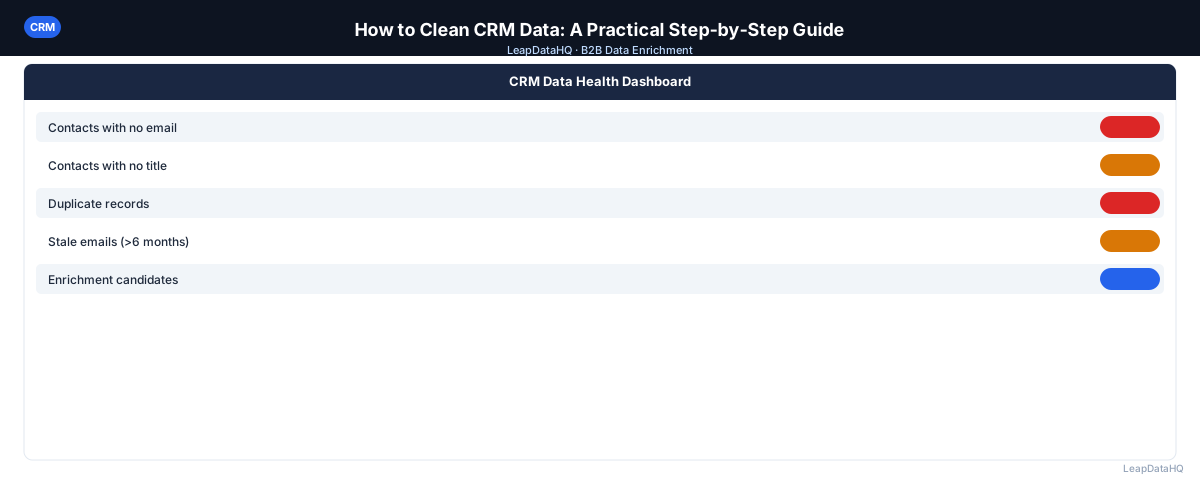
Dirty CRM data is more expensive than most teams realize. Stale email addresses mean your outreach bounces. Duplicate records mean sales reps waste time on the same prospect twice. Inconsistent company names mean your segmentation breaks. Poor data quality isn't just an inconvenience — it affects revenue.
The good news is that CRM data cleaning follows a predictable process. You audit what you have, remove or merge bad records, fix formatting and gaps, enrich what's incomplete, and put practices in place to prevent the same problems from recurring.
This guide walks through each step. You'll learn how to export and audit your CRM data, remove duplicates systematically, standardize formatting, update stale records, enrich incomplete data, and build ongoing practices that maintain data quality over time. Whether you're cleaning 1,000 records or 50,000, the process is the same.
The goal isn't perfect data — that's unrealistic. The goal is raising data quality enough that your outreach connects with the right people, your reporting is reliable, and your team isn't wasting time on dead ends. Most teams find that even a single cleaning pass produces measurable improvements in bounce rates, rep productivity, and campaign performance.
CRM cleaning is one of those tasks that feels overwhelming until you start it. Once you export the data and see the problems laid out in a spreadsheet, the work becomes manageable and even satisfying.
Step 1: Export Your CRM Data and Audit It
Start by exporting your contacts and companies to a spreadsheet. This gives you a clean view of your data outside the CRM interface, where problems are easier to spot. Look for these common issues:
- Blank fields across multiple records (missing email, company, or title)
- Inconsistent capitalization or formatting (e.g., "NEW YORK" vs "New York")
- Duplicate contacts or companies
- Invalid or obviously wrong email formats
- Records not updated in 12+ months
- Test records that were never cleaned out
The audit step is critical because it tells you the scope of the problem. Without knowing what percentage of records are affected by each issue, you cannot prioritize effectively. Export the data, open it in a spreadsheet, and count the problems before you start fixing them.
Step 2: Remove Duplicate Records
Duplicates are the most damaging data quality issue in most CRMs. They cause double outreach, inflated contact counts, and split activity history. Most CRMs have a native deduplication tool — use it first, then supplement with a manual review of fuzzy matches.
When merging duplicates, be careful about which record to keep. The record with more complete data and more recent activity is usually the right primary record. Make sure notes, tasks, and associated deals are transferred before deleting.
Deduplication is not just about removing rows — it is about preserving the best version of each contact. Take time to review merge candidates carefully, especially for high-value accounts where losing activity history could affect ongoing sales cycles.
Common Deduplication Scenarios
- Same email, different names (e.g., "John Smith" and "J. Smith")
- Same name, different companies (person changed jobs)
- Same company entered twice with different spellings
- Test contacts that share patterns with real contacts
Step 3: Standardize Formatting
Inconsistent formatting makes filtering and segmentation unreliable. Run a pass to standardize:
- Phone numbers: choose one format and apply it consistently
- Company names: remove trailing "Inc.", "LLC", "Ltd" or keep them — just be consistent
- State and country fields: use standard abbreviations (CA, not California and calif.)
- Job titles: normalize common variations (VP vs Vice President)
Standardization matters because it makes your data filterable. If half your records say "CA" and the other half say "California," your state-level filters and reports will be incomplete. Pick one format and apply it across all records.
Step 4: Update or Remove Stale Records
Contact data decays fast. People change jobs, get promoted, and leave companies. Email addresses become invalid. A record that hasn't been touched in 18 months is a liability in your outreach, not an asset.
Export records with no activity in the past 12-18 months and run them through an enrichment tool to see if the contact information is still current. For records where enrichment returns no match, either archive them or mark them as inactive rather than deleting so you preserve the history.
Step 5: Enrich Incomplete Records
After removing bad data, fill in the gaps in what's left. Records with company names but no emails, or emails but no phone numbers, can often be enriched automatically using a CSV enrichment tool.
Export the incomplete records, run them through enrichment, review confidence scores, and import the validated results back into your CRM. Only import what you're confident in — enriching blindly is how bad data gets back into a clean system.
Step 6: Set Up Ongoing Data Quality Practices
Cleaning CRM data is not a one-time project. Without ongoing practices, the same problems recur within months.
- Set required fields in your CRM so new records can't be created without minimum data
- Run a quarterly deduplication audit
- Use email bounce tracking — when an email bounces, update the record immediately
- Re-enrich your contact list annually to catch job changes
- Assign data quality ownership to a specific person or role
What This Means for Your Sales Team
Clean CRM data directly impacts your team's ability to reach the right people. When emails are valid, outreach connects. When company data is complete, segmentation works. When duplicates are removed, reps do not waste time on the same prospect twice.
The time investment in CRM cleaning pays for itself quickly. A team that previously spent 20% of their time on dead-end outreach due to bad data can redirect that time to productive conversations. For SDRs making 50+ outreach attempts per day, even a small improvement in data quality translates to several additional meaningful conversations per week.
Beyond outreach, clean data improves reporting accuracy. Territory analysis, pipeline forecasting, and campaign performance metrics all depend on reliable underlying data. Cleaning your CRM makes these reports trustworthy again. When leadership asks for pipeline numbers, you can provide them with confidence knowing the data is accurate.
Ready to enrich your CSV list?
Upload a CSV, fill missing data, review confidence scores, and export clean records.
Upload a CSV — Start EnrichingWho Should Clean Their CRM Data
CRM data cleaning is relevant for any team that uses a CRM for B2B outreach or customer management:
- Sales operations teams: responsible for data quality and CRM hygiene across the organization
- SDRs and sales reps: whose outreach effectiveness depends on accurate contact data in their CRM
- Marketing teams: who rely on CRM data for segmentation, campaign targeting, and lead routing
- Founders and revenue leaders: who need accurate pipeline and forecasting data from the CRM
- Customer success teams: who need current contact information to manage existing customer relationships
- Agency account managers: who manage client CRM instances and need to maintain data quality for client outreach
Checklist: CRM Data Cleaning
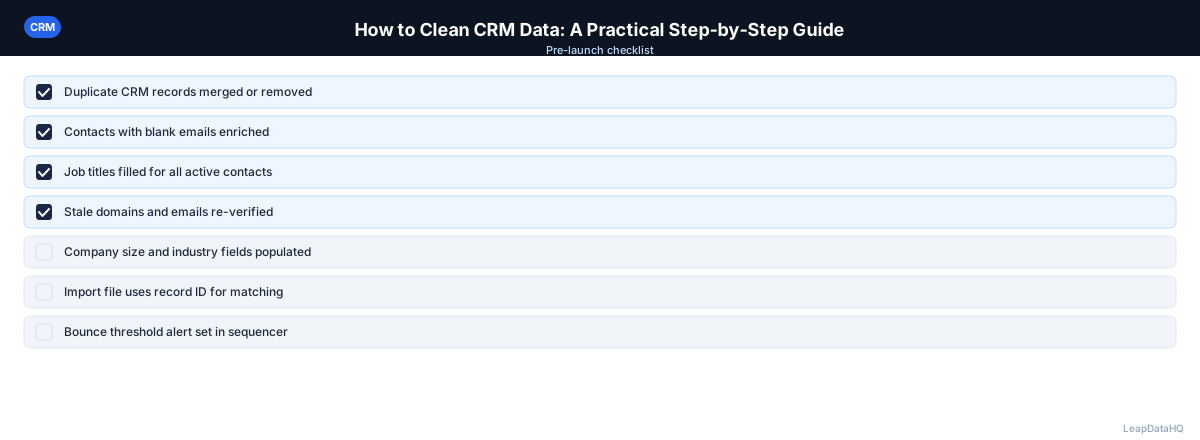
Use this checklist to ensure a thorough CRM data cleaning process:
- Exported all contacts and companies to a spreadsheet for auditing
- Identified and counted records with blank required fields (email, company, title)
- Ran native CRM deduplication tool and reviewed all duplicate record sets
- Manually reviewed fuzzy duplicates that the native tool missed
- Standardized phone number format across all records
- Standardized state, country, and region fields to consistent abbreviations
- Normalized job title variations to standard formats
- Identified records with no activity in 12+ months and flagged them for review
- Ran stale records through enrichment to check for current contact information
- Exported incomplete records and ran CSV enrichment to fill gaps
- Reviewed confidence scores and imported only high-confidence enriched data
- Set up required fields and validation rules to prevent future data quality issues
Common Mistakes to Avoid
These mistakes undermine CRM cleaning efforts and allow problems to recur:
- Cleaning without auditing first: Without measuring the scope of the problem, you cannot prioritize effectively. Export and audit your data before starting any cleaning work to understand which issues are most impactful.
- Deleting stale records instead of archiving: Deleting removes activity history that may be valuable for understanding past relationships. Archive or mark records as inactive instead, preserving history while removing them from active views.
- Importing enriched data without reviewing confidence scores: Enrichment tools return results with varying reliability. Importing everything without filtering reintroduces bad data into your freshly cleaned CRM. Always review confidence scores before importing.
- Cleaning without setting up prevention measures: Cleaning is temporary if you do not fix the intake processes that created the problems. Set required fields, validation rules, and deduplication rules to prevent recurrence.
- Trying to clean everything at once: A CRM with 50,000 records can feel overwhelming. Work in segments — start with active contacts, then move to inactive records. Prioritize the data quality issues that most directly affect revenue.
- Not assigning ownership: Without a specific person or role responsible for data quality, cleaning becomes everyone's job and nobody's priority. Assign CRM data quality ownership explicitly.
- Ignoring test and junk records: Most CRMs accumulate test records from development, training, and demo imports. These inflate your contact count and can cause confusion. Identify and remove them early in the cleaning process.
Practical Examples
Example 1: Pre-Campaign CRM Cleanup
A sales team is preparing for a major Q2 outreach campaign. They export their CRM, find 15% duplicate records, 20% missing emails, and 30% stale records. They deduplicate, enrich the missing emails, archive stale records, and launch the campaign with clean data. Bounce rates drop from 8% to under 2%.
Example 2: Post-Migration Data Fix
After migrating from one CRM to another, a team discovers formatting inconsistencies — phone numbers in five different formats, state fields with mixed abbreviations and full names. They export, standardize all fields in a spreadsheet, and re-import. Reporting accuracy improves immediately.
Example 3: Quarterly CRM Health Check
A sales ops team runs a quarterly CRM audit. They deduplicate new records, verify bounced emails, and re-enrich contacts with no activity in 12 months. The process takes one day each quarter and keeps the CRM reliable for the sales team year-round.
Example 4: Agency Client CRM Cleanup
An agency takes over management of a client's HubSpot instance. The CRM has 8,000 contacts with significant data quality issues. The agency exports, deduplicates (finding 1,200 duplicates), enriches missing emails, and standardizes formatting. They deliver a clean CRM with 6,800 verified contacts ready for outreach.
Example 5: New CRM Implementation
A company implementing Salesforce for the first time cleans their existing spreadsheet-based contact list before importing. They deduplicate, standardize, enrich missing fields, and verify emails. The clean import sets a strong foundation for their new CRM.
How LeapDataHQ Helps
LeapDataHQ helps with the enrichment step of CRM data cleaning. After you export incomplete records from your CRM — contacts missing emails, company data, or job titles — you upload the CSV to LeapDataHQ. The platform enriches each record with available data and returns confidence scores so you know which results to trust.
You review the enriched results, filter to high-confidence records, and export a clean CSV. Import only the validated data back into your CRM using your CRM's import tool. This approach ensures you are adding reliable data, not reintroducing the same quality problems you just fixed.
LeapDataHQ is also useful for the quarterly re-enrichment cycle. Export contacts that have not been updated recently, run them through enrichment at /crm-data-cleaning, and update your CRM with current email addresses and job titles. The credit-based pricing at /pricing means you pay only for what you enrich each quarter.
Next Steps
If your CRM data needs cleaning, start with the audit step. Export your contacts, identify the most impactful issues, and work through the checklist systematically. You do not need to fix everything at once — focus on the issues that most directly affect outreach. Invalid emails and missing company data are usually the best places to start because they have the most immediate impact on campaign performance.
For the enrichment step, LeapDataHQ helps you fill gaps in your CRM data. Upload your incomplete records at /crm-data-cleaning, review confidence scores, and import clean data back. The credit-based pricing means you pay only for what you enrich each quarter. Check /features and /pricing to see if it fits your workflow. Schedule a quarterly re-enrichment cycle to maintain data quality over time.
When to Use LeapDataHQ
LeapDataHQ fits into Step 5 of this process — enriching incomplete CRM records. Export your contacts with gaps, upload the CSV, enrich with company and contact data, review confidence signals, and import only what passes your quality threshold.
It also works for the quarterly re-enrichment cycle: export contacts that haven't been updated recently, run them through enrichment, and update your CRM with current email addresses and job titles.
The credit-based pricing means you pay only for the records you enrich each cycle. For teams running quarterly CRM health checks, this keeps enrichment costs aligned with actual usage rather than requiring a standing subscription.
LeapDataHQ returns confidence scores alongside each enriched field, giving you control over what enters your cleaned CRM. You filter to high-confidence results before importing, which is essential for maintaining the data quality you just worked to achieve.
For teams working through the complete CRM cleaning workflow — from audit through deduplication, standardization, enrichment, and ongoing maintenance — LeapDataHQ provides the enrichment layer without requiring developer integration or platform-level commitments. Results depend on input data quality and the public data available for each contact.
Start Enriching LeadsFrequently Asked Questions
How long does a full CRM data clean take?
For a CRM with 5,000-10,000 contacts, a thorough cleaning typically takes 1-3 days of focused work, including deduplication, formatting standardization, and enrichment. Larger databases take proportionally longer. Breaking the work into phases — audit, deduplicate, standardize, enrich — makes it more manageable.
Should I delete or archive stale records?
Archive rather than delete. Deleting removes the activity history, which may be valuable for understanding past relationships. Most CRMs support archiving or marking records as inactive, which keeps the history without cluttering active views. This is especially important for contacts with deal history or notes.
What's the fastest way to find duplicates in a CRM?
Use your CRM's native deduplication feature first (HubSpot, Salesforce, and most major CRMs have one). Then export to a spreadsheet and use conditional formatting or COUNTIF formulas to find remaining fuzzy duplicates by email and company name.
How often should I clean my CRM data?
A light monthly check (new records, obvious duplicates), a quarterly deduplication pass, and an annual full cleaning with enrichment is a sustainable cadence for most B2B teams. The key is consistency — regular small efforts prevent the need for massive cleanup projects.
What causes CRM data to go bad in the first place?
Most CRM data quality problems come from lack of required fields, manual data entry errors, no deduplication rules on import, and failure to update records when emails bounce or contacts change jobs. Process fixes prevent data quality problems from recurring.
Should I clean my CRM before or after migrating to a new system?
Clean before migrating. Migrating dirty data transfers all your existing problems to the new system. Clean your data in the old CRM first, then import only clean records into the new system. This gives you a fresh start without carrying over accumulated issues.
How do I convince my team to maintain CRM data quality?
Show the cost of bad data: calculate time wasted on bounced emails, duplicate outreach, and incorrect reporting. When the team sees the direct impact on their productivity and pipeline, they are more likely to follow data entry standards and support ongoing maintenance.