
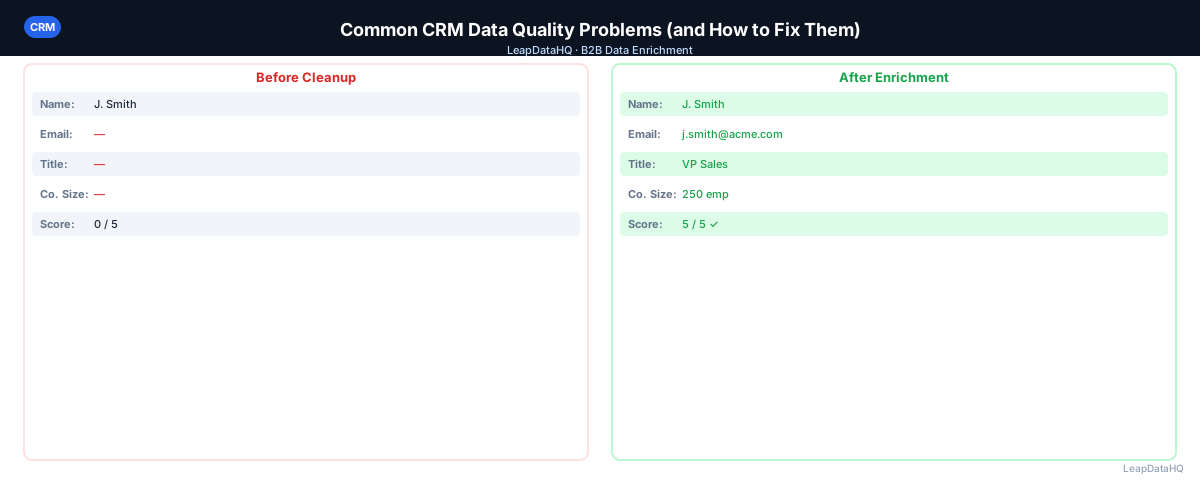
Every CRM accumulates data quality problems over time. They start small — a few duplicate records from an import, some contacts with missing emails, inconsistent formatting across fields. Over months and years, these problems compound. Reporting becomes unreliable. Segmentation breaks. Reps waste time on contacts that can't be reached.
The most common CRM data quality problems are predictable, diagnosable, and fixable. You don't need a massive transformation project — you need a systematic approach to each category.
The cost of ignoring CRM data quality is higher than most teams realize. Research consistently shows that B2B contact data decays at 20-30% per year. Without active maintenance, a CRM that was clean two years ago may have 40-60% stale or inaccurate records today. That's not just a data problem — it's a revenue problem.
Every bounced email damages sender reputation. Every duplicate record wastes rep time. Every missing field prevents personalization. Every inconsistent value breaks segmentation. These issues compound across your entire sales and marketing operation, reducing the effectiveness of every campaign, every sequence, and every report.
Here are the most common issues and how to address them, with practical steps you can implement regardless of which CRM platform you use. The key is working systematically through each category rather than trying to fix everything at once. Prioritize by impact on your revenue processes and start with the issues causing the most bounced emails and wasted rep time. Each problem has a known, proven solution that you can implement step by step to restore your data quality and improve overall campaign performance and results.
Problem 1: Duplicate Records
Duplicates appear when the same contact is imported multiple times, created manually and also via integration, or when name variations bypass duplicate detection. Use your CRM's native deduplication tool first, then export and look for email-less duplicates using name + company combinations.
Duplicates cause double outreach, inflate contact counts, and split activity history across records. A contact who exists twice in your CRM might receive the same campaign twice, generating confusion and spam complaints.
Problem 2: Stale and Outdated Contact Information
B2B contact data decays at roughly 20-30% per year. People change jobs, get promoted, and leave companies. Run email bounce tracking and immediately mark bounced addresses as invalid. For contacts untouched in 12+ months, run a re-enrichment pass to check current status.
What This Means for Your Workflow
CRM data quality problems affect every downstream process. Sales teams working from dirty data waste time on unreachable contacts and miss opportunities because they can't find the right person. Marketing campaigns built on bad data produce high bounce rates and low engagement. Leadership making decisions from unreliable reports is making decisions from fiction.
The cumulative impact is significant. Teams with clean CRM data report higher productivity, better campaign performance, and more accurate forecasting. Teams that ignore data quality spend increasing amounts of time working around the problems rather than solving them — manual research to verify contacts, workarounds for broken reports, and constant firefighting from data-related errors. The investment in systematic cleaning pays for itself quickly in recovered productivity and improved campaign results.
Who Should Address These CRM Data Quality Problems
CRM data quality is a cross-functional concern that affects multiple roles:
- Sales operations managers: responsible for CRM accuracy and sales reporting
- Revenue operations leaders: overseeing the full revenue technology stack
- Marketing operations: whose campaign performance depends on clean contact data
- CRM administrators: tasked with maintaining instance health and data standards
- Sales team leads: who need accurate data for territory planning and forecasting
- Individual contributors: whose daily outreach depends on reliable contact information
- Executive leadership: who make strategic decisions based on CRM-reported metrics
Problem 3: Missing Required Fields
Records created with minimum information accumulate in CRMs where no required fields are enforced. Export records with key fields missing and enrich them in bulk. Going forward, enforce required fields on all record creation paths.
Missing fields prevent segmentation, personalization, and reporting. A contact without a company name can't be included in account-level analysis. A contact without an email address can't receive outreach. A contact without a job title can't be targeted by seniority. Each missing field reduces the usefulness of the record and limits what your team can do with the data.
Problem 4: Inconsistent Field Formatting
When the same value is entered different ways — "SaaS", "SAAS", "Software as a Service" — list filters and reports stop working correctly. Convert high-value text fields to picklists or dropdowns. For existing data, export the field, standardize with find-and-replace, and re-import.
Problem 5: Contacts Without Company Associations
In CRMs that distinguish between contacts and companies, contacts without a company association can't be used for account-based views or company-level reporting. Export unassociated contacts, enrich for company domain, and associate contacts to companies.
This problem is especially common in CRMs where contacts can be created independently of companies. Form fills, event registrations, and manual entry often create contacts without company context. The fix requires enrichment to identify the company, then establishing the association in the CRM. For B2B companies, account-level reporting is essential for pipeline analysis and territory management, making this a high-priority fix.
Problem 6: Test and Junk Records
Most CRMs accumulate test records from development, training, and demo imports. Build a filter for obvious test patterns ("test@test.com", "John Doe", company names like "Test") and delete those records.
Test records inflate contact counts, appear in reports, and can accidentally receive real outreach. They should be identified and removed early in any cleaning process because they're easy to spot and their removal immediately improves data reliability. Search for common patterns: email addresses containing "test", names like "Test User" or "Demo Account", and company names containing "Test" or "Demo".
Problem 7: Lifecycle Stage Mismatches
Ready to enrich your CSV list?
Upload a CSV, fill missing data, review confidence scores, and export clean records.
Upload a CSV — Start EnrichingContacts in the wrong lifecycle stage cause inaccurate funnel reporting and inappropriate nurture sequences. Audit lifecycle stages against deal history and last activity. Build workflows that update stages based on deal status and engagement.
Lifecycle stage mismatches are particularly damaging because they corrupt the metrics that leadership relies on for decision-making. If your funnel shows 1,000 marketing qualified leads but 30% are actually still subscribers, your conversion rates are wrong and your marketing investment analysis is unreliable. Build automated workflows that update lifecycle stages based on measurable triggers: form submissions, deal creation, email engagement, and sales-accepted status.
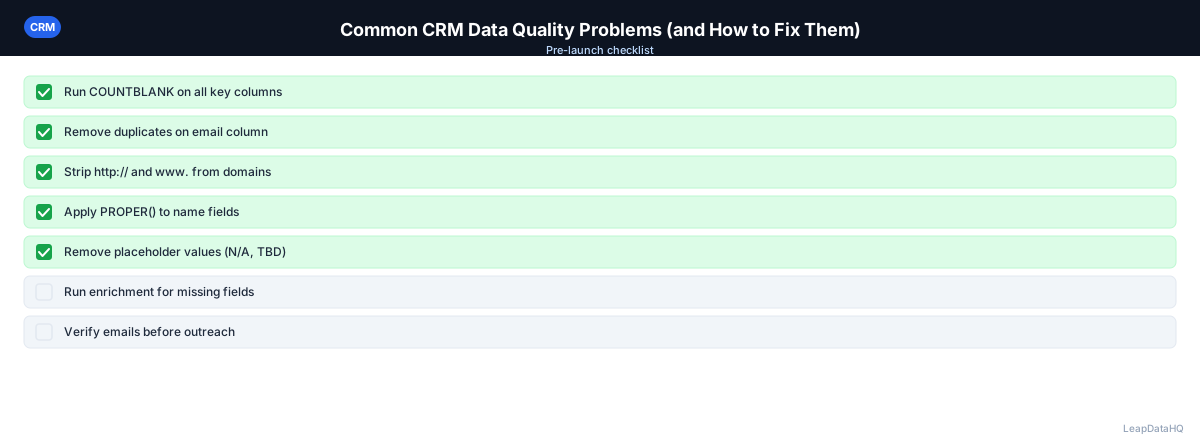
Checklist: CRM Data Quality Audit
- Ran deduplication using CRM native tools and manual fuzzy matching
- Identified and removed test and junk records
- Exported records with no activity in 12+ months for re-enrichment review
- Verified email addresses on all active outreach contacts
- Enriched records with missing email, company, or title fields
- Standardized formatting on high-value fields (country, industry, phone)
- Converted free-text fields to picklists where appropriate
- Established contact-company associations for all unassociated contacts
- Audited lifecycle stages against deal history and engagement data
- Set up required fields on all record creation paths
- Implemented validation rules for email format and key fields
- Created recurring data quality report for monthly monitoring
Common Mistakes to Avoid
- Trying to fix everything at once: CRM data quality problems are accumulated over months or years. Attempting to fix everything in a single project leads to burnout and incomplete results. Prioritize by impact and work through categories systematically.
- Cleaning without preventing recurrence: A one-time cleanup without implementing required fields, validation rules, and ongoing monitoring will need to be repeated within months. Prevention is always more cost-effective than repeated cleanup.
- Deleting records that should be archived: Deleting removes activity history and deal associations. Archive or tag stale records instead to preserve historical data while removing them from active views.
- Not quantifying the problem before starting: Without baseline metrics, you can't measure improvement or prioritize effectively. Run an audit first to understand the scope and categories of data quality issues.
- Importing enriched data without review: Low-confidence enrichment results may introduce new errors. Always review confidence scores and filter to high-confidence results before importing back into your CRM.
- Ignoring the human factor: Data quality problems often originate from inconsistent data entry practices. Train all users on standards and make data entry easy with required fields and dropdowns.
Practical Examples
Example 1: Pre-Sale CRM Cleanup
A company preparing for acquisition due diligence discovers their CRM has 30% duplicate records, 25% missing email addresses, and inconsistent industry values across 40% of records. They run a systematic cleanup: deduplication, enrichment of missing emails, and field standardization. The cleaned CRM supports accurate valuation.
Example 2: Quarterly Data Health Check
A sales ops team implements a quarterly data quality audit. Each quarter, they export stale records, run re-enrichment, merge new duplicates, and verify email addresses. The quarterly cadence prevents problems from accumulating and keeps data quality above the threshold where it starts affecting campaign performance.
Example 3: Post-Migration Data Reconciliation
After migrating from one CRM to another, a team discovers that the import process created 500 duplicate contacts and lost company associations on 1,200 records. They use deduplication tools to merge duplicates, enrich contacts to get company domains, and re-establish company associations.
Example 4: Campaign Performance Recovery
A marketing team's email campaign bounce rate climbs to 5%, triggering deliverability warnings. They trace the problem to 800 stale email addresses in their CRM from contacts who changed jobs. They verify all email addresses, remove invalid ones, enrich records with missing emails, and re-launch with clean data.
Example 5: Territory Planning Fix
A sales VP discovers that territory assignments are wrong because of inconsistent state and country values. They standardize all geographic fields, re-run territory assignment rules, and eliminate coverage gaps and conflicts across the sales organization.
How LeapDataHQ Helps
LeapDataHQ directly addresses Problems 2 and 3 from this list — stale records and missing fields. Export your incomplete or inactive contacts as a CSV, enrich them to check current email addresses and fill missing company data, review confidence signals, and import what's valid back into your CRM. The confidence scoring system gives you visibility into which records are reliable and which need additional review before importing.
For the re-enrichment workflow, LeapDataHQ provides a practical way to refresh records that haven't been updated in 6-12 months. Export stale contacts, run them through enrichment, and update your CRM with current email addresses and job titles. This catches the 20-30% of contacts who change jobs each year before they cause bounce issues in your campaigns.
The credit-based pricing model makes periodic enrichment practical for ongoing data maintenance. Instead of committing to an expensive data platform subscription, run enrichment batches as needed — quarterly refreshes, pre-campaign preparation, or post-migration cleanup — paying only for the records you actually enrich. For teams evaluating the cost of poor data quality, LeapDataHQ offers a low-risk way to test the value of enrichment before committing to larger volumes. Visit /crm-data-cleaning and /b2b-contact-enrichment to learn more about how enrichment addresses your specific CRM data quality challenges.
Next Steps
Start by running a data quality audit on your CRM. Export your contacts and quantify the issues: how many duplicates, how many missing emails, how many stale records. Then tackle the highest-impact category first. For enrichment needs, test with a batch of 50-100 incomplete records through LeapDataHQ to see match rates for your specific data. The investment in systematic cleaning pays for itself quickly in recovered productivity and improved campaign results.
When to Use LeapDataHQ
LeapDataHQ directly addresses Problems 2 and 3 from this list — stale records and missing fields. Export your incomplete or inactive contacts as a CSV, enrich them to check current email addresses and fill missing company data, review confidence signals, and import what's valid back into your CRM.
For teams running quarterly data quality audits, LeapDataHQ provides the enrichment layer that checks whether stale contacts are still reachable and fills gaps in incomplete records. The credit-based pricing means you only pay for the records you enrich, making periodic maintenance cost-effective.
When preparing for major campaigns, LeapDataHQ helps ensure your target contact lists are complete and current. Enriching records with missing emails before campaign launch prevents the bounce rate issues that damage sender reputation and reduce deliverability.
For teams that have accumulated significant data quality problems over time, LeapDataHQ supports the enrichment step in a systematic cleanup process. After deduplication and standardization, enrichment fills the remaining gaps in your CRM data, restoring it to a reliable state.
For organizations evaluating the cost of poor data quality, LeapDataHQ offers a low-risk way to test the value of enrichment. Upload a sample batch and see match rates and confidence scores for your specific data before committing to larger volumes. Visit /crm-data-cleaning and /features to explore how enrichment fits your data quality improvement plan.
Start Enriching LeadsFrequently Asked Questions
Which CRM data quality problem has the biggest impact on revenue?
Missing and invalid email addresses have the most direct revenue impact — they prevent outreach from reaching targets. Duplicates are a close second because they cause reps to do double work and inflate pipeline numbers. Both problems compound across your entire sales and marketing operation.
How do I convince leadership to invest time in CRM data cleaning?
Show the cost of the problem: calculate the time reps spend on bounced outreach, estimate the revenue lost to leads that couldn't be reached, and show the gap between CRM contact count and deliverable email count. Quantifying the problem in revenue terms makes the investment case clear.
Is it better to clean existing data or start fresh with a new list?
If records have deal history, notes, or custom fields worth preserving, clean them. If they're just contacts with no activity and no history, starting fresh may be more efficient. For most CRMs, a combination works best: clean active records and archive inactive ones.
What tools help with CRM data quality besides enrichment?
Email verification tools, CRM-native deduplication, data validation rules, and automated workflows that update lifecycle stages based on engagement all contribute to ongoing data quality. Enrichment fills the gap-filling role that other tools don't address.
How long does it take to fix CRM data quality problems?
Quick wins (deleting test records, fixing obvious formatting) can be done in hours. Full deduplication, enrichment, and standardization for 10,000+ records typically takes 1-2 weeks of focused work. Break the project into phases to make it manageable.
How do I maintain CRM data quality after cleaning it?
Implement required fields on record creation, use validation rules for key fields, run quarterly deduplication, re-enrich stale contacts annually, and assign data quality ownership to a specific person or role. Ongoing practices prevent the same problems from recurring. Monthly spot checks on new data quality catch issues early. Quarterly full audits address accumulated problems. Annual re-enrichment catches the 20-30% of contacts who change jobs each year.
What percentage of CRM records are typically bad?
Industry research suggests 10-30% of B2B contact records become outdated within a year. For CRMs that haven't been audited in 2-3 years, the percentage of stale or inaccurate records is often much higher — sometimes 40-60%. Regular audits and enrichment prevent accumulation. The longer you go without cleaning, the more severe the problems become and the more effort required to fix them.