
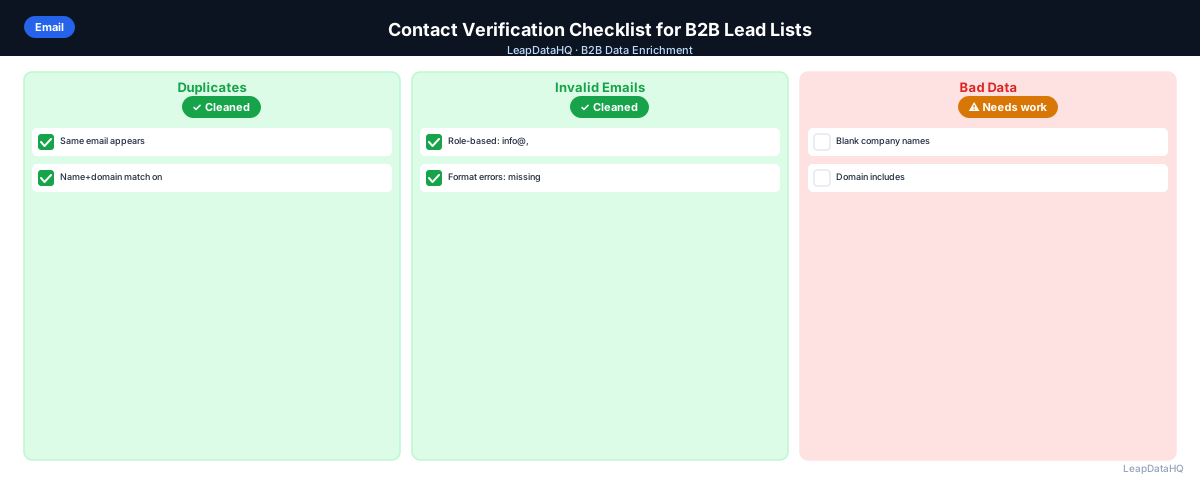
A contact verification checklist is a structured set of checks you run on a B2B lead list before loading it into your CRM or outreach tool. Its purpose is to catch the specific data problems that cause campaign failures — bounces, broken personalization, wrong contacts, duplicate outreach — before they happen.
Verification is not just about email addresses. A fully verified contact record confirms the email is deliverable, the person is still at the company, the title matches your ICP target level, and the data format is consistent enough for CRM import without creating new problems.
This checklist covers each category of contact verification, with specific checks for each one and guidance on what to do when a check fails.
A poor contact verification process has real consequences for outreach campaigns. When unverified data enters your CRM, you see it in the numbers: bounce rates climb into double digits, personalization tokens output empty or incorrect fields, and sales reps waste time dialing wrong numbers or emailing invalid addresses. The cost of skipping verification is not just the immediate campaign failure — it is the eroded trust from team members who stop relying on CRM data because they have been burned one too many times by bad records.
Building verification into your standard operating procedure rather than treating it as an optional step changes how your team views data quality. When every list goes through the same structured set of checks, the output becomes predictable. You know that any list stamped "verified" has passed the same standard, regardless of who sourced it or when. That consistency matters more than any single verification metric, because it makes the process repeatable and the outcome trustworthy.
Section 1: Email Address Verification
- ☐ Email is present (not blank)
- ☐ Email format is valid (contains @, valid domain, no spaces or special characters)
- ☐ Email domain matches company domain (contact@gmail.com for an acme.com employee is suspicious)
- ☐ Email is not a role-based address (not info@, support@, sales@, admin@, hello@, contact@)
- ☐ Email passed format validation (no syntax errors)
- ☐ Email domain has a valid MX record (domain accepts email)
- ☐ Email mailbox confirmed as active by SMTP verification
- ☐ Email not flagged as catch-all (or flagged and segmented separately)
- ☐ Email not a disposable or temporary address
What to Do When Email Verification Fails
If an email fails format validation: correct the format issue if the error is obvious (remove a space, fix a missing @), or remove the contact and attempt enrichment to find the correct address.
If an email fails mailbox verification (invalid): the contact has likely changed jobs or the address has been deactivated. Remove from email outreach. Run enrichment with first name, last name, and company domain to find an updated work email.
If an email is catch-all: the address may or may not be deliverable. Segment these contacts separately and send to them at lower volume with bounce monitoring, or exclude from cold email and approach via LinkedIn.
Section 2: Contact Identity Verification
- ☐ First name is present and correctly formatted (not blank, not all-caps)
- ☐ Last name is present and correctly formatted
- ☐ Job title is present (not blank)
- ☐ Job title matches expected seniority for your ICP (not too senior, not too junior)
- ☐ Job title is in correct format for personalization tokens (proper case, not abbreviated unexpectedly)
- ☐ Contact is not a bot or non-person entry (e.g., "Test Contact", "Sample User")
- ☐ Department field populated if used in segmentation or personalization
Section 3: Company Match Verification
- ☐ Company name is present
- ☐ Company name is formatted consistently (proper case, standard abbreviation)
- ☐ Company domain is present and matches company name
- ☐ Company size is within your ICP target range
- ☐ Industry matches your target vertical
- ☐ Company is still active (not acquired, merged, or shut down)
- ☐ Contact's company role matches the company they're associated with
Section 4: Deduplication Check
- ☐ No duplicate email addresses in the list
- ☐ No duplicate contacts (same first+last+company appearing twice with different emails)
- ☐ Contacts not already in your CRM and in an active sequence (avoid re-contacting)
- ☐ Contacts not on your unsubscribe or do-not-contact list
Section 5: Data Format Verification (for CRM Import)
- ☐ Dates in consistent format (YYYY-MM-DD or MM/DD/YYYY, matching CRM requirements)
- ☐ Phone numbers in consistent format (no mix of (555) 123-4567 and +15551234567)
- ☐ Country fields use consistent standard (US vs. United States)
- ☐ LinkedIn URLs are full profile URLs (not just usernames)
- ☐ No trailing spaces in any field (these break CRM deduplication)
- ☐ No merged cells if using Excel (these corrupt CSV export)
- ☐ File saved as UTF-8 encoded CSV (not Excel .xlsx)
Section 6: Enrichment Gap Check
Ready to enrich your CSV list?
Upload a CSV, fill missing data, review confidence scores, and export clean records.
Upload a CSV — Start Enriching- ☐ All contacts have email addresses (if not, enrichment is needed before outreach)
- ☐ All contacts have job titles (if not, enrichment or manual research needed)
- ☐ Company size populated for all contacts (needed for ICP segmentation)
- ☐ Industry populated for contacts where vertical-specific messaging is planned
- ☐ LinkedIn URL populated for contacts where LinkedIn outreach is planned
When to Run This Checklist
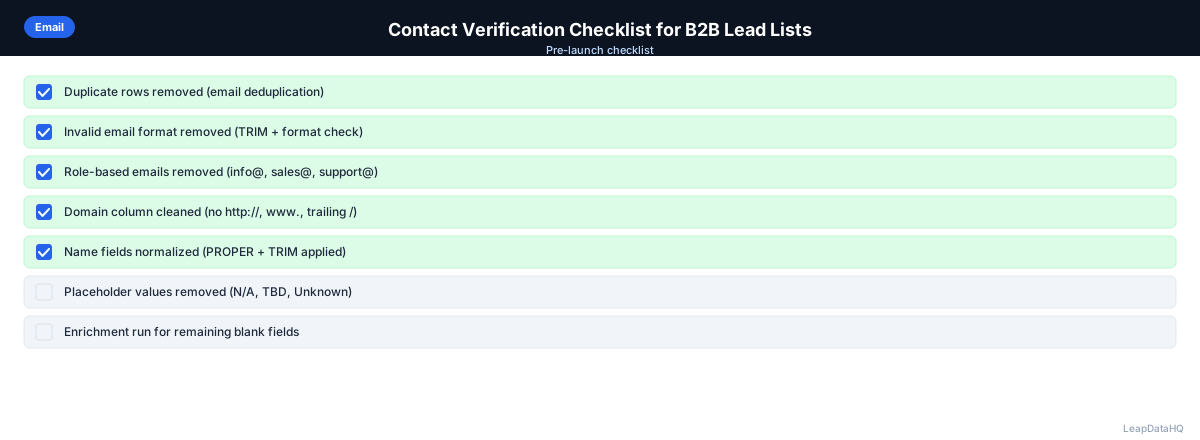
Run this checklist before: importing contacts to a CRM, loading contacts into an email sequencer, running a cold email campaign, re-using a list from a previous campaign, and sharing a contact list with a client or team member.
How long the checklist takes depends on list size and tooling. For a 200-contact list using a spreadsheet for manual checks plus an email verification tool, budget 30–45 minutes. With enrichment and verification tools, the automated checks (email format, deliverability, enrichment) run in minutes — the manual review of edge cases takes most of the time.
Prioritizing Verification Checks by Impact
Not all checks are equally important for every campaign. If you are running a high-volume cold email campaign with personalized first-line messaging, email deliverability and title accuracy are your critical checks — a bounced email or a wrong title breaks the campaign. If you are preparing a list for a CRM import that will be used across multiple departments over several months, data format consistency and deduplication become equally critical because data quality problems compound over time as users add notes, change statuses, and create records.
A practical prioritization approach is to separate checks into three tiers. Tier 1 checks block campaign launch if they fail: email deliverability, ICP title match, and deduplication against existing CRM contacts. Tier 2 checks should be addressed but may not require fixing every contact: company domain consistency, phone number formatting, and industry classification. Tier 3 checks are quality improvements that make the list easier to use but do not affect campaign outcomes: LinkedIn URL completeness, department field population, and date format standardization.
Common Verification Mistakes Teams Make
The most common mistake is treating email verification as the only check needed. A contact with a valid email but a wrong job title — sourced three years ago when the contact was a manager, now promoted to director — will receive personalized messaging that references the wrong seniority. The email delivers, the person opens it, and the incorrect title undermines credibility immediately. Email verification alone does not catch this problem.
Another frequent mistake is over-relying on automated checks without any manual review. Automation tools can flag catch-all domains and confidence thresholds, but they cannot judge context — whether a contact@gmail.com address for a sales director at a large enterprise is truly suspicious or whether an unusual industry code on a company record is a data entry error. Building a manual spot-check step into your verification workflow, reviewing 5–10% of contacts that pass automated checks, catches edge cases that tools miss.
Teams also commonly fail to re-verify data that was verified in the past. A contact list that passed all checks three months ago will have degraded by an estimated 2–5% per month in email validity alone. Running the full verification checklist again before each campaign, rather than relying on previous verification results, prevents gradual data quality erosion from silently reducing campaign performance over time.
Building a Verification Workflow for Your Team
A repeatable verification workflow has three stages. Stage one is preparation: deduplicate the incoming list and remove obvious junk contacts — test entries, imported sample rows, and contacts missing both email and company. Stage two is automated verification: run the list through email verification for deliverability, enrichment for missing fields, and ICP filtering for title and company fit. Stage three is manual review: spot-check borderline results, investigate contacts flagged as catch-all, and make go or no-go decisions on contacts that fall into gray areas.
When to Skip Verification Altogether
There are situations where running the full verification checklist is not worth the effort. If you are sourcing contacts purely for LinkedIn outreach with no email component, email verification can be skipped — focus instead on title accuracy and LinkedIn URL quality. If you are building a top-of-funnel awareness list where personalization is minimal and high volume is the goal, a lighter version of the checklist covering only ICP fit and deduplication may be sufficient.
The key is knowing when to apply the full checklist versus a lighter version. The decision should be based on the campaign type, the channel used, and the cost of a data quality failure for that specific use case. Documenting these rules helps your team apply the right level of verification consistently without over-engineering every list.
When to Use LeapDataHQ
LeapDataHQ addresses multiple sections of this checklist in one workflow: enrichment gaps (Section 6), some email quality checks (email format, confidence scoring), and export quality. Upload your contact list, run enrichment to fill gaps, review confidence scores, and export a cleaner file.
For email verification specifically (Section 1), pair LeapDataHQ enrichment with a dedicated email verification tool to cover both enrichment quality and deliverability confirmation.
Start Enriching LeadsFrequently Asked Questions
Do I need to run this checklist on every list, or just new ones?
Run it on every list before use, including lists you've used before. Contact data decays — a list that passed verification three months ago may have 5–10% invalid emails now. Re-running the checklist before each campaign use prevents cumulative data quality degradation from causing unexpected bounces.
What's the fastest way to run this checklist on a large list?
Split the checklist into tool-automated checks and manual checks. Use an email verification tool to automate Section 1. Use an enrichment tool to automate Section 6. Use a spreadsheet for Sections 2–5 with COUNTBLANK formulas and conditional formatting. The automated checks cover the most time-consuming verification steps; manual review focuses on what tools can't catch automatically.
What should I do with contacts that fail multiple checklist sections?
Contacts that fail email verification AND have missing title AND are outside ICP are not worth spending time on. Remove them. Contacts that fail one section (missing title but have a valid email and good ICP fit) are worth a manual enrichment attempt for the missing field. Set a threshold: if a contact fails more than two sections, remove it rather than investing time in recovery.
How do I handle international contacts in the checklist?
International contacts need additional attention on phone number format (country code included), email domain TLDs that may look unusual but are valid (.de, .co.uk, etc.), and company name variations across countries. GDPR requirements also apply for EU contacts — ensure your outreach has a legitimate interest basis and includes a proper unsubscribe mechanism.
Can I automate this checklist?
Partially. Email format validation and verification can be automated with tools. Enrichment gap detection can be automated. ICP filtering using enriched company data can be automated with spreadsheet formulas or CRM rules. Manual judgment steps — reviewing borderline confidence scores, investigating contacts that match multiple issues — can't be fully automated and benefit from human review.