
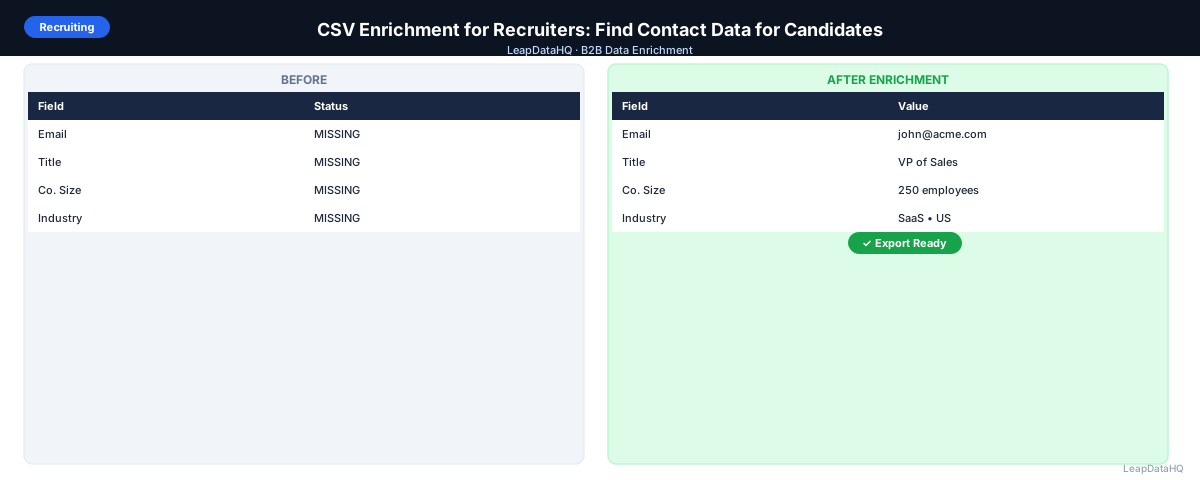
Recruiters spend a significant portion of their time finding how to reach the people they want to talk to. LinkedIn shows you who someone is — their title, experience, skills — but not how to contact them outside the platform. InMail is expensive, limited, and often ignored.
CSV enrichment gives recruiters a way to append email addresses and direct contact information to candidate lists, so outreach can happen through email — which typically has higher response rates than InMail for passive candidates.
The recruiting landscape has become increasingly competitive, and the ability to reach candidates quickly and personally can be the difference between filling a role and losing top talent to a faster-moving competitor. Email outreach allows recruiters to craft personalized messages that reference a candidate's specific background, skills, and career trajectory — something that's difficult to do effectively through LinkedIn's messaging interface.
For agencies and internal talent acquisition teams managing multiple roles simultaneously, the ability to enrich candidate lists in bulk transforms the sourcing workflow. Instead of spending hours manually looking up contact information for each candidate, you can prepare a complete outreach list in minutes.
This guide covers how recruiters can use CSV enrichment effectively, from building candidate lists to delivering personalized outreach that gets responses.
The Recruiter's Data Problem
Most recruiters build candidate lists from LinkedIn: a collection of names, titles, companies, and locations. LinkedIn doesn't provide email addresses through standard exports, and contacting 50+ candidates via InMail is both expensive and time-consuming.
The limitation extends beyond just email addresses. LinkedIn exports don't include direct phone numbers, and the company data available is often surface-level. For recruiters who need to build comprehensive candidate profiles and reach people through multiple channels, these gaps create significant workflow friction.
CSV enrichment bridges the gap. Take the LinkedIn data you have, add company domains where missing, and run the list through an enrichment tool to get work email addresses for candidates where that data is available. The result is a complete contact record that enables multi-channel outreach.
What Data Recruiters Can Enrich
Recruiters can enrich several types of candidate and company data to build more complete outreach profiles:
- Work email addresses (most common use case)
- Direct phone numbers for phone screening
- Company domain and website
- Company size and headcount
- Company industry and description
- Contact job title and seniority level
- LinkedIn profile URLs for additional research
What This Means for Your Recruiting Workflow
CSV enrichment transforms how recruiters approach candidate sourcing by removing the biggest bottleneck in the process: finding contact information. Instead of spending 3-5 minutes per candidate on manual email lookup, you can enrich an entire list in minutes and redirect that time into crafting personalized outreach messages.
The impact on recruiting metrics is significant. Email outreach to passive candidates typically sees higher response rates than InMail, because email feels more personal and professional. When you combine email outreach with enriched data that enables personalization — referencing the candidate's current company, role, or industry — response rates improve further.
For agencies managing multiple client roles simultaneously, the time savings compound. A recruiter handling 10 open roles might need to source and contact 50-100 candidates per role. Manual research for 500-1,000 candidates could consume an entire week. CSV enrichment reduces this to a few hours, freeing the recruiter to focus on screening, interviewing, and candidate experience.
Who Should Use CSV Enrichment for Recruiting
CSV enrichment serves multiple types of recruiting professionals and teams:
- Agency recruiters: managing high-volume sourcing across multiple client roles and industries
- Internal talent acquisition teams: building pipeline for hard-to-fill positions at specific companies
- Executive search consultants: reaching senior candidates who may not be active on LinkedIn
- RPO providers: delivering candidate shortlists with complete contact data to client companies
- University recruiters: contacting recent graduates and alumni for entry-level programs
- Technical recruiters: sourcing specialized talent in competitive markets where speed matters
- Volume hiring teams: filling multiple similar roles that require contacting large candidate pools
Building a Recruiter-Specific Enrichment Workflow
Step 1: Build Your Candidate List on LinkedIn
Use LinkedIn's search to find candidates matching your criteria: job title, current company type, location, experience level, skills. Save or note the contacts you want to reach. Be specific about your requirements — the more targeted your initial search, the higher quality your enriched output will be.
For each candidate, note their current role, company, and any distinguishing details that will help you personalize outreach later. If you're using Sales Navigator or Recruiter, save your searches and export the results to a spreadsheet for enrichment.
Step 2: Export and Organize Your List
Create a spreadsheet with: first name, last name, current company name, and company domain. If you don't have the domain, search the company name and add the website domain in a separate column. This step is critical — company domains are the most reliable lookup key for email enrichment.
Remove any duplicate entries, ensure names are properly formatted (first name and last name in separate columns), and check that company names are consistent. A clean input file improves match rates and reduces wasted enrichment credits.
Step 3: Enrich for Work Email
Upload your CSV with company domain, first name, and last name. The enrichment tool returns work email addresses where available. Review confidence scores — for recruiting outreach, high-confidence emails prevent bouncing and protect your professional reputation.
For candidates where enrichment returns a low-confidence result, consider manual research as a follow-up. Check the candidate's LinkedIn profile for contact information, look for public mentions in conference bios or press releases, or identify the company's email pattern from known employees.
Step 4: Personalize and Reach Out
Ready to enrich your CSV list?
Upload a CSV, fill missing data, review confidence scores, and export clean records.
Upload a CSV — Start EnrichingUse the enriched data (company, title, size) to personalize outreach. A message referencing the candidate's specific situation will always outperform a generic recruiter template. Mention their current company, reference a recent project or achievement visible on their profile, or connect their background to the specific role you're recruiting for.
Segment your outreach by candidate type: passive candidates at target companies, active job seekers, former colleagues, or alumni networks. Each segment responds to different messaging approaches, and enriched data helps you tailor your tone and content accordingly.
When Enrichment Works Best for Recruiting
- Passive candidate sourcing: candidates who aren't actively looking are less likely to check LinkedIn but do check email
- Executive search: for senior roles, email is often more appropriate than InMail
- Volume sourcing: when you need to contact 100+ candidates in a specific role/location
- Employer branding outreach: introducing your company to talent communities at scale
- Hard-to-fill roles: when you need to reach beyond active job seekers to find qualified candidates
- Geographic expansion: recruiting in new markets where your network is still developing
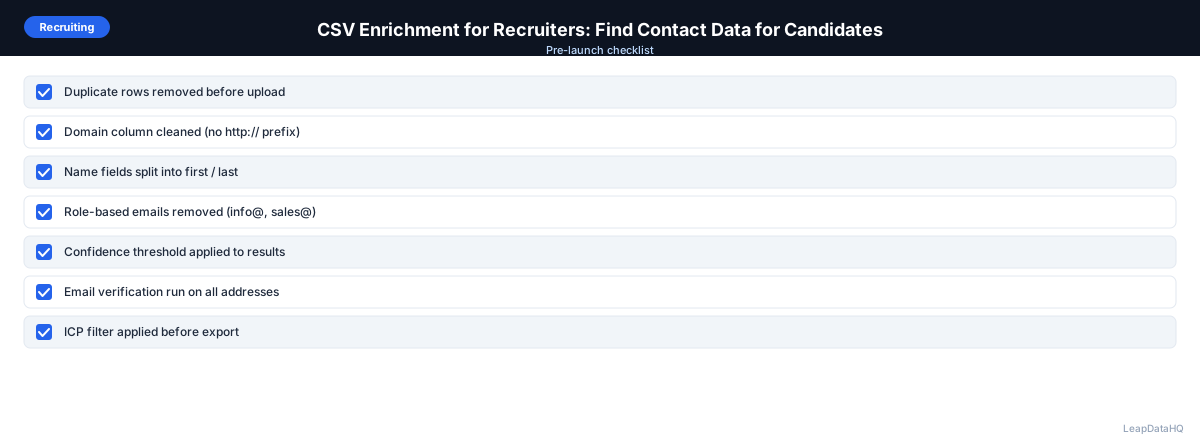
Checklist: Recruiter CSV Enrichment Workflow
- Built candidate list on LinkedIn with specific search criteria
- Exported candidate data to a structured spreadsheet
- Added company domains for all candidates (manual lookup where needed)
- Removed duplicate entries and standardized name formatting
- Verified company names are consistent across all rows
- Uploaded cleaned CSV to enrichment tool with correct column mapping
- Reviewed confidence scores on all returned email addresses
- Filtered out low-confidence results before outreach
- Verified enriched emails before adding to outreach campaign
- Segmented candidates by role type, seniority, or industry for personalized messaging
- Prepared personalized outreach templates referencing enriched data fields
- Set up tracking for email response rates by candidate segment
Common Mistakes to Avoid
- Skipping the domain lookup step: Company domains are the most reliable key for email enrichment. Without them, match rates drop significantly. Spend a few minutes adding domains before uploading.
- Sending generic templates to enriched candidates: Enrichment gives you data for personalization. Using it to write relevant, specific messages dramatically improves response rates compared to generic recruiter templates.
- Not verifying emails before sending: Bounced emails to candidates create a poor impression and can damage your professional reputation. Always verify enriched emails before including them in outreach.
- Using work emails without considering context: Some candidates may prefer personal email for recruiting conversations. Be transparent about how you found them and make it easy to opt out of future messages.
- Enriching stale candidate lists without refreshing: If your candidate list is 6+ months old, contacts may have changed jobs. Re-enrich before launching a new campaign to catch updates.
- Ignoring confidence scores and importing everything: Low-confidence emails are more likely to bounce or belong to the wrong person. Filter to high-confidence results for best results.
Practical Examples
Example 1: Agency Recruiter Sourcing for a Technical Role
An agency recruiter needs to find 50 qualified backend engineers in the San Francisco Bay Area for a fintech client. She builds a candidate list on LinkedIn, adds company domains, and enriches the list of 80 candidates. The enrichment returns 62 email addresses (78% match rate). After verification, she has 58 deliverable emails. She personalizes each message referencing the candidate's current company and technical stack, achieving a 12% response rate.
Example 2: Executive Search for a VP-Level Role
An executive search firm is recruiting a VP of Marketing for a Series C startup. They identify 30 candidates at comparable companies. After enrichment, they find emails for 25 candidates. Because these are senior professionals, the firm crafts highly personalized emails referencing each candidate's career trajectory and specific achievements. The email approach generates 8 initial conversations — a 32% engagement rate that would have been impossible through InMail alone.
Example 3: Volume Hiring for a Sales Team Expansion
A company is hiring 15 SDRs and needs to source from a pool of 300+ candidates. The talent acquisition team builds a list from LinkedIn and job boards, enriches for email addresses, and segments by experience level and industry background. Enriched data enables personalized messaging that references each candidate's current company and sales experience, improving response rates across the large outreach batch.
Example 4: Alumni Network Recruiting
A university career services office wants to reach 200 alumni working in tech for upcoming job opportunities. They build a list from alumni directories and LinkedIn, enrich for current email addresses and company data, and send personalized messages referencing their graduation year and current role. The enriched company data allows them to group alumni by employer and tailor messaging accordingly.
Example 5: Re-Engaging Past Candidates
A recruiter has a database of 400 candidates from previous searches who weren't right for past roles but could fit new openings. She re-enriches the list to check for job changes and updated contact information. The re-enrichment reveals that 25% have changed companies. She updates her records and launches targeted outreach to the refreshed list, re-engaging candidates who had gone cold.
How LeapDataHQ Helps
LeapDataHQ helps recruiters find work email addresses for candidates in bulk. Upload a CSV with company domains and candidate names, and the tool returns email addresses alongside confidence scores. Review the results, filter to high-confidence records, and export a clean list for your outreach campaign.
For agencies and independent recruiters who do periodic high-volume sourcing campaigns, the credit-based pricing model means you control enrichment costs per project. Enrich 100 candidates for one role and 500 for another — you only pay for what you use. No monthly seat fees or annual commitments required.
The confidence scoring system is particularly valuable for recruiters who need to maintain professional credibility. By filtering to high-confidence email addresses and verifying before sending, you avoid the embarrassment of bounced emails and ensure your outreach reaches the candidates you intended. Visit /find-missing-email-addresses and /b2b-contact-enrichment to learn more about how enrichment fits your recruiting workflow.
Next Steps
If you're a recruiter spending more time on contact lookup than candidate conversations, CSV enrichment can change that. Start with a list of 50 candidates from your current search, add company domains, and test enrichment with LeapDataHQ. The results will show you match rates for your specific candidate pool and how much time you can save on every sourcing project.
When to Use LeapDataHQ
LeapDataHQ works for recruiters who build candidate lists from LinkedIn or industry directories and need work email addresses to reach out. Upload a CSV with company domains and candidate names, get email addresses back, review confidence scores, and export a clean list for your outreach.
It fits particularly well for agencies and independent recruiters who do periodic high-volume sourcing campaigns and want to control enrichment costs per project. The credit-based model means you pay only for the candidates you enrich — no monthly fees for months when your sourcing volume is lower.
For executive search consultants, LeapDataHQ provides a way to find contact information for senior candidates who may not be responsive to InMail. Email outreach to executives requires accurate, professional contact data, and the confidence scoring system helps ensure you're reaching the right person at the right address.
The tool also supports re-enrichment workflows for maintaining candidate databases. When you have a list of past candidates that's gone stale, re-enriching catches job changes and email updates before you re-engage. This prevents wasted outreach and improves the efficiency of your candidate pipeline management.
For recruiters managing multiple roles across different industries, LeapDataHQ handles diverse candidate pools without requiring separate tools or subscriptions. Visit /csv-email-enrichment and /pricing to explore how it fits your sourcing workflow.
Start Enriching LeadsFrequently Asked Questions
Is it appropriate to email candidates using their work email for recruiting?
In most B2B contexts, reaching professionals at their work email for relevant opportunities is acceptable. Many candidates prefer email over InMail because it feels more personal and professional. Be transparent about how you found them, be relevant in your messaging, and always make it easy to opt out of future communications.
What match rate should I expect for candidate email enrichment?
Expect 50-70% for a typical LinkedIn sourcing list. Match rates are higher for candidates at larger companies with established email patterns and lower for very small companies or freelancers. Results depend on input data quality and the specific candidate pool you're targeting.
Can I enrich candidate data without a company domain?
It's harder and less accurate. Company domains are the most reliable lookup key for email enrichment. Spend a few minutes adding domains to your spreadsheet before enriching — it meaningfully improves match rates and reduces wasted credits on records that won't match correctly.
What's the difference between work email enrichment and personal email enrichment?
Work email enrichment finds the professional email tied to a person's current employer. Personal email enrichment is a separate and more privacy-sensitive process. Recruiting outreach typically uses work emails because they're more professional and directly tied to the candidate's career identity.
How do I handle candidates who have changed jobs since I sourced them?
If an email bounces or a candidate replies that they're at a different company, update your records immediately. Re-enriching stale candidate lists (6+ months old) before launching a new campaign helps catch job changes and ensures your outreach reaches candidates at their current employer.
Should I verify enriched candidate emails before sending?
Yes. Verification confirms the mailbox exists and can receive mail. For recruiting outreach, bounced emails create a poor professional impression and waste your time. Verification is a quick step that protects your credibility and improves deliverability.
How do I personalize recruiting outreach with enriched data?
Use enriched fields like company name, job title, company size, and industry to write specific, relevant messages. Reference the candidate's current role, mention something about their company, or connect their background to the specific opportunity. Personalization based on real data outperforms generic templates consistently.