
Data cleaning and data enrichment are two essential but distinct processes in B2B data management. Teams often confuse them or treat them interchangeably, but they serve different purposes and produce different outcomes.
Data cleaning — also called data scrubbing — focuses on fixing what is already in your dataset. It removes duplicate entries, corrects formatting errors, standardizes company names and job titles, and deletes invalid records. Cleaning makes your existing data accurate, consistent, and usable.
Data enrichment focuses on adding what is missing. It appends new fields to your existing records — email addresses, phone numbers, job titles, company size, industry information — by querying external databases. Enrichment fills the gaps that cleaning cannot address.
This guide explains the difference between data cleaning and data enrichment, when to use each, and how to combine them in a complete B2B data preparation workflow that produces outreach-ready contact lists.
What Is Data Cleaning?
Data cleaning is the process of identifying and correcting errors, inconsistencies, and inaccuracies in your existing dataset. It does not add new information — it improves the quality of the information you already have.
Common data cleaning tasks include:
- Removing duplicate records where the same contact appears multiple times
- Standardizing company names by removing legal suffixes and fixing capitalization
- Cleaning domain entries by removing URL prefixes and trailing slashes
- Correcting contact name formatting — fixing capitalization, removing middle initials
- Removing invalid entries like role-based emails (info@, support@)
- Fixing inconsistent job title formats
- Removing rows with completely blank or unidentifiable key fields
After cleaning, your data is consistent and accurate, but it still contains whatever gaps existed in the original dataset. If a record was missing an email address before cleaning, it is still missing after cleaning.
What Is Data Enrichment?
Data enrichment is the process of appending new information to your existing records by querying external data sources. It fills the gaps that cleaning cannot address.
Common data enrichment tasks include:
- Adding missing email addresses for contacts with company domains and names
- Appending job titles and seniority levels to contact records
- Adding company size, industry, and revenue information
- Appending LinkedIn profile URLs for contact and company pages
- Adding phone numbers and direct dial information
- Filling in location data like city, state, and country
After enrichment, your data contains information that was not originally present. A contact record that had a name and company but no email now has a deliverable email address.
Key Differences Between Cleaning and Enrichment
The core difference is what each process changes in your dataset:
Ready to enrich your CSV list?
Upload a CSV, fill missing data, review confidence scores, and export clean records.
Upload a CSV — Start Enriching- Cleaning modifies existing data — it does not add new records or fields
- Enrichment adds new data — it appends fields that did not exist or were blank
- Cleaning fixes errors — duplicates, formatting issues, invalid entries
- Enrichment fills gaps — missing email addresses, job titles, company data
- Cleaning uses only your existing data — it does not query external sources
- Enrichment queries external databases — it introduces new information to your dataset
Why Both Are Necessary
Cleaning without enrichment leaves your data accurate but incomplete. Enrichment without cleaning puts new data into a messy structure, producing inconsistent results. The correct sequence is clean first, then enrich.
Complete Data Preparation Workflow
- Source your prospect list from CRM export, LinkedIn, conference, or other channels
- Clean the data: remove duplicates, standardize company names, clean domains, fix contact formatting
- Remove invalid entries: role-based emails, blank records, placeholder data
- Enrich missing fields: fill in email addresses, job titles, company data, LinkedIn URLs
- Review confidence scores: filter out low-confidence results from the enrichment step
- Verify enriched email addresses: check deliverability before import
- Segment the complete list: use enriched fields for targeted outreach segmentation
- Import to CRM or outreach platform: clean, complete, verified data ready for campaigns
Practical Example
Consider a raw list with duplicates, inconsistent company names, missing domains, and 40% of records missing email addresses. After cleaning: duplicates are removed, company names standardized, domains cleaned. After enrichment: email gaps are filled, and new fields like job title and company size are appended.
Common Mistakes
- Enriching before cleaning: Dirty input produces inconsistent enrichment results. Clean first, then enrich.
- Cleaning without enriching: A clean list with missing fields is still not outreach-ready.
- Skipping verification after enrichment: Enriched emails need verification to confirm deliverability.
- Treating cleaning and enrichment as separate workflows: Combine both in a single platform or pipeline.
How LeapDataHQ Helps
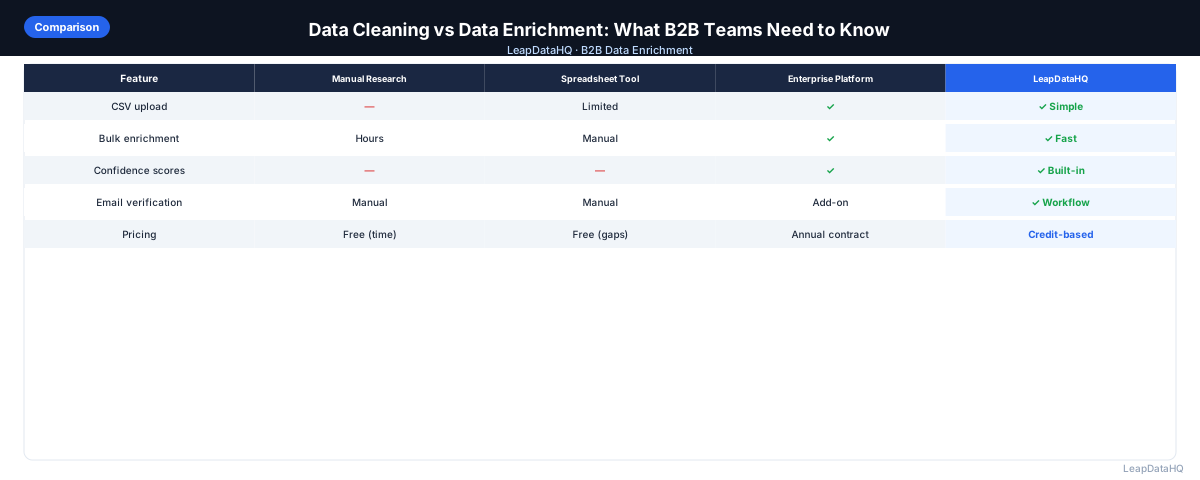
LeapDataHQ supports both data cleaning and data enrichment in a single platform. You upload your raw CSV, deduplicate records, standardize company names and domains, enrich missing fields, and verify email addresses — all in one workflow.
Rather than using separate tools for cleaning and enrichment, LeapDataHQ provides a unified dashboard that handles the complete data preparation pipeline. This saves time and reduces errors.
The credit-based pricing at /pricing means you pay only for enrichment credits. Cleanup operations are included in the platform workflow. Explore the complete process at /features.
When to Use LeapDataHQ
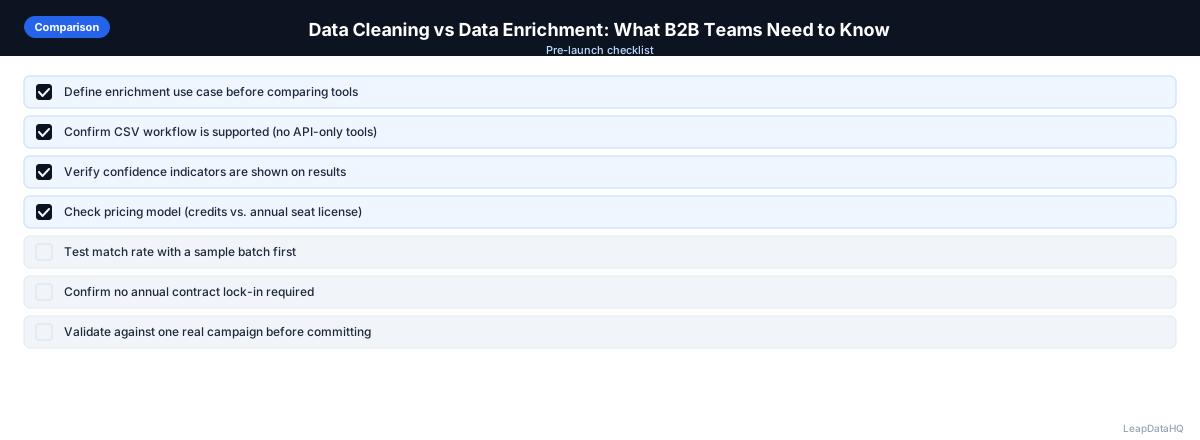
LeapDataHQ is designed for teams that need both data cleaning and data enrichment in a single workflow. Rather than cleaning in a spreadsheet, then exporting to an enrichment tool, LeapDataHQ handles the entire pipeline from raw input to clean, enriched output.
The platform is particularly valuable for teams that process prospect lists regularly — whether cleaning CRM exports, enriching conference attendee lists, or preparing client deliverables. It handles batches of 50 to 5,000 records efficiently.
LeapDataHQ returns confidence scores and verification statuses for every enriched field, enabling you to filter output by quality before export.
Start Enriching LeadsFrequently Asked Questions
Is data cleaning more important than data enrichment?
Both are essential. Cleaning ensures your existing data is accurate. Enrichment fills gaps that cleaning cannot address. Skipping either step leaves your data incomplete or unreliable.
Can I clean and enrich in the same tool?
Yes. Some platforms, including LeapDataHQ, combine cleaning and enrichment in a single workflow. This is more efficient than using separate tools.
How long does a combined clean and enrich workflow take?
For a 1,000-row list, the complete workflow takes a few minutes. Automated steps process quickly. Manual review of confidence scores takes additional time.
Should I clean my CRM data before enriching it?
Yes. Export your contacts from the CRM, clean them to remove duplicates and standardize formatting, then enrich missing fields. This ensures you are not wasting credits on duplicate records.
What happens if I enrich before cleaning?
Enriching dirty data produces inconsistent results. Duplicates get enriched twice, wasting credits. Inconsistent company names produce lower match rates. Clean first, then enrich.