
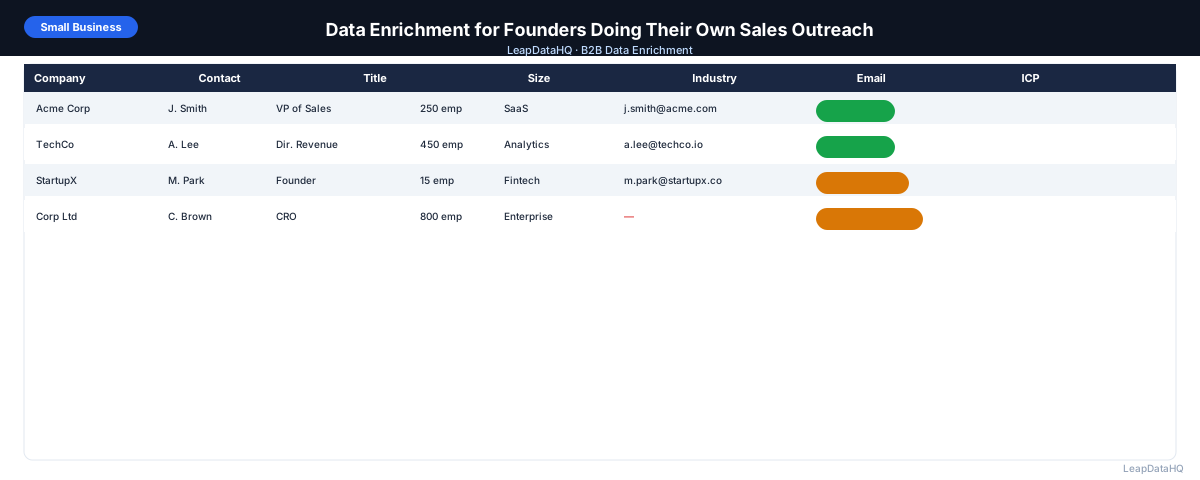
For founders running their own sales outreach, data quality problems show up quickly. You spend time building a prospect list from LinkedIn or a conference directory, but half the contacts don't have email addresses. You find tools that claim to find emails but the confidence varies wildly. You send a campaign and get bounces on addresses that seemed fine.
Data enrichment solves the specific problems founders hit in early-stage sales: finding work email addresses for contacts you've identified manually, filling in company size and industry so you can qualify the right accounts, and ensuring the list you've built is clean enough to produce reliable results from your email campaigns.
This guide is written for founders who are doing outreach themselves — not managing an SDR team, not running a RevOps function — and who want to understand how data enrichment fits into a practical early-stage sales workflow.
The philosophy here is simple: use tools that match your current stage. Early-stage founder-led sales doesn't need the same infrastructure as a 50-person sales org. You need a repeatable process for turning a list of target accounts into a set of deliverable, personalized outreach contacts — and you need to do it without spending more time on data prep than on actual selling.
The workflow described in this guide is intentionally lightweight. Each step is designed to be completed in under an hour, from preparing your initial prospect list to exporting a verified, enriched file ready for your first email send. If an enrichment step requires more than a few minutes of setup, it's probably more tool than a founder-led sales motion needs.
What Founders Actually Need From Data Enrichment
Founders don't need enterprise data enrichment platforms with seat licenses, complex integrations, and quarterly reviews. They need a tool that can take a list of companies and contacts they've identified manually, find work email addresses for those contacts, confirm company size and ICP fit, and return the data in a format that can be loaded into a sequencer or used for direct outreach.
The key constraint is that founders are doing this themselves, without a team. The tool needs to be usable without technical expertise, without weeks of onboarding, and without committing to an annual contract before you know how well your outreach will work.
How Founder-Led Sales Outreach Actually Fails at the Data Step
- Building a list of 50 target companies and contacts from LinkedIn, only to have no email addresses for any of them
- Using email pattern guessing (first.last@domain.com) without verifying whether the address actually exists
- Sending to email addresses that came back valid in theory but bounce in the sequencer
- Reaching the right company but the wrong person because title data is incomplete
- Crafting personalized outreach copy that fails because the personalization token returns blank
- Not knowing which contacts have already been emailed because the list isn't organized
Step 1: Build the Raw Prospect List in a Spreadsheet
Start simple: a spreadsheet with columns for first name, last name, company name, company domain, and job title. Populate from whatever source you're using — LinkedIn search, a conference attendee directory, a list of target companies you've researched. At this stage, don't worry about missing emails. The goal is to get the right people and companies identified first.
Step 2: Detect Which Fields Are Missing
Once your list is built, identify what's missing. For each contact, note: is the email address present? Is the job title present? Is the company domain in clean format? Count blanks — this tells you how many contacts need enrichment and what fields to request.
Step 3: Clean the Spreadsheet First
Before uploading for enrichment: make sure company domains are in clean format (acme.com, not https://www.acme.com/about). Make sure names are in separate first/last columns. Run TRIM() on all text fields to remove extra spaces. This takes 10 minutes but meaningfully improves the enrichment results you get back.
Ready to enrich your CSV list?
Upload a CSV, fill missing data, review confidence scores, and export clean records.
Upload a CSV — Start EnrichingStep 4: Enrich Email Addresses and Missing Fields
Upload the cleaned spreadsheet as CSV to LeapDataHQ or another enrichment tool. Map the columns (first name, last name, company domain). Request the fields you need: email address, job title if missing, company size if missing. The tool processes your file and returns enriched data with confidence scores.
Step 5: Review Confidence and Quality
Review the enriched results. For a founder doing their own outreach, the quality review is worth doing carefully — you're personally sending these emails, and a bad email or wrong personalization token reflects directly on you. Apply a confidence threshold and look at the mid-confidence results individually rather than bulk-including them.
Step 6: Fix Bad Rows
Remove any obvious problems: role-based email addresses, contacts where the enriched company size reveals an ICP mismatch, duplicates. For high-value accounts where enrichment didn't return a confident email, do manual research — look up the company website for email patterns, check LinkedIn for contact information.
Step 7: Verify Emails Before Sending
Run email verification on all addresses — enriched and pre-existing — before loading into your email tool. Free or low-cost email verification tools can process a 50-contact list in seconds. Remove addresses that come back invalid. Mark catch-all domain addresses as higher-risk.
Step 8: Run Outreach
Load the verified, cleaned list into your email sequencer or use directly for manual outreach. For founders sending manually (especially for highly personalized, very targeted campaigns), you don't need a sequencer — you can send from Gmail directly. For volume above 30–40 emails per week, a sequencer tool with throttling and bounce protection is worth using.
Founder-Led Outreach Data Checklist
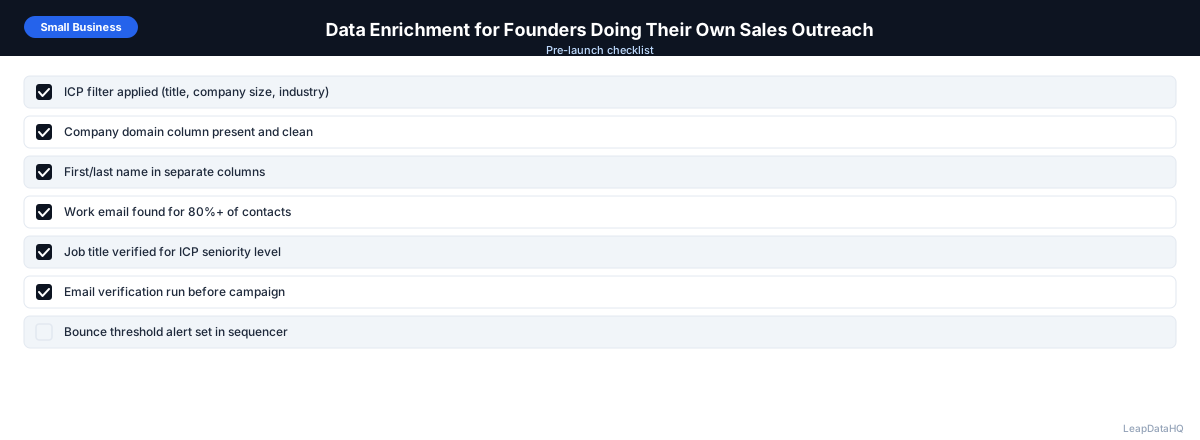
- ☐ Prospect list built with company name and domain for each contact
- ☐ Names in separate first/last columns
- ☐ Domain column cleaned (no http://, www., trailing content)
- ☐ Missing fields identified before enrichment
- ☐ CSV uploaded and enrichment run
- ☐ Confidence threshold applied (be stricter when sending personally)
- ☐ Role-based and mismatched emails removed
- ☐ Email verification run on all addresses
- ☐ Invalid addresses removed
- ☐ List organized with a date column or "last contacted" column
- ☐ Sending rate appropriate for domain age and warmup status
When to Use LeapDataHQ
LeapDataHQ is built for exactly this workflow. Upload a CSV of prospect companies and contacts, fill in missing email addresses and company data, review results with confidence scoring, and export a clean list ready for outreach. No annual commitment, credit-based pricing so you pay for what you use — it fits the irregular cadence of founder-led sales without locking into a monthly seat fee.
Visit /pricing to see current credit pricing, or /features for the full list of supported enrichment fields.
Start Enriching LeadsFrequently Asked Questions
How many contacts should a founder target for outreach?
For highly personalized outreach (research-heavy, custom emails), 20–50 contacts per week is realistic for a founder handling this alongside other responsibilities. For templated outreach with light personalization, 100–200 per week is achievable. Quality over quantity matters most in early-stage founder outreach — a 5% reply rate on 50 targeted contacts beats a 0.5% reply rate on 500 generic contacts.
Can I use free email finder tools instead of a paid enrichment service?
Free tools work for very small lists but have strict usage limits and lower coverage. Most free email finder tools allow 10–50 searches per month before requiring payment. For a 50–100 contact list, you'll typically exhaust free limits quickly. A paid enrichment tool with credit-based pricing gives better coverage and allows larger batches without the manual search-per-contact workflow.
What's the minimum list size that makes enrichment worthwhile?
Enrichment makes sense for any list larger than 20–30 contacts where manual email lookup would take significant time. Even for small lists, the time saved by automated enrichment (versus looking up each email one at a time) justifies the cost if the contacts are appropriately targeted.
Should I use my personal email or a business email for founder outreach?
Use a business domain email (yourname@yourcompany.com). Personal emails (Gmail, Outlook personal) often get lower open rates in B2B outreach and don't support domain-level deliverability practices like custom DKIM. If your company is new, warm up the sending domain gradually before running high-volume campaigns.
How do I track who I've contacted when doing outreach manually?
Add a "status" column to your spreadsheet and update it after each outreach: "sent", "replied", "meeting booked", "not interested". Add a "contacted date" column. This creates a simple CRM that prevents double-contacting and helps you track which segments are converting. When your volume grows to where spreadsheet tracking is insufficient, move to a lightweight CRM.