
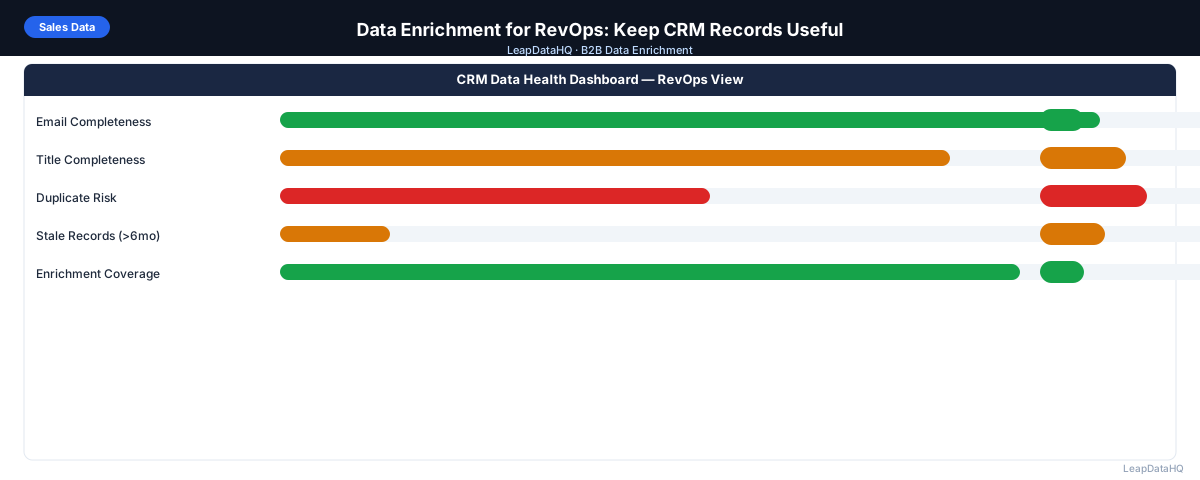
RevOps is responsible for the systems and data that sales and marketing teams depend on. When CRM data is incomplete — missing emails, blank titles, outdated company info — every downstream process suffers: campaign targeting is less precise, outreach personalization fails, pipeline reporting is inaccurate, and sales reps waste time researching data that should already be in the system.
Data enrichment for RevOps is the practice of systematically filling and maintaining CRM record completeness through periodic enrichment passes, governance standards, and integration with the tools that feed data into the CRM. Unlike ad hoc enrichment done campaign by campaign, RevOps-led enrichment is structured, recurring, and tied to measurable data quality metrics.
This guide covers how RevOps teams should approach data enrichment — what to prioritize, how to build the workflow, and how to measure improvement over time.
The most effective RevOps enrichment programs share a common structure: they start with a clear understanding of current data quality, prioritize fields by business impact rather than by ease of enrichment, run enrichment on a regular cadence rather than as a one-time project, and measure improvement against baseline metrics. Without this structure, enrichment becomes an ad hoc activity that fills gaps temporarily but does not build a sustainable data quality practice.
Why RevOps Owns Data Enrichment
RevOps sits at the intersection of sales, marketing, and customer success data. It's the function best positioned to define data quality standards, implement enrichment workflows, and maintain data governance across teams. When enrichment is left to individual sales reps or marketers, it happens inconsistently — different standards, different tools, and no systematic tracking of data quality over time.
A RevOps-owned enrichment program ensures consistent data quality across the full CRM database, not just the contacts most recently sourced or most actively worked. This matters most for pipeline reporting accuracy, segmentation for marketing campaigns, and territory management that depends on reliable company-level data.
Key Fields RevOps Should Prioritize for Enrichment
- Email address: the most fundamental field for outreach — if it's missing or invalid, the contact is unreachable via email
- Job title: required for ICP qualification, lead scoring, and personalization
- Department: enables team-level segmentation and routing rules
- Company size (headcount): drives ICP scoring and territory assignment
- Industry: enables vertical-specific campaigns and reporting
- Company revenue range: useful for enterprise vs. SMB segmentation
- LinkedIn URL: enables social selling and profile verification
- Phone number: for SDR calling workflows and direct outreach
- Lead source: ensures attribution reporting is complete (though often captured at creation, not via enrichment)
Building a RevOps Enrichment Program
Define Baseline Data Quality Metrics
Before running enrichment, establish baseline metrics for your CRM. What percentage of active contacts have email addresses? Job titles? Company size? Industry? These baselines let you measure the impact of enrichment and track data quality over time.
Run this audit quarterly: export a sample of 500–1,000 active contacts and check field completeness. Track completeness rates for each key field. Set targets: Email > 90%, Title > 80%, Company Size > 75%. Any field below its target is a priority for the next enrichment pass.
Set an Enrichment Cadence
- Monthly: enrich newly created contacts from the past 30 days. Contacts added via form, import, or manual entry often have missing fields that can be filled before they sit incomplete for months.
- Quarterly: run enrichment on contacts missing key fields across the full active contact database. Check for email validity drift — addresses that were valid last quarter may have gone inactive.
- Annually: full CRM enrichment and re-verification pass. This catches contacts who changed jobs, companies that rebranded, and email addresses that have been inactive for more than a year.
Step 1: Export CRM Contacts for Enrichment
Export the target segment from your CRM. For monthly enrichment: contacts created in the past 30 days with blank email or title. For quarterly enrichment: contacts with blank fields across any key dimension. For annual enrichment: all active contacts with a data quality score below your target.
Step 2: Detect Enrichment Gaps
Ready to enrich your CSV list?
Upload a CSV, fill missing data, review confidence scores, and export clean records.
Upload a CSV — Start EnrichingAudit the export for field completeness. Prioritize enrichment fields by business impact: email first (outreach capacity), title second (ICP qualification), company size and industry third (segmentation). For large exports, address the highest-impact gaps first rather than trying to enrich every field in one pass.
Step 3: Run Enrichment on Priority Fields
Upload the export to your enrichment tool. Map columns correctly and request the priority fields. Review results with confidence scores and apply your threshold. For RevOps use cases where data will be used for segmentation and reporting (not just outreach), a slightly lower confidence threshold may be acceptable — you're filling blanks for analysis, not just outreach.
Step 4: Review and Validate Results
Before re-importing to your CRM, validate enriched results. Check that enriched company sizes match your CRM's existing company records (to avoid conflicts). Check that enriched titles make sense for the contacts. Run email verification on any enriched email addresses before updating the CRM email field.
Step 5: Re-Import to CRM with Governance Controls
Re-import using update mode, matched by record ID. Map enriched fields only to blank CRM fields — don't overwrite existing values with enriched values unless you've verified the enriched value is more accurate. This conservative approach avoids introducing new errors while filling gaps.
Step 6: Track and Report Data Quality Improvement
After each enrichment pass, re-run your baseline completeness metrics and document the improvement. Share these metrics with sales and marketing leadership — data quality improvement is a RevOps output that can be quantified and communicated.
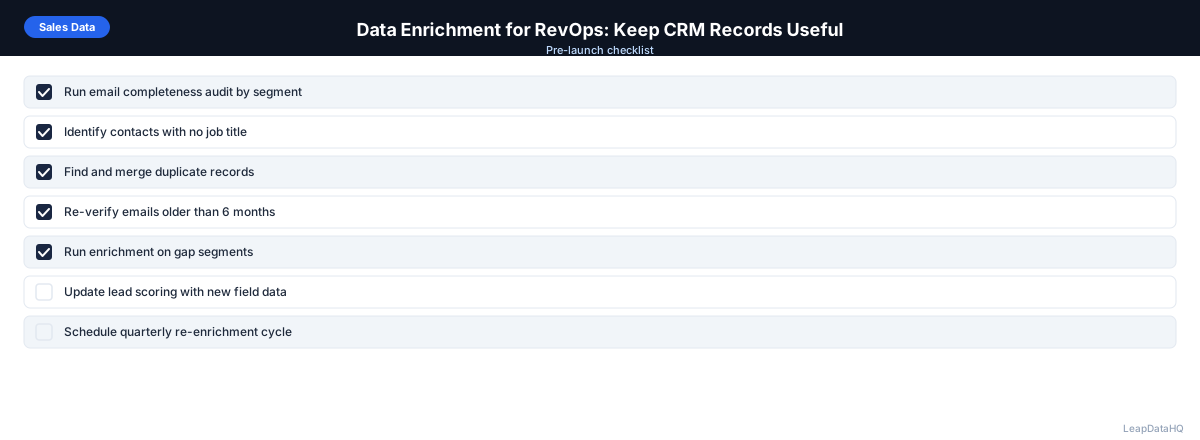
RevOps Data Enrichment Governance Checklist
- ☐ Data quality targets defined for each key field
- ☐ Baseline completeness metrics documented before each enrichment pass
- ☐ Enrichment cadence scheduled (monthly, quarterly, annual)
- ☐ Enrichment tool selected with appropriate data processing agreement
- ☐ Confidence threshold defined and documented
- ☐ Email verification included in enrichment workflow for email field updates
- ☐ CRM import settings verified (update-only mode, correct field mapping)
- ☐ Post-import spot check procedure documented
- ☐ Data quality metrics tracked over time (not just one-time)
- ☐ Lead scoring and segmentation rules updated after field completeness improves
Managing Enrichment Costs in a RevOps Program
RevOps teams managing enrichment at scale need to control costs while maximizing coverage. The most effective approach is to tier enrichment investment by record value. High-priority records — contacts with open opportunities, executives at strategic accounts, leads in active sequences — get full enrichment across all fields with strict confidence thresholds. Lower-priority records get lighter enrichment focused only on the fields needed for basic qualification. This tiered approach concentrates enrichment spend where it produces the most business value.
RevOps should also track enrichment cost per improved field and per usable contact. These metrics help evaluate whether the enrichment tool and workflow are cost-effective and whether certain segments or fields should have their enrichment thresholds adjusted. Over time, tracking cost per completed field identifies opportunities to optimize the enrichment program for better ROI.
When to Use LeapDataHQ
LeapDataHQ works for the CSV-layer enrichment step in a RevOps enrichment program. Export contacts from your CRM, upload to LeapDataHQ to fill missing fields, review confidence scores, and prepare a re-import file for your CRM system.
This workflow doesn't require a CRM integration — it works at the export/import layer, which is practical for teams that want to run periodic enrichment passes without building a native integration. For high-frequency enrichment needs, see the features page for API and integration options.
Start Enriching LeadsFrequently Asked Questions
How do I measure the ROI of a RevOps enrichment program?
Track two categories of impact: operational (what percentage of contacts are now contactable via email, how much time sales reps save not manually researching contact data) and campaign performance (email deliverability rates before and after enrichment, reply rates for enriched vs. non-enriched segments). Both can be measured and communicated to leadership as enrichment program outcomes.
How should RevOps handle conflicts between enriched data and existing CRM data?
As a default, only use enriched data to fill blank fields — don't overwrite existing values automatically. For fields where your existing CRM data may be stale (email addresses on contacts inactive for 12+ months), consider updating with enriched values if confidence is high. Create a documented policy for conflict resolution so the decision is consistent across enrichment passes.
Should RevOps enrich leads and contacts separately?
Yes. Leads and Contacts represent different stages of the buyer journey and often have different field structures. Enrich Leads with fields relevant to lead scoring and routing (title, company size). Enrich Contacts with fields relevant to active outreach and account management (email, phone, LinkedIn). Some tools allow enrichment of both objects, but the field sets and use cases differ.
What role does enrichment play in lead scoring?
Enrichment enables lead scoring to work correctly. Most lead scoring models use firmographic fields like company size, industry, and title. If 30% of your leads are missing company size, your scoring model is inaccurate for that 30%. Enriching those fields makes lead scoring more reliable and prevents high-quality leads from being under-scored just because they have incomplete data.
How does RevOps prevent data quality from degrading after enrichment?
Prevention requires governance at the input layer: required fields on web forms, validation rules in the CRM, clear standards for manual data entry, and quality filters on integration sources (tools that automatically create CRM records). Enrichment fixes existing problems — governance prevents new ones from accumulating at the same rate.