
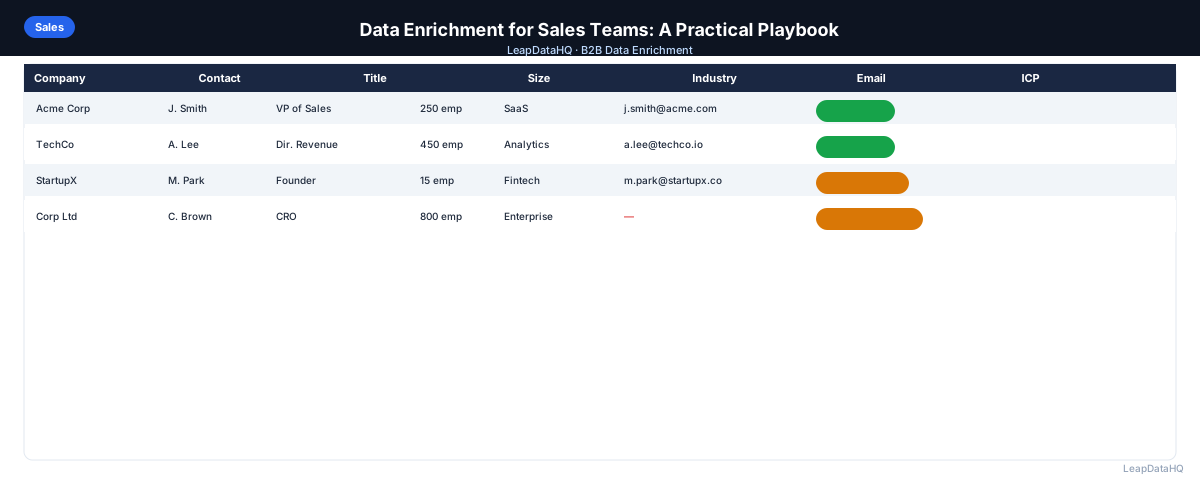
Data enrichment is one of the highest-leverage investments a B2B sales team can make. The time reps spend on manual research — looking up emails, finding phone numbers, verifying company data — is time not spent on calls, demos, and follow-ups. Enrichment automates most of that research.
But enrichment delivers value beyond time savings. Better data quality means higher email deliverability, more relevant personalization, and more accurate CRM reporting. All three directly affect pipeline and revenue.
This playbook covers how sales teams of different sizes can build enrichment into their workflow. You'll learn the specific use cases for sales teams, how to implement enrichment for small, growing, and larger teams, and how to measure the impact of enrichment on your sales metrics.
Whether you're a team of 3 or a team of 30, these principles will help you integrate enrichment into your sales process effectively.
The Sales Team Enrichment Use Cases
Sales teams use enrichment at multiple stages of the sales workflow. Understanding these use cases helps you identify where enrichment delivers the most value for your specific team.
- New prospect list building: enriching a sourced list of target accounts and contacts before outreach
- CRM gap-fill: appending missing data to existing CRM records
- Inbound lead enrichment: adding company context to inbound form fills
- Deal research: enriching a specific account before a discovery call or proposal
- List refresh: re-enriching old contacts to check current email and title before re-engaging
Each use case has different requirements. New prospect list building is typically batch enrichment of 100-500 records. CRM gap-fill may involve enriching specific fields for existing records. Inbound lead enrichment is often real-time or near-real-time. Deal research is one-off enrichment for high-value accounts. List refresh is periodic re-enrichment of old contacts.
What This Means for Your Sales Team
For sales teams, enrichment is a productivity multiplier. Reps spend less time on research and more time on revenue-generating activities. The time savings compound — a rep who saves 30 minutes per day on manual research gains 2.5 hours per week, or over 100 hours per year. That's time that can be spent on calls, demos, and follow-ups.
Beyond time savings, enrichment improves the quality of outreach. Reps with enriched data can personalize messaging based on company size, industry, and technology stack. This relevance improves reply rates and meeting set rates. Better data also means fewer bounced emails, protecting sender reputation and maintaining deliverability.
The impact shows up in sales metrics: higher email deliverability, better reply rates, more meetings set, shorter sales cycles, and more accurate CRM reporting. All of these contribute to pipeline generation and revenue. Enrichment is not just a convenience — it's a competitive advantage.
Who Should Use Enrichment in Sales
Enrichment is valuable for sales teams of all sizes, but the implementation varies by team size and structure.
- Small sales teams (1-5 reps) doing manual prospecting and list building
- Growing sales teams (5-25 reps) needing consistent processes across the team
- Larger sales teams (25+ reps) requiring systematic enrichment infrastructure
- SDRs and BDRs building outbound prospect lists daily
- Account executives researching accounts before discovery calls
- Sales ops and RevOps teams maintaining CRM data quality
- Sales managers tracking team performance and pipeline accuracy
If your sales team does B2B outreach, enrichment should be part of your standard workflow. The specific implementation depends on your team size, but the principles are the same: enrich before outreach, verify before sending, and maintain data quality over time.
For Small Sales Teams (1-5 Reps)
Small teams typically do enrichment manually on a per-campaign basis. The workflow: build a target list, upload to enrichment, review results, export for outreach. CSV-based enrichment tools that don't require developer setup are the right fit — flexible, affordable, and fast to use.
The priority for small teams is reducing manual research time, not sophisticated automation. Even a basic enrichment workflow that eliminates manual email lookup saves significant rep hours per week. The key is consistency — make enrichment a standard step before every campaign launch.
Small teams should focus on the highest-impact use case: new prospect list building. Enrich target lists before outreach to improve deliverability and personalization. CRM gap-fill and list refresh can be handled manually for small databases.
For Growing Sales Teams (5-25 Reps)
Growing teams need more consistency across reps. Establish a standard enrichment process: all new prospect lists go through enrichment before they enter the CRM. Assign ownership of list quality to a sales ops or RevOps role. Standardize the minimum data requirements for a record to be considered outreach-ready.
At this stage, consider establishing a weekly enrichment cycle: reps submit lists for enrichment by Monday, enriched lists are returned Wednesday, reps start outreach Thursday. This creates a predictable rhythm for list building and outreach. It also ensures consistency — all reps follow the same process.
Growing teams should also implement CRM gap-fill as a regular practice. Export contacts missing key fields, enrich them, and import the results. This improves data quality across the team and ensures reps have complete information for outreach.
For Larger Sales Teams (25+ Reps)
Larger teams benefit from more systematic enrichment infrastructure. This may include scheduled batch enrichment of inbound leads, defined processes for keeping CRM records complete, and regular re-enrichment of the full database.
Data quality metrics should be tracked in the CRM and reported regularly — percentage of records with valid emails, CRM completeness rate, bounced email rate per rep. These metrics identify where data quality problems originate and which reps need additional process support.
Larger teams should also consider enrichment as part of their sales technology stack. A defined process for reviewing and importing enriched data into the CRM keeps records complete and reduces manual work, which helps ensure data consistency across the team.
Building a Sales Enrichment Policy
A sales enrichment policy standardizes how your team uses enrichment. This ensures consistency, controls costs, and maximizes the value of enrichment across the team.
- Define the minimum data a record needs to be outreach-ready (email, company, title at minimum)
- Establish a required enrichment step before any new list is loaded into a sequencer
- Set a process for handling bounced emails — mark invalid in CRM same day
- Schedule quarterly re-enrichment of the CRM for contacts not updated in 6+ months
- Track enrichment costs as a sales expense and tie to pipeline generated
- Define confidence score thresholds for outreach — only use high-confidence results
How Enrichment Improves Sales Metrics
The impact of enrichment shows up across multiple sales metrics. Understanding these impacts helps you build the business case for enrichment investment.
- Email deliverability: fewer bounces from verified, current email addresses
- Reply rate: better targeting and more relevant personalization from enriched data
- Meeting set rate: reaching the right decision maker with the right title improves conversion
- Rep efficiency: less time on manual research, more time on outreach and follow-up
- CRM data quality: fewer gaps and inconsistencies reduce reporting errors
Ready to enrich your CSV list?
Upload a CSV, fill missing data, review confidence scores, and export clean records.
Upload a CSV — Start EnrichingTo quantify the impact, track these metrics before and after implementing enrichment. Most sales teams see measurable improvement within the first 30-60 days. The combination of time savings and performance improvement typically produces clear ROI within the first quarter of use.
Present these metrics to leadership when requesting enrichment budget. Frame enrichment not as a cost but as an investment in rep productivity and campaign performance. When leadership sees the connection between enrichment and pipeline generation, budget approval becomes straightforward.
Enrichment Tool Selection for Sales Teams
Choosing the right enrichment tool depends on your team size, workflow, and budget. Small teams need simple CSV-based tools that don't require developer setup. Growing teams need tools that support standardized processes across multiple reps. Larger teams may need API-based tools with CRM integration for real-time enrichment.
Key evaluation criteria include match rates for your target market, confidence scoring capabilities, pricing model (credit-based vs. seat-based), ease of use for non-technical reps, and integration options with your existing sales stack. Test with a sample of your actual data before committing to ensure the tool covers your target market effectively.
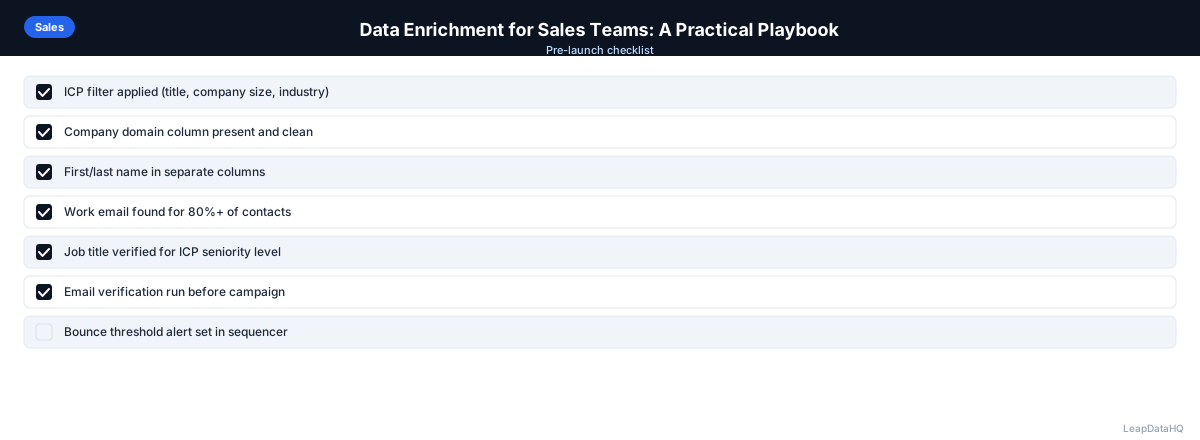
Checklist: Sales Team Enrichment Implementation
Use this checklist when implementing enrichment for your sales team:
- Enrichment use cases are identified for your team (prospect lists, CRM gap-fill, inbound leads)
- Enrichment tool is selected based on team size and workflow requirements
- Enrichment process is documented in standard operating procedures
- All reps are trained on the enrichment workflow
- Minimum data requirements are defined for outreach-ready records
- Bounce handling process is established and communicated
- Re-enrichment schedule is set for CRM maintenance
- Enrichment costs are tracked and tied to pipeline metrics
- Confidence score thresholds are defined for outreach
- Enrichment ROI is measured and reported monthly
Common Mistakes to Avoid
- Not making enrichment a required step before outreach. Without a policy requiring enrichment, some reps will skip it to save time. This creates inconsistency and reduces overall campaign quality. Make enrichment mandatory in your sales process.
- Not defining minimum data requirements. Without clear standards, reps will outreach to incomplete records. Define what fields must be populated before a record is outreach-ready.
- Not handling bounced emails immediately. Every day a bounced address sits in the CRM is a day it might be re-used. Establish a same-day bounce handling process.
- Not tracking enrichment ROI. Without measuring the impact, you can't evaluate whether enrichment is delivering value. Track cost per contact, time saved, and campaign performance improvements.
- Not re-enriching old CRM records. Contact data decays over time. Without periodic re-enrichment, your CRM accumulates outdated information. Schedule quarterly re-enrichment passes.
- Using low-confidence results without verification. Low-confidence enrichment results are more likely to bounce. Filter to high-confidence results before outreach to protect sender reputation.
- Not training reps on the enrichment workflow. Reps who don't understand the process will use it inconsistently or incorrectly. Include enrichment training in sales onboarding.
- Centralizing enrichment too much for large teams. For teams of 25+, centralized enrichment can become a bottleneck. Provide rep-level access with training and governance.
Practical Examples (Illustrative)
The following scenarios are illustrative examples of how teams structure enrichment work. They are not customer results, and actual outcomes depend on your data quality, target market, and outreach strategy.
Example 1: Small SaaS Sales Team
A 4-person SaaS sales team spending many hours per week on manual email research can replace that work with a CSV enrichment workflow. The time saved can be redirected to follow-up calls and meetings, which is typically where small teams see the biggest productivity gain.
Example 2: Growing Sales Team Standardizing Process
A 15-person sales team with inconsistent list quality across reps can implement a standard enrichment process with a weekly cycle. Standardizing when and how lists are enriched tends to reduce bounce rates and improve reply consistency because every rep starts from the same complete data.
Example 3: Larger Team with a Defined Enrichment Step
A larger sales team can define enrichment as a required step so reps work from reviewed, complete records. Exporting records missing key fields, enriching them in a batch, and re-importing the results is a common way to keep a large database consistent without manual per-record research.
Example 4: SDR Team Enriching Inbound Leads
An SDR team receiving inbound leads can enrich each batch of new form-fill contacts to add company size, industry, and title data. That extra context helps prioritize high-value leads and route them to the right rep before outreach.
Example 5: Sales Ops Running Periodic Re-Enrichment
A sales ops team can run periodic re-enrichment of its CRM. Exporting contacts not updated in several months, enriching them, and importing the results can surface people who have changed jobs, helping prevent outreach to outdated addresses and supporting deliverability.
How LeapDataHQ Helps
LeapDataHQ fits into the small and growing sales team workflows described above. For batch enrichment of new prospect lists — the most common use case — upload a CSV of target accounts and contacts, get enriched data back with confidence scores, and export for outreach. The workflow is simple enough that any rep can run it without ops support.
For sales teams that run monthly or quarterly list-building cycles, the credit-based pricing means enrichment costs align with actual prospecting activity rather than a fixed monthly seat fee. You enrich 500 contacts one month, 1,000 the next, and 300 the month after — paying only for what you use.
The confidence scores returned during enrichment help sales teams filter to high-quality results before outreach. This protects sender reputation and improves campaign performance. For teams concerned about data quality, the ability to review and filter before exporting is a critical feature.
For growing sales teams implementing standardized enrichment processes, LeapDataHQ provides consistent results across all reps. The credit-based model keeps costs predictable and aligned with usage, while the simple CSV workflow ensures that any team member can execute the enrichment process without specialized training.
Sales ops teams appreciate LeapDataHQ's transparency in cost tracking. You can see exactly how many credits each enrichment uses, making it easy to allocate enrichment budgets across teams, campaigns, or clients. This transparency simplifies budget planning and ROI calculation for sales leadership.
Next Steps
If your sales team is doing manual research or inconsistent enrichment, start by implementing a standard enrichment workflow. LeapDataHQ provides the enrichment layer that fits into sales team processes without requiring developer setup or enterprise contracts. Check our /features and /pricing to see if it fits your team's needs.
When to Use LeapDataHQ
LeapDataHQ fits into the small and growing sales team workflows described above. For batch enrichment of new prospect lists — the most common use case — upload a CSV of target accounts and contacts, get enriched data back with confidence scores, and export for outreach.
For sales teams that run monthly or quarterly list-building cycles, the credit-based pricing means enrichment costs align with actual prospecting activity rather than a fixed monthly seat fee. This flexibility is valuable for teams with variable prospecting volume.
The workflow is simple enough for any rep to use: upload a CSV, map columns, review results, and export. No developer setup or complex configuration required. This makes it practical for small teams without dedicated sales ops resources.
For growing teams implementing standardized enrichment processes, LeapDataHQ provides consistent results across all reps. The confidence scores enable quality filtering, and the credit-based model keeps costs predictable and aligned with usage.
Start Enriching LeadsFrequently Asked Questions
Should every rep have access to the enrichment tool, or should it be centralized?
For small teams, centralized enrichment with a single account and a defined process works well and keeps costs predictable. For larger teams where reps build their own territory lists, providing rep-level access (with training on the process) reduces the bottleneck. The right approach depends on your team size and workflow.
How do I calculate the ROI of data enrichment for a sales team?
Estimate the time reps currently spend on manual research per week, multiply by rep cost per hour, and compare to enrichment tool cost. Add the value of improved deliverability and reply rates. For most teams, the ROI is clear within the first month of use. Track metrics before and after to quantify the impact.
What's the right enrichment volume for a typical SDR quota?
A typical SDR sending 50-100 new outreach emails per week needs roughly 200-400 enriched contacts per month (accounting for follow-ups). Match enrichment volume to actual outreach cadence. Don't over-enrich — only enrich contacts you'll actually use in the near term.
Should we enrich inbound leads as well as outbound prospects?
Yes. Inbound leads from form fills often have minimal data — just name, email, and company. Enriching with company size, industry, and title helps you qualify leads faster and route them appropriately without lengthy manual research. This is especially valuable for high-volume inbound programs.
How do we prevent enrichment from becoming a bottleneck?
Establish a clear SLA for the enrichment step — for example, within 48 hours of a list being submitted. Make the enrichment workflow simple enough that anyone can run it (not just a dedicated ops person). And make sure the output format is ready to load directly into your sequencer without additional formatting work.
What enrichment data fields are most valuable for sales teams?
Email address is the most critical — without it, you can't do email outreach. Company size and industry enable segmentation and personalization. Job title helps you reach the right decision maker. Phone number is valuable for teams doing phone outreach. Technology stack data is useful for products with integrations.
How do we handle enrichment for international markets?
Test enrichment match rates for your specific international markets before committing to large volumes. Some tools have stronger coverage in North America than in Europe or Asia. For international markets with lower match rates, supplement enrichment with manual research for high-value targets. Set expectations about match rates for different regions.