
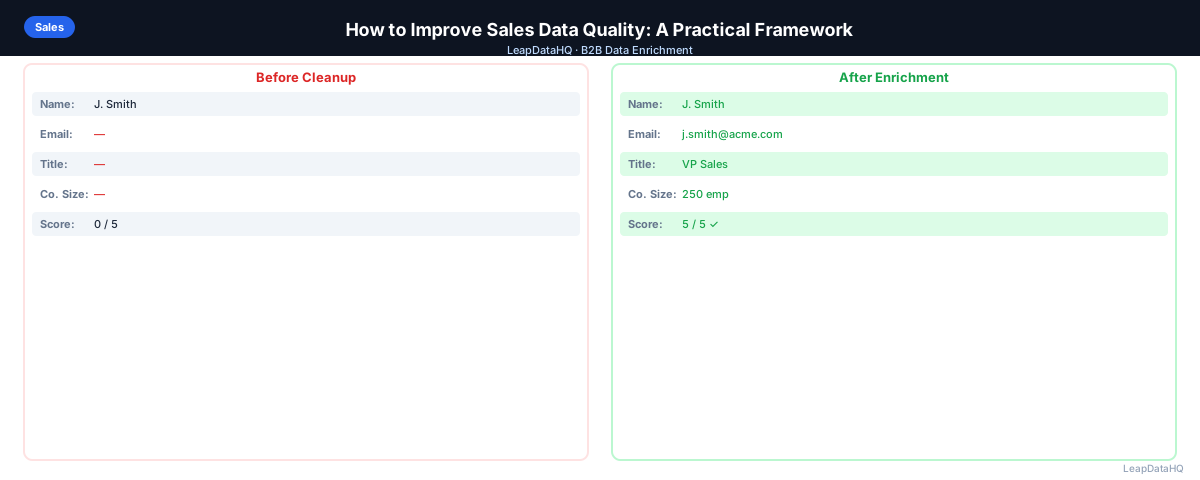
Sales data quality problems are often invisible until they become expensive. An SDR spends an hour on a prospect who left the company six months ago. A sequence gets a 15% bounce rate. A territory analysis is wrong because company size fields are filled inconsistently. These aren't one-off mistakes — they're symptoms of a systemic data quality problem.
Improving sales data quality isn't about perfecting every record. It's about raising the average quality enough that your outreach connects with the right people, your reporting is reliable, and your team isn't wasting time on dead ends.
This guide gives you a framework to diagnose, fix, and maintain better sales data. The framework works whether you manage a CRM with 1,000 contacts or 100,000. The principles are the same — audit, prioritize, fix, and prevent — even though the specific actions vary by database size.
Many teams treat data quality as a one-time project. They clean their CRM, feel good about the results, and then watch the same problems return within months. The framework in this guide includes ongoing maintenance practices that prevent the cycle from repeating.
The most impactful improvements come from fixing the intake process. If new records enter your CRM with complete, accurate data, the overall quality stays higher with less ongoing effort. Prevention is always more efficient than remediation.
Why Sales Data Quality Degrades
Contact data has a natural decay rate. People change jobs at a meaningful rate every year. Companies get acquired, rebrand, or shut down. Email addresses become invalid. Phone numbers change. The longer a record sits untouched in your CRM, the less reliable it becomes.
The problem is compounded by how data enters systems. Manual entry introduces typos and inconsistencies. List imports often lack validation. Integrations between tools can sync bad data across systems. And without enforced field requirements, records get created with minimum information.
Understanding these root causes helps you address them systematically. Natural decay requires periodic re-enrichment. Manual entry errors require validation rules. Import problems require pre-import cleaning. Each cause has a corresponding fix.
Step 1: Audit Your Current Data Quality
Before fixing anything, measure the problem. Export your CRM contacts and run a basic analysis:
- Percentage of records missing email addresses
- Percentage of records missing phone numbers
- Percentage of records with company name but no domain
- Records not updated in 12+ months
- Records with duplicate email addresses
- Records with obvious placeholder data ("test", "unknown", "N/A")
This audit gives you a baseline. You'll know exactly how bad the problem is and which categories of records are most affected. Without measurement, you cannot prioritize effectively or demonstrate improvement over time.
Step 2: Fix the Highest-Impact Issues First
Don't try to fix everything at once. Prioritize the issues that most directly affect revenue.
Invalid Emails
Run your email list through a verification tool. Flag or suppress invalid addresses before they cause bounces in your next campaign. A 5% hard bounce rate can get your sending domain flagged — this is a high-urgency fix.
Invalid emails are the highest-priority fix because they directly damage your sender reputation. Every bounce signals to email providers that you are sending to unvetted lists. Fix this first to protect your deliverability.
Missing Company Data
Records without company name, domain, or industry can't be segmented or targeted. Export them and run an enrichment pass to fill the gaps. Even partial enrichment — adding a domain where only a company name exists — dramatically improves the usefulness of these records.
Duplicate Records
Duplicates waste rep time and create disjointed activity history. Use your CRM's deduplication tool and then manually merge any high-value records that weren't caught automatically.
Step 3: Enrich to Fill Gaps Systematically
After removing bad records, enrich what's incomplete. CSV enrichment tools let you upload a batch of contacts and append missing data — emails, phone numbers, company size, and job titles.
The key to making enrichment work for data quality (not just prospecting) is the review step. Use confidence scores to decide which enriched records are safe to import. If you import everything regardless of confidence, you're just replacing one type of bad data with another.
Step 4: Build Ongoing Practices to Prevent Decay
- Require email and company name for all new CRM records
- Validate email format on entry (no spaces, must include @)
- Sync email bounce data back to your CRM — mark bounced addresses as invalid immediately
- Set a calendar reminder for quarterly deduplication
- Re-enrich your most active segments annually
- Train reps on data entry standards — inconsistency often comes from different team members using different formats
Measuring Data Quality Over Time
Set up a simple monthly report: percentage of records with valid emails, percentage with complete company data, and hard bounce rate on outbound sequences. Track these over time. If quality is improving, your practices are working. If it's degrading, you have a new intake problem.
What This Means for Your Sales Outcomes
Sales data quality directly affects three things: deliverability, rep productivity, and reporting accuracy. When emails are valid, your outreach reaches the intended recipients. When contact data is complete, reps can personalize effectively and segment accurately. When company data is consistent, your territory analysis and pipeline forecasting are reliable.
The compounding effect is significant. A team with 90% data quality will consistently outperform a team with 70% data quality using the same messaging and the same number of outreach attempts. The difference is not in effort — it is in how many of those efforts reach the right person with the right information.
Ready to enrich your CSV list?
Upload a CSV, fill missing data, review confidence scores, and export clean records.
Upload a CSV — Start EnrichingImproving data quality is one of the highest-leverage investments a sales team can make. It does not require new messaging, new tools, or new processes — it makes your existing processes work better by ensuring the underlying data is reliable. Teams that prioritize data quality see compounding returns over time as their outreach becomes more efficient and their reporting becomes more accurate.
Who Should Focus on Sales Data Quality
Sales data quality affects everyone who touches the CRM or depends on its output:
- VP of Sales and revenue leaders: who need accurate pipeline data for forecasting and board reporting
- Sales operations teams: who are responsible for CRM hygiene and data integrity across the organization
- SDRs and account executives: whose outreach effectiveness depends on reaching the right person with accurate data
- Marketing teams: who rely on CRM data for lead routing, segmentation, and campaign targeting
- Customer success teams: who need current contact information to manage existing customer relationships
- Founders at early-stage companies: who are often doing their own outreach and need reliable data to book meetings
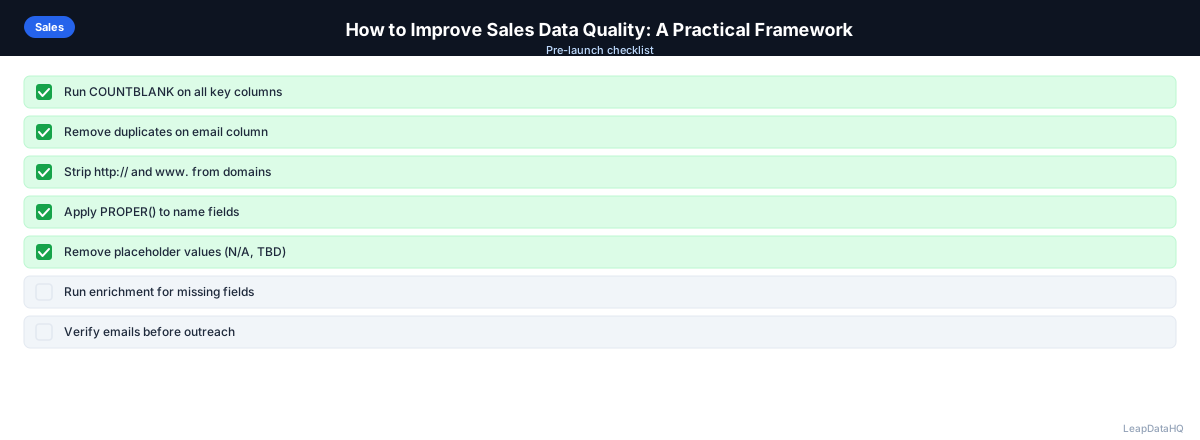
Checklist: Sales Data Quality Improvement
Use this checklist to systematically improve and maintain your sales data quality:
- Exported CRM contacts and measured percentage of records with missing emails
- Measured percentage of records missing company name, domain, or industry
- Identified and counted records not updated in 12+ months
- Ran email verification on all active outreach contacts and suppressed invalid addresses
- Ran CRM deduplication tool and manually merged remaining high-value duplicates
- Exported incomplete records and ran CSV enrichment to fill missing fields
- Reviewed enrichment confidence scores and imported only high-confidence results
- Set required fields on CRM record creation (minimum: email and company name)
- Implemented email format validation rules on all record creation paths
- Configured bounce tracking to automatically mark invalid emails in CRM
- Scheduled quarterly deduplication audit and annual re-enrichment cycle
- Created monthly data quality report tracking valid email rate, complete data rate, and bounce rate
Common Mistakes to Avoid
These mistakes prevent meaningful improvement in sales data quality:
- Trying to fix everything at once: A CRM with thousands of problematic records is overwhelming if you try to fix everything simultaneously. Prioritize by revenue impact — invalid emails first, then missing company data, then duplicates.
- Fixing data without fixing intake: Cleaning your CRM without implementing prevention measures is like mopping the floor while the faucet is still running. Fix the intake process at the same time as you clean existing data.
- Importing enriched data without review: Enrichment tools return results with varying confidence levels. Importing everything without filtering reintroduces bad data. Always review confidence scores before importing enriched records.
- Not measuring before and after: Without a baseline audit, you cannot demonstrate improvement. Measure data quality metrics before starting and track them monthly to show progress and identify new issues.
- Ignoring the human element: Data quality problems often come from inconsistent data entry by different team members. Training and clear standards are as important as technical fixes.
- Not scheduling ongoing maintenance: Data quality is not a one-time project. Without scheduled deduplication, re-enrichment, and audit cycles, the same problems return within months.
- Over-investing in low-impact records: Focus enrichment and cleaning effort on records in active segments. Spending time cleaning records at companies outside your ICP wastes resources.
Practical Examples
Example 1: Pre-Campaign Data Quality Sprint
A sales team discovers their cold email sequence has an 11% bounce rate. They audit their CRM, find 25% of email addresses are invalid, verify the full list, suppress invalid addresses, and re-enrich records with missing data. Bounce rates drop to under 2% within two weeks.
Example 2: Quarterly Data Health Check
A sales ops team runs a quarterly audit: deduplication, email verification for active contacts, and re-enrichment of stale records. The process takes one day per quarter and keeps bounce rates consistently under 2% throughout the year.
Example 3: New Team Onboarding
A new VP of Sales inherits a CRM with significant data quality issues. They audit the data, fix invalid emails, enrich missing fields, implement required field rules, and train the team on data entry standards. Within 90 days, outreach connect rates improve by 35%.
Example 4: Territory Planning Fix
A company's territory analysis is unreliable because company size fields are filled inconsistently. They standardize the field, enrich missing company size data, and re-run territory assignments. Rep workload distribution becomes fair and coverage gaps become visible.
Example 5: Post-Acquisition Data Merge
After acquiring a smaller company, a team merges two CRMs with overlapping contacts. They deduplicate, standardize formatting across both datasets, enrich missing fields, and create unified records. The merged CRM provides a single source of truth for the combined sales team.
How LeapDataHQ Helps
LeapDataHQ helps improve sales data quality through its CSV enrichment workflow. When your audit reveals records with missing emails, incomplete company data, or outdated job titles, you export those records as a CSV and upload them to LeapDataHQ. The platform enriches each record and returns confidence scores so you know which results to trust.
You review the enriched results, filter to high-confidence records, and export a clean CSV to import back into your CRM. This approach ensures you are adding reliable data that improves overall quality rather than introducing new problems.
For periodic re-enrichment — checking whether contacts at a given segment are still at the same company or still have the same email — LeapDataHQ provides an efficient on-demand workflow. Upload stale records, enrich, review, and update your CRM. The credit-based pricing at /pricing means you pay only for what you enrich. Explore /features and /b2b-contact-enrichment for details.
Next Steps
Start by auditing your current data quality. Export your CRM contacts, measure the percentage of records with missing or invalid data, and prioritize the highest-impact fixes. Invalid emails and missing company data are usually the best places to start because they directly affect deliverability and segmentation. Set up a monthly data quality report to track improvement over time.
For the enrichment step, LeapDataHQ helps fill gaps in your sales data. Upload incomplete records at /b2b-contact-enrichment, review confidence scores, and import clean data back. The platform works across industries and company sizes, with results that depend on input data quality. Check /features and /pricing to see if it fits your workflow. Implement the ongoing maintenance practices from this guide to prevent data quality from degrading again.
When to Use LeapDataHQ
LeapDataHQ fits into the enrichment step of this framework. When your audit reveals records with missing emails, incomplete company data, or outdated job titles, export those records as a CSV and run them through LeapDataHQ to fill the gaps.
It's particularly useful for periodic re-enrichment — when you want to check whether contacts at a given segment are still at the same company or still have the same email address.
The credit-based pricing means you pay only for what you enrich, making it practical for quarterly re-enrichment cycles or campaign-specific data quality sprints. No seat fees or annual contracts required.
LeapDataHQ returns confidence scores alongside each enriched field, giving you control over what enters your CRM. You filter to high-confidence results before importing, which is essential for maintaining the data quality improvements you have worked to achieve.
For teams working through the complete data quality framework — from audit through fixing, enrichment, and ongoing maintenance — LeapDataHQ provides the enrichment layer without requiring developer integration or platform-level commitments. Results depend on input data quality and the public data available for each contact.
Start Enriching LeadsFrequently Asked Questions
What percentage of CRM records are typically bad?
Industry research suggests 10-30% of B2B contact records become outdated within a year. For CRMs that have not been audited in 2-3 years, the percentage of stale or inaccurate records is often much higher. Regular auditing and re-enrichment keeps this percentage manageable.
How does bad data affect outbound email performance?
Bad data increases bounce rates, which damages sender reputation over time. It also wastes SDR time on contacts who cannot be reached or are no longer relevant. Both effects compound — lower deliverability means even good contacts receive fewer emails.
What's the most cost-effective way to improve data quality?
Fixing the intake process prevents future degradation at minimal cost. Deduplication is usually free using your CRM's built-in tools. Email verification is inexpensive per record. Enrichment costs more but has the highest ROI for incomplete records in active segments.
Should we use one enrichment tool or multiple?
One tool is simpler to manage and avoids conflicting data from different sources. If your primary tool has gaps in specific markets, adding a secondary tool for those segments makes sense — but manage them separately rather than mixing outputs without flagging sources.
How do we improve data quality without disrupting active sales cycles?
Work in segments: start with records that have no recent activity. Avoid touching records that are in active deals or sequences. Clean historical data first, then implement better intake practices for new records going forward.
How do we measure the ROI of data quality improvement?
Track bounce rates before and after, measure rep time saved on dead-end outreach, and compare campaign connect rates. Most teams see measurable improvement within the first month of implementing data quality practices.
What is the biggest mistake teams make with sales data quality?
Treating data quality as a one-time project rather than an ongoing practice. Without scheduled maintenance — quarterly deduplication, annual re-enrichment, and monthly bounce tracking — the same problems return within months of any cleaning effort.